TL; DR
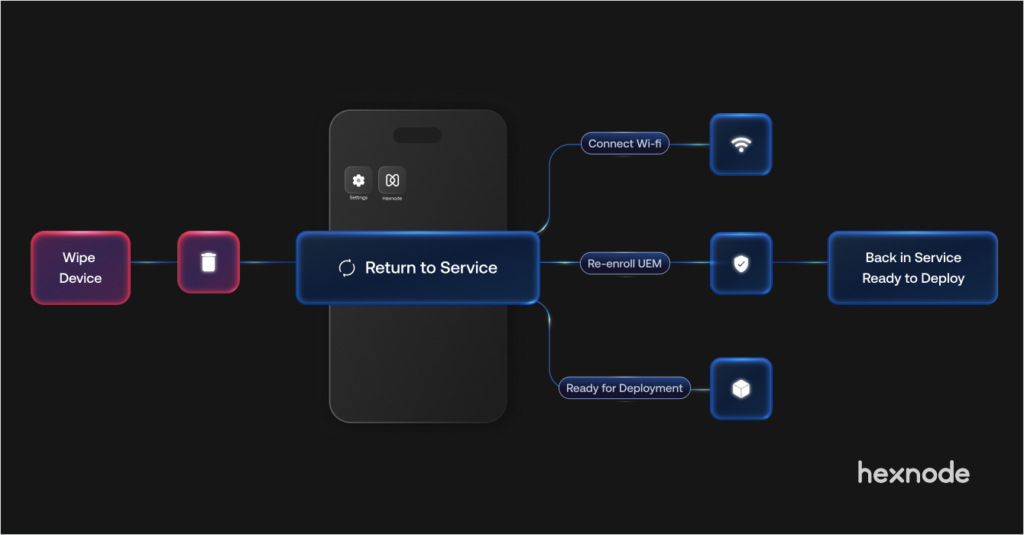
Return to Service in Hexnode UEM simplifies redeploying supported Apple devices by automating key steps after a device wipe, reducing the need for manual setup. By preconfiguring network and enrollment details, IT teams can erase, re-enroll, and prepare devices for reuse more efficiently, helping speed up device turnover and reduce administrative effort.
What’s new
- Hexnode UEM now supports Apple’s Return to Service feature.
- Automate device wipe, re-enrollment, and redeployment.
- Available for supported devices running iOS 17+, iPadOS 17+, and visionOS 26.0+.
Wiping a device shouldn’t mean setting it up all over again
IT teams commonly wipe and reassign Apple devices, especially after they repair a device, receive a returned device, or prepare it for a new user. However, the process does not always end with simply erasing the device.
Traditionally, wiping an Apple device still leaves IT teams with several manual setup tasks, such as:
- Selecting the language and region
- Connecting the device to Wi-Fi
- Preparing the device for MDM enrollment
For organizations managing large fleets of iPhones or iPads, these repetitive steps can slow device redeployment.
To make this process easier, Hexnode UEM now officially supports Apple’s Return to Service feature for devices running iOS 17+, iPadOS 17+, and visionOS 26.0+.
What is Return to Service for Apple devices?
Apple introduced Return to Service at WWDC23 to automate resetting and re-enrolling supported Apple devices, returning them to a managed, ready-to-use state after erasing them.
In Hexnode UEM, Return to Service works as an enhancement to the Wipe command for supported Apple devices. Instead of sending a device back to the factory “Hello” screen and waiting for manual setup, admins can send the Erase Device command with the required instructions already in place.
This allows the device to erase its data, reconnect to the network, re-enroll into device management, and reach the Home Screen with minimal manual intervention.
From erase to re-enrollment: How Return to Service works
Return to Service reduces the manual effort required to prepare a wiped Apple device for reuse. Once enabled, the device can automatically use the information included with the erase command to complete key parts of the setup process.
Instead of manually completing Setup Assistant, Return to Service can:
- Restore the previously selected language and region
- Connect to the configured Wi-Fi network
- Continue the device enrollment process
When the erase command is sent with Return to Service details, the device:
- Receives the configured Wi-Fi and device management service information.
- Erases all content and settings.
- Reboots automatically.
- Applies the previously used language and region settings.
- Connects to the configured Wi-Fi network (or another available internet connection, such as a tethered connection).
- Re-enrolls into device management and proceeds to the Home Screen with minimal manual intervention.
By reducing manual setup after a device reset, Return to Service helps IT teams bring devices back into service more quickly and prepare them for their next user.
A faster way to prepare devices for the next user
Consider an organization that regularly reassigns iPhones or iPads to employees. When an employee returns a device, a device is repaired, or IT prepares a device for a new user, the IT team needs to wipe it and bring it back into a managed state.
Without Return to Service, IT teams typically need to:
- Handle the device after it is wiped
- Select the language and region
- Connect it to Wi-Fi
- Complete enough of Setup Assistant for enrollment
With Return to Service in Hexnode UEM:
- Configure the required network settings before the wipe
- Start the erase command with automatic re-enrollment enabled
- Let the device reconnect, re-enroll, and complete setup with minimal manual intervention
This makes the device ready to hand off to the next employee much faster than a manual setup process.
Setting up Return to Service in Hexnode UEM
To use Return to Service in Hexnode UEM:
- Navigate to Enroll > Platform Specific > iOS > Return to Service.
- Configure the Wi-Fi network and proxy settings the device will use after it has been wiped. This is required if the device does not have another way to connect to the internet, such as a tethered connection.
- Initiate the Wipe Device remote action.
- Enable the Re-enroll device to UEM automatically option.
Once you execute the command, the device erases its data, reboots, connects to the configured Wi-Fi network, and automatically re-enrolls into Hexnode UEM.
Get Apple devices back into service with less manual effort
Return to Service in Hexnode UEM makes it easier for IT teams to wipe, re-enroll, and redeploy supported Apple devices. By reducing manual setup steps after a device reset, it helps admins return devices to a managed and deployable state faster.
Ready to simplify Apple device resets?
Explore how Return to Service helps automate device wipe, re-enrollment, and redeployment.
Try Hexnode Now