Security Blind Spots Putting Your Business at Risk
Discover the hidden vulnerabilities in your network from shadow IT to unpatched software that scanners often miss.

Get fresh insights, pro tips, and thought starters–only the best of posts for you.

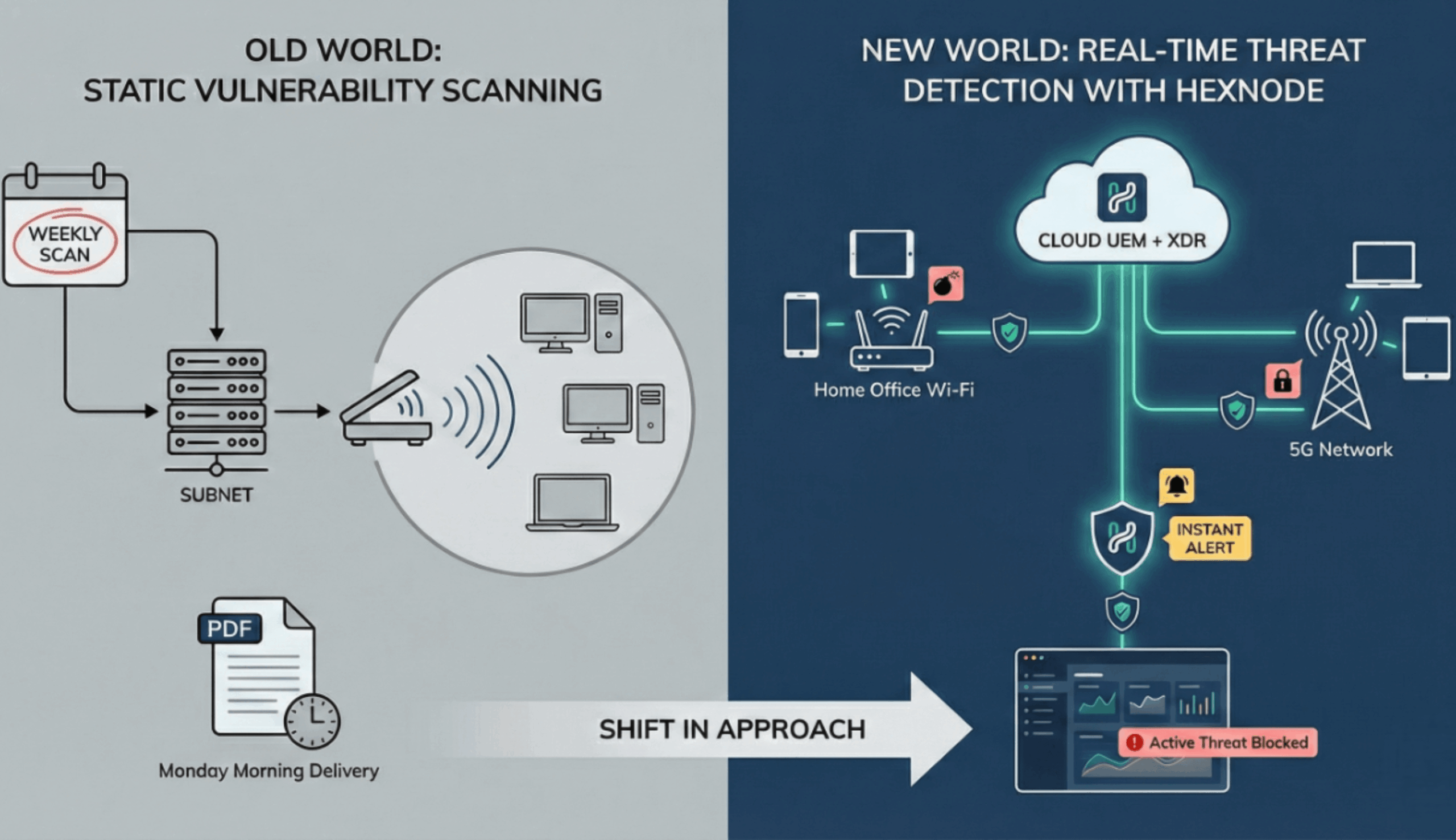
In the legacy model of “Perimeter Security,” vulnerability assessment was passive and scheduled. You bought a network scanner, blasted packets at your subnets every Friday night, and emailed a PDF report to the IT Manager on Monday morning.
But in 2026, your fleet is distributed across home Wi-Fi and 5G networks. A traditional network scanner has no line-of-sight to these devices.
More critically, scanning is static. Knowing you have a vulnerability is useless if you don’t know that an attacker is actively exploiting it right now.
To secure a modern enterprise, you need real-time threat detection.
This guide explores the next evolution of Endpoint Security. We will move beyond siloed “Patch Management” to a unified architecture using Hexnode UEM and Hexnode XDR. This is how you hunt for risk in real-time across a distributed fleet.
To secure a modern enterprise, you must answer two different questions simultaneously. Most organizations only answer the first, leaving them blind to active threats.
By layering Hexnode XDR (Extended Detection & Response) on top of Hexnode UEM, we create a closed-loop system that doesn’t just list problems but it neutralizes them.
The foundation of any hunt is knowing your terrain. Before you look for attackers, you must look for open doors.
Traditional scanners work “Outside-In” (pinging ports). Hexnode UEM works “Inside-Out” via the endpoint agent.
This works perfectly for known patches. But for Zero-Day exploits or configuration errors (like an open port), UEM must hand the baton to XDR.
Patches take time. Even in a mature organization, testing and deployment windows can leave a 24-48 hour gap. Hexnode XDR is your sentry during that exposure window.
While UEM sees “Old Version,” XDR sees “Bad Behavior.” Even if you cannot patch a legacy server running a vulnerable version of Log4j, you can use XDR to watch it.
This is Context-Aware Security. You aren’t just seeing a random alert; you are seeing the direct consequence of the unpatched vulnerability.
This is the category-defining capability of the Hunter’s Stack. In a siloed organization, the Security Team (XDR) detects the threat but must email the IT Team (UEM) to fix it. That email is the bottleneck where breaches happen.
In the Hexnode ecosystem, the response is automated.
A Critical CVE exists in Adobe Reader. No official patch is available from the vendor yet.
1. XDR Detection: XDR identifies Acrobat.exe attempting to spawn cmd.exe (a typical buffer overflow exploit).
2. Automated Response (Level 1): XDR immediately terminates the process to stop the immediate bleeding.
3. Orchestrated Response (Level 2): XDR signals UEM to move the device to a “Quarantine Group.”
4. UEM Enforcement:
Result: The threat is neutralized behaviorally (XDR) and structurally (UEM) without human intervention.

See the technical specs on how Hexnode automates patch deployment for Windows and macOS to close the "Exposure Window" faster.
Download DatasheetNot all vulnerabilities have CVE numbers. Some are self-inflicted wounds, such as a developer leaving RDP open to the internet.
1. UEM Query: Use Hexnode Custom Scripts to audit the registry for RDP status.
Result: Finds 50 devices with RDP enabled.
2. XDR Pivot: Use Hexnode XDR to query login logs for those specific 50 devices.
Query: event_type=”login_failed” AND protocol=”RDP”
Result: Finds 2 devices with 500+ failed login attempts (Brute Force attack in progress).
3. Prioritization: You now know exactly which 2 devices to remediation first.
Your CISO doesn’t want two reports (one for patches, one for threats). They want a single view of Risk.
Widget 1: Vulnerability Exposure (UEM)
Widget 2: Real time Threat Detection Activity (XDR)
Widget 3: Mean Time to Remediate (MTTR)
Actionable Step: Use Hexnode’s API to pull data from both UEM and XDR into a single PowerBI or Tableau dashboard. This proves to the board that your security program is proactive, not reactive.
Why do I need XDR for Vulnerability Assessment if I have UEM?
UEM provides Static Assessment (identifying missing patches). XDR provides Dynamic Assessment (identifying active exploitation). You need XDR to protect devices that cannot be patched immediately (Zero-Days or Legacy Apps) by monitoring for suspicious behaviors like process injection.
Can Hexnode XDR patch vulnerabilities?
Hexnode XDR detects the threat and then orchestrates Hexnode UEM to apply the patch. The two systems work in a loop: XDR identifies the risk, and triggers UEM to isolate the device, push the update, or uninstall the vulnerable application automatically.
How does this reduce risk?
It shrinks the Exposure Window. UEM minimizes the attack surface by patching known CVEs. XDR protects the remaining surface by detecting and blocking exploits on unpatched vulnerabilities (Virtual Patching), ensuring comprehensive coverage against both known and unknown threats.
The line between “IT Operations” and “Security Operations” has dissolved. If you are managing the OS, you are responsible for its security.
By combining Hexnode UEM (The Map) with Hexnode XDR (The Radar), you gain the ability to hunt for vulnerabilities in 3D. You don’t just see the missing patch; you see the attacker trying to exploit it.
Stop scanning for lists. Start your real-time threat detection today.
Automate your defense against Zero-Day exploits. 14-day free trial.
Start Free Trial