Hexnode UEM MSP: All you need to know
Learn to manage diverse client fleets from a single, unified dashboard designed for service providers.

Get fresh insights, pro tips, and thought starters–only the best of posts for you.

The countdown has begun. Cisco Meraki Systems Manager (MDM) is reaching end of life, and organizations using it will need to move – whether they planned to or not. But this isn’t just a forced migration. It’s a chance to step up to a platform that closes long-standing feature gaps, lowers total cost of ownership (TCO), and finally simplifies multi-platform device management.
For many Meraki customers and MSPs, this is the first real opportunity to move beyond a network-centric MDM and adopt a true Unified Endpoint Management (UEM) solution built for today’s endpoints.
If you’re still running Cisco Meraki Systems Manager, you’re now working against a fixed timeline. Cisco’s official Meraki end-of-sale announcement confirms that new licenses will no longer be available after June 3, 2026, with all support ending on June 3, 2029. After that, there are no updates, no fixes, and no safety net.
This isn’t a routine vendor switch. It’s a mandatory migration with direct security and operational implications, one that forces Meraki customers and MSPs to evaluate their Meraki MDM replacement options sooner rather than later.
Choosing to “ride out” your Meraki subscription until the final hour might seem cost-effective, but it introduces compounding risks that can cripple your IT infrastructure.
Here is what happens when you remain on an End-of-Life MDM:
Waiting only increases risk. Once the final Meraki end-of-life date passes, unpatched vulnerabilities become permanent, support disappears, and device fleets begin accumulating technical debt at scale. With migration inevitable, the real question isn’t if you should move, but what you should move to.
A limited-scope MDM tied to a fragmented ecosystem won’t cut it anymore. What’s needed is a future-ready UEM platform that delivers real depth, cross-platform coverage, and strong multi-tenancy, especially for MSPs managing multiple customer environments.
This is where Hexnode UEM fits in. Designed from the ground up for scale and flexibility, Hexnode delivers unified management across Android, iOS, Windows, macOS, ChromeOS, Linux and rugged devices, without the constraints of a network-dependent model. It’s consistently rated higher than Cisco Meraki for Quality of Support and Asset Management, reflecting the real-world experience of IT teams making the switch.
For Meraki customers, this transition is an opportunity to consolidate tools, simplify management, and move to a platform that’s built for the long haul – not just to replace what’s being retired.
Hexnode UEM isn’t just a response to the Meraki Systems Manager end-of-life, it’s the upgrade Meraki customers should have made earlier. Instead of stopping at basic MDM, Hexnode delivers a true Unified Endpoint Management (UEM) platform built for modern, multi-OS environments.
For organizations and MSPs, this transition is a strategic reset. You gain deeper device control, stronger support for rugged and dedicated-use deployments, and a platform that scales cleanly across multiple customers, all while reducing total cost of ownership (TCO).
Meraki Systems Manager handled core mobile and desktop management reasonably well, but it struggled when deployments became more specialized. Hexnode closes those gaps, making your Cisco Meraki migration a clear upgrade, not a lateral switch.
Hexnode delivers deep, consistent management across Android, iOS, Windows, macOS, and rugged devices – with no uneven feature sets or platform compromises. That matters when your fleet includes frontline devices, kiosks, or purpose-built hardware where generic MDM tools simply fall short.
Dedicated-use devices are where Hexnode’s depth becomes obvious. The platform offers industry-leading kiosk and lockdown capabilities, including:
While Meraki offered basic kiosk functionality, Hexnode goes much further, both in configuration depth and ease of deployment. Use-case-specific setup wizards simplify rollouts for digital signage, POS systems, and inventory scanners. Even day-to-day admin tasks – like remotely clearing app cache on an Android kiosk, are handled in just a few clicks from the console.
Hexnode also delivers where Meraki often stopped short. IT teams get:
This level of control is critical for maintaining compliance and reducing hands-on IT effort at scale.
Hexnode UEM simplifies the entire app and content lifecycle from a single interface. IT teams can silently deploy public apps via Managed Google Play and Apple Business Manager, distribute in-house apps through the built-in Enterprise App Store, and manage content centrally, without stitching together multiple tools.
Any Meraki MDM replacement should reduce complexity, not add to it. The real value of switching to Hexnode UEM shows up in total cost of ownership.
Meraki’s licensing model often ties customers into a broader network ecosystem, introducing unnecessary dependencies and cost creep. Hexnode takes a different approach. Its tiered, all-inclusive licensing is straightforward and predictable. So you pay for the UEM capabilities you actually use, without forced hardware or hidden add-ons.
The real cost of device management isn’t just licensing – it’s fragmented tools, wasted admin time, and unreliable support. Hexnode eliminates the first two and consistently delivers on the third.
For MSPs managing multiple client fleets, Hexnode isn’t just a good option – it’s the right one. The platform’s native multi-tenant architecture lets MSPs manage all customers from a single secure dashboard, without credential sprawl or operational overhead.
This design directly addresses the problems MSPs face when managing Meraki environments, improving scalability and profitability across diverse customer fleets. It’s no surprise that 100% of Hexnode users surveyed on PeerSpot say they would recommend the platform, reinforcing its value in real-world deployments.
Hexnode’s console is designed to be intuitive from day one. Zero-touch enrollment using Apple DEP/ADE and Android Zero-Touch, combined with drag-and-drop policy assignments, drastically reduces setup time and ongoing management effort, especially compared to legacy MDM platforms.
As Meraki exits the market, support quality becomes non-negotiable. Hexnode consistently earns high ratings for customer support, with dedicated assistance, frequent feature updates, and regular security enhancements. Unlike Meraki customers facing a fixed support expiration, Hexnode users gain a platform that continues to evolve.
A smooth migration from Meraki to Hexnode UEM starts long before the first device is enrolled. The difference between a clean rollout and a painful one almost always comes down to preparation – Knowing your inventory, understanding your existing policies, and choosing the right enrollment strategy upfront.
This phase isn’t busywork. It’s where you eliminate surprises, prevent data loss, and avoid unnecessary disruption for users. Teams that invest time here consistently see faster rollouts, fewer helpdesk tickets, and far less post-migration cleanup.
The most common reason UEM migrations struggle is rushed or incomplete planning. Your goal in Phase 1 is to build a clear blueprint of your current Meraki environment so the move to Hexnode is controlled, predictable, and fully aligned with how your devices are actually used.
Think of this checklist as your safety net. A thorough audit now saves hours, sometimes weeks of troubleshooting later.
Start with a complete device inventory. Document every device currently managed under Meraki, including:
This step ensures nothing gets missed and helps you plan the migration timeline without running into license gaps or unexpected expirations.
This is where the real analysis happens. List out all existing Meraki policies – restrictions, security settings, compliance rules, and deployed apps and map them to their equivalents in Hexnode.
In most cases, Meraki policies translate directly to Hexnode’s Compliance Policies and Configuration Profiles, often with more granular control. This exercise doesn’t just replicate your current setup, it highlights areas where you can strengthen security or simplify management using Hexnode’s deeper feature set.
Migration is as much about people as it is about technology. Communicate early and clearly with both end users and internal stakeholders.
Share:
Clear communication reduces resistance, improves adoption, and cuts down on avoidable support requests once the rollout begins.
Your enrollment strategy determines how quickly and how smoothly devices move over to Hexnode.
For corporate-owned devices, confirm your zero-touch setup before migration begins. Verify your organization’s enrollment status in:
Hexnode integrates natively with both platforms, allowing devices to be enrolled automatically with minimal user involvement. Once configured, enrollment becomes a few clicks in the console rather than a hands-on process for IT.
Avoid the temptation to migrate everything at once. Start with a small, low-risk group such as IT-owned devices or a single department to validate your policy mapping and workflows.
This phased rollout acts as a real-world proof of concept. It lets you confirm that configurations behave as expected before expanding deployment across the wider organization or customer base.
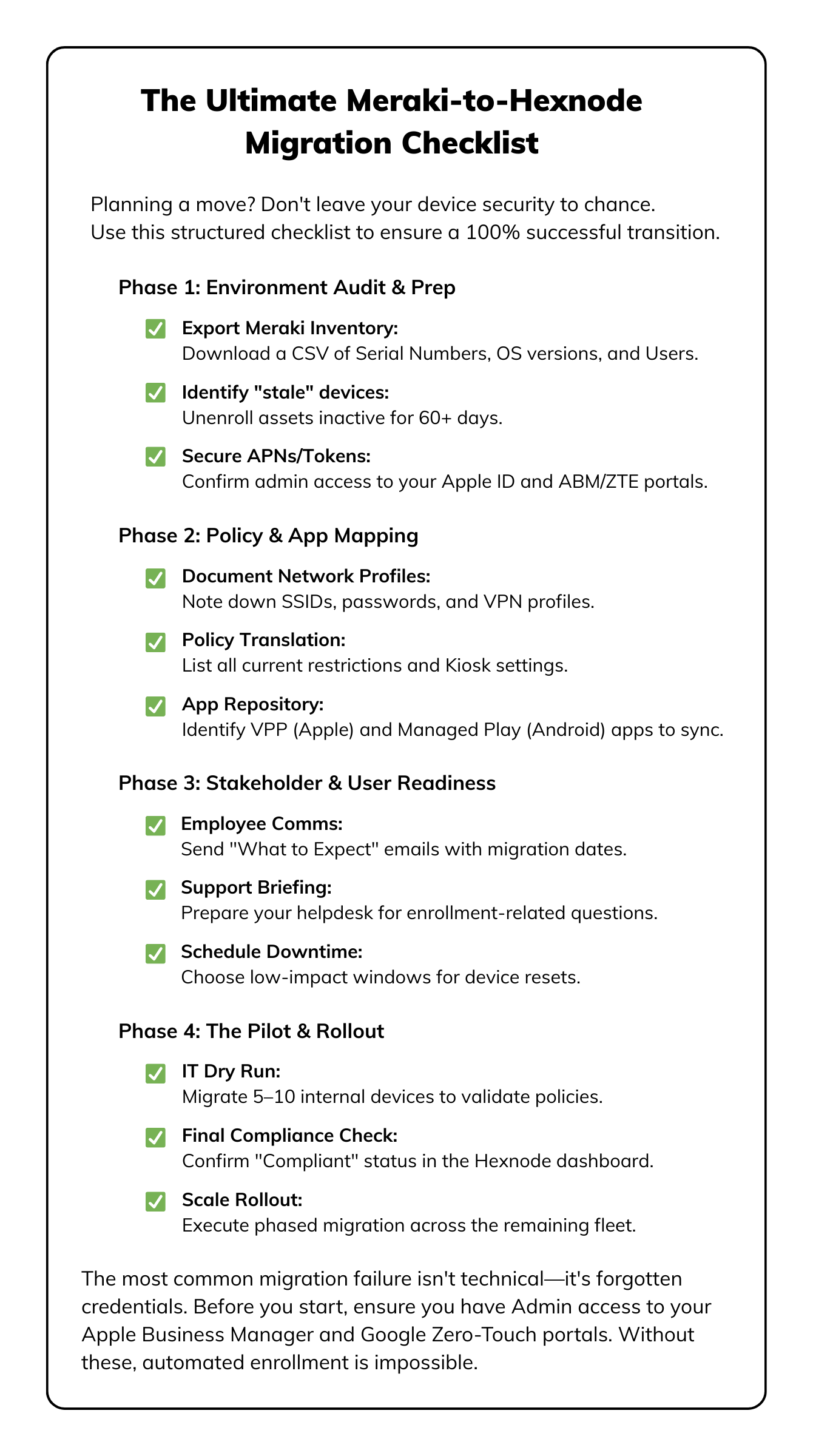

Transitioning to a new UEM doesn't have to be a challenge. Use this curated kit to build a fail-safe migration strategy with step-by-step handbooks and expert checklists.
Download the kitPhase 2 is where planning turns into execution. This is the hands-on stage retiring devices from Meraki and enrolling them into Hexnode using automated, zero-touch workflows that keep disruption to a minimum.
When done right, this phase is fast and largely hands-off. By leaning on Hexnode’s built-in automation and keeping tight control over enrollment tokens, teams consistently cut migration time compared to manual, agent-heavy approaches. More importantly, devices land in Hexnode fully managed, fully compliant, and ready for use.
This is also where Phase 1 pays off. Automation is the difference-maker here. Hexnode’s unified console handles every enrollment method – ADE, Android Zero-Touch, and self-service in one place, ensuring consistent policy application across all device types.
Rule of thumb: The fastest migrations are the ones that require the fewest human touches.
This step is about clean separation, removing Meraki without leaving behind anything that could interfere with new management.
Start by retiring devices from the Meraki dashboard. Issuing the Retire or Unenroll command removes the Meraki management profile and releases the device for re-enrollment.
For iOS and macOS devices, this step is critical. It ensures the existing MDM profile doesn’t block or conflict with Hexnode during the next enrollment cycle.
Start by retiring devices from the Meraki dashboard. Issuing the Retire or Unenroll command removes the Meraki management profile and releases the device for re-enrollment.
For iOS and macOS devices, this step is critical. It ensures the existing MDM profile doesn’t block or conflict with Hexnode during the next enrollment cycle.
For corporate-owned devices, enrollment tokens are everything. Apple Business Manager (DEP/ADE) and Android Zero-Touch Enrollment tokens must be carefully transferred before devices are reset.
Remove the required service tokens such as the APNs certificate, ABM server token, or Android ZTE token from the Meraki console, then securely upload and link them inside Hexnode. Once this is done, the device’s next factory reset will automatically point it to Hexnode for enrollment.
Get this step right, and the rest of the migration becomes almost automatic.
This is the moment devices officially move under Hexnode management.
With tokens and profiles already configured, enrollment becomes hands-off. Corporate-owned devices, once reset, automatically connect to Hexnode and enroll without user involvement.
For shared devices or bulk manual enrollments, Hexnode supports CSV-based bulk enrollment – ideal for onboarding large batches quickly without manual repetition.
Once devices enroll, immediately apply the policies you mapped in Phase 1. This is your quality check.
Confirm that critical controls are enforced correctly:
Validation at this stage ensures devices behave exactly as expected before broader rollout.
Once devices are stable and compliant in Hexnode, Meraki can be safely retired.
Deactivate remaining Meraki licenses and accounts to avoid unnecessary billing. Over the first few weeks, monitor compliance reports inside Hexnode and fine-tune policies based on real usage.
Hexnode’s automated enforcement and reporting make this optimization straightforward, helping teams lock in long-term stability without constant manual intervention.
The Meraki end-of-life announcement isn’t a setback – it’s a reset. For many teams, it’s the moment to move off a platform they’ve outgrown and onto a modern UEM that offers broader platform support, deeper security controls, and simpler licensing.
Organizations that switch to Hexnode typically see meaningful results within the first few months, including reduced administrative overhead and better visibility across their device fleets. The outcome is not just tighter security, but a cleaner, more efficient way to manage endpoints long term.
The earlier phases in this guide lay out the how. What really matters, though, is the why. One comment we consistently hear from teams after migrating says it best:
We switched because we had to – but we stayed because Hexnode gave us a level of control we didn’t realize we were missing.
This transition is your chance to consolidate tools, simplify policy enforcement, and finally manage all endpoints from a single, unified platform.
Across industries, organizations are turning this required migration into a clear advantage.
A large healthcare network managing over 7,000 devices across iOS, Windows, and Android needed to move away from Meraki due to platform limitations. With Hexnode UEM, they completed the migration in under four weeks, without disrupting frontline clinical workflows.
The results were immediate. The team enforced HIPAA-aligned security controls using granular access policies and remote wipe capabilities, while gaining a unified view of their entire mixed-OS environment, something they previously struggled to achieve.
Western Airways uses iPads as Electronic Flight Bags (EFBs) for its flight crews and needed strong remote app deployment, location tracking, and wipe capabilities. After moving to Hexnode UEM, the team streamlined app distribution using Apple VPP and gained detailed location history and reliable remote wipe controls – all from a simple, intuitive console. The result was faster device management and consistently up-to-date, secure EFBs supporting strict aviation safety standards.
A global logistics company migrated hundreds of Android-based rugged devices used in warehouse operations. Using Hexnode’s advanced Kiosk Mode and deep Android management features, they achieved complete device lockdown, eliminating misuse and significantly improving operational consistency on the warehouse floor.
These examples highlight a consistent pattern: migrating to Hexnode leads to stronger security, better cross-platform control, and simpler day-to-day management through a single console.
A useful next step is to revisit the Meraki policy map you created in Phase 1 and compare it directly with Hexnode’s feature set. The gaps and the gains become obvious very quickly.
The takeaway is simple: moving on from Meraki isn’t just about replacing a vendor; it’s about upgrading to a more powerful, future-ready UEM standard.
Hexnode UEM gives you a future-ready foundation for endpoint management, helping you centralize control, strengthen security, and scale more easily as your environment grows. It also positions you better for what comes next, whether that’s tighter compliance requirements, deeper integrations with modern security tools, or managing a more diverse device fleet.
With comprehensive policy management, full zero-touch enrollment support, and hands-on migration assistance, Hexnode makes the transition low-risk and high-impact.
Try out Hexnode UEM to simplify your Meraki migration and effectively manage all your endpoints.
Start your 14-day free trial today!Is Hexnode a true UEM solution, or is it just MDM?
Hexnode is a Unified Endpoint Management (UEM) solution. It goes beyond Mobile Device Management (MDM) by integrating capabilities for robust management of mobile devices, rugged devices, and traditional operating systems (Windows and macOS), providing a comprehensive security and lifecycle management platform.
Does Hexnode support Apple’s ADE/DEP and Android Zero-Touch Enrollment?
Yes. Hexnode provides direct integration with Apple Business Manager (ADE/DEP) and Android Zero-Touch Enrollment (ZTE). This ensures that devices retain corporate ownership and are automatically enrolled into the correct Hexnode profile immediately upon factory reset, facilitating large-scale migrations seamlessly.
What happens to my existing Meraki policies when I migrate?
Meraki policies are retired when the Meraki management profile is removed. You must replicate these settings inside the Hexnode console before enrollment. The blog serves as a checklist to ensure you capture and implement the equivalent restrictions, Kiosk settings, and compliance rules within Hexnode’s framework.
Is Hexnode a better choice than Intune for a former Meraki customer?
Hexnode is often preferred by MSPs and organizations managing highly diverse fleets (especially those with custom Kiosk, Rugged Android, or Digital Signage requirements). While InTune is strong for the Microsoft stack, Hexnode offers greater cross-platform depth and granular control for non-traditional devices.