Remote access software has evolved into core enterprise infrastructure, yet pricing evaluations often remain surface-level. Focusing solely on base license cost obscures the true financial impact. A comprehensive assessment must include Total Cost of Ownership (TCO), encompassing operational overheads, security risks, and administrative complexity, alongside Return on Investment (ROI). Integrated UEM-based models streamline costs, eliminate tool sprawl, and provide predictable per-device pricing with superior long-term value.
The global remote access software market represents a critical pillar of modern enterprise infrastructure. It has evolved from a niche IT utility into a foundational requirement for remote and hybrid workforce. As the market heads toward a projected $14.73 billion by 2034, many organizations remain caught in the “sticker price” trap. It is where the affordability of a base license cascades to hidden expenses.
For organizations attempting to quantify the financial impact of these solutions, the analysis must move beyond simple sticker prices. It needs to cover the complex interplay of licensing models, total cost of ownership (TCO), regulatory compliance burdens, and the quantifiable return on investment (ROI). This blog explores how shifting from a point-solution mindset to an integrated management framework can protect your bottom line and turn remote access from an expense into a strategic advantage.
Remote access software is a technology that allows a user to securely connect to and control a computer or device from a separate geographic location. By creating a virtual window, it enables IT admins or employees to interact with target machines as if they were physically present—accessing files, running applications, and performing system maintenance over the internet or a private network.
Are Remote Access Software and Remote Desktop Software the Same?
While often used synonymously and interchangeably, “Remote Access” is the broad category of technology. “Remote Desktop” typically refers to the remote access protocol (like RDP) or the act of accessing a PC’s full desktop environment.
The technical distinction lies in the scope of control. Remote access can include command-line access (SSH), file-level manipulation, or single-app streaming, whereas remote desktop implies a full graphical user interface (GUI) session that mirrors the entire desktop environment of the target machine.
Why Do You Need Remote Access Software?
The strategic necessity of remote access has transcended basic troubleshooting. It now functions as a central system of a resilient, distributed business model. As the workforce becomes more fragmented, the ability to project expertise across geographic boundaries determines an organization’s agility. Here are some of the primary drivers behind the adoption of modern remote access solutions:
Seamless Support for the Hybrid and Remote Workforce: With 88% of employers now providing hybrid work options, remote access is the only way to maintain consistent IT support. It eliminates the logistics challenge of shipping laptops for minor repairs and ensures that employees remain productive regardless of their physical location.
Optimization of Field and Retail Operations: In industries like retail and logistics, remote access allows IT teams to manage hundreds of kiosks, POS systems, and ruggedized handhelds from a central console. This drastically reduce Mean Time to Repair (MTTR) and eliminate the massive costs associated with technician travel and on-site service calls.
Hardening Security and Compliance Posture: Modern remote access is a cornerstone of Zero Trust Network Access (ZTNA). Unlike legacy VPNs that provide broad network access, remote access software provides granular, application-level control, ensuring that even if a device is compromised, lateral movement is impossible.
Operational Resilience and Disaster Recovery: When physical offices are inaccessible due to environmental or technical disruptions, remote access allows for the continuity of business-critical workflows. By hosting resources in the cloud and providing secure remote gateways, organizations can maintain higher uptime and meet critical disaster recovery specs like RTO and RPO, safeguarding the brand’s reputation and financial stability.
How to Choose the Best Remote Access Software for Your Organization
Selecting a remote access solution requires an evaluation that goes beyond the feature list and focuses on the long-term operational health of the IT ecosystem. Here are some factors to look for in a remote access software:
Unified Multi-Platform Versatility
The ideal remote access software must provide a consistent, high-fidelity experience across Windows, macOS, Android, and iOS. Organizations frequently suffer from “platform silos” where different tools are required for different operating systems, leading to increased training costs and inconsistent security enforcement. True cross-platform support ensures that an admin can transition from troubleshooting a Windows server to an iPad kiosk without switching interfaces.
Integrated Automation and Workflow Orchestration
Remote access is an actionable component of device management. The best tools allow for automated session initiation, one-click remote view from a device record, and integration with services like Freshservice or Zendesk. This reduces administrative friction, allowing IT teams to focus on strategic initiatives rather than tool maintenance.
Scalable and Transparent Pricing Architecture
Pricing is the most critical factor because it dictates the sustainability of the tool as the organization grows. Superficial low-entry costs often mask aggressive upsells for essential features like security auditing or multi-monitor support. Organizations should prioritize “all-inclusive” models where remote access is bundled into a broader management suite, as this significantly reduces the Total Cost of Ownership (TCO) compared to maintaining multiple standalone licenses.
The True TCO of Unified Endpoint Management: A Financial Model for 2026
Learn how Hexnode UEM reduces costs by eliminating hidden legacy add-on fees.
What are the Key Factors to Consider in Remote Access Software Pricing?
Understanding the landscape of remote access pricing requires navigating a complex array of licensing philosophies. Each model has its own logic, typically optimized for specific organizational structures or use cases. However, not all models are created equal in terms of long-term value.
Need / Use Case
Pricing Model
Description
User-Centric Workforce
Per-User
Licenses are tied to a specific named user, allowing that individual to access a set number of devices (e.g., laptop + desktop + mobile).
Shift-Based / Shared Devices
Per-Device
Billed based on the total number of managed endpoints. Ideal for warehouses, retail stores, or environments where multiple employees share the same hardware.
Large-Scale Support Teams
Concurrent Session
Charges based on the number of active sessions happening at once. Thousands of users can be registered, but only a fixed number can be remotely accessed simultaneously.
Ad-Hoc IT Troubleshooting
Per-Technician
Licensing is tied to the support staff. This model often results in high costs for internal IT teams who need to support a vast fleet of varied endpoints.
Modern Integrated Enterprise
Integrated UEM Model
Remote access is bundled as a core feature of a Unified Endpoint Management suite, eliminating the need for separate point-solution licenses.
Legacy / High Upfront CapEx
Perpetual License
A one-time payment for permanent access to a specific version. While it avoids monthly fees, it often incurs hidden costs for security updates and lacks cloud scalability.
Why the Integrated UEM Model Outperforms Traditional Licensing
Despite the variety of models available, the Integrated UEM Model (such as the one utilized in modern endpoint management suites) consistently proves to be the most advantageous for a variety of reasons:
Elimination of Tool Sprawl: By consolidating remote support into the management console, organizations avoid the fragmentation challenge where IT teams must pay for and maintain five different tools for one outcome.
Unified Security Policy: An integrated model ensures that remote access is subject to the same compliance checks, geofencing, and encryption policies as the rest of the device fleet, closing security gaps.
Predictable Scalability: Organizations pay based on managed assets, which aligns perfectly with business growth, unlike per-technician models which can become prohibitively expensive as the IT team expands.
Operational Velocity: The ability to initiate a remote session directly from a device’s management record saves minutes per ticket, which compounds into thousands of hours of reclaimed productivity across a large enterprise.
Transparent Scaling: A Look at Hexnode’s Pricing
While many legacy vendors hide their costs behind “Contact Sales” buttons, Hexnode utilizes a transparent, tier-based pricing model that scales with your device count. This ensures that you only pay for the capabilities you need, whether you are managing a small team or a global enterprise.
App and kiosk management, location tracking, ABM and Android enterprise enrolment
Enterprise
$3.2
Unattended remote view, directory integrations, and geofencing.
Ultimate
$4.7
Remote control, custom scripting, and advanced automation.
Ultra
Request pricing
Patch management, Hexnode Genie, and advanced desktop security (BitLocker/FileVault).
The Financial Iceberg: Pricing is Not Just the Monthly Bill
When procurement teams focus solely on the “sticker price” of a remote access license, they are ignoring the vast majority of the financial impact. This “Financial Iceberg” of remote access hides its most significant costs beneath the surface in the form of operational overhead, security risks, and productivity losses. To truly understand what remote access software costs, an organization must analyze its Total Cost of Ownership (TCO) and Return on Investment (ROI).
Understanding Total Cost of Ownership (TCO)
TCO considers the full lifecycle cost of a solution, encompassing every dollar spent to make the system functional, secure, and sustainable. In the remote access domain, TCO is divided into three primary categories:
Direct Costs: These are the visible expenses, including subscription fees, server hardware (for on-premises models), and implementation consulting.
Indirect Operational Costs: This is often the largest hidden expense. It includes the salaried time of IT personnel required to manage the tool, apply security patches to the remote access server, and troubleshoot connectivity issues. If a tool is difficult to use, the time spent in training and the loss of “time-to-productivity” for new hires adds to this burden.
Risk-Related Costs: The financial fallout from a security breach caused by an insecure remote access tool can be catastrophic. This includes not just the cost of remediation, but potential regulatory fines (GDPR/HIPAA), lost customer trust, and increased cyber insurance premiums.
Quantifying Value: ROI Calculation Formulas
The decision to invest in remote access software must be justified through a rigorous Return on Investment (ROI) analysis. This involves capturing both quantitative savings and qualitative improvements.
The standard formula for calculating ROI is expressed as:
ROI= (Net Benefit/Total Cost) x 100
where, Net Benefit = (Savings from reduced travel + Savings from reduced downtime + Productivity gains) – (Licensing + Implementation costs).
Key ROI Metrics for Remote Access
Here are some scenarios where choosing the right Remote Access Software helps increase your ROI:
Labor Savings: If remote access software reduces the time spent on a task (e.g., report generation) from 4 hours to 1 hour, and 5 team members perform this weekly, the organization reclaims 60 hours per month.
Reduced Downtime: Imagine an organization faces five network outages a year. For a large company, just one hour of downtime can cost over $300,000. Using a reliable remote tool could prevent these expensive gaps in work. This allows the business to avoid major financial losses from even a single hour of downtime.
Employee Retention: Replacing an employee costs approximately 50% of their salary. Facilitating remote work through software improves retention, which can be quantified as a direct saving in recruitment and training costs.
Strategic Value Realization with Hexnode UEM
Hexnode UEM serves as a prime example of how an integrated approach to remote access can fundamentally shift the cost-value equation for an enterprise. By embedding high-performance remote monitoring and management features, Hexnode eliminates the financial and operational friction inherent in standalone point solutions.
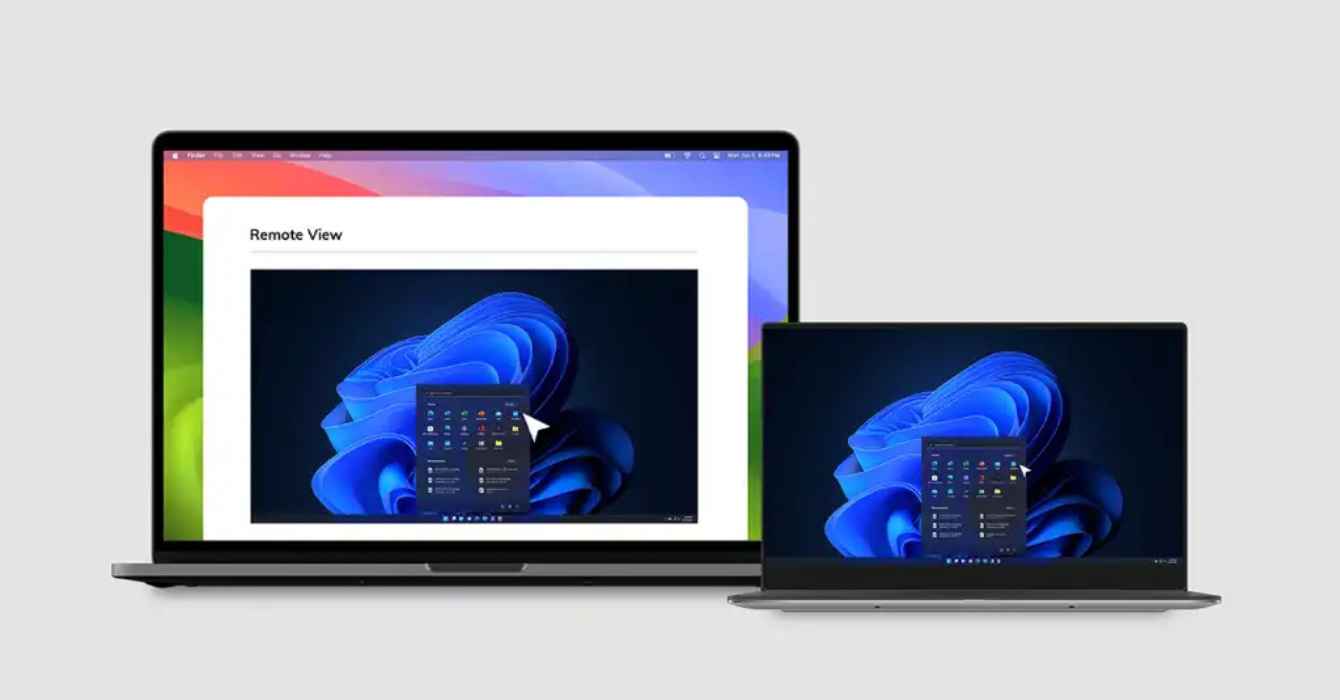
Real-Time Troubleshooting & Remote Actions: Hexnode allows admins to monitor user actions via Remote View (iOS, macOS, Android, Windows) and take direct command through Remote Control (Android). Beyond just viewing screens, admins can execute immediate remote actions like launching apps, powering off, or restarting devices to resolve issues instantly.
Proactive Device Health Monitoring: Hexnode provides continuous insights into device health and status. By tracking compliance and performance in real-time, IT can identify and resolve potential failures before they result in employee downtime, effectively shifting from reactive “break-fix” support to a proactive management model.
Automated Management & Scripting: To reduce TCO, Hexnode automates repetitive tasks. Admins can push custom scripts and commands for Windows and Mac or enforce time-based and dynamic group policies. This automation allows a small IT team to manage thousands of devices efficiently, ensuring configurations are always up to date without manual ticketing.
Integrated Patch & OS Lifecycle Management: Vulnerability management is baked into the console. Hexnode allows you to schedule, delay, or enforce OS updates during off-peak hours. This prevents the network congestion and productivity loss associated with forced mid-day updates, while ensuring the entire fleet remains secure against emerging threats.
Calculate Your Savings: The Hexnode ROI Tool
The transition from a “cost center” to a “value driver” starts with data. If you are struggling to quantify how much a unified approach could save your investment, use the Hexnode ROI Calculator. By inputting your fleet size and current support overhead, you can visualize the immediate reduction in tool sprawl and the long-term gains in operational velocity.
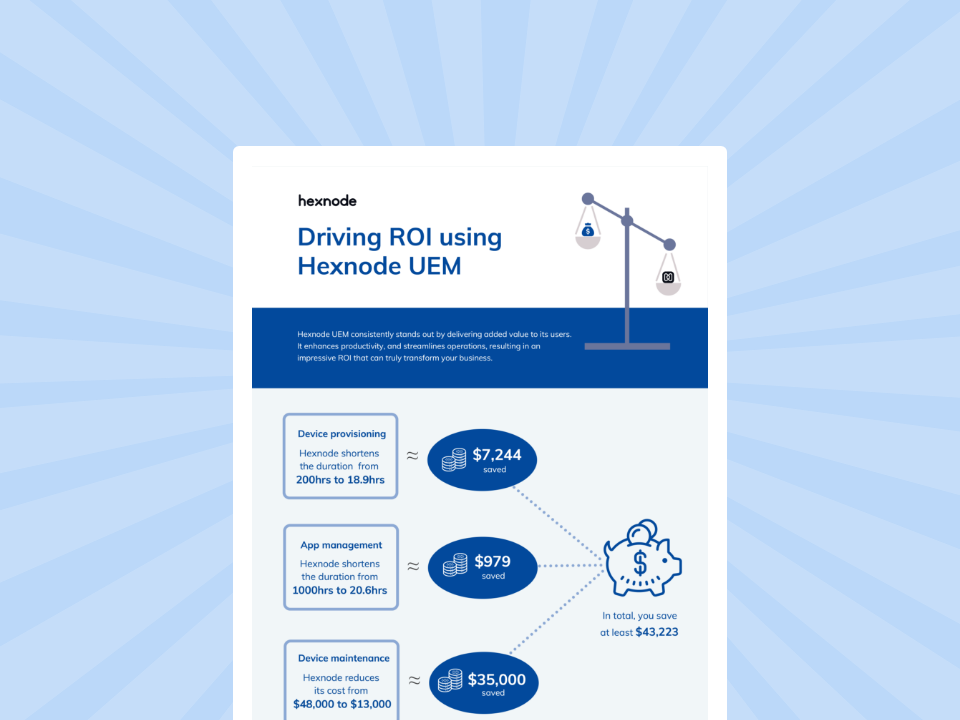
Infographic
Driving ROI with Hexnode
Download the infographic to check out how Hexnode UEM drives ROI for organizations.
In 2026, the “sticker price” of remote access software is a distraction. The true cost includes hours lost to tool switching and fragmented security risks. Unmanaged endpoints also add a heavy logistical burden.
Choosing a solution within a broader UEM framework ensures a superior ROI. This approach significantly lowers your three-year TCO. Hexnode UEM offers ideal pricing and deep feature capabilities. Its future-ready architecture makes it the definitive choice for cost-conscious enterprises.
Frequently Asked Questions
1. What is the difference between “sticker price” and TCO?
Sticker price is just the monthly license fee. Total Cost of Ownership (TCO) includes hidden expenses like specialized labor, security add-ons, premium support fees, and the cost of managing separate tools.
2. Why is an integrated UEM model better than standalone tools?
Integrated UEM eliminates “tool sprawl” by combining remote access, security, and device management into one platform. This reduces licensing costs, simplifies your tech stack, and ensures consistent security policies across all devices.
3. How does remote access software improve ROI? >>>>It boosts ROI by significantly reducing technician travel costs, minimizing employee downtime through faster troubleshooting, and increasing IT productivity via automated workflows and centralized control.
Maximize ROI with Integrated Remote Access
Eliminate hidden costs and tool sprawl by consolidating remote support, security, and device management into one predictable, high-ROI platform.
Curious, constantly learning, and turning complex tech concepts into meaningful narratives through thoughtful storytelling. Here I write about endpoint security that are grounded in real IT use cases.