Android kiosk software helps businesses lock down Android devices into secure, purpose-built tools for POS, digital signage, self-service kiosks, and field operations. This guide compares leading Android kiosk solutions based on security, remote management, scalability, and kiosk controls, while also covering common kiosk challenges, deployment basics, and what businesses should evaluate before choosing an Android kiosk solution.
In today’s fast-paced business landscape, securing devices while maintaining a smooth user experience is a critical challenge. Android kiosk software helps businesses transform off-the-shelf Android devices into dedicated, secure tools for specific tasks.
Whether you are deploying digital signage, point-of-sale terminals, self-service check-in pads, field devices, or unattended kiosks, the right android kiosk software keeps devices locked, secure, and productive.
But with dozens of options available, which one is the best kiosk app for Android? And which platform offers the most reliable Android kiosk management for your business? This guide compares the top contenders to help you choose the right solution.
What is Android Kiosk Software?
Android kiosk software is a specialized application or Unified Endpoint Management (UEM) solution that locks an Android device into a controlled state. It can restrict users to a single app, known as single app kiosk mode, or allow access to a defined set of apps, known as multi-app kiosk mode.
Unlike basic screen pinning, professional android kiosk software gives IT admins centralized control. Admins can remotely configure devices, push app updates, track location, troubleshoot issues, and prevent users from accessing unauthorized apps or settings.
This makes android kiosk software an important part of Android device management for businesses deploying dedicated-use devices.
What is Android kiosk mode?
Android kiosk mode has emerged as an easy solution to blocking out distractions and improving work efficiency.
Quick Comparison: Top 5 Android Kiosk Solutions
Software
Best For
Free Trial?
Key Strength
1. Hexnode UEM
Best overall for SMBs and enterprises
14 days
Advanced kiosk and peripheral controls
2. Scalefusion
Visual-heavy dashboards
14 days
Custom branding options
3. Esper
DevOps and custom fleets
Custom
Developer-focused tools
4. AirDroid Business
Unattended remote access
14 days
Remote control functionality
5. KioWare
Browser-based kiosks
Demo
Browser-specific lockdown
First-Hand Experience: How to Set Up Android Kiosk Mode with Hexnode
Hexnode’s Android kiosk documentation outlines setup steps including device enrollment, kiosk policy creation, policy association, and kiosk activation.
Here is a simple workflow for deploying Android kiosk mode with Hexnode:
1. Enroll the device
For Android Enterprise devices, kiosk activation is available only on devices enrolled in Device Owner mode.
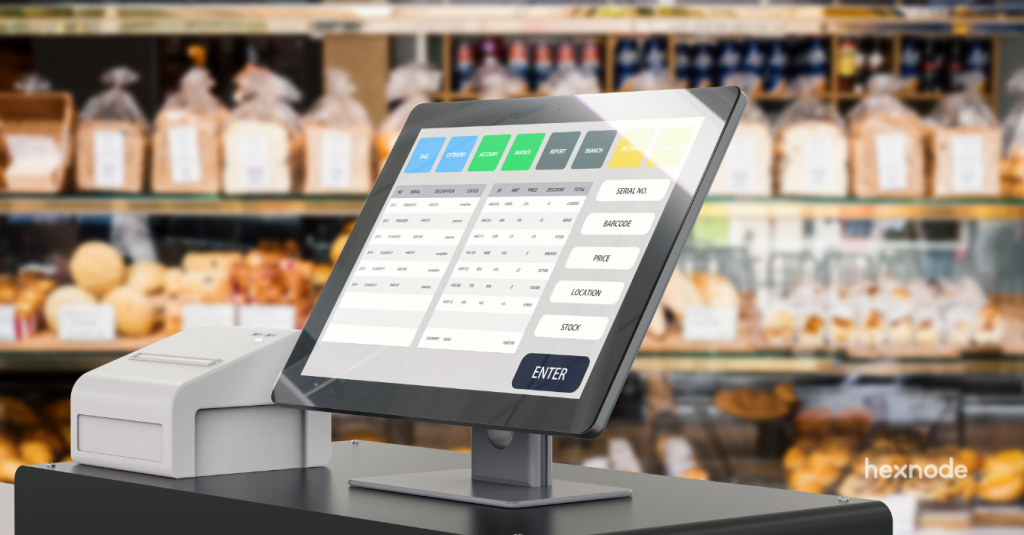
Single App Mode for POS systems or digital signage.
Multi-App Mode for employee devices that require access to multiple business applications.
4. Configure kiosk restrictions
Configure supported kiosk settings such as:
Hardware button restrictions
Software button controls
Device status bar controls
Notification bar restrictions
Wi-Fi settings
Peripheral settings
5. Apply the policy
Associate the policy with target devices. The devices will enter kiosk mode based on the configured settings.
Featured resource
Hexnode – The perfect choice for Android device management
It might be challenging for IT admins to manage a huge number of Android devices. Hexnode UEM makes Android device management a seamless experience for them. Check out the White paper to know how.
When searching for the best Android kiosk software, these ten solutions consistently stand out based on features, reliability, scalability, and support.
1. Hexnode UEM
Hexnode UEM is a Unified Endpoint Management platform with advanced Android kiosk capabilities. It supports Android kiosk lockdown with single app, multi-app, website kiosk, kiosk browser, digital signage, and peripheral settings.
Hexnode provides granular control over apps, websites, device settings, network access, hardware buttons, and supported peripheral controls. It also supports remote troubleshooting, kiosk browser lockdown, location tracking, and Android Enterprise management.
Best for: Businesses looking for scalable, secure, and easy-to-manage android kiosk software.
Top features:
Kiosk browser: Restrict web access to approved URLs only.
Digital signage: Turn Android devices into remotely managed digital displays.
Location tracking and geofencing: Create virtual fences, dynamically associate or disassociate policies, and mark devices non-compliant when they move out of a geofence.
Single app and multi-app kiosk: Lock devices to one app or a selected group of apps.
Verdict: Hexnode combines Android kiosk lockdown with centralized management, remote troubleshooting, policy management, and Android Enterprise support for businesses managing dedicated Android devices.
Scalefusion is an Android kiosk software platform that emphasizes dashboard visibility, branding, and device customization. It offers single app kiosk, multi-app kiosk, custom launcher configurations, and remote support features.
Best for: Retail and customer-facing environments that need branded kiosk experiences.
Top features:
Custom branding: Create a branded kiosk launcher experience.
FileDock: Distribute and manage files on kiosk devices.
DeepDive analytics: Monitor device health and usage.
Remote Cast: View device screens for remote troubleshooting.
Verdict: Scalefusion is a strong contender for the best kiosk app for Android, especially when visual customization is a priority.
Esper positions itself as a DevOps-focused platform for dedicated Android devices. It is designed for teams that build, deploy, and manage custom Android device fleets where staged rollouts and application lifecycle management are important.
Best for: Software teams managing custom Android device deployments.
Top features:
Pipeline deployment: Roll out app and OS updates in stages.
Telemetry: Access advanced debugging and device insights.
Custom fleet management: Manage dedicated Android devices at scale.
Verdict: Esper is a good choice for developers who need granular control over app deployment pipelines and dedicated device workflows.
AirDroid Business focuses on remote access and remote support for Android devices. It is commonly used for managing unattended Android kiosks across multiple locations.
Best for: Small teams managing geographically dispersed unattended kiosks.
Top features:
Unattended remote access: Remotely control Android kiosk devices.
Black screen mode: Maintain user privacy during remote maintenance.
App and device management: Push apps, configure devices, and monitor device status.
Verdict: AirDroid Business is strong for remote troubleshooting, though it may offer fewer broader UEM capabilities than full endpoint management platforms.
5. KioWare for Android
KioWare focuses heavily on browser-based kiosk experiences, making it a practical option for businesses that need to lock Android tablets to websites or web apps.
Best for: Browser-only kiosks and web-based self-service terminals.
Top features:
Browser lockdown: Restrict users to specific websites or web applications.
Peripheral support: Integrate with barcode scanners, card readers, printers, and other devices.
Custom browser controls: Configure navigation, toolbars, and browsing behavior.
Verdict: KioWare is one of the best kiosk apps for Android if your primary use case is locking a device to a website or web app.
6. ManageEngine Mobile Device Manager Plus
ManageEngine Mobile Device Manager Plus offers mobile device management with kiosk capabilities for enterprise IT environments.
Best for: Enterprise IT departments requiring detailed integrations and device management.
Top features:
Automated enrollment: Provision devices in bulk.
Asset management: Track device inventory and hardware details.
Kiosk lockdown: Configure devices in single app or multi-app kiosk mode.
Verdict: ManageEngine is powerful, but the interface and feature depth may feel complex for smaller teams new to android kiosk software.
Fully Kiosk Browser is popular among small businesses, DIY users, and home automation enthusiasts.
Best for: Single-device projects, DIY kiosks, and very small businesses.
Top features:
Browser kiosk mode: Lock Android devices to websites or web apps.
Motion detection: Wake the screen when movement is detected using the front camera.
Flexible licensing: Offers a budget-friendly licensing model.
Verdict: Fully Kiosk Browser is affordable and practical for simple setups, but it lacks the enterprise-grade management depth found in premium android kiosk software.
9. Miradore
Miradore is a lightweight mobile device management solution known for its simple setup and free plan for basic device management.
Best for: Startups and small businesses with simple kiosk requirements.
Top features:
Fast enrollment: Enroll Android devices quickly using QR codes.
Patch management: Help keep devices updated.
Basic device restrictions: Apply essential security and management controls.
Verdict: Miradore is a good entry point into android kiosk software, but growing businesses may eventually need more advanced kiosk and remote management features.
Citrix Endpoint Management is part of a broader enterprise workspace and virtualization ecosystem.
Best for: Enterprises already invested in the Citrix ecosystem.
Top features:
Secure app access: Manage secure access to enterprise applications.
Enterprise integrations: Connect with Citrix workspace and security tools.
Endpoint controls: Apply device restrictions and app-level policies.
Verdict: Citrix can be powerful for enterprise customers, but it may be overkill for small businesses that only need Android kiosk software.
Troubleshooting Common Android Kiosk Issues
Even the best android kiosk software can encounter occasional issues. Here are some common kiosk problems and how to fix them.
1. Users Escaping Kiosk Mode
The issue: A user manages to return to the home screen, access settings, or bypass the kiosk restriction.
The fix: Use documented Android restrictions such as Disable Safe Mode, and configure supported kiosk controls such as:
Status bar restrictions
Notification bar restrictions
Software button controls
Hardware button restrictions
These settings help prevent unauthorized access outside the kiosk environment.
2. App Freezing or Crashing
The issue: The kiosk app freezes or crashes, leaving the device unresponsive.
The fix: With Hexnode, admins can use Android remote view/control and remote actions such as Clear App Data to troubleshoot supported devices. Kiosk policies can also configure a default kiosk app with an auto-launch period.
These settings help improve device longevity and reduce unnecessary power consumption.
Frequently Asked Questions
What is an Android kiosk?
An Android kiosk is a tablet or smartphone restricted to perform a specific function, usually by locking it to a single app or a selected set of apps using android kiosk software. Unlike a regular consumer device, an Android kiosk is configured to prevent access to unauthorized apps, settings, or system controls.
How do I run Android in kiosk mode?
There are two common ways to run Android in kiosk mode: Temporary use Many Android devices include a built-in feature called Screen Pinning or App Pinning that can temporarily lock the device to a single app, though availability and naming may vary by Android version and manufacturer. Business use Enroll the device into an MDM or UEM solution like Hexnode, create a kiosk policy, select the approved apps or websites, and apply the policy to the device. This locks the device into the configured kiosk mode while allowing admins to apply supported kiosk restrictions and controls.
How do I install Fully Kiosk on my Android phone?
To install Fully Kiosk Browser: Open the Google Play Store. Search for “Fully Kiosk Browser & Launcher.” Install and launch the app. Grant the required permissions. Enable Kiosk Mode in the app settings. For enterprise deployments, Hexnode can deploy and manage apps on enrolled Android devices from the portal.
Is there a free Android kiosk mode?
Yes. Many Android devices include a built-in feature called Screen Pinning or App Pinning that can temporarily lock the device to a single app. However, it is generally not considered secure enough for most public or enterprise deployments because users may still be able to exit the pinned app. Businesses typically use dedicated android kiosk software for stronger restrictions, centralized management, and remote troubleshooting.
Can I use any Android tablet as a kiosk?
Many Android tablets running Android 6.0 or later can support kiosk deployments, though capabilities may vary depending on device manufacturer, Android Enterprise compatibility, and OEM restrictions. Devices that support Android Enterprise or OEM management frameworks such as Samsung Knox often provide additional device management APIs and kiosk configuration options.
Conclusion
Choosing the right android kiosk software depends on your scale, security requirements, device type, and management needs.
Simple kiosk apps may work for a single tablet or basic browser lockdown. But businesses often require centralized device management, remote troubleshooting, policy enforcement, and scalable Android kiosk controls.
Hexnode UEM combines Android kiosk lockdown with centralized management, remote troubleshooting, policy management, device restrictions, and Android Enterprise support, making it a strong option for businesses managing dedicated Android device fleets.
Disclaimer: This comparison is based on publicly available information as of May 2026. We recommend visiting the official websites of the companies for the most current information. All product and company names are trademarks™ or registered® trademarks of their respective holders. Use of them does not imply any affiliation with or endorsement by them.
Looking for an Android kiosk software?
Try out Hexnode's 14 day free trial to setup kiosk mode for your Android devices.
Content Writer at Hexnode, a curious mind with a knack for words, I dive into ideas worth unpacking and craft narratives worth sharing. I enjoy turning complex concepts into clear, engaging stories that connect with people and spark thought. From tech trends to everyday insights, I’m driven by curiosity, clarity, and creativity, always learning, always refining, and always looking for the next story that deserves to be told well.