Effective XDR reporting turns high-volume security data into evidence for prioritization, remediation, accountability and governance.
Tracking totals alone can hide unresolved threats, coverage gaps, failed actions and stale telemetry, creating a misleading view of risk.
Link every metric to a defined question, owner, threshold, review cadence and response, then validate data quality and remediation results.
Hexnode XDR provides device, threat, action, audit and policy reports with filtering, table customization and PDF or CSV exports for structured monitoring and review.
XDR reporting is difficult because the platform can collect far more data than a security team can meaningfully interpret. Threat detections, endpoint telemetry, policy events, remediation records and administrative activity may all be available, yet volume alone does not create actionable security insight.
Teams often emphasize total detection counts while missing whether high-severity incidents remain unresolved, endpoints have stopped reporting, policies leave coverage gaps or analysts completed assigned actions. Effective XDR security reports must therefore answer defined questions: Which issues require action, who owns the response and what evidence supports operational, risk and governance decisions at each review cycle?
What Happens When Security Teams Track the Wrong XDR Metrics?
Tracking the wrong metrics gives security teams an incomplete or misleading view of risk. High detection volumes, alerts closed or endpoints scanned may appear reassuring, but these figures reveal little without the status, severity, ownership and remediation context behind them.
Vanity metrics and disconnected reports can obscure unresolved threats, unmanaged endpoints and failed response actions. Analysts may spend time processing low-value alerts while critical incidents remain unassigned, slowing containment and increasing alert fatigue.
Poor reporting also makes it harder to explain security performance to executives or reconstruct decisions during audits and post-incident reviews. If report data is stale, incomplete or based on inconsistent filters, apparent improvements may reflect missing telemetry rather than reduced risk, creating false confidence in the organization’s security posture.
What Are XDR Security Reports?
XDR security reports organize threat, incident, response and administrative data from integrated security layers—including endpoints, identities, email, applications, networks and cloud workloads—into structured views for monitoring, investigation and governance. They help security teams examine what occurred, which assets were affected, how analysts responded and whether identified risks remain unresolved.
Unlike an isolated event record, a report groups relevant security fields around a defined operational question. Teams can filter results by attributes such as severity, status, endpoint or time range, compare activity across reporting periods and export evidence for further analysis or retention.
Raw telemetry records processes, files, connections and other endpoint activity. Contextual reporting transforms selected telemetry and workflow data into interpretable evidence that supports investigation, remediation tracking and oversight.
How Are XDR Reports Different from Dashboards, Alerts and Logs?
Dashboards summarize the current security posture, alerts notify analysts about conditions requiring attention, logs preserve granular event records and reports organize selected data into structured evidence for analysis.
Each layer answers a different question. A dashboard shows where to focus, an alert identifies what may require investigation, logs provide technical detail and reports support comparison, accountability and historical review. Analysts should move between these layers rather than treat one as the complete source of truth.
Dashboard values may differ from report totals because of time ranges, active filters, synchronization intervals, data scope or refresh timing.
XDR Monitoring Explained: How It Works and Why It Matters
Learn how XDR monitoring turns endpoint telemetry into actionable investigation context.
Which XDR Reports and Metrics Should Security Teams Track?
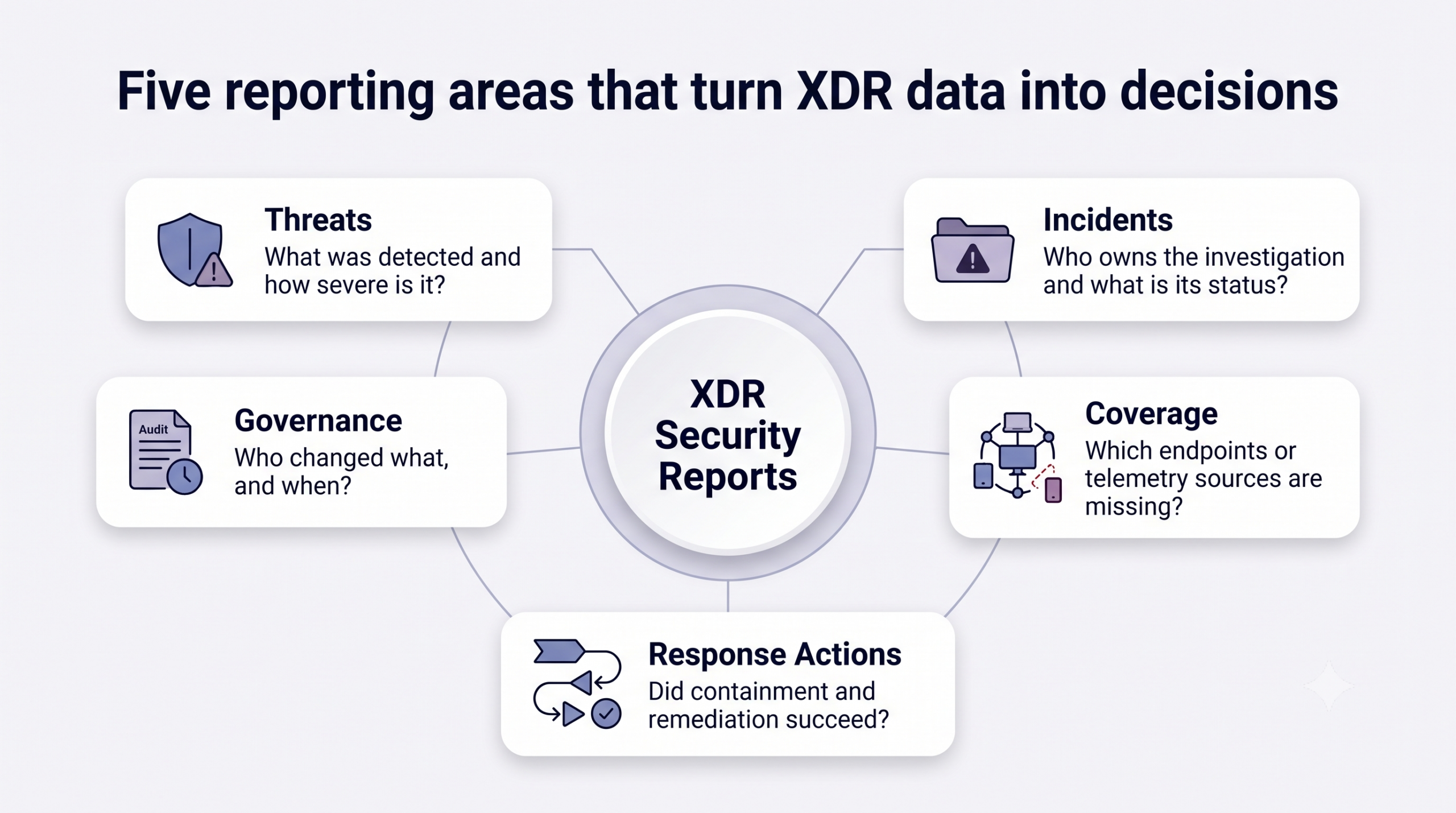
At a minimum, security teams should track threats, incidents, telemetry-source coverage, response actions and governance, with source-specific reporting for connected endpoint, identity, email, application, network and cloud environments. Together, these views show what was detected, which assets are exposed, how investigations are progressing, whether remediation succeeded and who changed the environment.
Every metric should answer a defined question, have an accountable owner and trigger a decision or follow-up action. The following sections use a practical metric, purpose and action framework to connect reported evidence with a specific security outcome.
Five XDR security reporting areas mapped to operational decisions
Which Threat Detection Metrics Reveal Actual Risk?
Threat detection metrics provide stronger risk context when severity, detection type, affected asset, status and timing are evaluated alongside asset criticality, potential business impact and organizational risk tolerance. A total threat count without this context cannot distinguish a contained low-severity event from an unresolved critical compromise.
Analysts should track:
Threat volume by severity and detection type
Malware, ransomware and trojan detections
Malicious, suspicious or clean verdicts
Processes responsible for triggering detections
Pending, active and resolved threat status
Repeated detections affecting the same endpoint
Trends and concentration matter more than an isolated total. A sudden detection spike may indicate an active campaign, while repeated malware findings on one endpoint can expose ineffective remediation or persistent compromise. Grouping threats by endpoint, process and time period helps analysts identify high-risk devices, recurring attack patterns and pending threats requiring immediate investigation.
Pro tip:
Combine detection severity with asset criticality and business impact. A lower-severity detection affecting a critical system may require faster escalation than a higher-severity event on an isolated, low-value endpoint.
Which Incident Metrics Measure Investigation Progress?
Incident metrics measure investigation progress by showing where each case sits in the response lifecycle, who owns it and how long it remains at each stage. Teams should track open, assigned, in-progress and resolved incidents alongside their severity, age, assignee and affected endpoints.
Operational measurements should include:
Number and age of unassigned incidents
Incident backlog and its rate of growth
Time from detection to analyst assignment
Time to containment
Time to resolution
These metrics expose assignment bottlenecks, overloaded analysts and cases that exceed response targets. However, a shorter closure time does not necessarily indicate better performance. Teams must interpret it alongside incident severity, investigative depth, recurrence and resolution accuracy. Prematurely closing incidents can improve headline metrics while allowing the underlying threat to persist.
Which Endpoint Reports Expose Coverage and Visibility Gaps?
Endpoint reports expose coverage gaps by identifying devices that are enrolled but no longer communicating, lack an assigned security policy or have lost the XDR agent. Security teams should track enrolled, online, offline, inactive, recently onboarded, policy-free and agent-removed endpoints.
Each record should include operational context such as the OS version, agent version, device health, ownership and last check-in time where available. These attributes help distinguish temporary connectivity loss from persistent monitoring failures.
Reviewing endpoint states can reveal telemetry blind spots, stalled agent deployments and outdated software. It also identifies devices that appear in inventory but may be excluded from effective threat monitoring because they are inactive, unprotected or improperly configured.
Which Response Metrics Show Whether Remediation Worked?
Response metrics show whether remediation worked by recording what action was performed, where it ran, when it started and whether it completed successfully. Teams should track the target endpoint, initiation and completion times, action status and any recorded failure details.
Failed, delayed or persistently pending actions can indicate endpoint connectivity loss, agent issues, insufficient permissions or an ineffective response procedure. These outcomes require investigation rather than being counted as completed remediation.
Action initiation alone does not prove that a threat was contained or removed. Analysts should correlate action records with the threat’s current status, subsequent detections and follow-up scan results. This confirms whether remediation changed the endpoint’s security state or whether further action remains necessary.
Note:
A successful action status confirms that the command completed; it does not automatically confirm that the underlying threat was eliminated. Check the updated threat status, subsequent detections and follow-up scan results before closing the incident.
Which Audit and Policy Reports Support Governance?
Audit and policy reports support governance by documenting administrative activity, configuration changes and security control coverage. Teams should track technician actions, policy creation and modification, policy assignments, remote terminal sessions and critical system events.
A useful audit record identifies who performed an action, what changed, when it occurred and which console module or security function was involved. This creates a traceable sequence of events for reviewing privileged activity and investigating unauthorized or unexpected changes.
Policy and audit evidence also supports periodic access reviews, formal change-control processes and internal investigations. During compliance assessments or post-incident reviews, these reports help demonstrate how controls were configured, who modified them and whether administrative actions followed approved procedures.
How Do You Build an Actionable XDR Reporting Process?
Build an actionable XDR reporting process as a recurring operational workflow, not a periodic data-export exercise. Reports should consistently translate security data into assigned decisions, investigations and remediation tasks.
The process must connect security objectives with relevant metrics, accountable owners, defined review cadences and escalation thresholds. The following five steps cover how to define reporting questions, select metrics, establish baselines, set review intervals and continuously validate the reporting set.
Step 1: Define the Security Question and Decision
Start with a specific operational question, such as “Which critical threats remain unresolved?” or “Which endpoints have stopped reporting?” Selecting every available metric creates volume without clarifying what the team must do next.
Map each question to a decision, responsible owner and required response time. For example, an unresolved critical threat may require immediate escalation to the incident-response lead.
Separate operational, management and audit reporting requirements. Analysts need granular investigation data, leaders need risk and performance trends, and auditors need traceable control evidence.
Step 2: Select Metrics with Clear Owners and Thresholds
Create a reporting register that defines each metric, data source, owner, review frequency, acceptable range and escalation condition. This prevents different teams from interpreting or acting on the same measurement inconsistently.
Prioritize metrics tied to a defined response. An inactive endpoint should trigger a connectivity or agent investigation, while an unresolved critical threat should initiate escalation under the incident-response process.
Remove duplicate metrics that measure the same condition under different labels. Exclude measurements that lack a reliable data source, consistent definition or actionable threshold, even if they make reports appear more comprehensive.
Make every metric actionable:
Document the security question, data source, owner, review frequency, acceptable range and escalation condition. If a metric does not lead to a decision or follow-up action, reconsider whether it belongs in the reporting set.
Step 3: Establish Baselines Before Setting Targets
Measure typical threat volume, incident backlog, response duration, endpoint connectivity and action failure rates over a representative period. Without a baseline, teams cannot distinguish normal variation from a meaningful operational or security change.
Segment baselines by severity, endpoint group, operating system or business unit where differences in risk and activity are relevant. Compare current results against these established ranges to identify anomalies. An increase warrants investigation, but it should not automatically be presented as a security failure without examining changes in coverage, workload and detection sensitivity.
Step 4: Match Reporting Cadence to Operational Urgency
Review critical threats and failed containment actions continuously or daily. Assess incident backlogs and endpoint coverage gaps weekly, then evaluate longer-term security trends and governance controls monthly.
Define escalation thresholds for overdue incidents, unassigned critical findings, inactive agents and repeated action failures. Each threshold should specify when escalation occurs and who receives it.
Retain report exports when teams need point-in-time evidence for audits, post-incident reviews or offline analysis. Apply documented retention periods and access controls according to organizational and regulatory requirements.
Step 5: Validate Data Quality and Tune the Reporting Set
Before interpreting missing or unexpected data, verify the selected time range, active filters, device synchronization, agent status and enabled security modules. A reporting gap may reflect collection or configuration problems rather than the absence of threats.
Review the reporting set periodically. Remove metrics that no longer support a defined decision, and add measurements when new threats, controls or reporting obligations change what the organization must monitor.
Document every metric’s definition, calculation method, scope and data source. Shared definitions ensure that analysts, IT teams and executives interpret reported results consistently across operational reviews and risk discussions.
What Can Security Teams Track with Hexnode XDR Reports?
Security teams can use Hexnode XDR Reports to examine endpoint coverage, threat activity, remediation outcomes, policy deployment and administrative changes from structured report tables.
Device Reports include All Devices, Windows Devices, macOS Devices, Online Devices, Offline Devices, Inactive Devices, Migrated Devices, Recently Onboarded, Policy-Free Devices and Agent Deleted. These views help teams locate monitoring gaps and examine attributes such as device health, connectivity, OS version, agent build, deployment method and deployment time.
Threat Reports include All Threats, Malware, Ransomware and Trojan. Available fields cover the affected endpoint, severity, detection time, status, remediation, assignee, triggering process and verdict. Analysts can use this context to prioritize threats and verify whether remediation remains pending.
Hexnode XDR also provides:
Action History for action type, target, initiation and completion times, and status
Audit History, Remote Terminal and Critical Events for technician and system traceability
All Policies for policy version, associated device count, creation time and last modification
Report tables support Customize Table, Search Bar, Filter By and Reset Filters. Technicians can export selected rows or complete datasets in PDF or CSV format.
Data generally updates when devices synchronize with the XDR agent, while state-based reports may depend on periodic check-ins. Confirm device synchronization, agent state and required module availability before treating missing records as evidence that no relevant activity occurred.
Featured Resource
Introduction to Hexnode XDR
See how Hexnode XDR connects threat detection, investigation, response and reporting in one workflow.
How often should security teams review XDR reports?
Review critical threats and failed containment actions continuously or daily. Examine incident backlogs and monitoring gaps weekly, while broader trends, policy coverage and governance records can be reviewed monthly.
Should SOC analysts and executives use the same XDR reports?
No, each audience requires a different level of detail. Analysts need endpoint, detection and remediation data, while executives need risk trends, unresolved exposure and performance indicators tied to business impact.
How can teams confirm that XDR remediation was successful?
Correlate the completed response action with the threat’s updated status, subsequent detections and follow-up scan results. An initiated or completed command does not by itself prove that the threat was removed or contained.
Why might an XDR report contain missing or outdated data?
Missing or outdated data can result from inactive filters, device synchronization delays, offline agents or disabled security modules. Verify the report scope, time range and telemetry source status before concluding that no relevant activity occurred.
How long should organizations retain XDR report exports?
Retention periods should follow the organization’s legal, regulatory, contractual and incident-response requirements. Preserve point-in-time exports when they are needed for audits, investigations, post-incident reviews or historical comparisons.
When should an organization change its XDR reporting metrics?
Revise the reporting set when threats, security controls, business priorities or compliance obligations change. Remove metrics that no longer support a decision, and add measurements only when they have a reliable data source, accountable owner and defined response.
Turn XDR Report Data into Security Decisions
Effective XDR reporting must do more than summarize activity. It should expose unresolved risk, monitoring gaps, remediation outcomes and the analysts responsible for next steps. This turns report data into evidence for prioritization, escalation and governance.
Turn XDR data into security decisions
Use Hexnode XDR to track threats, endpoint coverage, response actions and audit activity.
Associate Product Marketer at Hexnode focused on SaaS content marketing. I craft blogs that translate complex device management concepts into content rooted in real IT workflows and product realities.