MCP servers give AI applications a standardized way to securely access enterprise tools and data, replacing brittle one-off integrations.
Point-to-point AI integrations don’t scale, creating maintenance overhead, inconsistent interfaces, and vendor lock-in.
MCP standardizes how servers expose tools, resources, and prompts so any AI client can discover and use them across any MCP server.
Security fundamentals like authentication and audit logging still apply, and centralized systems such as Hexnode UEM provide the governed foundation these workflows need.
What is an MCP server and how does it work? An MCP (Model Context Protocol) server is software that enables AI applications to securely interact with external tools, data sources, and enterprise systems through a standardized interface. Instead of building separate integrations for every AI application, organizations expose capabilities once through an MCP server for any compatible AI client to use.
Enterprise IT teams face growing pressure to make AI assistants genuinely useful, not just conversational, by pulling live data from ticketing systems, device inventories, CRMs, and internal knowledge bases. However, the technical bottleneck isn’t the AI model itself. It is the integration layer connecting that model to enterprise systems securely and at scale.
This is the gap MCP was built to close. Before evaluating how it works or where it fits into an enterprise AI stack, it helps to understand the problem MCP servers were designed to solve.
To answer the question, what is an MCP server and how does it work, you first need to understand why organizations are moving away from traditional AI integrations.
Why Are Organizations Looking Beyond Traditional AI Integrations?
Organizations are moving beyond traditional AI integrations because maintaining separate API integrations for every AI application is difficult to scale. This pattern creates several recurring problems for IT and engineering teams:
Maintenance overhead: Each integration is a separate codebase that breaks independently when an underlying API changes.
Inconsistent interfaces: Every system exposes data differently, so engineers must build and maintain custom logic per connection instead of reusing one pattern.
Vendor lock-in: Integrations built around one AI provider’s API often need rebuilding if the organization switches models or vendors.
Scalability limitations: The number of required integrations grows multiplicatively as AI applications and internal systems both increase.
The result is fragmented, brittle integration work that consumes engineering hours better spent elsewhere. As enterprises scale AI adoption across departments, this integration debt becomes a direct bottleneck, one that a standardized protocol is designed to remove.
What Is Model Context Protocol (MCP)?
Model Context Protocol (MCP) is an open protocol that standardizes how AI applications discover and interact with external tools, resources, and services. Anthropic introduced MCP as a publicly available specification, so any organization can build compatible clients and servers regardless of AI vendor. See the official Model Context Protocol documentation for the full specification.
MCP servers can expose three standardized capabilities:
Tools: Model-invoked functions that perform actions.
Resources: Structured content managed by the client application to provide context.
Prompts: User-invoked templates that guide interactions.
After connection initialization and capability negotiation, clients use standardized protocol methods to find available tools, resources, and prompts, and invoke them through the appropriate request methods.
Understanding what is an MCP server and how does it work becomes much easier when you look at the underlying architecture and request flow.
What is an MCP server and how does it work? Enterprise AI integration architecture
How Does an MCP Server Work?
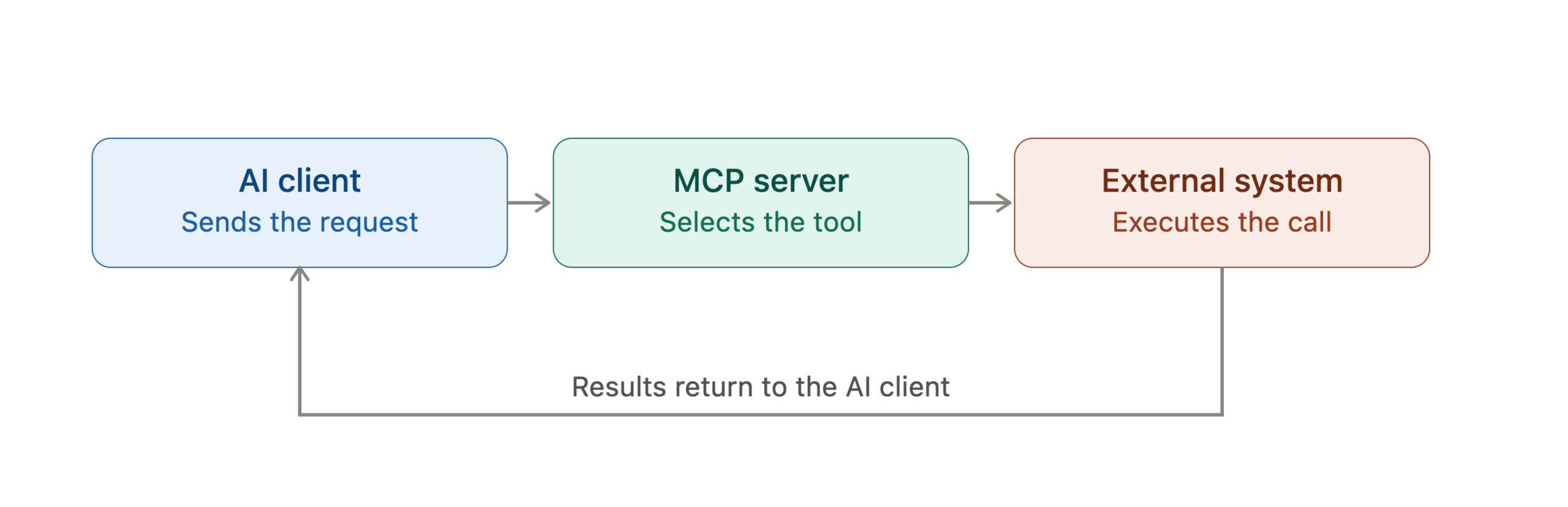
An MCP server exposes standardized tools, resources, and prompts that AI clients can discover and invoke, translating those requests into interactions with existing APIs, databases, files, or enterprise applications before returning structured results.
The request flow follows a consistent pattern:
The user submits a prompt to the AI application.
The AI client determines that answering the prompt requires external data or an action beyond its training.
The MCP server exposes its available tools, and the client discovers what is callable and what each tool requires as input.
The appropriate tool executes against the underlying system, such as an API call, a database query, or a file lookup.
Results return to the AI client, which incorporates them into its response to the user.
This flow is what separates an MCP-connected AI from a static chatbot. Because of it, every response can be grounded in live system state rather than only in training data.
MCP Client vs MCP Server
An MCP client discovers and invokes available capabilities, while an MCP server exposes those capabilities and executes requests against connected systems before returning structured responses.
MCP client
MCP server
Role
Initiates requests
Exposes and executes tools
Owned by
The AI application
The system being connected
Responsibility
Tool discovery, request formatting
Tool execution, data access, security enforcement
What Is an MCP Server Used For?
Organizations use MCP servers to simplify AI integrations across multiple enterprise systems, since one standardized interface reduces duplicate work and improves interoperability. The primary advantages include:
Standardized integrations: A single MCP server implementation works with any MCP-compatible AI client instead of one vendor’s API.
Easier maintenance: Updates to the underlying system happen in one place instead of across every custom integration.
Better interoperability: Teams can swap AI models or add applications without rebuilding the connection to each internal system.
Faster development: Engineers build against a known protocol instead of reverse-engineering each system’s API.
Reusable connectors: An MCP server built for one system can serve every AI initiative that needs it, not just one project.
In practice, this means organizations expose internal capabilities once, and multiple AI assistants can consume them without a separate integration for each one.
Common Enterprise Use Cases for MCP Servers
MCP servers help AI applications securely access enterprise systems such as IT service management platforms, knowledge bases, CRM applications, databases, and endpoint management solutions. Common use cases include:
IT service management: An AI assistant looks up ticket status, assignment history, and SLA timers directly from the ITSM platform.
Enterprise knowledge search: Connecting internal wikis, SharePoint, or Confluence lets an assistant retrieve current documentation instead of outdated training data.
CRM access: Pulling live account, opportunity, or support-case data gives sales and support teams accurate, real-time answers.
Device inventory systems: Teams can query device status, compliance state, or configuration details across a managed fleet.
Secure workflow automation: approved actions such as provisioning, notifications, and escalations trigger within defined permission boundaries.
Each scenario shares the same pattern: an AI assistant needs live, structured access to a system it doesn’t own, without a bespoke integration for every combination of tool and backend system.
MCP Server vs Traditional API Integration
An MCP server and a traditional API integration both connect applications, but they serve different purposes. Traditional APIs connect specific systems directly. MCP, on the other hand, standardizes how AI applications discover and interact with multiple systems through a common protocol.
MCP server
Traditional API integration
Integration effort
Built once, reusable across AI clients
Built separately for each AI application
Standardization
Follows a common protocol for discovery and invocation
Varies by API design, with no shared standard for AI consumption
Maintenance
Centralized: update once, all clients benefit
Distributed: each integration maintained independently
Scalability
Scales linearly as new AI clients adopt the same server
Scales multiplicatively as AI applications and systems grow
Reusability
High: one server, many consumers
Low: typically scoped to one consumer
Traditional direct APIs still have a place. When a single, tightly scoped integration is unlikely to be reused, a direct API connection can be simpler than standing up an MCP server. MCP earns its value when multiple AI clients need access to the same system.
What Security Considerations Should Enterprises Evaluate?
MCP standardizes communication between AI applications and enterprise systems, but existing security controls remain essential for protecting connected resources. Key areas to evaluate include:
Authentication and authorization: Verifying the identity of the AI client, or the user behind it, and confirming it has permission to invoke the specific tool requested.
Least privilege: Scoping each MCP server to expose only the tools and data its use case needs.
Audit logging: Recording every tool call, its parameters, and its result to support monitoring and compliance review.
Input validation and secrets management: Sanitizing parameters passed into a tool call, and storing and rotating the credentials the server uses to authenticate against backend systems.
None of these controls are unique to MCP. They are the same identity, access, and monitoring practices enterprises already apply to APIs and internal services. An MCP server can expose many tools across many systems through one interface, so getting these fundamentals right matters more, not less.
Featured resource
Hexnode UEM Capability Statement
Get a quick overview of Hexnode UEM's device management, policy enforcement, compliance, and automation capabilities for modern enterprise IT.
Monitor tool usage to catch anomalous patterns early, tracking which tools are called, how often, and by whom.
Document exposed capabilities clearly so both engineers and AI clients use each tool correctly.
Continuously review security posture, since the systems an MCP server connects to will change over time.
Treating an MCP server as infrastructure with its own lifecycle, rather than a one-time project, keeps it secure and maintainable as adoption grows.
How Hexnode Fits into Enterprise AI Workflows
As organizations expand AI-enabled workflows, centralized endpoint management helps devices stay secure, compliant, and consistently governed. This is the layer Hexnode UEM addresses, giving organizations a controlled foundation before extending any AI-driven access to endpoint data.
Specifically, this includes:
Device management and inventory: Centralized visibility and control, with an accurate, queryable record of every managed device.
Policy and compliance management: Defining and enforcing configuration and security policies while monitoring adherence to organizational and regulatory requirements.
API support: Enabling programmatic access to device and policy data for integration with other systems.
Remote actions: Executing management operations across devices through defined, permissioned channels.
The common thread here matches the security practices covered earlier: least privilege, audit logging, and centralized control. Organizations with fragmented endpoint management may find it harder to govern device-related integrations consistently.
Hexnode’s AI assistant, Hexnode Genie, is evolving in this direction too. The next phase is being built to give it more direct, real-time access to portal data across devices, policies, and apps. An early sign of how MCP-style standardized access is starting to show up inside UEM platforms themselves.
AI Endpoint Management Glossary: Copilots, Agents, Automation, and Scripts Explained
Learn the key AI endpoint management concepts and how they support secure enterprise IT operations.
FAQs
Can an MCP server connect to more than one AI model at the same time?
Yes, since it isn’t tied to a single AI vendor’s API. Any MCP-compatible client can connect to the same server without a separate integration, letting organizations swap or add AI models without reworking their connections.
Who builds and maintains an MCP server, and can organizations build their own?
Yes, organizations can develop custom MCP servers to expose internal applications, APIs, or workflows to compatible AI clients. This typically falls to the team that owns the underlying system, with security teams defining access controls. Many start with a small set of read-only tools before expanding.
Does adopting MCP require replacing existing enterprise APIs?
No. MCP servers typically sit on top of existing APIs, acting as a translation layer that converts AI client requests into calls against systems already in place.
What happens if an MCP server goes down or becomes unavailable?
Any AI client relying on that system loses access to its tools and data until admins restore it. The AI application can usually still respond using its own training data, but it cannot retrieve live information or execute actions through that server.
Conclusion
Understanding what is an MCP server and how does it work is becoming increasingly important as enterprises look to connect AI assistants with the tools, data, and workflows they rely on every day.
An MCP server solves a real, growing problem: as AI assistants take on more enterprise work, connecting them to tools, data, and systems one integration at a time simply doesn’t scale. By standardizing how AI clients discover and invoke tools, resources, and prompts, MCP replaces that fragmented approach with a single, reusable interface, one that works across ITSM platforms, CRMs, databases, and device fleets alike.
That standardization doesn’t remove the need for sound security practices. Authentication, least privilege, and audit logging matter just as much with MCP as they do with any other integration layer, arguably more, given how many systems a single server can expose.
For endpoint management specifically, this is where the foundation matters most. Whether AI accesses device and policy data through MCP or a direct API, IT teams must first centrally manage, consistently configure, and tightly control access to that environment. Getting that governance right now is what makes any AI-enabled workflow, current or future, worth building on.
I write at the intersection of technology, process, and people, focusing on explaining complex products with clarity. I break down tools, systems, and workflows without any noise, jargon, or the hype.