Hexnode UEM affordability depends on meeting your fleet’s requirements at a sustainable total cost, including licensing and administration.
Match required capabilities to Pro, Enterprise, Ultimate, or Ultra; missing features and unused subscriptions both increase costs.
Evaluate UEM + XDR or UEM + IdP when security or identity requirements justify the additional purchase.
Include deployment, administration, and retained tools in your budget. Validate operational savings during the trial and confirm paid-plan entitlements through an itemized quote.
Your UEM subscription covers licensing, but your budget must also account for deployment, ongoing administration, and any separate security tools.
For IT directors, comparing advertised rates is only the starting point. A mixed-OS fleet may require different management capabilities, while technician access and overlapping subscriptions can change the overall cost.
Affordability means meeting your management requirements at a sustainable total cost, including licenses and administrative effort.
This Hexnode UEM pricing breakdown explains what each plan includes, when UEM + XDR or IdP bundles merit consideration, and how to calculate a practical budget for your fleet before committing to a subscription.
What does choosing the wrong UEM plan cost your business?
The wrong UEM plan can increase administrative workload, employee downtime, and unnecessary software spending. Missing capabilities leave IT teams manually configuring new devices, coordinating updates, and troubleshooting issues that remote management could help resolve.
As these tasks accumulate, support queues grow. Employees wait longer for devices, applications, and fixes they need to work.
Overbuying creates another expense: advanced capabilities that remain unused or subscriptions that duplicate existing tools.
Meanwhile, gaps in patching, configuration enforcement, or reporting can leave vulnerabilities unresolved and make compliance evidence harder to produce. Purchasing a platform alone does not establish or maintain compliance with applicable requirements.
Feature Resource
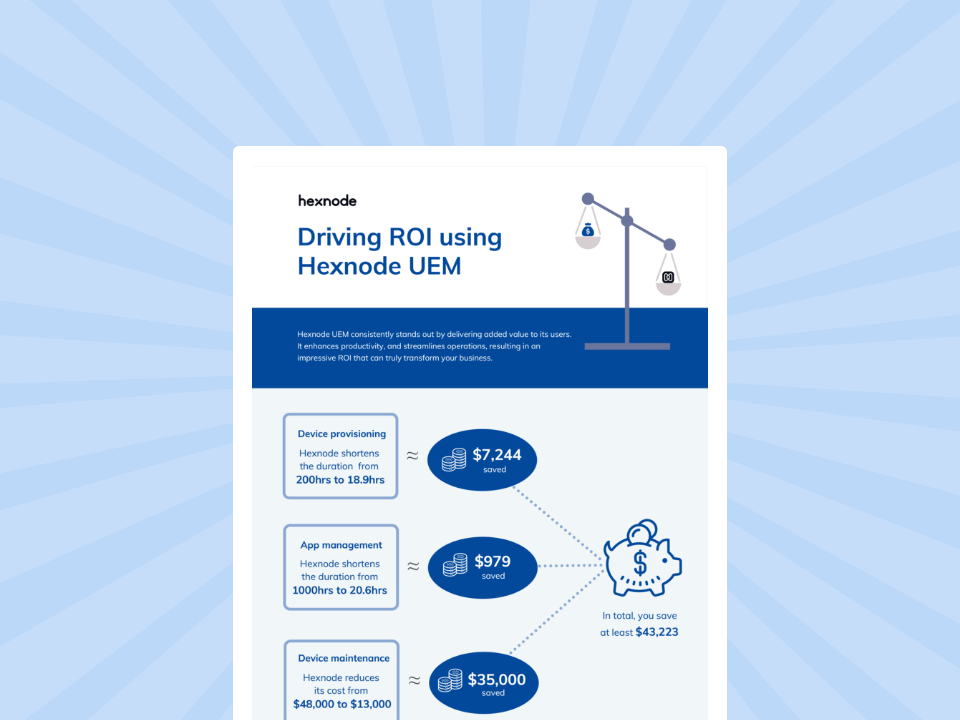
Driving ROI with Hexnode
Download the infographic to check out how Hexnode UEM drives ROI for organizations
How much does Hexnode UEM cost, and what do you get?
Hexnode UEM pricing starts at $2.20 per device/month, with four tiers: Pro, Enterprise, Ultimate, and Ultra. Your required capabilities determine which offers value. The September 18, 2026 snapshot below separates published rates from Ultra’s quote-based pricing. Each tier expands the management capabilities available to your team.
What is included in Pro, Enterprise, Ultimate, and Ultra?
Pro covers mobile management, Enterprise introduces basic desktop management, Ultimate expands desktop operations, and Ultra adds advanced controls.
UEM plan
Published USD/device/month
Included technicians
Selected capabilities
Pro
$2.20
2
Mobile kiosk and app management; Apple Business Manager integration
Enterprise
$3.20
3
Basic desktop management; Remote View
Ultimate
$4.70
4
Custom Scripting; macOS FileVault; desktop app management; Remote Control
Ultra
Request pricing
5
Windows BitLocker; Windows/macOS patch management; Script with Genie AI
These are selected entitlements from the current UEM pricing page, rather than an exhaustive feature list.
Use the following requirements to begin your evaluation:
Pro: Consider this tier for mobile deployments where application restrictions, kiosk operation, and enrollment are the main requirements.
Enterprise: Evaluate this tier when your fleet includes desktops and technicians need basic management and remote viewing.
Ultimate: Consider this tier when desktop application deployment, custom scripts, and macOS encryption management form part of routine operations.
Ultra: Evaluate this tier when Windows encryption controls and advanced Windows/macOS patch workflows are mandatory.
The upgrade boundaries matter. Remote View lets technicians observe a screen; Remote Control adds interaction where supported. Likewise, mobile app management does not establish entitlement to desktop app management.
Custom scripting also differs from a managed patch workflow. Hexnode’s advanced patch management includes update discovery, approval, deployment, and status reporting for supported Windows/macOS workflows.
Script with Genie AI helps administrators generate scripts from natural-language instructions, edit them, and save them for deployment. Administrators still need to test generated scripts.
Before selecting a tier, verify each required capability against your operating systems, versions, and enrollment methods. A plan entitlement does not imply identical functionality across every platform.
How do billing terms, minimum licenses, and technician seats affect cost?
Your cost depends on billable devices, the billing term, and technician requirements. Hexnode publishes a 15-device starting minimum and advertises 10% savings with annual billing. A monthly equivalent expresses the subscription rate; it does not necessarily represent the invoice amount. Confirm the selected billing option and annual payable total before approving the budget.
To increase device counts, add technicians, or upgrade, navigate to Admin > License > Modify. Request an itemized quote confirming additional-seat charges, renewal terms, taxes, and any applicable onboarding or support fees. Establish which services the subscription includes rather than assuming extra charges apply or disappear.
The 14-day UEM trial uses Ultra. Consequently, a successful trial can include capabilities absent from your intended paid tier. Map every tested workflow to its required entitlement before purchasing, particularly when evaluating a lower-cost plan after using the trial.
Should you choose UEM alone, UEM + XDR, or UEM + IdP?
Choose UEM alone for device administration, UEM + XDR when you also need endpoint threat investigation, or UEM + IdP for identity and application-access requirements.
Hexnode lists both bundles with sales-assisted pricing and advertises savings of up to 30%. That maximum is not guaranteed for every purchase. Confirm the discount basis and whether annual-billing savings can also apply. The published options do not establish a three-product package. Check out Hexnode Suite pricing here.
UEM + XDR: investigating and containing endpoint threats
Evaluate this combination when security teams need investigation and response capabilities alongside device management. Hexnode XDR provides:
Endpoint Isolation: Restricts network connectivity while retaining the connection to the XDR console.
File Quarantine: Places malicious files in a restricted, encrypted location.
Process Tree: Shows parent-child process relationships associated with a detected threat.
These actions support investigation and containment within the documented incident workflow.
Standalone XDR Standard lists $5.50 per device/month. Use this as a standalone reference, not a bundle quote.
UEM + IdP: controlling access and managing account lifecycles
Evaluate this combination when application access should depend on user identity and device compliance. Before selecting UEM + IdP, request documentation confirming how Hexnode IdP evaluates device compliance for your required applications and platforms. Its SCIM 2.0 provisioning can create, update, and deactivate accounts in supported applications through configured synchronization.
The Conditional Access Engine appears in IdP Enterprise. Public pricing states neither a numeric rate nor a billing unit, so confirm the included tier, chargeable population, and application compatibility. Check out IdP plans here.
Hexnode IdP supplies identity services. Third-party identity integrations connect external providers, while Hexnode Access enables device login using supported IdP credentials. These serve distinct requirements and should remain separate line items in your evaluation. Read more about Hexnode Access.
The ROI of Switching to Hexnode: What MSPs Save in Time, Tickets, and Tooling
Learn how MSPs can evaluate Hexnode ROI through technician time saved, faster support, and tool consolidation.
How do you choose a Hexnode plan and calculate your budget?
Inventory your requirements, shortlist the necessary tier, calculate total ownership cost, and validate your assumptions in a pilot. This process turns the pricing comparison into a purchase recommendation grounded in your fleet’s needs, measured administrative effort, and confirmed commercial terms.
Step 1 — Which capabilities does your fleet actually need?
Start with capabilities your team must deliver. Build a checklist covering:
Fleet: Device count, operating systems, versions, and ownership.
Workflows: Kiosk use, critical applications, and deployment requirements.
Administration: Technician count and access requirements.
Security: Patching, investigation, and identity responsibilities.
Mark each requirement as mandatory or optional. Then evaluate Pro for mobile kiosks, Enterprise for desktop Remote View, Ultimate for desktop scripting and app management, and Ultra for advanced patching.
Check OS versions, enrollment prerequisites, and application coverage before treating any requirement as satisfied. Advanced patch workflows vary by platform.
Add XDR or IdP to the shortlist when a defined security or access requirement justifies it. Confirm eligible endpoint counts and identity licensing separately.
Step 2 — How do you calculate licensing cost and total ownership cost?
Calculate licensing first, then add the costs of deploying and operating the solution:
Keep the billing period consistent. For monthly rates, multiply by 12 to estimate a year at an unchanged rate. Calculate each product separately using its confirmed billing unit; do not assume IdP uses device-based licensing.
Illustrative Ultimate licensing calculation
Using the published $4.70 per device/month rate:
Calculation
Amount
100 devices × $4.70
$470 monthly equivalent
$470 × 12 months
$5,640 over 12 months
This illustration excludes discounts, taxes, and other charges. It is an arithmetic baseline, not a customer quote or confirmation of annual-billing terms.
Compare your current stack and proposed deployment across the same devices, capabilities, and period. Calculate administrative cost using measured hours × a stated hourly labor rate, including setup and ongoing maintenance.
Count software savings only when you can reduce or retire the relevant contract. Retain overlapping costs during migration. Apply the same scope, labor assumptions, and contract period when comparing standalone subscriptions with a bundle quote.
Step 3 — How can you validate value before committing?
Test representative devices and workflows against acceptance criteria you define beforehand. Record baseline onboarding effort, maintenance time, support workload, and rollout success.
During the pilot, create and configure the workflow from Automate, then use the Initiate Automation remote action on the supported target devices when you need to run an existing automation manually. Inspect Action History for completion, failures, and output. Compare hands-on effort with the baseline, including time spent investigating unsuccessful runs.
Request an itemized quote covering the selected tier, device and technician seats, billing term, bundle entitlements, and renewal conditions. Replace provisional figures in your budget with those confirmed amounts.
Finally, check each successful workflow against the intended paid tier. The UEM trial uses Ultra, so its capabilities can overstate the value available under a lower-tier subscription. Exclude savings that depend on features you will not purchase.
Which Hexnode capabilities can make UEM more affordable to operate?
Automation, patch management, and AI-assisted scripting can reduce administrative effort when they replace recurring manual tasks. Hexnode includes Automation with Deploy in Ultimate, while Ultra adds advanced patch management and Script with Genie AI. Their value depends on the workflows your team actually uses.
Automation with Deploy / Initiate Automation
Predefined workflows let administrators reuse a sequence of actions instead of repeating each task for every device. For example, configure a workflow that associates a policy and executes a tested configuration script.
Use Initiate Automation to run that workflow on selected devices, applying platform and target filters where appropriate. Review Action History for execution results and failures. Compare hands-on administration time against the manual process, including workflow preparation and troubleshooting. Bulk execution saves effort only when the resulting configuration meets your requirements.
Automated Patch Management
For supported Windows and macOS workflows, Ultra’s patch capabilities combine approval-based deployment, maintenance windows, and patch-status reporting. Administrators can require approval before automated deployment and schedule supported update operations around business activity.
These controls can reduce recurring coordination and simplify evidence collection. Reports help identify missing updates, failed deployments, and devices awaiting restarts. Measure maintenance effort and reporting time during the pilot. Retire a separate patching tool only after verifying application coverage, deployment controls, and reporting requirements.
Script with Genie AI
Genie generates scripts from natural-language instructions. Administrators can edit the output and save it to the Hexnode repository for deployment.
This can shorten script drafting, but review and testing remain part of the workload. Specify the target operating system, validate the script on representative devices, and measure the complete drafting-to-deployment process.
Use those measured results alongside the final subscription quote to assess whether the required tier reduces your overall operating cost.
Ready to price Hexnode for your device fleet?
Request a quote based on your device count, operating systems, technician needs, and required UEM, XDR, or IdP capabilities. Ask for itemized pricing that identifies the included features, billing term, and renewal conditions. Compare that quote against your current licensing and administrative costs.
If you need to validate workflows first, use the 14-day UEM trial. Measure onboarding effort, maintenance time, support workload, and deployment success on representative devices. Confirm that your intended paid tier includes the capabilities behind those results before committing your budget.
When is a higher-priced UEM plan worth the additional cost?
A higher-priced plan can offer better value when its required capabilities reduce manual work or replace existing tools. Compare the additional subscription cost with measured operational savings, including setup and troubleshooting effort.
How should I budget for overlapping subscriptions during a UEM migration?
Include both subscriptions for any period when the existing and replacement tools remain necessary. Count savings only from the date you can reduce or terminate the previous contract.
Does time saved through UEM automation translate directly into budget savings?
Time savings reduce administrative effort but do not automatically reduce spending. Track recovered staff hours separately from subscription savings, and include workflow maintenance and failed-run investigation in your calculations.
Can I retire my existing patching tool after adopting Hexnode?
Retiring a separate patching tool depends on whether the selected Hexnode plan meets your application coverage, deployment, and reporting requirements. Validate those requirements on representative devices before removing the existing tool or counting its subscription as a saving.
Should I buy UEM + IdP if I already use an identity provider?
An existing identity provider makes a requirements comparison essential before purchasing another identity service. Identify any unmet access or account-management needs, then evaluate whether an integration or an additional product addresses them.
What should I ask Hexnode to confirm before renewing?
Request confirmation of renewal pricing, device and technician quantities, included capabilities, and any bundle terms. Reassess actual feature usage and fleet requirements so the renewed subscription reflects what your team needs.
Try Hexnode Free for 14 Days
Sign up for Hexnode and find the right UEM plan for your device fleet and budget.
I’m a technical content writer at Hexnode who loves simplifying tech. I break down complex ideas, remove the fluff, and help readers clearly understand our product for what it actually is: simple, reliable, and built to solve real problems.