Digital employee experience measures how workplace technology affects employees—not simply whether systems remain available. Effective DEX programs combine technical and service data with employee feedback, then use governed self-service, responsive support, automation and policy controls to remove recurring friction without weakening security. Organizations should begin with one high-friction journey, establish a baseline, implement targeted improvements and evaluate the results across technical health, service performance, employee experience and business outcomes.
Workplace technology can meet every availability target and still prevent employees from working efficiently. Slow devices, failed applications, fragmented support and repetitive access processes create friction that conventional infrastructure metrics may not reveal. Digital employee experience gives IT teams a broader way to understand these interactions, connect technical conditions with employee outcomes and improve how workplace technology is delivered. This guide examines what DEX includes, how it operates, how it is measured and where employee self-service fits within a broader DEX strategy.
Digital employee experience (DEX) is the quality of employees’ interactions with workplace technology and their perception of those interactions. It covers devices, applications, access systems, digital workflows, information resources and IT support throughout the employee lifecycle—from onboarding and daily work to role changes, support and offboarding.
DEX in simple terms
DEX evaluates whether technology enables employees to work effectively or introduces unnecessary friction. It combines objective signals, such as device health, application performance, login times and support resolution data, with subjective signals, including employee feedback and perceived ease of use.
This distinction matters because technical availability does not guarantee a good experience. However, a service may be operational while employees still encounter slow performance, repeated authentication prompts or complicated support workflows. DEX is therefore an ongoing management discipline, not a single tool or satisfaction score.
Where DEX fits within employee experience
Concept
Primary focus
Employee experience
The complete organizational, cultural and workplace experience
Digital employee experience
How workplace technology affects employees’ ability to work
User experience
A person’s perceptions and responses arising from the use or anticipated use of a product, system or service.
Measuring the availability, performance and interaction quality of digital services
What supports a DEX program
DEX programs typically draw on endpoint and application telemetry, employee feedback, service-management data, self-service workflows, automation, knowledge resources and support tools. No individual capability provides a complete view. Monitoring exposes technical friction, service workflows coordinate resolution, self-service reduces avoidable dependence on IT, and employee feedback helps determine whether a technical improvement produced a better experience.
Why Digital Employee Experience Matters
Hybrid work and diverse device environments have made employee technology experiences harder for centralized IT teams to observe. A device may appear healthy and a service may remain available while an employee still struggles with slow access, failed applications, missing resources or an unclear support process.
Likewise, the same requirement applies to onsite and frontline employees whose work depends on shared devices, kiosks, specialized applications or tightly controlled digital workflows.
Individually, these issues may seem minor. Repeated across teams and workflows, however, they create cumulative disruption, increase ticket volumes and reduce the value organizations receive from their technology investments.
A mature DEX program can help IT identify and address these points of friction, potentially improving issue resolution, self-service adoption and experience consistency across locations and device types.
DEX also affects security. Controls that are understandable and proportionate make compliant behavior easier. Excessive prompts, prolonged approval chains or restrictive workflows can instead encourage employees to seek unauthorized workarounds, creating additional support demand and weakening organizational governance.
The Four Pillars of Digital Employee Experience
An effective DEX strategy must improve the employee’s ability to work while giving IT sufficient visibility and control. Organizations can structure their DEX strategy around four connected pillars.
Empower employees
Employees should be able to complete approved, routine IT tasks without waiting for the helpdesk. Self-service actions, accessible information and straightforward service requests reduce unnecessary delays while allowing IT to determine which capabilities users can access.
Deliver seamless support
When self-service cannot resolve an issue, employees need a clear path to technical assistance. Effective support captures relevant device and issue context, routes the request correctly, enables communication with technicians and provides visibility into resolution progress. This reduces repeated information gathering and avoidable handoffs.
Strengthen security and governance
Employee autonomy must operate within defined controls. Role-based permissions, policies, approval workflows and audit records help IT provide access without giving users unrestricted administrative capabilities. Well-designed governance applies necessary safeguards without making legitimate work unnecessarily difficult.
Drive continuous improvement
DEX requires more than resolving individual incidents. IT teams must combine technical signals, service data, usage patterns and employee feedback to identify recurring friction. Ultimately, tracking whether changes improve performance, adoption or support outcomes turns isolated fixes into an ongoing improvement cycle.
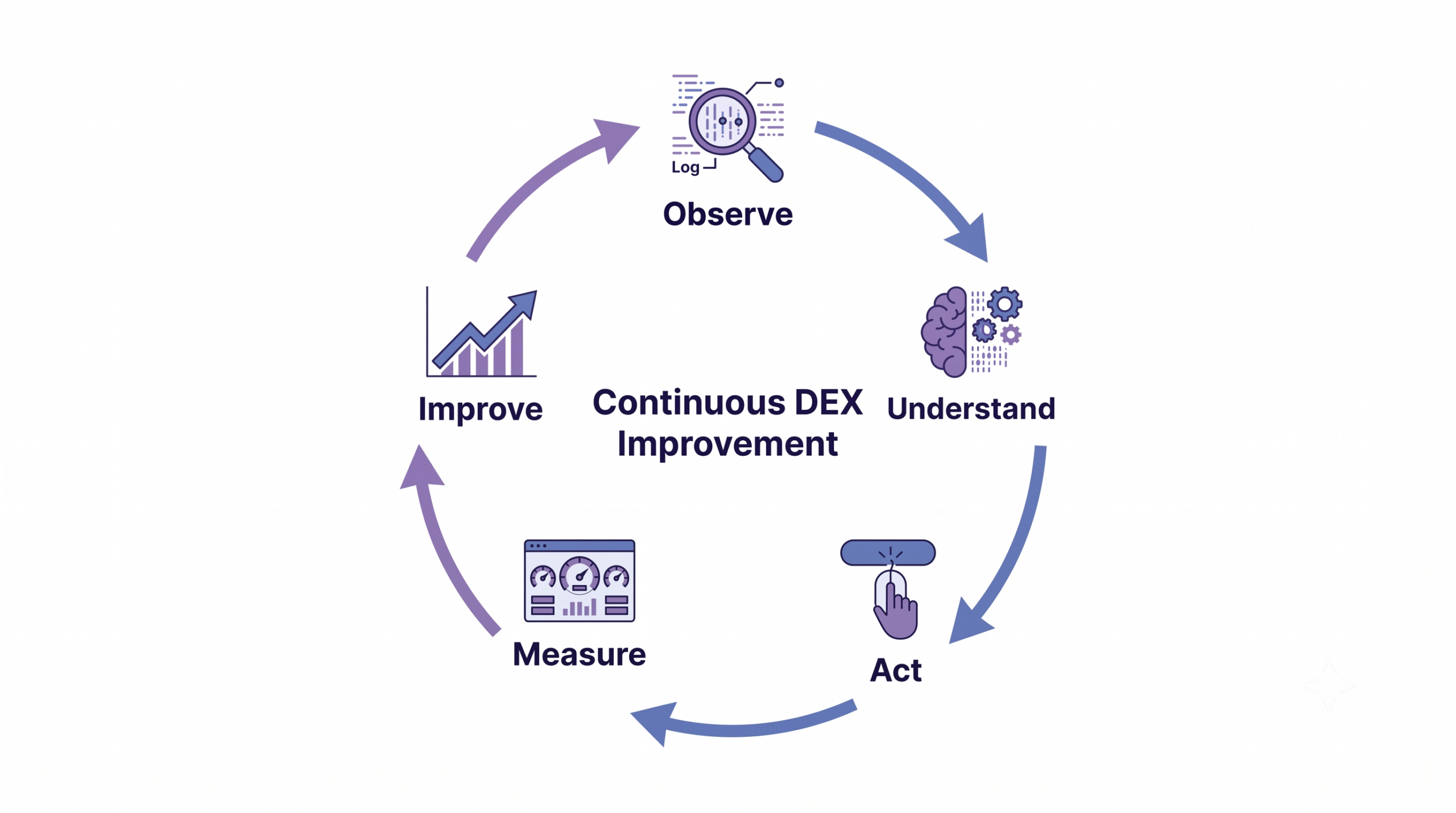
How DEX Works as a Continuous Improvement Loop
DEX is not a static dashboard or a score reviewed periodically. Organizations can manage DEX through a continuous cycle of observing employee technology experiences, addressing friction and validating whether the response produced a meaningful improvement.
Understand the experience
IT teams collect signals from endpoint health, application performance, access workflows, support incidents, technology usage and employee feedback. Correlating these signals with device, user, role, location and workflow context can help identify affected groups, recurring patterns and potential operational impact.
Prioritize and act
Next, issues should be prioritized according to severity, reach, recurrence and business importance. The appropriate response may involve employee self-service, technician assistance, automation, configuration changes, better knowledge resources or redesigning an inefficient process.
Measure the result
After acting, IT must determine whether disruption decreased, recurrence was prevented or employees completed the affected task more reliably. Those results become new inputs for the next assessment cycle.
Continuous DEX improvement
What Digital Employee Experience Looks Like in Practice
Consider an employee joining a hybrid team and using a personal laptop for work.
Joining and accessing the workplace
The employee follows a guided enrollment process, receives the required security policies and gains access to approved applications and onboarding resources. IT applies the visibility and organizational data controls supported by the chosen enrollment and device-management model.
Handling everyday IT needs
Later, the employee needs additional software. They locate the application through a self-service catalog and submit a request. Because the application requires approval, IT verifies the user’s role before authorizing installation. Routine actions and workplace guidance remain available without a separate support interaction.
Recovering from disruption
When the application begins failing, the employee raises a ticket linked to the affected device and includes relevant context. A technician reviews the request, communicates with the employee and initiates approved remote assistance.
After resolution, ticket data, recurring error patterns and employee feedback help IT determine whether the fix should be automated or applied more broadly.
Featured Resource
Introduction to Hexnode
See how Hexnode simplifies endpoint visibility, management, security, and everyday IT workflows.
A single metric rarely provides enough context to evaluate DEX reliably. Organizations need a layered measurement model that connects technical conditions and IT performance with the employee’s experience and resulting business impact.
Measurement layer
Example metrics
Purpose
Technical health
Device compliance, startup time, application failures and connectivity
Identifies performance, availability and security-related friction
Service performance
Ticket volume, resolution time, repeat incidents and escalations
Evaluates how efficiently IT restores normal work
Employee experience and adoption
Employee feedback, task completion, self-service success and application adoption
Shows whether technology is usable and accepted
Business outcomes
Estimated disruption avoided, productive time restored and support effort reduced
Connects DEX improvements with operational value
Enterprise-wide averages can conceal localized problems. Results should be segmented by role, location, device type, operating system, application or workflow to identify where friction is concentrated and which groups require attention.
Experience level agreements (XLAs) can complement traditional service level agreements (SLAs). SLA metrics may show whether an application met its availability target or a ticket was resolved within the agreed time, while XLA indicators assess whether employees completed the task with an acceptable level of effort and disruption.
While a composite DEX score may simplify reporting, but it is not sufficient by itself. Its value depends on the quality, weighting and transparency of the underlying signals.
How to Build and Improve a DEX Strategy
A DEX strategy should begin with a defined employee problem, measurable evidence and clear accountability—not with the selection of a platform.
Start with a high-friction employee journey
Map one important journey, such as onboarding, application access or incident resolution. Identify where employees wait, repeat steps, change tools or contact support. Establish a baseline using technical data, support records, usage signals and direct employee feedback so that improvement can be measured against the original experience.
Establish ownership and guardrails
Assign responsibility across IT operations, service management, security and relevant business teams. Prioritize issues according to their frequency, severity, workforce reach, security implications and remediation effort.
Employee-level data also requires governance. Define the purpose of collection, explain what is measured, restrict access, apply appropriate retention periods and complete privacy reviews before expanding monitoring.
Improve, validate and scale
Pilot the proposed change with a defined user group. Compare technical, service and experience outcomes with the baseline rather than relying on deployment completion alone. Document unexpected effects, refine the workflow and scale only after confirming that the change reduced friction without creating new security or support risks.
Common DEX Mistakes to Avoid
DEX initiatives often underperform because organizations focus on technology deployment rather than the employee outcomes the technology should improve. Common mistakes include:
Treating a tool as the strategy: Purchasing a platform does not replace journey mapping, ownership, baselining or continuous improvement.
Turning DEX into employee surveillance: Measurement should identify technology friction and service problems, not evaluate individual productivity or behavior.
Relying on isolated metrics: Uptime, ticket closure rates or a composite score can appear healthy while employees continue to encounter disruption.
Automating flawed workflows: Automation can scale unnecessary steps and poor decisions as easily as it scales efficient processes.
Providing ungoverned self-service: Employee actions require appropriate permissions, approval conditions and auditable records.
Treating security and experience as opposites: Well-designed controls should reduce avoidable friction while preserving security, compliance and administrative oversight.
DEX Guide: The Do’s and Don’ts of Digital Employee Experience Tool Deployment
Learn how to baseline, govern and scale a DEX initiative while avoiding common deployment mistakes.
How Hexnode Connects Employee Self-Service with Governed IT Operations
Hexnode provides documented capabilities for self-service app installation, macOS privilege elevation, incident monitoring and reporting. Administrators can configure App Catalog deployments and macOS self-service privilege elevation through separate policies in Hexnode.
Give employees one place for everyday IT needs
Users can install preapproved applications through the App Catalog in the Hexnode app, while macOS users can initiate temporary privilege elevation when permitted by policy.
Hexnode’s App Catalog allows users to install preapproved applications on demand, reducing the need for routine software-provisioning requests.
Combine autonomy with policy-driven control
Administrators can deploy App Catalog policies for approved applications and configure a macOS Self Service policy for temporary privilege elevation. Policies can be assigned according to an individual user, group or organizational domain.
For macOS self-service privilege elevation, administrators define the permitted duration and daily usage limit through policy before users initiate the action from the Hexnode app. Hexnode groups incidents into Critical, Endpoints, Users, Apps, Patches, Identity Providers and Exports, and allows authorized technicians to assign, filter, comment on and update supported incidents. For supported self-service capabilities, administrators retain control through configured policies and platform-specific limits.
Turn operational activity into improvement signals
Hexnode provides administrative visibility into managed devices, users, and incidents, with reporting across supported device-management categories. It features built-in and custom reports that can be scheduled for periodic email delivery or exported in PDF and CSV format, as noted in the platform’s documentation.
Additionally, administrators gain access to detailed coverage of applications, audits, and actions, while incidents can be filtered by time, assignee, status, and verdict. IT teams can use Hexnode reports to monitor and analyze supported corporate asset and device-management information. Together, these documented capabilities support application delivery, controlled privilege elevation, incident investigation and device-management reporting.
FAQs
Do organizations need a dedicated DEX platform to get started?
No. IT can begin by mapping one employee journey and using existing technical data, support records, usage signals and employee feedback to establish a baseline. Dedicated tools may help consolidate and scale these efforts, but they do not replace strategy, ownership or governance.
Is employee feedback necessary when devices and applications appear healthy?
Yes. Technical data may show that systems are operational without revealing confusing workflows, excessive effort or other employee-facing friction. IT teams must correlate qualitative user feedback with quantitative telemetry and service metrics rather than analyzing sentiment in isolation.
How often should IT measure digital employee experience?
Continuous or scheduled telemetry reviews track technical performance and service health, whereas targeted user feedback yields maximum insight when collected immediately following key operational touchpoints or major platform changes. The appropriate cadence depends on the affected workflow, its business importance and how quickly its conditions change.
Should DEX results be compared across teams or departments?
Comparisons are meaningful only when the measurement method and operating context are consistent. Operational segmentation pinpoints localized friction and exposes root causes rather than ranking team performance or evaluating individual productivity.
When should a DEX issue be automated instead of assigned to a technician?
Security and operational automation excels across repeatable, low-risk response workflows with proven validation histories. Ambiguous, high-impact or security-sensitive issues—and actions requiring approval—should remain within controlled technician workflows.
How can IT determine whether a DEX improvement worked?
Compare post-change technical, service and employee-experience indicators with the original baseline. A successful intervention should reduce disruption or recurrence without introducing additional security, compliance or support problems.
Conclusion
Digital employee experience (DEX) is the continuous practice of making workplace technology usable, reliable, supportable and appropriately governed. Employee autonomy and IT control are not competing goals; the right policies and workflows can enable both. Meaningful improvement requires technical evidence, service data and the employee perspective rather than assumptions or isolated metrics. A practical starting point is to identify one recurring digital journey that causes disruption, establish its baseline and address the most consequential source of friction.
Put Better Employee Experiences into Practice
Explore how Hexnode can support governed self-service, endpoint control and more efficient IT operations.
Associate Product Marketer at Hexnode focused on SaaS content marketing. I craft blogs that translate complex device management concepts into content rooted in real IT workflows and product realities.