Traditional VPNs give authenticated users broad access to the corporate network, creating risks such as excessive privileges, lateral movement, performance bottlenecks, and a larger attack surface. Zero Trust Network Access (ZTNA) offers a more secure approach by granting access only to specific applications based on identity, device context, and real-time risk. It continuously verifies each session, limits unauthorized movement, hides applications from public exposure, and provides faster direct-to-app connectivity. While VPNs may still support some legacy use cases, ZTNA is better suited to modern cloud environments, remote teams, contractors, and hybrid workforces. Combined with UEM and XDR, ZTNA can enforce device compliance, control corporate apps, and block unmanaged or compromised endpoints.
The rapid shift to remote and hybrid work did more than just change where we work. It altered the whole paradigm of network accessibility. For decades, Virtual Private Networks (VPNs) served as the primary gateway for safe, unrestricted network access. But evolving threat landscapes, cloud adoption, and hybrid work models exposed critical flaws in this traditional security model.
Once a user authenticates successfully, the system treats them as an internal entity and grants broad access to the corporate network. If an attacker compromises a single VPN endpoint, they gain movement capabilities across the entire corporate infrastructure. In an era where data breaches are frequent and devastating, unchecked internal or external network access is an unacceptable risk.
To secure modern enterprise networks, the industry needs to move away from perimeter-based security toward an architecture defined by Zero Trust Network Access (ZTNA). This article explores what ZTNA is, the difference between ZTNA vs. VPN access models, and why organizations are rethinking connectivity for today’s hybrid workforce.
Designed for an era where data lived in physical on-site servers, VPN aimed to extend the network safety of the office perimeter to remote devices. However, as the digital landscape evolves, the very architecture that made VPNs successful became its liability.
How Traditional VPNs Work
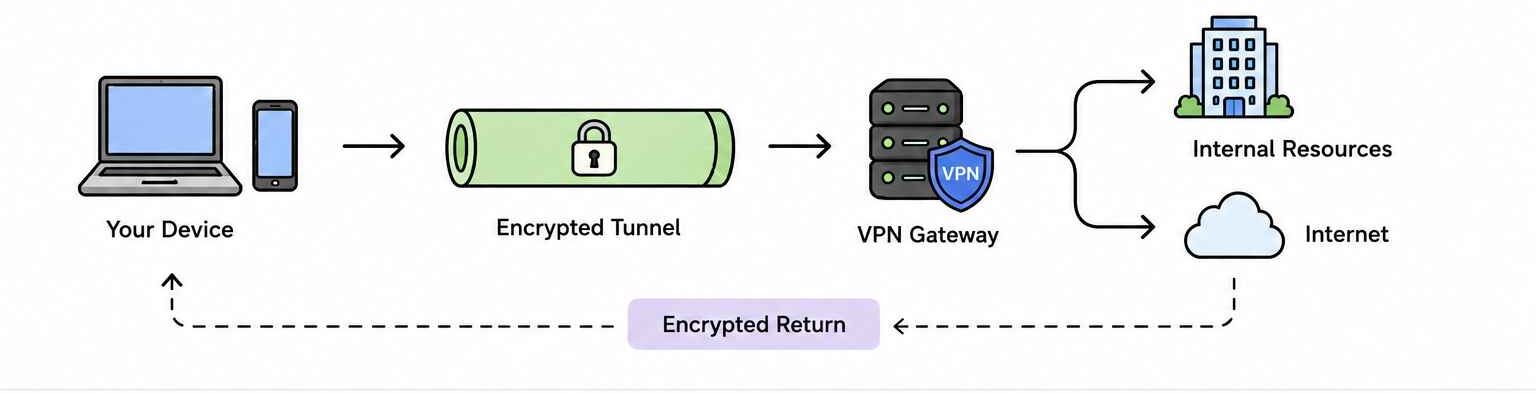
VPN explained
Traditional VPNs act as a secure bridge between your device and a private network. Rather than sending your data directly to the internet, your device creates a point-to-point connection that re-routes your traffic through the VPN server.
In a corporate setup, VPN creates a secure, encrypted tunnel from the user’s device to the corporate firewall. Here, the goal isn’t just about hiding your browsing or encrypting your network from an ISP. It’s about extending the perimeter. This means, the VPN server assigns your device an internal IP address from its own local network, through which your endpoint device can securely access internal corporate resources as though it were connected directly to the organization’s network.
The VPN Connection Process
A traditional VPN connection typically relies on five stages:
Handshake: Your device reaches out to the VPN server (or a corporate gateway). They verify each other’s identity (using a password or digital certificates) and agree on a security protocol for authentication.
Tunneling and IP Assignment: Once authentication succeeds, the VPN server establishes an encrypted tunnel.For a corporate network, the VPN server assigns your device an internal IP address from the company’s local network. This makes your device appear “local” to the office firewall.
Encrypted Transmission: When you request a file from an internal server or browse the web, your data is scrambled (using algorithms like AES-256) on your device. It travels through your Internet Service Provider (ISP), but because it’s encrypted, the ISP can only see a connection to the VPN server, while keeping the actual content invisible.
Decryption & Routing: The VPN server receives the data and unpacks it using a key. It then routes your request:
To the Internet: Acting as a proxy to keep your browsing private.
To the Internal Network: Accessing private corporate resources like HR portals, databases, or shared drives that are blocked from the public web.
Return: The destination (website or internal server) sends data back to the VPN server. The server re-encrypts that data and sends it back to your device, where it is decrypted for you to view.
Why the Traditional VPN Model is Strategically Dangerous
Once you validate your identity via a password or Multi-Factor Authentication (MFA), the system assumes you are a trustworthy endpoint. This grants you the key to broad, unfiltered network access, similar to an internal environment. However, this model creates a significant architectural blind spot by introducing critical risks such as:
Over-Privileged Access
Most legacy VPN setups provide users with access to the entire network rather than specific applications. It’s either “all or no” access. This results in over-privileged access, where an employee in one domain might have a network entry to another domain’s restricted servers or unauthorized sites, violating the core security principle of “Least Privilege”.
Lateral Movement Risk
If an attacker steals a single set of credentials, they don’t just compromise one app. They land inside the perimeter. From there, they can perform “lateral movement,” scanning the network to hop from the VPN gateway to sensitive file servers, databases, and administrative consoles.
Performance Bottlenecks
In a corporate setup, organizations route all traffic, including SaaS and cloud app traffic, through a central VPN server before sending it to the internet. When many people use the tunnel or if the load is heavy, it sometimes creates a bottleneck. This inefficient routing, often called “hairpinning,” degrades the user experience and strains hardware.
ZTNA: The Future of Access Control
The traditional security strategy, where anyone inside the network is trusted by default, is no longer viable in a world of remote work and cloud-based assets. As organizations move away from a perimeter-based infrastructure, Zero Trust Network Access (ZTNA) has emerged as the definitive standard for modern security.
What is Zero Trust Network Access (ZTNA)?
ZTNA provides secure remote access to applications through clear access control policies. It assumes that threats can exist both inside and outside the network. It follows the principle of “Never Trust, Always Verify.” The system does not grant access based on a user’s location or IP address. Instead, the ZTNA broker grants access for each session and application. It checks identity and device health every time. ZTNA does not place users on the entire network like a VPN. It creates an encrypted connection between the user and the specific resource they can access. If users are not authorized to see an application, it stays hidden from them.
What is Zero Trust Network Access (ZTNA) and why is it the future of cloud network security?
Understand Zero Trust Network Access (ZTNA), its principles, architecture, and role in securing application access.
How ZTNA Works?
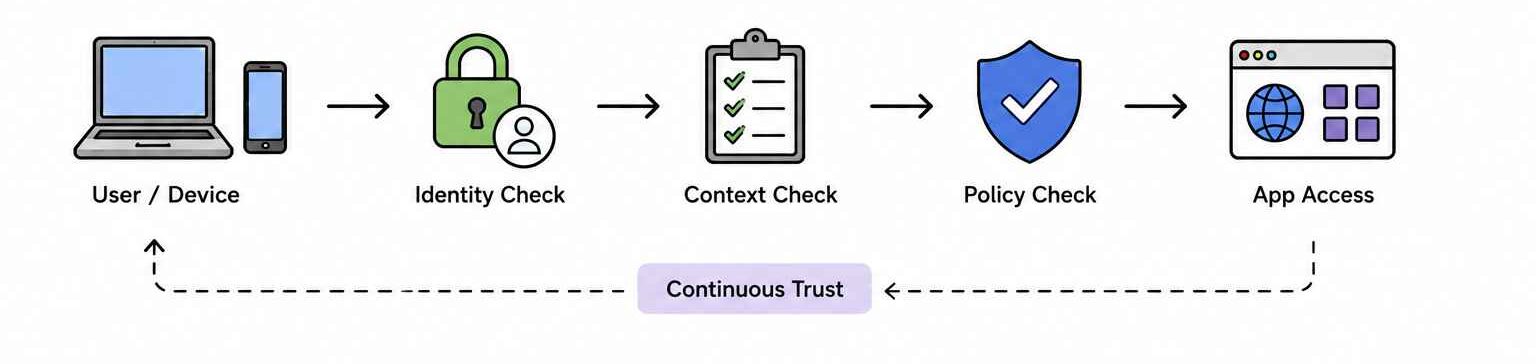
ZTNA explained
ZTNA creates an encrypted tunnel between a specific user and a specific application, rather than connecting the user to the entire network.
Identity Verification: When a user attempts to access a corporate application, the ZTNA service first verifies their identity using standard authentication methods such as passwords or multi-factor authentication.
Context & Device Check: Before the ZTNA broker grants access, the system looks at “contextual signals” and checks. The system evaluates contextual signals, including:
Who the user is
What device they are using
Where they are connecting from
When they are connecting
Policy Decision: The ZTNA service broker compares the user’s identity and device health against the company’s security policies. If everything matches, it grants access only to that specific application and not the whole network.
Secure Connection: The broker then creates a secure, encrypted tunnel directly between the user and the application. This makes the application invisible to anyone else on the network.
Continuous Monitoring: In ZTNA, trust is not permanent. It continuously monitors the connection. If a user’s device suddenly behaves strangely or disables its security software, the ZTNA service can automatically terminate the session.
Why Zero Trust Network Access is the Future of Remote Security
By decoupling access from the physical network and through continuous monitoring and verification, ZTNA solves the most persistent security and performance challenges facing IT teams today.
Micro-Segmentation
One of the greatest risks in cybersecurity is lateral movement, where a hacker gains entry to a low-security segment of a network and hops to sensitive data. ZTNA utilizes micro-segmentation to prevent this. ZTNA limits users to only the applications required for their role (e.g., the CRM or an HR portal).
Continuous Authorization
Traditional security checks happen once at login. ZTNA, however, performs continuous risk assessment. It monitors the session in real-time. If a user’s device suddenly becomes non-compliant, for example, if they disable their firewall or change their location, the ZTNA controller can revoke access immediately, mid-session.
Superior User Experience
ZTNA eliminates the “VPN hairpinning” effect. In older setups, traffic often had to be backhauled to a central data center before being sent to the cloud, causing significant latency constraints. ZTNA directs traffic straight to the cloud application or the nearest edge gateway, providing a faster, more reliable connection that feels seamless to the end-user.
Reduced Attack Surface
Unlike a VPN, which often requires a public-facing IP address that hackers can discover and scan, ZTNA creates a “Dark Cloud” environment. The infrastructure and applications are hidden from the public internet. Since an attacker cannot see what they cannot find, the risk of DDoS attacks and zero-day exploits targeting your gateway is greatly reduced.
Seamless Multi-Cloud and Hybrid Integration
Modern IT environments are messy, with data spread across AWS, Azure, and on-premises servers. Traditional networking struggles to bridge these gaps without complex configurations. ZTNA acts as a unified security overlay. It allows IT teams to apply the same security policies across all environments simultaneously, ensuring that a user’s experience and security level remain identical whether they are accessing a legacy server or a modern SaaS app.
ZTNA vs. VPN: A Quick Comparison
Metric
ZTNA (Zero Trust Network Access)
Traditional VPN
Security Model
“Never Trust, Always Verify” – Trust is always based on contextual signals.
“Trust but Verify” – Once authenticated, you are trusted by default.
Access Scope
Application-level – Grants access only to specific apps/services.
Network-level – Grants access to the entire subnet/segment.
Lateral Movement
Blocked – Micro-segmentation prevents moving between apps.
High Risk – Attackers can move freely across the network once inside.
Authentication
Continuous – Identity and device health are verified in real-time.
At Login – The system grants trust once at the start of the session.
Visibility
Deep Granularity – Shows exactly which apps and files were accessed.
Network Visibility – Only shows who is connected to the network.
User Experience
Low Latency – Direct-to-app routing via the nearest cloud edge.
High Latency – “Hairpinning” traffic through a central data center.
Infrastructure
Software-defined – Cloud-native and largely agent-based or browser-based, easier to scale and maintain.
Hardware-heavy – Requires physical concentrators and appliances.
Choosing the Right Infrastructure for Your Corporate Network
Choosing between a VPN (Virtual Private Network) and ZTNA (Zero Trust Network Access) depends on whether you need to connect a user to a place (the network) or to a thing (a specific application).
When VPN Still Makes Sense
VPN is ideal where you want to extend the office network to a remote user. Once connected, the user is essentially inside your office network’s digital perimeter. It is suited for:
Legacy Infrastructures: Companies running older applications that require a direct, persistent connection to a local server or specific network protocols.
Small, Stable Workforces: A small team that rarely changes and they all need access to the same set of central resources
Full Network Visibility: IT admins or developers who need to perform network-level tasks, such as pinging various hardware devices, managing routers, or running network diagnostics that require being “on-site” virtually.
Budget-Conscious Basics: Organizations that already own firewall hardware with built-in VPN capabilities and don’t have the budget for a modern SaaS security stack.
Where ZTNA Delivers Greater Value
ZTNA is designed for the modern “work from anywhere” world. Instead of focussing on the network, it focuses on the user and the application they are trying to reach. It is a secure access model for:
Hybrid & Remote Teams: Large, distributed workforces because it connects users directly to the app rather than routing everything through a central office.
Third-Party & Contractor Access: Vendors or freelancers who require access to only the specific tools they need, without exposing the rest of your internal network.
BYOD (Bring Your Own Device): Companies where staff use personal BYOD endpoints for official purposes. ZTNA can check if a device is “healthy” (has antivirus, latest OS) before granting access, which a standard VPN cannot easily do.
High-Security Environments: Industries like Finance or Healthcare. Because ZTNA provides the least privilege and it prevents lateral movement. If a hacker steals a user’s credentials, they are stuck in that one app and cannot hop to other parts of the network.
The Critical Role of UEM in Device Posture Enforcement
Despite its advantages over a traditional VPN, ZTNA’s promise of “never trust, always verify” is only as strong as the endpoint attempting to connect. If a user with valid credentials logs in from a device already compromised by a keylogger or one with disabled encryption, the ZTNA broker may unknowingly admit a malware or an attacker into the application session. To truly fortify the network, organizations must leverage Unified Endpoint Management (UEM) like Hexnode to harden the device and verify its integrity before it ever reaches the ZTNA gateway.
Featured Resource
What makes Hexnode the go-to UEM vendor in the market?
Download this White paper to learn the reason you should choose Hexnode when there are other vendors in the market claiming to be better than Hexnode.
To effectively bridge the gap between user productivity and corporate security, a strong UEM framework is required. One that can enable:
Device Posture Check
Before the ZTNA broker ever grants a user entry to a sensitive application, it queries the UEM for a device posture check and compliance. This is the definitive “gatekeeper” moment where the UEM validates the device for:
Disk Encryption: UEM enables and confirms that BitLocker (Windows) or FileVault (macOS) is active, ensuring data remains encrypted if the device is lost.
Patch Status: It verifies the OS and security patches are up-to-date, closing the window on known vulnerabilities that attackers exploit.
Configuration Compliance: Beyond static checks, UEM monitors for active threats such as jailbreaking or rooting. If a user compromises their device’s integrity to install unauthorized software, it instantly flags the device as non-compliant, triggering access revocation.
If the device fails even one check, UEMs signal the ZTNA broker to deny access, preventing a compromised endpoint from touching the corporate network.
App-Level Micro-Segmentation and Control
UEMs enable containerization through technologies such as Android Work Profile and managed app frameworks. This creates a separate space on the device where corporate apps operate. Moreover, it locks down corporate-owned devices to a curated list of authorized apps. Admins can configure the ZTNA broker to allow traffic only from specific, managed containers. This prevents shadow IT and personal apps from leaking data into the corporate network.
Conditional Access Integration
Security works like a dual-key system. Your Identity Provider, such as Microsoft Entra ID or Okta Device Trust, verifies the user. The UEM verifies the device and checks whether it meets security requirements. If a user logs in from a personal, unmanaged laptop, the UEM blocks final access. It prevents the IdP from issuing the access token. This integration stops users from logging in with valid credentials from unmanaged devices.
Continuous Risk Scoring
UEMs can integrate with threat defense partners like Quokka. They can then assign a dynamic risk score to every app on a device. A user may install an app that seems harmless. Later, security tools may find that the app has data-leaking permissions. The UEM then updates the device’s risk profile. The UEM sends this signal to the ZTNA gateway. The gateway can require MFA or block access until the user removes the risky app.
Geofencing and Dynamic Grouping
UEM allows you to enhance security by establishing geographic safe zones. When a managed device exits a defined perimeter, such as a corporate office or specific country, the UEM automatically classifies the device as high-risk. This triggers the Zero Trust Network Access (ZTNA) gateway to dynamically adjust permissions based on location context or even restrict access to highly sensitive databases while allowing access to basic features.
Peripheral and Network Control
While ZTNA secures the network pipeline between the user and the application, UEM also secures the physical environment around that network. This ensures that data doesn’t leak out of the device once it has been legally accessed.
Peripheral Lockdown: UEM can disable USB ports, screen recording, or clipboard functions (copy/paste) for specific high-security applications. Even if ZTNA grants access to a sensitive file, the UEM ensures that file cannot be moved onto an unauthorized thumb drive.
Wi-Fi and Connectivity Enforcement: To prevent Man-in-the-Middle attacks, UEM can force devices to only connect to known, encrypted Wi-Fi networks or a corporate VPN. If a user connects to an unsecured public hotspot, the UEM can signal the ZTNA broker to revoke the authentication requirements or limit the session to read-only access.
Certificate-Based Authentication: Instead of relying on vulnerable passwords, UEM can deploy unique identity certificates to every managed device. The ZTNA broker then uses these certificates as a hardware-backed identity, ensuring that only the specific physical device issued by the company can ever hit the login page.
XDR for Continuous Monitoring
While Unified Endpoint Management (UEM) establishes the foundation and Zero Trust Network Access (ZTNA) secures the gateway, these are only the first steps. XDR elevates the security architecture from a static access model to a dynamic defense system., moving security from a static entry check to a dynamic defence.
Beyond Access: From Static to Continuous Security
Traditional security verifies the device at login and then grants access for the duration of the session. However, threats are dynamic. An XDR solution like Hexnode XDR provides continuous monitoring. It doesn’t just check for safety criteria during connection but also maintains vigilant detections and response.
Real-Time Vigilance: If a device’s health status changes mid-session (e.g., a rootkit is detected or a suspicious process begins beaconing data to an unknown), XDR identifies the anomaly immediately.
Instant Revocation: The moment a compromise is detected or if the device becomes non-compliant, XDR can signal the ZTNA broker. The system can trigger an automated response and revoke access instantly. It terminates active sessions before the threat moves laterally through the network. This integration helps the system verify trust continuously. It also reduces attackers’ window of opportunity and keeps the network secure around the clock.
Unified Response: By integrating UEM context (who owns the device, what is its compliance history) with XDR telemetry (what is the device doing right now), security teams get a high-fidelity view that reduces false positives and accelerates remediation.
Strengthen Your Entire Security Infrastructure with ZTNA, UEM, and XDR
The transition from a traditional VPN architecture to ZTNA has become a strategic imperative. As organizations grapple with an increasingly sophisticated threat landscape, the legacy VPN approach has proven insufficient.
To move from strategy to execution, organizations should follow this phased roadmap:
Audit and Map Your Ecosystem: Identify all existing remote access points and document critical data, applications, and assets that require the highest level of security.
Establish Device Hygiene with UEM: Prioritize the enrollment of all corporate and BYOD assets into Hexnode UEM platform. Define strict compliance baselines. These can include OS version, disk encryption, and biometric requirements. The system grants access only after devices meet these standards.
Pilot a “Least Privilege” Policy: Start with a high-risk user group or a single cloud application. Implement ZTNA policies that grant access based on identity and context, rather than network location.
Decommission Legacy VPNs Gradually: As applications are migrated to the ZTNA framework, begin reducing the reliance on VPN concentrators to reduce your external attack surface and lower licensing costs.
Continuous Monitoring and Iteration: Zero Trust is a journey, not a destination. Regularly review access logs and refine policies to adapt to evolving user behaviors and emerging threats using an XDR solution.
Together, ZTNA, UEM, and XDR create a security architecture built for modern enterprise environments. They replace implicit trust with continuous verification, reduce attack surfaces, and deliver secure access without sacrificing performance.
Frequently Asked Questions (FAQs)
1: Can ZTNA replace my VPN entirely?
For application access, ZTNA can and should replace the VPN. However, some organizations still require VPNs for niche use cases, such as site-to-site connectivity or maintaining persistent network access for systems management—though these cases are rapidly diminishing.
2: Does ZTNA provide endpoint protection like antivirus?
No. ZTNA is an access control model; it does not detect or remove malware. ZTNA relies on other security tools, such as UEM (Hexnode) or EDR, to confirm that the endpoint is clean and compliant before granting access.
3: What makes ZTNA better for compliance reporting than VPNs?
ZTNA provides highly granular audit logs because it tracks every per-application session and includes the device posture score at the time of access. VPN logs typically only track the initial login and the full IP connection time, offering little verifiable detail.
4: Is ZTNA compatible with BYOD (Bring Your Own Device)?
Yes, ZTNA is highly compatible with BYOD. Because ZTNA only grants access to specific applications and never the full network, and because UEM can enforce security controls via MAM (Mobile Application Management) containers, it provides a much safer way to manage access for employee-owned devices than VPN
Strengthen Android Governance with Centralized Control
Manage application access, enforce policy boundaries, and secure app-to-app interactions across your Android device fleet from a single console.
Curious, constantly learning, and turning complex tech concepts into meaningful narratives through thoughtful storytelling. Here I write about endpoint security that are grounded in real IT use cases.