Why Malicious Processes Are Hard to Stop Once They’re Running
Process termination threat response becomes critical when security teams confirm a malicious process running on an enterprise endpoint. Active threats may include malware loaders, ransomware encryptors, cryptominers, or credential-stealing tools. Once active, these processes can consume resources, modify files, or launch additional processes.
However, detection alone does not stop the threat. Analysts often need remote access to the affected endpoint before they can intervene. They may also need administrator credentials and the exact process identifier. Moreover, attackers can terminate tools, disrupt connectivity, or trigger new payloads during this delay.
Manual intervention creates several operational challenges:
Remote access takes time
Analysts must establish a working session before they can inspect or stop the process.
Administrative permissions create friction
Standard user accounts may lack the privileges required for process termination.
Process names can mislead analysts
Malware may imitate legitimate executables or run under unexpected names.
Timing determines the outcome
Even a short delay can allow an encryptor to modify more files or malware to launch child processes.
Traditional remediation methods rarely match the speed of an active attack. A full device wipe can remove threats, but it also disrupts users and destroys valuable investigation context. Likewise, reimaging requires preparation, downtime, and application restoration.
Scheduled antivirus scans create another gap. They may detect malicious files later, but they cannot always interrupt activity at the critical moment. Therefore, teams need process termination threat response capabilities that act immediately after validation.
This challenge creates a practical incident-response question: once analysts detect a malicious process, how can they stop it immediately before it causes further damage?
What Happens If a Malicious Process Isn’t Stopped in Time
An active malicious process can expand a contained endpoint event into a broader security incident. However, the escalation path depends on the malware’s capabilities, permissions, and access to other systems.
First, malware may attempt to obtain higher privileges. Elevated access can help it disable security controls, access protected data, or modify system settings. Next, the threat may discover credentials, network shares, and reachable endpoints.
Attackers can then use that access for lateral movement. As a result, one compromised device may provide a route into additional workstations or servers. Data-stealing malware may also collect sensitive information and transfer it to attacker-controlled infrastructure.
Ransomware creates a particularly urgent timeline. An active encryptor can modify local files, connected storage, or accessible network shares. Therefore, every minute without intervention can increase the volume of affected data.
Additional runtime also increases operational costs:
Longer dwell time gives the threat more opportunity to execute its objectives.
Wider remediation scope forces teams to investigate more accounts, endpoints, processes, and network connections.
More forensic work increases the time required to establish the incident timeline.
More affected systems can complicate containment, recovery, and service restoration.
Consequently, delayed process termination threat response can prolong business disruption and increase recovery costs. Security teams may need to isolate devices, restore data, reset credentials, and rebuild affected systems.
Confirmed data exposure may also trigger contractual or regulatory notification requirements. However, obligations depend on the affected data, jurisdiction, and applicable regulations. The NIST Incident Response Recommendations and Considerations for Cybersecurity Risk Management help organizations connect incident response with recovery, reporting, and risk management.
What Is Process Termination in Endpoint Threat Response?
Process termination is the act of forcibly stopping a running program on an endpoint before it can perform further malicious actions. In process termination threat response, an analyst ends the process after validating its malicious or unauthorized behavior.
This action interrupts execution immediately. Therefore, it can stop malware from encrypting files, consuming system resources, or launching additional processes. Analysts may terminate one process or its entire process tree, depending on the response tool and threat behavior.
However, process termination addresses execution only. It does not automatically complete other containment or remediation tasks:
Process termination stops a running program.
File quarantine or deletion stops the observed copy from executing, while file-blocking controls can prevent matching files from running again.
Device isolation restricts network communication to limit attacker access and lateral movement.
Security teams often combine these actions. For example, an analyst may terminate malware, isolate the endpoint, and quarantine its executable. This layered approach limits immediate activity while preserving time for investigation and cleanup.
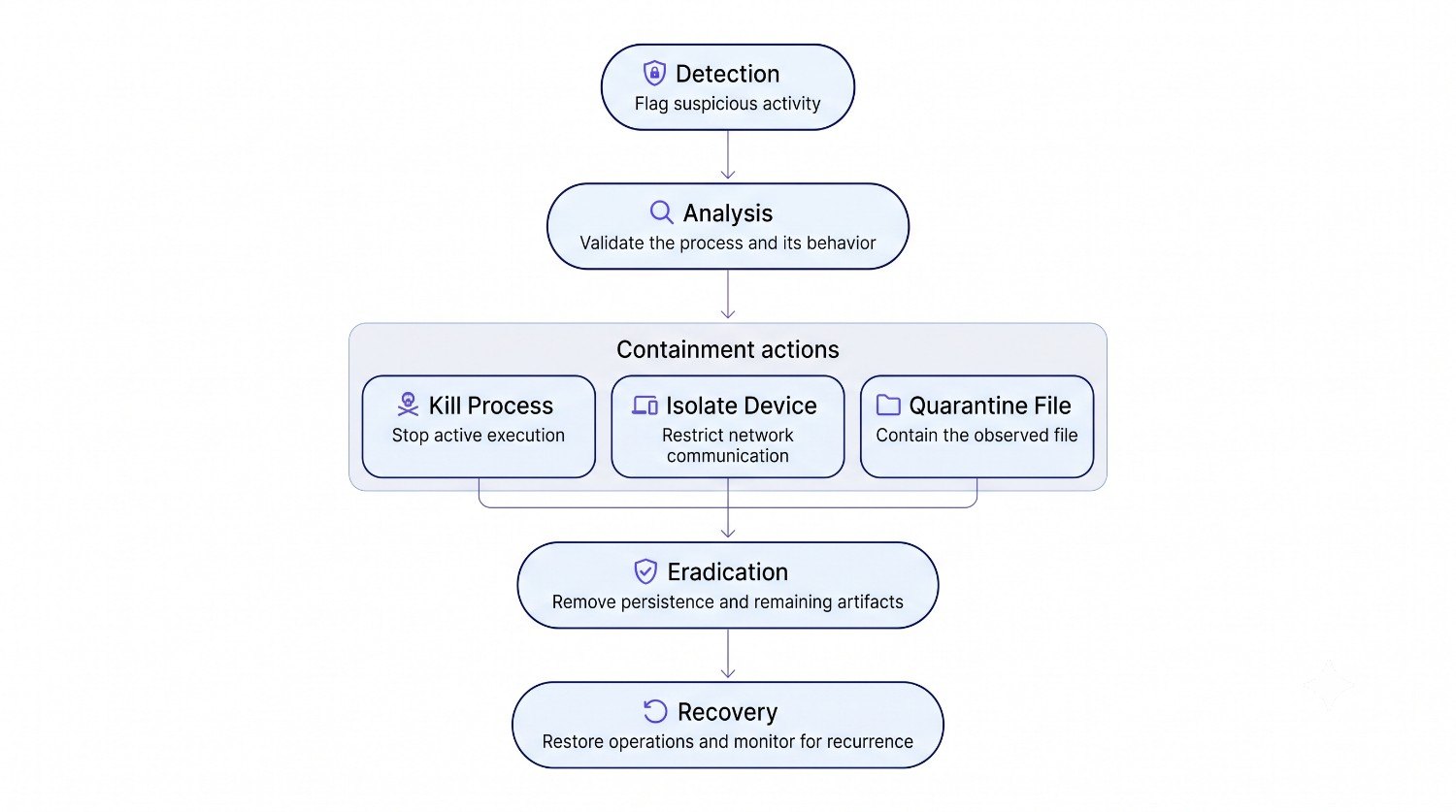
Process termination sits within the containment phase of incident response. A simplified workflow follows this sequence:
During containment, teams may terminate processes, isolate devices, and restrict compromised accounts. Next, eradication removes malware, persistence mechanisms, and other artifacts. Finally, recovery restores normal operations and monitors the endpoint for recurring activity.
The NIST Incident Response Recommendations and Considerations place incident response within broader cybersecurity risk management and operational recovery.
How Security Tools Identify a Process as Malicious
Security tools identify suspicious processes by evaluating file indicators, runtime behavior, and access patterns. Analysts then review this evidence before initiating process termination threat response.
Common detection triggers include:
Known malware signatures
Security tools compare files, code patterns, and hashes against known threat indicators. A match can identify previously documented malware.
Behavioral anomalies
Detection engines monitor how processes start and interact. For example, a document application launching PowerShell may warrant investigation.
Unusual parent-child relationships
Malware often launches processes through unexpected execution chains. However, legitimate administration tools can produce similar patterns.
Sensitive resource access
A process may attempt to read credentials, modify protected files, or access security-related system settings.
Suspicious process activity
Rapid file changes, persistence attempts, or unexpected command execution can indicate malicious intent.
No single signal always proves that a process is malicious. Therefore, analysts should evaluate the process name, executable path, command line, user context, and related activity. They should also inspect parent and child processes to understand the complete execution chain.
Mapping observed behavior to the MITRE ATT&CK Enterprise techniques gives analysts a consistent framework for interpreting attacker activity. For instance, a suspicious process may align with command execution, credential access, or defense evasion techniques.
This context helps analysts distinguish genuine threats from legitimate administrative activity. As a result, teams can act quickly while reducing the risk of terminating essential business or system processes by mistake.
Manual vs. Automated Process Termination Threat Response
Security teams can terminate processes manually, through one-click console actions, or with predefined automated policies. Each method differs in speed, access requirements, and analyst involvement.
Method
How it works
Main constraint
Manual termination
An analyst accesses the endpoint and uses Task Manager, a terminal, or another system utility.
Requires endpoint access, appropriate privileges, and manual process identification.
One-click termination
An analyst validates the threat and issues a termination command from a security console.
Still requires analyst review and approval.
Automated termination
A predefined response policy terminates the process when specified detection conditions occur.
Depends on reliable detection logic and carefully configured policies.
Manual termination can delay containment while the analyst authenticates and investigates. Meanwhile, the malicious process may continue operating.
Console-based termination shortens the path between detection and containment. However, teams should align each method with threat severity and detection confidence. This approach helps reduce delays without terminating legitimate processes unnecessarily.
5 Ways Hexnode Strengthens Your Incident Response Plan
Learn how endpoint telemetry, alert context, and audit records strengthen practical incident response workflows.
How Hexnode XDR Handles Process Termination
Hexnode XDR provides a Kill Process capability for immediate, console-based threat response. Security teams can terminate a confirmed malicious process on a managed endpoint with a single click. Therefore, analysts can issue the process-termination command directly from the Hexnode XDR console.
The console also gives analysts the context required before they act. They can review the process tree and select the relevant process node. Moreover, Kill Process Tree terminates the selected process and every child process it created. This option helps analysts disrupt a connected execution chain instead of addressing each process separately.
However, terminating a process only stops its current execution. Hexnode XDR pairs Kill Process with two complementary response actions under its Respond with Speed and Certainty toolkit:
Isolate Device restricts the endpoint’s network access while preserving its connection to the Hexnode XDR console.
Quarantine File moves the malicious file into a restricted, encrypted location for containment and review.
Kill Process stops the selected malicious process from continuing its execution.
Together, these actions support a coordinated response. Analysts can halt active execution, restrict network communication, and contain the underlying file from one console. As a result, teams can address multiple attack paths without relying on a single remediation action.
Hexnode XDR also maintains a Complete Audit Trail. It immutably logs technician actions and system events. Consequently, teams can trace administrative and remediation activity during post-incident analysis.
Featured resource
Hexnode XDR Info Sheet
Get a concise overview of how Hexnode XDR unifies endpoint detection, investigation, and threat response.
Does killing a malicious process remove the malware from the endpoint?
No, process termination only stops the program’s current execution. Where applicable, teams should quarantine or delete malicious files and remove related persistence mechanisms, scripts, or other execution artifacts.
When should analysts kill an entire process tree instead of one process?
Analysts should kill the process tree when a malicious process has launched connected child processes. Terminating only the parent may leave those child processes running.
Can malware restart after security teams terminate its process?
Yes, malware may restart if its executable or persistence mechanism remains on the endpoint. Teams should follow termination with containment, eradication, and monitoring.
What should analysts verify before terminating a suspicious process?
Analysts should review the executable path, command line, user context, and parent-child relationships. They should also assess related behavior to avoid disrupting legitimate applications or system processes.
Should security teams isolate an endpoint before terminating a malicious process?
The response order depends on the threat’s behavior and investigation context. Teams can combine isolation, process termination, and file quarantine to restrict communications, stop execution, and contain the source file.
Does Hexnode XDR record process termination actions for later review?
Yes, Hexnode XDR’s Complete Audit Trail records technician actions and system events. Security teams can use these records to trace technician actions, remediation activity, and system events.
Stop Malicious Processes Before They Spread
Fast containment can determine whether a malicious process remains an endpoint event or develops into a broader incident. Therefore, security teams need response actions that work immediately after analysts confirm the threat.
One-click process termination stops active execution without requiring local device access. However, termination alone does not contain the associated file or restrict network communication. Teams need coordinated controls for complete process termination threat response.
Hexnode XDR combines three complementary actions:
Kill Process terminates the selected process, while Kill Process Tree terminates the selected process and every child process it spawned.
Isolate Device restricts network access and limits further communication.
Quarantine File contains the underlying malicious file for review.
Together, these actions shorten the path from detection to containment. They also help teams reduce breach impact and avoid slower manual response workflows.
Stop Active Endpoint Threats Faster
Request a Hexnode XDR trial to explore process termination, device isolation, and file quarantine from one console.
I write at the intersection of technology, process, and people, focusing on explaining complex products with clarity. I break down tools, systems, and workflows without any noise, jargon, or the hype.