Mobile threat defense complements UEM by identifying mobile risks that configuration and compliance data alone may not reveal.
MTD evaluates device, application, network and web threats, helping teams detect risk after enrollment.
An effective MTD–UEM strategy connects validated threat signals to proportionate remediation, recovery and continuous device-risk reassessment.
Hexnode supports Check Point Harmony Mobile integration for device-risk visibility and Bitdefender GravityZone MTD deployment and configuration on supported Android devices.
Unified endpoint management (UEM) configures devices, distributes applications and enforces security policies. However, it may not continuously detect phishing attempts, malicious applications, unsafe networks or indicators of active device compromise.
Mobile devices routinely move between corporate Wi-Fi, home networks, cellular connections and public hotspots while retaining access to sensitive applications and data. Each transition changes the device’s exposure to threats without necessarily changing its UEM configuration or compliance status.
A device that was compliant during enrollment may later encounter a malicious link, compromised application or hostile network. Organizations therefore need mobile-specific threat intelligence that continuously evaluates risk after enrollment. Mobile threat defense complements UEM by detecting changes in the device’s security condition that configuration and inventory data alone may not reveal.
What are the risks of leaving mobile threats outside UEM?
Disconnected threat detection and device management create fragmented security workflows. When an alert appears, IT and security teams must manually correlate it with device ownership, configuration, application inventory, compliance status and user access before choosing a response.
These delays can allow stolen credentials to support unauthorized access, malicious applications to expose corporate data and compromised devices to remain connected. They can also create compliance gaps, disrupt legitimate users and increase investigation and remediation times.
Threat alerts provide limited protection unless they initiate a defined containment and recovery process. Each workflow should specify how teams validate risk, restrict affected devices, communicate with users, confirm remediation and safely restore access. Without those steps, alerts accumulate while exposure continues unchecked across the fleet.
What is mobile threat defense?
Mobile Threat Defense (MTD) continuously evaluates mobile devices for device, application, network and web-based threats. It identifies conditions that may indicate compromise, unsafe behavior or increased exposure after a device has been enrolled and configured.
MTD can combine device telemetry, application analysis, network inspection and external threat intelligence to calculate or communicate risk. Depending on the product and operating system, it may detect malicious apps, phishing attempts, vulnerable configurations or suspicious connections.
MTD is a specialized security layer, not a complete replacement for UEM, identity and access controls or data protection. These systems address different parts of mobile security architecture.
How does mobile threat defense work?
Mobile threat defense works by collecting permitted device signals, analyzing activity, identifying suspicious conditions, assigning a risk level and communicating findings to administrators or connected security systems.
Detection may occur partly on the device, where an MTD app can observe supported indicators and respond quickly. Cloud-based services can perform broader analysis, correlate events and apply updated detection logic. External threat-intelligence feeds add context about malicious URLs, applications, networks and other known indicators. Products differ in architecture, permissions and platform coverage.
When a finding is validated, the workflow should move beyond alerting. Security teams can investigate the evidence, notify the user, require remediation or restrict access until the device returns to an acceptable risk state and the finding is formally closed.
What types of threats can MTD detect?
MTD can detect threats across four mobile security layers, although the exact coverage depends on the product and operating system:
Device threats: Rooting, jailbreaking, device tampering, disabled platform protections and other indicators that the operating system may be compromised.
Application threats: Malware, suspicious application behavior, risky permissions, vulnerable applications and apps installed from untrusted sources.
Web threats: Phishing links, malicious websites, unsafe redirects and other attempts to capture credentials or deliver harmful content.
An active threat indicates current malicious or suspicious activity. A posture weakness, such as an outdated operating system, vulnerable application or disabled security setting, instead creates conditions that attackers could exploit.
Detection capabilities vary by mobile platform, device ownership model, deployment method, granted permissions and MTD vendor. BYOD privacy restrictions may also limit the signals available for analysis compared with fully managed corporate devices.
Featured Resource
Mobile Threat Defense Checklist
Use a practical checklist to strengthen device, application, network and user-focused mobile security.
UEM manages device configurations and administrative controls, while MTD detects mobile-specific threats and supplies risk intelligence. They address different but complementary parts of mobile security.
Area
UEM
MTD
Primary purpose
Manage, configure and secure endpoints
Detect and assess mobile threats
Collected data
Inventory, ownership, configuration, compliance and app status
Device, app, network and web-threat signals
Typical actions
Deploy policies and apps, apply restrictions and issue remote actions
Detect threats, assign risk and generate alerts
Primary administrators
IT and endpoint management teams
Security and incident-response teams
Security role
Management and enforcement layer
Threat detection and risk-intelligence layer
Neither technology completely replaces the other. UEM may enforce a secure baseline without recognizing every active threat, while MTD may detect risk without providing the full set of device-management controls required for remediation. Their value increases when MTD signals inform coordinated UEM actions and recovery workflows.
What is the difference between MTD and mobile app vetting?
MTD monitors devices and their operating environments for device, application, network and web-based threats. Mobile app vetting focuses more narrowly on the application itself, examining its code, third-party components, permissions, privacy behavior, vulnerabilities and software supply-chain risk.
The timing and depth of analysis also differ. MTD commonly detects threats or changes in risk while a device is operating. App vetting can assess an application before deployment and continue evaluating it as its code, dependencies or risk profile change.
The two approaches may overlap in areas such as malicious application detection, risky permissions and vulnerable software. However, neither view is complete on its own. Organizations should combine device-level visibility with application-level analysis to understand both the conditions affecting an endpoint and the risks introduced by the applications running on it.
Mobile App Security With Hexnode UEM and Quokka
See how Hexnode and Quokka combine UEM controls with continuous mobile application risk assessment.
Where does MTD fit into a UEM strategy?
MTD fits into a UEM strategy as the source of continuously updated mobile-risk intelligence. UEM remains the management and enforcement layer that establishes configurations, manages applications and applies administrative controls. Together, they connect current threat context with practical device actions.
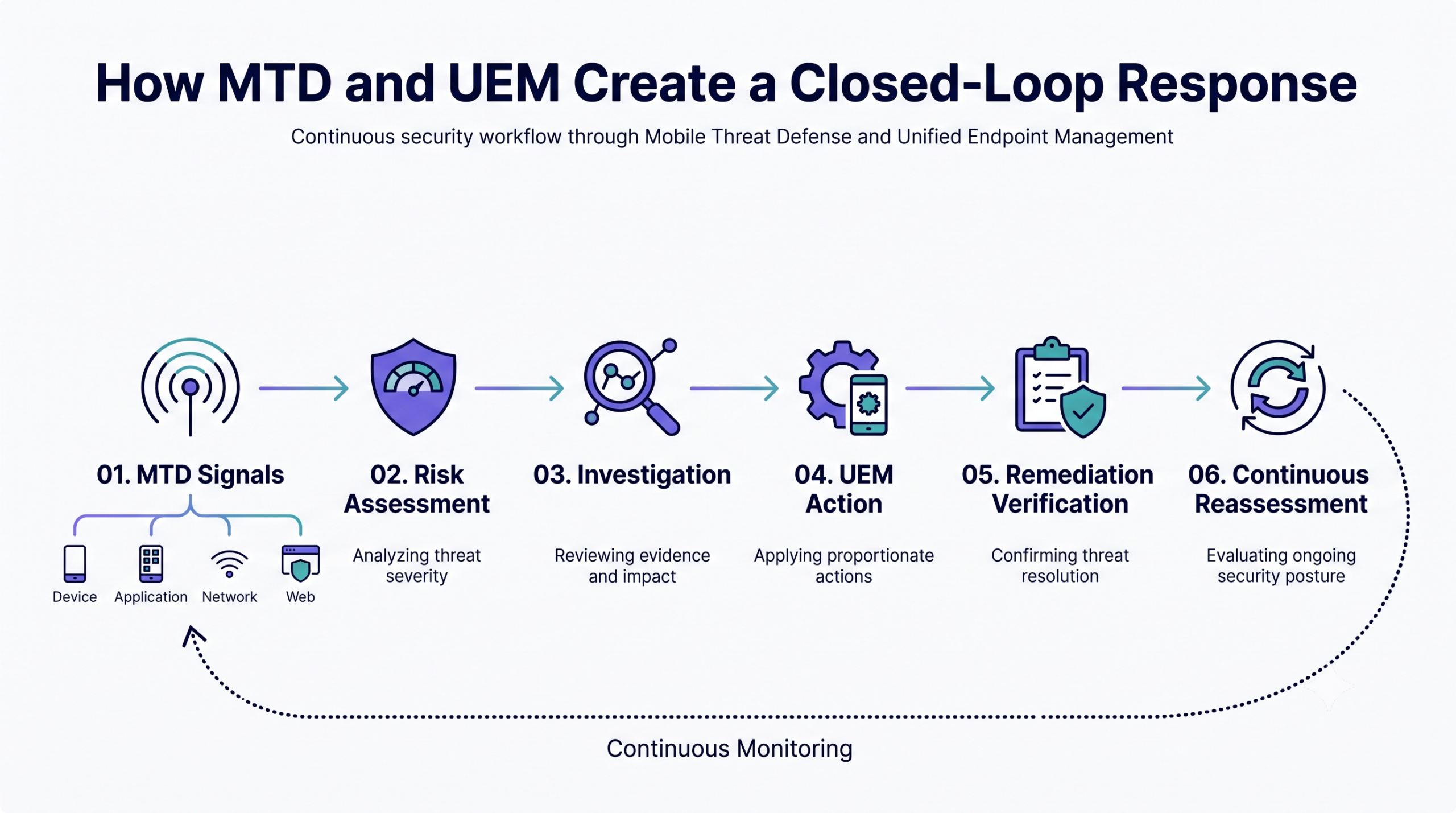
A closed-loop model follows six stages: establish a secure baseline, detect a threat, communicate the resulting risk, investigate the evidence, enforce proportionate remediation and verify recovery. Verification matters because removing a malicious app or leaving an unsafe network does not automatically prove that the device is trustworthy again.
How MTD and UEM Create a Closed-Loop Response
This approach supports zero-trust security. An initial posture assessment may confirm that a device meets security requirements at a specific point in time, but it does not grant permanent trust. Device risk must be reassessed as applications, networks, configurations and user activity change throughout the device lifecycle over time.
How should you implement MTD with UEM?
Organizations should align threat coverage, device ownership models, risk thresholds and response actions before deploying MTD with UEM. A successful implementation requires more than installing a security application; it requires agreed detection priorities, clear operational ownership and proportionate remediation.
The following five-step process helps IT and security teams define requirements, connect risk signals to actions, validate workflows and formalize response.
Step 1: Assess mobile risks and existing security controls
Start by documenting the mobile environment MTD must protect. Inventory operating systems, device models, ownership types, installed and business-critical applications, corporate data-access paths and the networks devices commonly use. Include corporate-owned endpoints and BYOD deployments because available telemetry and administrative control may differ.
Next, map existing safeguards to each identified risk. Record what UEM policies, identity controls, secure web gateways, mobile app vetting and other security tools already detect or enforce. This analysis should expose genuine visibility and response gaps, prevent duplicated controls and reduce redundant alerts before deployment begins.
Step 2: Define MTD requirements and risk levels
Convert the identified gaps into specific MTD requirements. Define whether the deployment must protect against phishing, malicious applications, rooted or jailbroken devices, unsafe networks, vulnerable operating systems or all five categories. Prioritize coverage according to data sensitivity, user exposure and business impact.
Next, define the evidence required to classify a device as low, medium or high risk. Document which indicators, combinations or persistence thresholds justify each rating and the expected response.
Evaluate platform support, ownership-model limitations, privacy safeguards, battery and performance impact, reporting, APIs, deployment requirements and UEM compatibility. Confirm that signals and actions remain consistent across managed devices.
Step 3: Map threat signals to UEM actions
Document how each threat finding moves from the MTD system into UEM and any connected identity or incident-response tools. Assign ownership for alert validation, investigation, device action, user communication, recovery verification and case closure so findings do not remain unaddressed.
Map validated risk states to proportionate actions. A low-risk finding may justify monitoring or user notification, while medium or high-risk conditions may require remediation, application removal or temporary access restriction.
Add safeguards for stale data, duplicate alerts and false positives. Require confirmation before disruptive actions, define expiration rules for risk states and ensure access is restored after remediation is verified.
Step 4: Pilot the integrated workflow
Run a controlled pilot with a representative device group. Include every supported mobile platform, corporate-owned devices, BYOD deployments and users with different roles, access privileges and exposure levels. This mix helps reveal platform-specific limitations and ownership-related privacy constraints.
Validate the complete workflow rather than testing detection alone. Confirm application deployment, device activation, threat detection, risk synchronization, alert accuracy, remediation enforcement and restoration of access after the device returns to an acceptable state.
Measure false positives, battery and performance impact, user friction, enrollment failures and help-desk demand. Resolve recurring issues, document exceptions and retest failed scenarios before safely expanding deployment fleetwide.
Step 5: Create response and recovery playbooks
Turn the validated pilot workflow into documented response and recovery playbooks. Create separate procedures for phishing, malicious applications, compromised operating systems, unsafe networks and outdated devices because each condition requires different evidence and remediation.
For every playbook, identify the responsible team, validation step, user communication process, containment action, remediation requirement and evidence needed for closure. Define escalation criteria for high-risk devices and unresolved findings.
Document exceptions for business-critical devices, inaccessible users and disputed detections. Recovery procedures should explain how teams confirm remediation, refresh the device’s risk state, remove temporary restrictions and restore access. Prevent remediated devices from remaining unnecessarily restricted.
How do you measure the effectiveness of MTD?
Measure MTD effectiveness by tracking both security outcomes and operational performance. Core metrics should include deployment coverage, percentage of protected devices, threats by category, repeat detections, false-positive rate and average remediation time.
Pay particular attention to unresolved high-risk devices and the percentage of validated findings that result in completed remediation. A high alert volume does not demonstrate effectiveness if affected devices remain exposed or recovery is never verified.
Review detection policies, response thresholds, platform coverage and user guidance regularly. Use investigation outcomes to refine controls without creating unnecessary operational disruption.
How does Hexnode support mobile threat defense?
Hexnode UEM supports mobile threat defense through documented workflows for integrating or deploying specific third-party MTD products. Administrators can use the UEM console to connect supported services or distribute and configure an MTD application on eligible devices.
Check Point Harmony Mobile integration with Hexnode UEM
Hexnode UEM integrates with Check Point Harmony Mobile to bring device-specific threat information from managed iOS and Android devices into the UEM console. Administrators configure the connection from Admin > Integrations > Check Point Harmony Mobile and register devices using the Harmony Mobile Protect app.
For each registered device, Hexnode can display the Harmony Mobile Protect status and the reported risk level: None, Low, Medium or High. This gives administrators a consistent view of protection and risk without separately matching devices across consoles.
Administrators can also open the configured integration to review its associated device groups. Device risk-status reports can be generated and exported in PDF or CSV format for investigation, operational review or recordkeeping across the managed mobile fleet.
Deploying Bitdefender GravityZone MTD through Hexnode UEM
Hexnode UEM can centrally deploy Bitdefender GravityZone MTD to managed Android devices. Administrators first add the store application to Hexnode’s app inventory and obtain the required activation link from the Bitdefender GravityZone portal.
In an Android Enterprise policy, administrators can open App Management > App Configurations, select Bitdefender GravityZone MTD and enter the activation link. The available Tracking ID 1 and Tracking ID 2 fields can pass device identifier wildcards for tracking.
The app can be distributed through Hexnode. Silent installation with a Required Apps policy is supported for Android Enterprise Device Owner and Samsung Knox devices. Detailed security information and vulnerability monitoring remain available in the Bitdefender GravityZone portal.
BYOD devices may require MTD when they access sensitive corporate applications or data. However, privacy controls and platform restrictions can limit available telemetry, so organizations should define which signals are necessary before deployment.
Should a high MTD risk score automatically block corporate access?
Not necessarily. Teams should validate the evidence, establish risk thresholds and reserve disruptive actions for conditions that justify them. Recovery rules should also restore access after the device returns to an acceptable state.
What should IT teams test during an MTD and UEM pilot?
Test application deployment, device activation, threat detection, risk synchronization, remediation and access restoration. Also measure false positives, battery impact, user friction, enrollment failures and help-desk demand.
How can organizations reduce false positives from mobile threat defense?
Define the evidence required for each risk level and confirm high-impact findings before taking disruptive action. Expiration rules, investigation feedback and regular policy reviews can prevent outdated or duplicate alerts from driving unnecessary restrictions.
Which mobile threat defense workflows does Hexnode document?
Hexnode documents an integration with Check Point Harmony Mobile for viewing device protection and risk information on iOS and Android. It also documents deploying and configuring Bitdefender GravityZone MTD on supported Android devices, with detailed monitoring performed in the Bitdefender portal.
Add mobile threat intelligence to your UEM workflow
Use Hexnode UEM to deploy supported MTD applications and view documented Check Point Harmony Mobile risk information for managed devices. Start a 14-day free trial or request a demonstration to evaluate supported MTD deployment, integration and risk-visibility workflows.
Use a representative pilot group to validate deployment, risk reporting and remediation before extending the workflow across your mobile fleet.
Connect Mobile Threat Intelligence With UEM
Test supported MTD deployment and risk visibility workflows with Hexnode UEM for 14 days.
Associate Product Marketer at Hexnode focused on SaaS content marketing. I craft blogs that translate complex device management concepts into content rooted in real IT workflows and product realities.