Linux password standards only protect endpoints when they are consistently enforced and verified across managed devices.
The challenge: Different Linux distributions, authentication configurations, and manual settings create enforcement gaps, security risks, and administrative overhead.
The solution: Establish a password baseline, deploy policies to supported devices, and verify enforcement through configuration checks and password-change testing.
The Hexnode fit: Hexnode UEM enables IT teams to configure and assign Linux password restrictions to enrolled devices, reducing manual configuration and improving consistency.
Why are Linux password policies difficult to enforce across devices?
Security teams establish minimum password lengths, complexity requirements, and password expiration rules, yet Linux endpoints often operate with inconsistent configurations. The challenge lies in translating documented security standards into technical controls that enforce the same requirements across every applicable device.
Unlike environments with standardized authentication configurations, Linux fleets may include multiple distributions, desktop environments, and locally managed user accounts. Each can introduce differences in how password policies are configured and enforced. Authentication mechanisms such as Pluggable Authentication Modules (PAM) also require appropriate configuration to apply password restrictions consistently.
For IT administrators managing remote Linux workstations, these differences create additional overhead. Manually configuring password settings on individual devices increases the risk of configuration drift, missed endpoints, and inconsistent enforcement.
Effective Linux password policy enforcement requires more than defining acceptable credentials. The challenge is ensuring those requirements reach the intended devices and remain enforceable without administrators repeatedly modifying local configurations.
What happens when Linux password standards aren’t enforced?
Inconsistent password enforcement leaves Linux endpoints vulnerable to credential-based attacks. Weak or reused local account passwords increase the risk of unauthorized access, password guessing, and account compromise. While password policies reduce these risks, they cannot independently address threats such as credential phishing, stolen sessions, or compromised authentication infrastructure.
Beyond security exposure, inconsistent configurations create recurring administrative work. IT teams must inspect individual endpoints, identify deviations from established password requirements, and manually correct settings. Across distributed Linux fleets, these activities consume time and increase the likelihood of overlooked devices.
Audit readiness presents another challenge. Documented password standards do not prove that technical controls are functioning. Administrators need evidence that target endpoints have received, successfully applied, and actively enforce all required policies.
Without reliable verification, organizations struggle to demonstrate consistent policy implementation, investigate configuration gaps, or substantiate internal security assessments. Effective enforcement therefore requires both technical restrictions and evidence of their operation.
Which password requirements can Linux administrators enforce?
Linux supports several configurable password restrictions, depending on the distribution and authentication configuration:
Password length and composition: Minimum character count and requirements for uppercase letters, lowercase letters, numbers, or special characters.
Password aging: Minimum and maximum password ages, with expiration warnings.
Password similarity: Restrictions on passwords resembling previous credentials.
Repeated characters: Limits on consecutive identical characters or character patterns.
However, technical configurability does not automatically mean a control is recommended. NIST SP 800-63B prioritizes longer passwords and prohibits arbitrary periodic changes and mandatory composition rules for centrally verified passwords. Locally verified Linux passwords and organizational requirements need separate evaluation.
Password history, account lockout, breached-password screening, and multifactor authentication are separate security controls. Administrators must verify their availability and implementation independently rather than assuming standard password policies provide them.
What is Linux password policy enforcement, and how does it work?
Linux password policy enforcement is the process of applying technical controls that require local account passwords to meet defined security requirements during password creation or modification. While password standards establish rules for credential security, enforcement ensures the operating system’s authentication mechanisms actively apply those rules.
Linux primarily relies on Pluggable Authentication Modules (PAM) to implement password-related restrictions. Several components support this process:
pam_pwquality: Evaluates new passwords against configured quality requirements, including minimum length, character composition, and similarity to existing passwords.
pam_unix: Handles local password authentication and updates, supporting password changes through the PAM authentication stack.
Password-aging controls: Define minimum and maximum password ages and expiration warnings. Default values can be configured through /etc/login.defs for newly created accounts, while existing users’ password-aging settings can be managed separately using tools such as chage, which updates the relevant shadow password attributes.
Actual enforcement depends on the Linux distribution, authentication stack, and applicable configuration.
Administrators can configure these requirements manually through files such as /etc/pam.d/ and /etc/security/pwquality.conf. Alternatively, policy-driven device management allows administrators to deploy supported password restrictions across targeted endpoints without individually modifying each device.
However, distributing configuration settings alone does not guarantee enforcement. Consistent configurations, supported operating environments, and verification of actual password-change behavior are essential.
Why do manually configured Linux password policies become inconsistent?
Manually enforcing Linux password requirements involves maintaining PAM configurations, password quality settings, and password-aging rules across individual endpoints. When administrators configure these controls separately, differences in settings, missed updates, and configuration drift can leave devices operating under inconsistent password restrictions.
Several factors contribute to these inconsistencies:
Incomplete provisioning: Newly deployed Linux devices may lack the required password configurations, leaving enforcement gaps from initial setup.
Local configuration changes: Administrative modifications, software updates, or changes to authentication settings can alter existing password restrictions.
Environment differences: Linux distributions, desktop environments, and authentication mechanisms may interpret or apply password requirements differently.
Manual maintenance: Repeatedly inspecting and updating individual endpoints increases administrative overhead and the likelihood of overlooked configurations.
Consistent Linux password policy enforcement requires a documented security baseline, repeatable policy deployment, and clearly defined device targeting. Administrators must also account for supported operating environments and establish verification procedures to confirm that restrictions function as intended.
These requirements provide the foundation for implementing password policies consistently across managed Linux devices.
Featured Resource
Explore Hexnode Linux Management
Discover how Hexnode manages Linux devices with security policies, remote support, and lifecycle controls.
How can IT teams implement consistent Linux password policies?
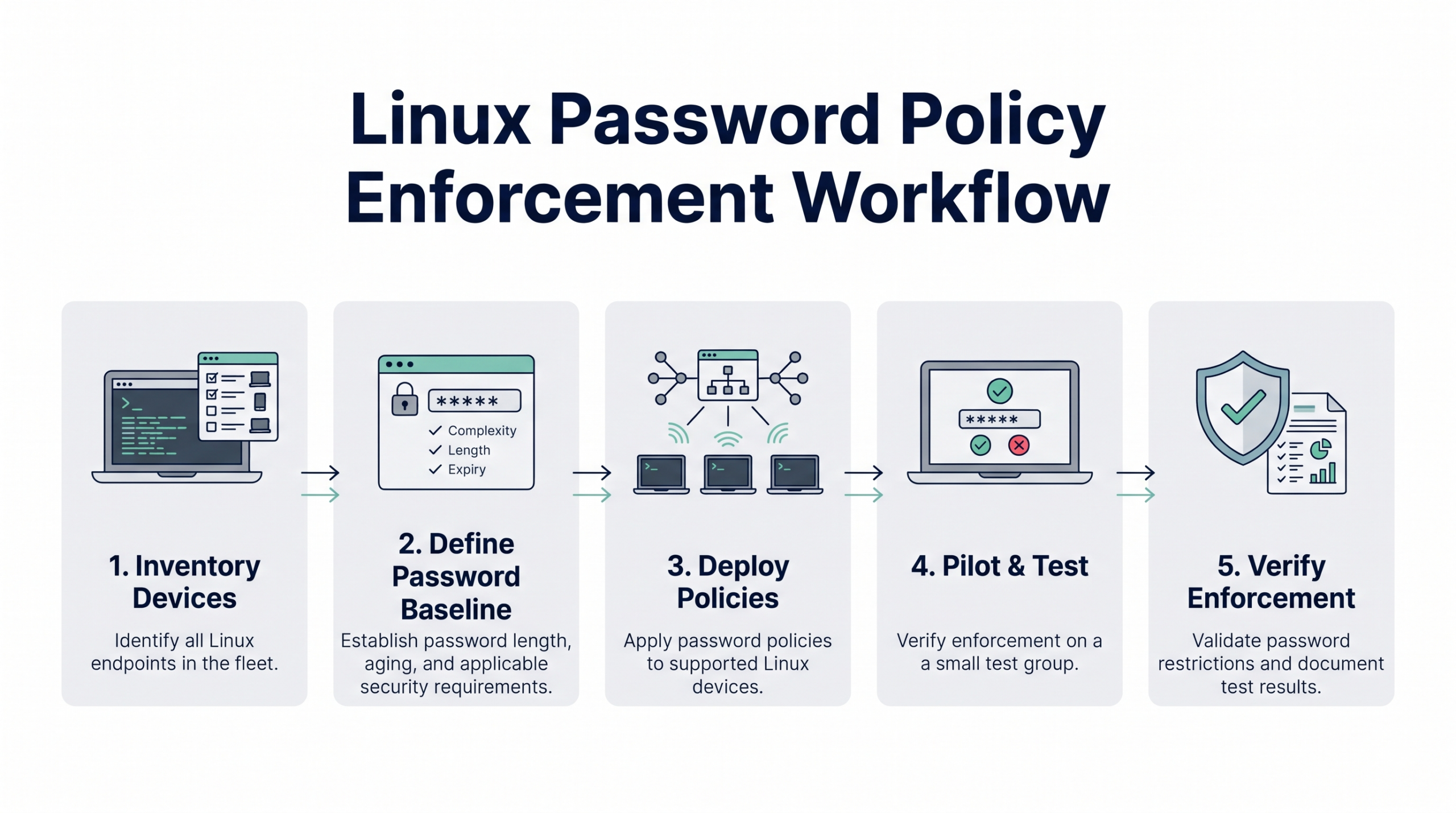
Consistent Linux password policy enforcement requires a structured approach to defining, deploying, and validating password restrictions. The following five-step process helps IT teams establish consistent controls across supported Linux environments without relying on individual device configurations.
Linux Password Policy Enforcement Workflow
Step 1: Identify Linux devices and authentication requirements
Inventory managed Linux distributions, desktop environments, local user accounts, and authentication methods across the fleet. Identify which endpoints use locally managed passwords and which rely on external authentication services, such as LDAP or Active Directory.
This assessment helps administrators determine where local password enforcement is applicable and identify differences in authentication configurations that could affect policy deployment.
Step 2: Define an enforceable password baseline
Translate organizational security requirements into measurable settings, including minimum password length, applicable password-aging controls, and supported password restrictions.
Align these settings with current security guidance. Avoid treating mandatory character complexity or frequent password rotation as universal best practices, particularly when stronger alternatives are available.
Step 3: Select a consistent deployment method
Evaluate native Linux configuration management tools, endpoint management policies, and other supported deployment mechanisms.
Choose an approach that enables repeatable policy deployment and targeted device assignment, reducing the need to configure individual endpoints manually. Ensure the selected method supports the distributions and authentication environments in scope.
Step 4: Pilot the policy on representative devices
Test the proposed password policy across representative Linux distributions, desktop environments, and authentication configurations.
Attempt both compliant and noncompliant password changes to verify that restrictions work as intended. Confirm that enforcement does not unexpectedly disrupt existing users, legitimate authentication workflows, or administrative access.
Step 5: Verify enforcement and maintain the baseline
Confirm that the Mac successfully applied the password configurations and that actual password-change behavior matches the defined requirements.
Periodically reassess the baseline following operating system upgrades, authentication configuration changes, and security policy revisions. Identify configuration drift and address enforcement gaps before expanding or maintaining deployment across the fleet.
Maintain verification records and reassess password requirements whenever organizational security standards or supported Linux environments change.
How can administrators verify that Linux password rules actually work?
Verifying Linux password policy enforcement requires confirming that password restrictions are applied and function as intended. Policy assignment, configuration application, and successful enforcement represent three distinct stages:
Policy assignment: The intended password requirements are assigned to the target device.
Configuration application: The device receives and applies the required settings.
Successful enforcement: The authentication mechanism rejects noncompliant passwords and accepts valid ones.
A successfully assigned policy does not guarantee that password restrictions are functioning.
Administrators should perform controlled tests on representative devices:
Minimum length: Attempt to set a password shorter than the configured minimum and confirm rejection.
Character restrictions: Test passwords that violate applicable composition or repetition requirements.
Valid passwords: Confirm that passwords meeting all configured requirements are accepted.
Password aging: Separately verify expiration and password-change restrictions where configured.
Maintain a verification record documenting the device or test group, Linux distribution, desktop environment, intended rule, observed behavior, and remediation status.
Combining configuration inspection with functional testing provides stronger evidence of enforcement and helps administrators identify discrepancies before broader deployment.
Linux device management 101
Explore Linux device management challenges, enrollment methods, security policies, and endpoint administration.
How does Hexnode enforce password standards on managed Linux devices?
Hexnode UEM supports Linux password policy enforcement through its Linux > Password policy configuration. Administrators can define password requirements in the Hexnode console and assign them to enrolled Linux devices, reducing the need to configure password restrictions individually on each endpoint.
What Linux password settings can Hexnode enforce?
Hexnode provides configurable controls for password length, aging, character composition, and similarity:
Minimum password length: Set a minimum length between 6 and 16 characters.
Password aging: Configure minimum and maximum password ages to control when passwords can be changed and how long they remain valid.
Expiration warnings: Specify when users receive warnings before their passwords expire.
Character requirements: Define the minimum number of character classes required and individual requirements for digits, uppercase letters, lowercase letters, and special characters.
Consecutive character limits: Restrict repeated identical characters or consecutive characters belonging to the same class.
Specify the minimum number of characters in the new password that must not be present in the previous password. Setting this value to 0 disables similarity checks, except when the new password is identical to the old one.
Administrators should select these restrictions according to organizational security requirements rather than treating every available complexity control as a recommended practice.
How to configure a Linux password policy in Hexnode
To apply password requirements to enrolled Linux devices:
Sign in to the Hexnode UEM portal and navigate to Policies > New Policy, or open an existing policy.
Enter the policy name and description.
Navigate to Linux > Password > Configure.
Configure the required password restrictions according to your organization’s baseline.
Open Policy Targets > + Add Devices, select the intended Linux devices, click OK, and save the policy.
For an existing saved policy, select Manage > Associate Targets, choose the target devices, and click Associate.
This workflow allows IT teams to apply consistent password requirements to selected endpoints without manually editing each device’s local authentication settings.
Important Note
Hexnode’s Linux Password policy is not supported on Linux Mint or Linux distributions using the KDE desktop environment. Verify device compatibility before assigning the policy to your Linux fleet.
What happens when the policy reaches a Linux device?
When users navigate to Settings > System > Users > Password to change their password, the new value must satisfy the configured requirements.
If a password violates those restrictions, Hexnode’s documented device-side behavior prevents the change. Password creation guidelines appear, and the Change option remains disabled until the requirements are satisfied.
Administrators should account for the following limitations:
Linux Mint and Linux distributions using KDE desktop environments are not supported by this password policy.
If the Settings application was already open when the policy was applied or removed, users must close it for the change to take effect.
The documented behavior applies to password changes; it does not establish automatic replacement of existing passwords or fleet-wide password-compliance reporting.
Before broader deployment, test the policy on representative supported Linux devices and verify that compliant passwords are accepted while noncompliant passwords are rejected.
FAQs
Does applying a Linux password policy automatically update existing passwords?
No. Applying a password policy does not necessarily force users to replace existing passwords. Depending on the enforcement mechanism, new restrictions may take effect when users create or change passwords, so administrators should verify the behavior on managed devices.
Can Linux password policies be enforced on devices that use Active Directory or LDAP?
Yes, but enforcement depends on how administrators configure authentication. For centrally authenticated accounts, Active Directory or LDAP-backed authentication services—rather than local Linux settings—control password requirements. Administrators should identify which system governs password changes before deploying local restrictions.
Does Linux password policy enforcement prevent users from reusing old passwords?
Not automatically. Password history enforcement typically requires a separate mechanism, such as pam_pwhistory, depending on the distribution and authentication configuration. Password similarity restrictions alone do not guarantee that previously used passwords cannot be reused.
Can Hexnode enforce Linux password policies on Ubuntu and other distributions?
Hexnode supports password policy configuration on compatible enrolled Linux devices, but support depends on the distribution and desktop environment. Its Linux Password policy does not support Linux Mint or distributions using the KDE desktop environment. Administrators should verify compatibility before applying policies across a mixed Linux fleet.
How can IT teams prevent Linux password policies from drifting after OS updates?
IT teams can reduce configuration drift by maintaining a defined password baseline and periodically checking applied settings against it. Following operating system upgrades or authentication changes, administrators should verify that password restrictions remain configured and function correctly.
Are Linux password policies enough to meet enterprise security compliance requirements?
No. Password policies address credential requirements but do not independently establish compliance with an enterprise security framework. Organizations must also evaluate applicable authentication controls, access management, monitoring, and audit evidence against their specific regulatory or internal security requirements.
Ready to turn Linux password standards into enforceable policies?
Strong password standards are effective only when IT teams can translate them into technical controls, apply them consistently, and verify enforcement across supported Linux devices.
Hexnode UEM’s Linux Password policy helps administrators configure password requirements and deploy them to enrolled endpoints without repeatedly modifying individual device settings.
Reduce configuration inconsistencies and validate password restrictions across your Linux fleet.
Associate Product Marketer at Hexnode focused on SaaS content marketing. I craft blogs that translate complex device management concepts into content rooted in real IT workflows and product realities.