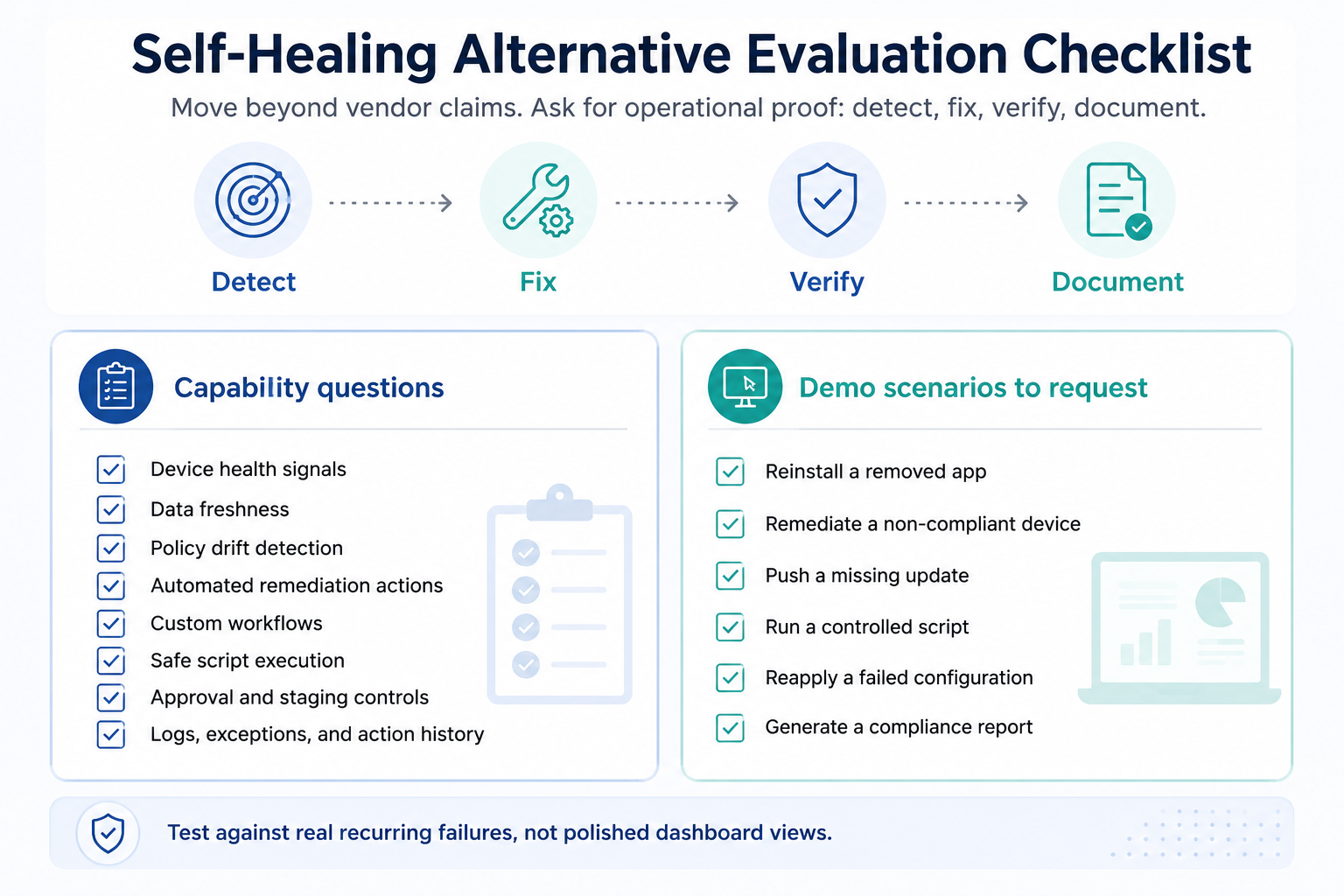
A real self-healing alternative to Ivanti should do more than raise alerts. It should detect device issues, remediate them, verify the fix, and log the outcome. The best-fit platform depends on visibility, policy drift detection, automation flexibility, governance, auditability, and support for the organization’s actual device mix. Teams should test alternatives against recurring failures from their own environment, with Hexnode included where compliance consistency, controlled remediation, and automation are key priorities.
This article does not assume Ivanti is limited to alerting. Ivanti publicly positions Neurons for Healing, Neurons Bots, and DEX workflows around automated detection, diagnosis, remediation, and self-healing. The goal here is to define what buyers should test when evaluating an alternative, not to claim feature absence in Ivanti.
What self-healing should mean beyond the buzzword
In enterprise IT, self-healing should not mean “the system sent an alert.” It means the environment can detect a known failure state, initiate the correct action, validate that the fix resolved the issue, and record the event for audit and operational review.
Detect, remediate, verify, report
A credible self-healing workflow follows a closed loop:
Detect the issue: a required app is missing, encryption is disabled, an OS version is outdated, or a configuration profile has failed.
Remediate the issue: reinstall the app, reapply the policy, trigger an update, run a script, or restore the expected setting.
Verify the outcome: confirm the device has returned to its approved state.
Report the action: log the event, result, timestamp, and remediation status.
That verification step is critical. Without it, IT teams are still left guessing whether the fix worked.
Alerts are not the same as self-healing
A notification-only workflow may improve awareness, but it does not reduce operational load by itself. Real self-healing should lower ticket volume, shorten mean time to remediation, improve compliance posture, and reduce disruption for end users.
Why teams start looking for an Ivanti alternative for self-healing
Ivanti is already associated with automation-driven self-healing, so teams evaluating alternatives are usually not questioning the value of the model. They are asking whether another approach can better fit their operating environment, governance requirements, and remediation priorities.
The evaluation often starts when IT leaders need stronger alignment across areas such as:
Operational workflow fit: Can remediation logic reflect how the team actually operates?
Admin experience: Can teams build, test, and adjust automations without unnecessary complexity?
Reporting depth: Are remediation actions, failures, and exceptions visible enough for audits?
Automation flexibility: Can the platform handle both standard fixes and environment-specific issues?
Environment fit: Does it support the organization’s device mix, ownership models, and remote work patterns?
The best alternative is not necessarily the one with the longest feature list. It is the one that reliably fixes the organization’s most common recurring issues without increasing operational risk.
That makes the evaluation practical: identify the failure states that consume time today, then assess which platform can detect, remediate, verify, and document them consistently.
Visibility comes first: you can’t heal what you can’t see
Self-healing depends on accurate device intelligence. If the platform cannot consistently detect a failed configuration, missing control, or non-compliant state, remediation will either miss the issue or trigger the wrong action.
Inventory and health signals
At minimum, buyers should assess whether the platform can surface the signals that drive remediation decisions:
Device status: online, offline, inactive, locked, compromised, or unmanaged.
OS and patch state: current version, pending updates, failed updates, and unsupported builds.
Configuration health: assigned policy, deployment status, failure reason, and last check-in time.
These signals become the foundation for reliable automated action. Without them, self-healing becomes reactive troubleshooting with a different label.
Fresh data versus stale reports
For remote and hybrid fleets, stale reporting creates blind spots. A device that checked in three days ago may have since lost encryption, missed an update, or dropped out of compliance.
Evaluation should consider how quickly devices report state changes, including real-time or near-real-time visibility where supported, plus clear behavior for delayed check-ins, offline devices, and platform-specific sync limitations. Teams also need segmentation by risk, platform, ownership, location, compliance state, and issue type, plus audit trails that show what changed, when it changed, and what remediation followed.
Look for automated remediation, not just alerts
A self-healing capability should do more than surface exceptions in a dashboard. It should connect a detected failure state to a controlled remediation action, then confirm whether the device returned to its expected state.
Trigger conditions
The first evaluation point is whether the platform can act on meaningful conditions, not just generic alerts. For example:
A device becomes non-compliant.
A required app is removed or fails to install.
Encryption, passcode, or another security control is disabled.
The OS falls behind an approved update baseline.
A configuration profile fails or is tampered with.
These triggers should be specific enough to avoid noise, but flexible enough to reflect real operational policies.
Corrective actions
The next question is what the system can actually do once a trigger fires.
Common remediation actions may include:
Reinstalling a missing or failed application.
Reapplying a configuration or security policy.
Pushing an OS or app update.
Running a remediation script.
Restarting a service or process.
Locking a risky device.
Collecting logs for escalation.
This distinction matters. A tool that only creates an alert still leaves IT responsible for the repair.
Verification loop
Post-action verification is where self-healing becomes measurable. The platform should confirm whether the remediation succeeded, failed, or requires escalation.
Teams should also evaluate guardrails: prevent endless remediation loops, support exceptions, restrict high-risk actions, and test automation on smaller device groups before broad rollout.
Compliance drift is the self-healing use case buyers often overlook
Self-healing is often framed around break-fix scenarios, but compliance drift is where it becomes strategically important. Policy drift occurs when the actual state of a device no longer matches the intended state defined by IT, security, or compliance teams.
What policy drift looks like in real life
In enterprise environments, drift is rarely a single dramatic failure. It usually appears as small deviations that compound over time:
Encryption is disabled or fails to enforce.
A required app is removed, outdated, or missing after enrollment.
A passcode rule changes outside the approved baseline.
An OS update is skipped or delayed beyond policy limits.
A configuration profile fails, expires, or is removed.
A device silently falls out of compliance after a missed check-in.
Each issue may look minor in isolation, but together they weaken control, increase audit exposure, and create inconsistent security posture across the fleet.
Why drift needs automated correction
Periodic audits alone are often insufficient for fast-moving device environments. By the time a manual review identifies drift, the device may have already introduced security, compliance, or operational risk.
A serious self-healing alternative should be able to detect drift, apply a corrective action, verify the result, and preserve evidence for compliance reporting.
UEM for Endpoint Drift Management: Remediate Drift Automatically
See how endpoint drift creates compliance gaps and how automated remediation keeps devices aligned with IT policy.
Workflow flexibility matters: scripts, conditions, schedules, and approvals
Self-healing is not one-size-fits-all. Prebuilt remediation actions are useful for common issues, but enterprise environments often have edge cases tied to legacy apps, custom configurations, regional policies, or platform-specific dependencies.
A strong alternative should support multiple workflow models, including:
Scheduled automations for recurring maintenance, update checks, or compliance enforcement.
Activity-based triggers when a device becomes non-compliant, misses a check-in, or reports a failed configuration.
Manual execution for controlled remediation during investigations.
Bulk actions for known issues affecting a device group.
Device-specific targeting based on platform, ownership, risk level, location, or compliance state.
Scripting is another key evaluation point because not every issue can be resolved through built-in remediation actions. Some issues cannot be fixed through standard controls alone. IT teams may need to run custom scripts to restart a service, remove a conflicting file, repair an agent, collect diagnostics, or restore a local setting across Windows, macOS, or Linux devices.
Flexibility also needs governance. High-risk actions should support testing, staged rollout, approvals, role-based access, and clear rollback planning. Without those controls, automation can reduce manual work while increasing operational risk.
Security and control: don’t automate your way into risk
Automation reduces manual intervention, but it can also amplify mistakes. A poorly scoped remediation policy can lock out users, remove critical apps, change encryption behavior, or apply fixes to devices that should have been excluded.
Guardrails for automated fixes
Self-healing workflows should include clear controls before they are deployed broadly. At minimum, evaluate whether the platform supports:
Role-based permissions to limit who can create, approve, or execute remediation actions.
Approval paths for high-impact changes.
Device groups and rollout rings to test actions before fleet-wide enforcement.
Exception handling for executives, regulated users, shared devices, or business-critical systems.
Simulation, dry-run capabilities, or pilot deployments can further reduce the risk of unintended changes where supported.
Sensitive actions need extra scrutiny. Device wipe, remote lock, encryption changes, app removals, script execution, certificate updates, and network configuration changes should not run without strict targeting and validation.
Auditability and admin accountability
Every remediation event should leave a clear trail. IT teams need audit logs, action history, timestamps, admin attribution, device context, and success or failure status.
That evidence is essential for troubleshooting, compliance reviews, and proving that automation is improving control rather than creating unmanaged risk.
Match the alternative to your device reality
A self-healing platform should be evaluated against the way devices are actually used, not against a generic feature matrix. The same remediation model will not work equally well for office laptops, frontline tablets, shared devices, field hardware, and kiosk-style deployments.
OS and ownership mix
Start by mapping the fleet in detail:
Windows, macOS, Linux, Android, iOS, and ChromeOS coverage.
Corporate-owned, BYOD, shared, and single-purpose devices.
Devices assigned to executives, contractors, frontline workers, or regulated teams.
Platform-specific gaps in app deployment, update control, scripting, or remote commands.
This matters because self-healing depends on what the platform can actually detect and fix on each operating system.
Remote, frontline, and shared-device environments
Network conditions also shape the decision. Devices may be offline for long periods, roam between networks, rely on unstable connectivity, or operate outside office infrastructure entirely.
Evaluate how the alternative handles missed check-ins, delayed remediation, remote troubleshooting, update failures, and user disruption. The goal is not just to automate fixes. It is to reduce downtime, preserve security posture, and avoid adding friction for the people using the devices.
Evaluation checklist: questions to ask before choosing an Ivanti alternative
A serious evaluation should move beyond vendor claims and focus on operational proof. The right question is not “Does it support self-healing?” It is whether the platform can detect, fix, verify, and document the issues that actually consume your IT team’s time.
Self-Healing Alternative Evaluation Checklist
Teams should validate self-healing claims in a pilot using real device states, not just demo scenarios. Test whether the platform can detect the issue, trigger the intended action, avoid repeated loops, verify the outcome, and produce evidence usable by IT and compliance teams.
When comparing Ivanti alternatives, buyers should map the exact Ivanti capabilities currently in use—such as Neurons for Healing, Neurons Bots, Neurons Workspace, DEX, or ITSM-linked automation—because licensing and module boundaries can affect which self-healing workflows are available
Bringing policy drift back under control with Hexnode
For teams evaluating self-healing around compliance drift, Hexnode is relevant when the goal is to keep devices aligned with assigned policies, compliance rules, required apps, scripts, and supported remote actions from a UEM workflow
In practice, that means Hexnode can support desired-state enforcement across common drift scenarios, such as:
Reinitiating required-app installation on supported platforms when a required app is detected as missing or non-compliant.
Associating, removing, or reapplying policies through configured automation workflows where supported.
Running custom remediation scripts on supported Windows, macOS, and Linux devices.
Moving non-compliant devices into remediation-focused groups or workflows that trigger scoped actions such as alerts, policy changes, scripts, lock, wipe, or other supported remote actions.
Operational control matters just as much as automation itself. With Hexnode, admins can schedule automation workflows, trigger them through device activity, or execute them manually across a single device or a broader group. Target filters, platform checks, and action history help teams keep remediation scoped, visible, and accountable.
For more complex issues, scripted and remote actions extend the remediation model.
IT teams can execute custom scripts on supported Windows, macOS, and Linux devices, and use platform-specific remote actions such as scans, OS updates, bug reports, app-log collection, lock/wipe, restart, or other supported actions depending on OS compatibility and enrollment state.
The outcome is not automation for its own sake. This delivers reduced manual effort, stronger compliance consistency, faster remediation, better device visibility, and greater control over how teams apply fixes.
For teams evaluating self-healing around policy drift and automated remediation, Hexnode is worth including in the shortlist.
FAQ
What should you look for in an alternative to Ivanti’s self-healing capabilities?
Look for a platform that supports a complete repair loop — detection, diagnosis, remediation, verification, and reporting — while matching the specific Ivanti workflows your organization relies on today. Prioritize recurring, low-risk issues first, like missing apps, failed configurations, or policy drift, before automating anything disruptive.
When should remediation require human approval?
Organizations must require explicit approval for disruptive or sensitive actions—such as wipes, locks, encryption changes, app removals, and script executions—because poorly scoped automation can lock out valid users or affect excluded devices. Audit history matters here too: it proves what changed, when, and whether remediation actually succeeded.
How should you pilot and evaluate a self-healing alternative like Hexnode?
Test it against real recurring failures from your own environment — drift detection, remediation, verification, reporting, and platform fit — rather than relying on demo scenarios alone.
Is Hexnode a one-to-one replacement for Ivanti Neurons for Healing?
Not necessarily. The products differ in architecture, workflow design, licensing, and supported capabilities, so compare the exact Ivanti modules and workflows you use with Hexnode’s automation, compliance, scripting, and reporting capabilities.
Featured Resource
Simplifying Compliance: An Actionable Guide for IT
Get a practical guide to compliance challenges and how device management can support stronger security foundation.
Conclusion: choose the tool that can prove the repair loop
Teams should not evaluate self-healing as a simple feature label. Instead, they must assess it as a complete repair loop: detecting the issue, applying the right remediation, verifying that the device returned to its expected state, and reporting the outcome. For teams comparing Ivanti alternatives, the strongest evaluation method is to test each platform against real recurring issues from their own environment, such as missing apps, failed configurations, outdated OS versions, disabled controls, or compliance drift. The decision should come down to visibility, policy drift detection, workflow flexibility, governance, and auditability. Organizations prioritizing compliance consistency, controlled remediation, automation, and fleet visibility may find Hexnode a strong candidate during evaluation. Start by testing self-healing workflows against the device failures that create the most tickets, risk, and manual effort today.
Disclaimer:
This article is based on publicly available product information reviewed as of July 2026. Ivanti and Hexnode product capabilities, licensing, modules, automation behavior, supported platforms, and documentation may change over time. Buyers should validate current feature availability, OS compatibility, enrollment prerequisites, licensing, and workflow behavior with each vendor’s official documentation or product trial before making a purchasing decision. All product and company names are trademarks™ or registered® trademarks of their respective holders. Use of them does not imply affiliation with or endorsement by them.
Bring endpoint drift under control
See how Hexnode helps IT teams automate fixes, enforce compliance, and keep devices aligned with policy, at scale.
Associate Product Marketer at Hexnode focused on SaaS content marketing. I craft blogs that translate complex device management concepts into content rooted in real IT workflows and product realities.