Endpoint and identity coordination breaks down when teams manage accounts and devices without shared context, clear ownership, or coordinated handoffs.
Siloed workflows cause delays, duplicated effort, security exposure, and gaps in audit evidence.
Share request details, identity and device states, approvals, ownership, and action history. Assign accountable owners, define handoffs, and verify outcomes before closing tickets.
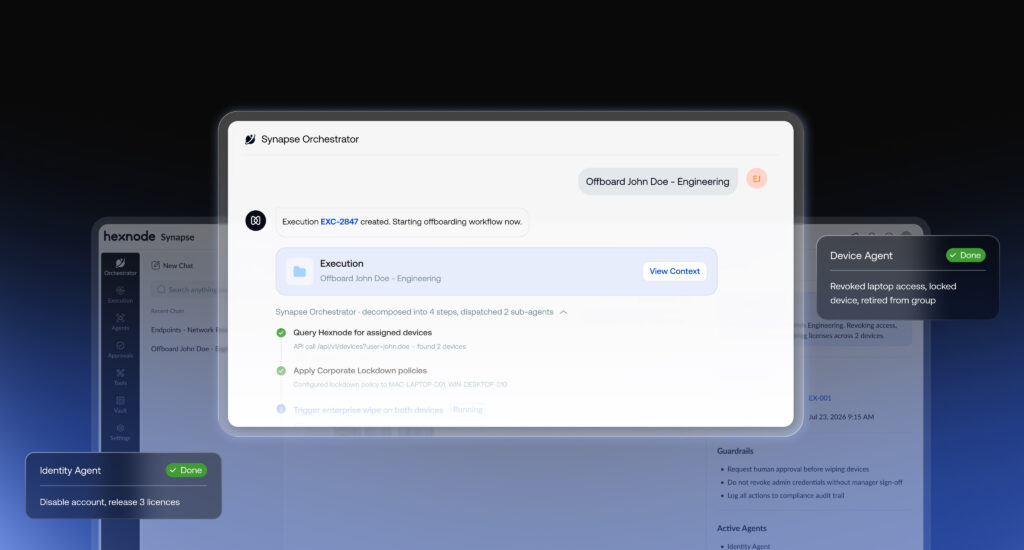
Hexnode Synapse coordinates work across endpoint, identity, and threat state through specialist agents, human approval for high-risk actions, and a centralized dashboard for reviewing operational histories and exporting audit trails.
Endpoint and identity coordination matters because routine IT requests cross team boundaries. Identity receives a new-hire request to create an account. Then endpoint prepares the laptop, while a ticket queue holds work without clear ownership.
An identity represents a person or other subject through identifying attributes. The associated account, roles, and access rights determine how that subject interacts with systems. Without shared context about the request, device state, account state, and owner, teams act on partial information. As a result, access may be ready before IT manages the device, or a laptop may arrive with incorrect permissions.
What Happens When Endpoint and Identity Teams Work in Silos?
When endpoint and identity teams work in silos, each sees only its own system. One team knows a device’s state, while the other knows the account’s state. Consequently, requests move through tickets and chat messages, ownership becomes unclear, and actions happen out of sequence.
Common symptoms include:
Duplicated requests: HR submits an onboarding request, but the identity team and endpoint team create separate tickets without linking them.
Unclear ownership: The identity team creates an account, but nobody confirms who must configure the device and validate access.
Actions out of sequence: IT grants application access before configuring the device or checking its compliance status.
No single workflow record: Teams close their individual tickets, yet nobody records whether the entire request succeeded.
These gaps also affect employee departures. For example, IT disables a departing employee’s account, but the device remains enrolled in endpoint management. Because no team owns device retirement, the laptop stays in inventory without a clear disposition.
The underlying problem is not simply the number of tickets. Instead, teams lack a shared record connecting the request, account, device, responsible owner, and completed actions.
What Does Missing Shared Context Cost IT Teams?
Without shared context, IT teams risk slower resolutions, mismatched account and device states, and weaker audit evidence. When account status and device state diverge, teams may leave devices enrolled after termination or grant access before checking device compliance. These gaps affect operational efficiency and security oversight.
Slower resolution: Teams spend time chasing ticket updates and confirming whether another team completed its tasks.
Security exposure: An organization may disable an employee’s account while leaving their device enrolled. Conversely, a new hire may receive application access before the device meets security policy.
Audit gaps: Without one workflow record, auditors may struggle to trace approvals, ownership, account changes, and device actions.
Duplicated effort: Endpoint and identity teams repeat checks or recreate requests because neither sees the other’s progress.
Orphaned accounts can create security risks when organizations fail to deactivate accounts after employees leave. NIST SP 800-53 Rev. 5, AC-2 (Account Management) addresses account creation, modification, disabling, and removal. It also calls for organizations to align account management with personnel termination and transfer processes.
What Is Shared Context Between Endpoint and Identity Teams?
Shared context is the set of task facts that authorized teams and agents can access. These facts include the request, relevant identity and device states, task ownership, approvals, and action history. This common view helps teams make decisions using the same information.
For example, a device’s enrollment status alone does not establish whether its user should access a corporate application. Similarly, an active account does not prove that its assigned device meets security requirements.
Context element
What the endpoint team sees
What the identity team sees
Why sharing it helps
Request details
Device setup and configuration needs
Account and application access needs
Connects related tasks to one request
User and role
Assigned user and device
Account status, roles, and permissions
Aligns device assignment with access
Device state
Enrollment and compliance status
Device posture relevant to access decisions
Helps assess access against device state
Approvals
Approved device actions
Approved account and access changes
Helps teams identify missing approvals and sequence actions correctly; enforced access controls can block actions that lack the required authorization
Action history
Configuration changes and results
Account changes and access decisions
Creates a traceable workflow record
Shared context supports zero trust, which rejects implicit trust based solely on network location or asset ownership. Zero-trust architectures use subject and device authentication and authorization before establishing access sessions.
As organizations introduce AI agents in IT operations, a common, reviewable context becomes increasingly important. Agents act on the information and permissions available to them. Consequently, teams need clear ownership, current state information, approval requirements, and an auditable record of actions.
Featured resource
Hexnode IdP Solution Brief
Explore how Hexnode IdP brings identity and device trust together through single sign-on, multifactor authentication, role-based access control, and automated provisioning.
A task that spans endpoint and identity needs one accountable owner for the overall outcome, plus named owners for individual steps. The request owner tracks completion, the identity owner manages accounts and access, and the endpoint owner manages devices. Meanwhile, designated approvers authorize sensitive actions.
Role
Responsibility
Example in onboarding
Request owner
Coordinates the request and tracks end-to-end completion
Confirms the new hire has the required account access and configured device
Identity owner
Creates accounts, assigns roles, and grants approved access
Provisions the account and assigns appropriate application permissions
Endpoint owner
Enrolls, configures, and checks the assigned device
Prepares the laptop and verifies its compliance state
Approver
Authorizes actions requiring additional review
Approves privileged access or an exception to device policy
RACI is a responsibility matrix that identifies who is Responsible, Accountable, Consulted, and Informed for each task. Using RACI for cross-team workflows clarifies stakeholder responsibilities and helps reduce ownership gaps.
Apply three rules to every shared workflow:
Assign one accountable owner per outcome. Multiple teams may execute steps, but one person remains accountable for completion.
Record ownership on the request. Keep the owner, status, dependencies, and next action in the shared workflow record, not only in chat.
Define an escalation path. Specify who receives stalled tasks and when to escalate unresolved approvals or failed actions.
For example, if device enrollment stalls during onboarding, the endpoint owner investigates the failure. The request owner tracks the dependency and escalates it when necessary, rather than assuming the identity team will resolve it.
How Do You Coordinate Endpoint and Identity Workflows?
Coordinate endpoint and identity workflows through five repeatable steps. Choose one workflow, map its handoffs, record shared context, assign owners and approvers, and verify the outcome.
Start with one workflow. Choose employee onboarding or offboarding. Map the required account changes, application access, device configuration, and retirement actions from initiation to completion.
Map every handoff. Document the sequence, dependencies, and expected outcome for each step. For onboarding, confirm account provisioning and device readiness before granting access that requires a compliant device.
Create a shared request record. Use a common ticket or workflow system that both teams can access. Record these minimum fields:
Requester and affected user
Device identifier and enrollment status
Owner for each step
Required approvals and approver
Current status and next action
Timestamps for requests, approvals, and completed actions
Assign owners and approval gates. Record the owner for each step and designate approvers for sensitive actions. Require approval for privileged access changes and device wipes before execution.
Define completion criteria and failure handling. Specify what each step must achieve and what happens when it fails. Record the failure, assign follow-up ownership, and keep the request open until the required outcome is verified.
DaaS Device Provisioning Automation with Hexnode
Explore how device provisioning, enrollment, configuration, and retirement fit into a repeatable device lifecycle.
How Do You Verify a Cross-Team Workflow Completed Correctly?
Verify a cross-team workflow by comparing the final state in each system against the original request. Confirm the account has the intended access, the device has the required configuration and compliance status, and the action history records approvals and execution.
Use this checklist before closing a request:
Account state: Confirm the account status, roles, and permissions match the request.
Device state: Verify enrollment, configuration, and required compliance status.
Approvals: Confirm the appropriate approvers authorized sensitive actions.
Exceptions: Record failed steps, policy exceptions, and unresolved discrepancies.
Closure evidence: Attach verification results and close the ticket only after confirming the required outcomes.
An audit trail is a time-ordered record of who performed an action, what they did, and when they did it.
Next, establish a recurring review loop. Sample completed workflows weekly or monthly, depending on operational volume and risk. Track completion time, handoff delays, and mismatches between requested and actual states. Use these findings to identify recurring failures, clarify ownership, and improve handoff procedures without imposing arbitrary numeric targets.
How Hexnode Synapse Brings Shared Context to Endpoint and Identity Work
Hexnode Synapse is an agentic orchestration layer designed to coordinate work across endpoint, identity, and threat state.
The platform uses three specialist agents:
Device Agent: Supports reasoning about endpoint configurations and troubleshooting requests within Hexnode Synapse.
Identity Agent: Supports user access, permissions, and user lifecycle operations within Hexnode Synapse.
Threat Agent: Supports triage of security alerts from Hexnode XDR through specialized agents.
Hexnode describes Synapse as supporting agent-driven onboarding workflows that coordinate work across endpoint, identity, and security systems.
Frequently Asked Questions
Why do endpoint and identity teams need shared context?
Endpoint and identity teams need shared context to coordinate account access, device configuration, approvals, and task ownership. Without it, teams may grant access before checking device compliance or leave devices enrolled after disabling employee accounts. Shared context reduces handoff gaps and supports more consistent security decisions.
What information should endpoint and identity teams share?
Endpoint and identity teams should share request details, user identity and roles, device enrollment and compliance status, required approvals, step owners, and action history. A common request record helps both teams track progress and identify unresolved dependencies. Timestamps and exception records also support audits.
Who should own an onboarding or offboarding request?
One accountable request owner should track the overall outcome, while named identity and endpoint owners manage their respective tasks. Designated approvers should authorize sensitive actions, such as privileged access changes or device wipes. Recording ownership and escalation paths in the request helps clarify responsibilities and reduce the risk of ownership gaps.
How can teams verify that a cross-team workflow completed correctly?
Teams should compare the final account and device states against the original request. They should confirm permissions, device configuration, compliance status, approvals, and exception records. Before closing the ticket, teams should retain an audit trail showing who performed each action and when.
Turn Separate Tasks into One Accountable Workflow
Endpoint and identity coordination improves when teams share request context, clear ownership, defined handoffs, and a common action history. Start with one cross-team workflow, assign owners and approvers, and verify the final account and device states against the original request.
Register Your Interest in Hexnode Synapse
Explore how agentic orchestration can connect endpoint, identity, and security workflows.
I write at the intersection of technology, process, and people, focusing on explaining complex products with clarity. I break down tools, systems, and workflows without any noise, jargon, or the hype.