Mixed-ownership DaaS succeeds when BYOD and corporate-owned devices share an operating framework but follow different privacy, security, support and lifecycle controls.
Treating every device alike risks overmanaging personal endpoints and undermanaging company assets, creating privacy, compliance and operational gaps.
Define ownership, management authority, responsibilities, enrollment, policies and offboarding before deployment; then pilot each supported ownership-platform combination and measure it separately.
Hexnode UEM can classify ownership, apply ownership-based Dynamic Device Groups, support privacy-focused BYOD enrollment and automate supported corporate provisioning.
DaaS delivery becomes more complex when a client environment includes both employee-owned and corporate-owned devices. Each ownership model requires different approaches to privacy, provisioning, security enforcement, technical support and lifecycle management.
Personal devices must preserve clear boundaries between business and private data. Management should typically focus on corporate applications, accounts and data without granting unnecessary visibility into personal activity. Corporate-owned devices generally allow broader control, including automated provisioning, configuration enforcement, compliance monitoring, remote troubleshooting, device recovery and secure retirement.
Applying one management model across both categories creates friction. Excessive control over BYOD endpoints can raise privacy concerns and discourage participation, while limited management of company assets can leave security and lifecycle gaps.
DaaS does not independently establish who owns a device or how much authority the provider has over it. Ownership classifications, management boundaries and support responsibilities must be explicitly defined through the client’s service agreement, internal policies and technical controls.
What Happens When DaaS Treats Every Device the Same?
A uniform DaaS management model either overreaches on personal devices or leaves corporate-owned endpoints without sufficient control. Both outcomes introduce operational, security and governance risks.
On employee-owned devices, extensive inventory collection, location tracking or full-device controls can create legitimate privacy concerns. Employees may resist enrollment if they cannot distinguish between corporate oversight and access to personal activity. Depending on the jurisdiction and workplace, excessive monitoring may also conflict with internal privacy policies, employment agreements or labor requirements.
Corporate-owned devices present the opposite risk. Limited management can make provisioning, patch deployment, compliance enforcement, remote recovery and secure retirement inconsistent. Devices may remain misconfigured, unsupported or associated with former users.
Incorrect ownership labels compound these problems by applying the wrong policies and support workflows. When separate tools manage procurement, UEM, service tickets and asset records, IT teams spend additional time reconciling data and assigning responsibility. The result is configuration drift, incomplete inventories, unclear support accountability and corporate data remaining on devices beyond its approved lifecycle.
What Does DaaS Mean in a Mixed-Ownership Environment?
Device as a Service (DaaS) combines device procurement or sourcing with configurable lifecycle services such as deployment, management, technical support, refresh and retirement. In a mixed-ownership environment, these services are adapted according to who owns the endpoint and what management authority the organization holds.
For corporate-owned devices, the service may span the entire lifecycle—from procurement and zero-touch provisioning to maintenance, retrieval and disposition. Under BYOD, the scope is narrower and usually begins when an employee enrolls a personal device for work. Services may cover business application delivery, access configuration, compliance checks, work-related support and corporate data removal.
A hybrid program can use both models, including arrangements where employees select company-funded devices or use personal hardware. However, sharing a DaaS framework does not mean every endpoint receives identical controls or support.
The DaaS provider performs the workflows specified in the service agreement, such as staging devices, applying configurations, handling support requests or coordinating replacements. The client organization remains responsible for governance decisions, including access rules, acceptable-use requirements, privacy boundaries, data retention and incident procedures. Clear responsibility mapping ensures that operational execution remains aligned with the client’s security and compliance obligations.
How Do BYOD and Corporate-Owned Device Requirements Differ?
BYOD requires privacy-focused management of the corporate workspace, while corporate-owned devices permit broader control across the complete device lifecycle.
Requirement
BYOD
Corporate-owned
Device ownership
Employee
Organization
Procurement
Selected and purchased by employee
Purchased, leased or sourced by the organization or provider
Enrollment
User-led and consent-based
IT-led or automated
Management scope
Corporate accounts, apps, configurations and data
Device-wide configuration, security and lifecycle controls
Privacy expectations
Strong separation of personal and business activity
Monitoring aligned with organizational policy
Support responsibility
Often limited to work services and managed apps
Covers approved hardware, OS, apps and configurations
Data removal
Selectively remove managed corporate applications, profiles and data while preserving personal content where the platform and enrollment method support it.
Selective wipe or full device wipe
Refresh
Employee-led unless an allowance program applies
Scheduled and coordinated by the organization or provider
End-of-life handling
Remove work access and management
Retrieve, sanitize, reassign, refurbish or dispose
BYOD management should avoid unrestricted control over the complete endpoint. Corporate ownership allows deeper inventory collection, policy enforcement, troubleshooting, recovery and retirement controls because the organization controls the asset.
Where Do Their Device Lifecycles Diverge?
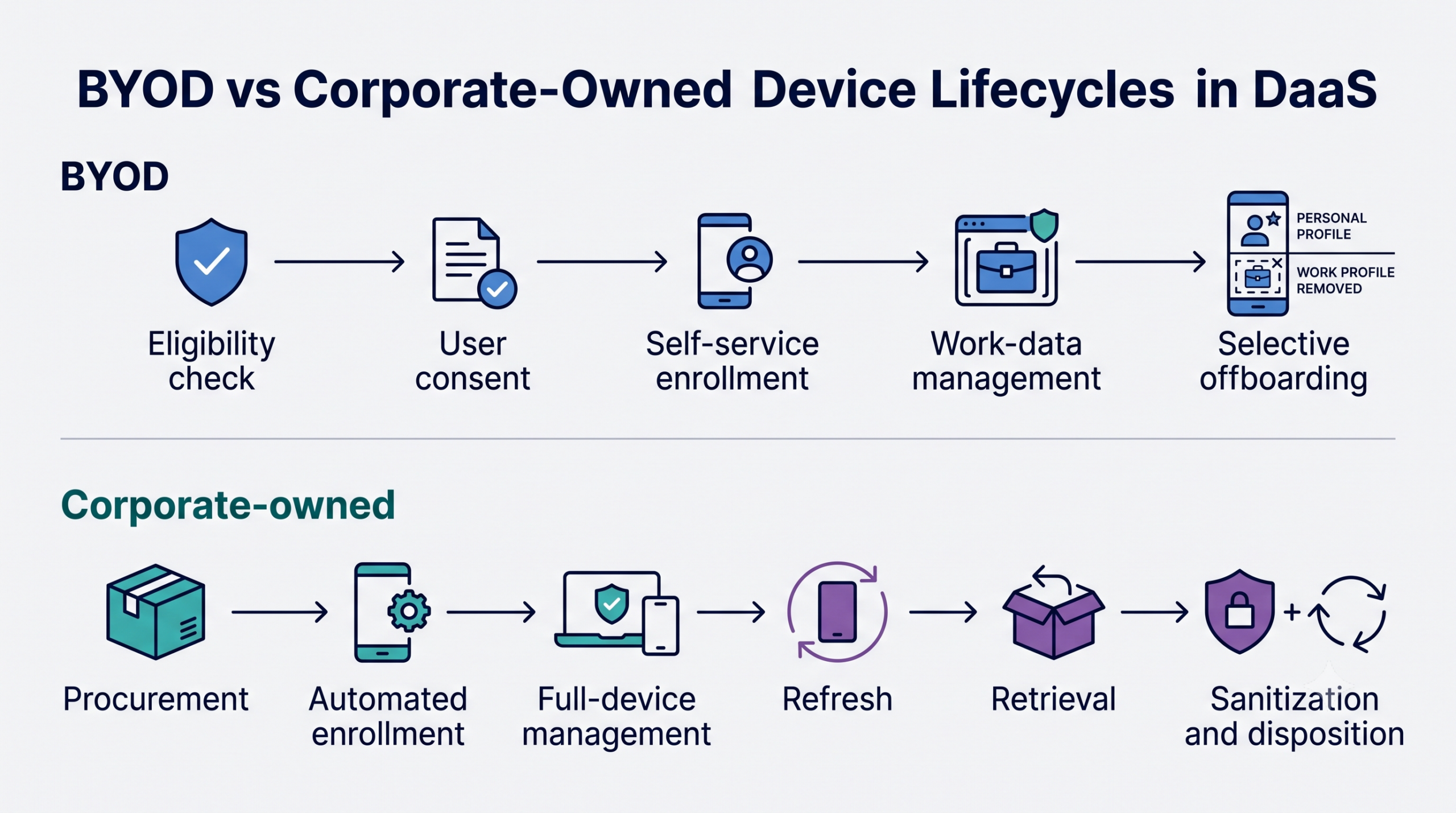
The lifecycles diverge at acquisition and remain different through provisioning, support, refresh and offboarding. Corporate-owned devices follow an asset lifecycle, while BYOD follows an access and corporate-data lifecycle.
BYOD and corporate-owned device lifecycle paths in a DaaS program
Corporate-owned device lifecycle:
Select approved hardware and operating systems.
Procure devices and record ownership, serial numbers and assigned users.
Register devices with the appropriate automated enrollment service.
Apply zero-touch provisioning, required applications and security baselines.
Monitor compliance, deploy updates and provide device-level support.
Refresh devices according to age, condition or support status.
Retrieve devices during replacement or employee offboarding.
Sanitize corporate data and verify that removal is complete.
Reassign, refurbish, return or dispose of the asset through an approved process.
BYOD lifecycle:
Verify that the device and user meet eligibility requirements.
Obtain informed consent for enrollment and management.
Use self-service enrollment to configure corporate access.
Manage work accounts, applications, configurations and data.
Enforce documented support and privacy boundaries.
Remove corporate access and managed data when eligibility or employment ends.
BYOD offboarding normally ends the management relationship. Corporate-device offboarding continues until the physical asset reaches its next approved state.
How Does DaaS Support Both BYOD and Corporate-Owned Devices?
DaaS supports both models by providing a consistent operating framework while assigning different services and controls according to device ownership. The objective is standardized administration, not identical management.
A provider can maintain separate service catalogs for personal and corporate endpoints. Each catalog should define eligible platforms, enrollment methods, security baselines, application access, support coverage, remote actions and offboarding procedures. BYOD may receive user-led enrollment and support limited to managed business resources, while corporate devices can receive automated provisioning and device-level assistance.
Several systems create the shared operating layer:
UEM applies configurations and records device status.
Identity services authenticate users and govern access.
Automated provisioning prepares corporate devices with minimal manual handling.
Application delivery supplies approved business software.
Compliance monitoring identifies endpoints that no longer meet access requirements.
Remote support resolves eligible issues within the agreed management boundary.
Workflows should be selected using multiple attributes rather than ownership alone. Device ownership, user role, operating system, compliance state and lifecycle stage collectively determine which configurations, applications, support actions and data-removal procedures apply to each endpoint.
How Should Clients Implement a Mixed-Ownership DaaS Strategy?
Clients should implement a mixed-ownership strategy by defining device categories, management authority and operational responsibilities before enrolling endpoints.
Inventory device use cases: Identify user roles, required applications, operating systems, data sensitivity and working conditions. Determine where BYOD is acceptable and where corporate hardware is necessary.
Classify ownership: Establish authoritative labels for personal and corporate-owned devices. Include employee-funded, company-funded and leased-device variations where applicable.
Important:
Classifying a device as personal or corporate-owned does not automatically apply the correct controls. Ownership must be connected to the appropriate device groups, policies, applications and support workflows.
Define management boundaries: Specify which inventory, configurations, applications, data and remote actions IT or the provider can access for each category.
Select enrollment methods: Use consent-based, user-led enrollment for BYOD and automated provisioning where supported for corporate devices.
Assign policies: Map security baselines, compliance rules, application entitlements and access requirements to ownership, platform and user role.
Establish support responsibilities: Document what the internal IT team, provider and employee must troubleshoot or replace.
Document offboarding: Define how corporate access and data are removed, when devices must be retrieved and what evidence confirms completion.
💡Pro tip:
Test offboarding before onboarding the wider fleet. Confirm that BYOD workflows remove only managed corporate data and that corporate-device workflows produce the required wipe, retrieval and reassignment evidence.
Define Ownership-Specific Security and Privacy Policies
Once responsibilities are assigned, translate them into separate security and privacy policies for each ownership model.
For BYOD, document which work applications, accounts, configurations and corporate data the organization can manage. Specify what device information is collected, when compliance is evaluated and which conditions can restrict access. Offboarding procedures should identify which managed applications, credentials, configurations and business data can be selectively removed, document platform-specific limitations and verify completion without intentionally deleting personal content.
Corporate-owned devices can use stronger security baselines because the organization controls the asset. Policies should address encryption, authentication, approved applications, OS updates, network access and permitted remote actions. They should also define recovery procedures for lost, stolen or reassigned devices.
Communicate these controls before enrollment. Employees should understand what administrators and the DaaS provider can view or change, including whether inventory collection, location access or remote support is enabled. Obtain appropriate consent and explain when corporate-data removal may occur. This transparency reduces disputes and helps ensure that technical controls remain within the approved management boundary.
Design Separate Enrollment and Offboarding Paths
Enrollment should direct each device into the appropriate management model from the outset. Eligible personal devices should use privacy-preserving, user-led enrollment, supported by clear consent and eligibility checks. Corporate-owned hardware should use automated or zero-touch provisioning where the platform supports it, reducing manual staging and configuration errors.
The workflow should verify the user’s identity and evaluate device ownership, operating system and enrollment method. These attributes should place the endpoint into the correct device group, security baseline, application set and support tier automatically. This reduces dependence on administrators manually selecting policies and limits the risk of applying corporate-level controls to a personal device.
Offboarding outcomes must also be defined before deployment. For BYOD, the process should revoke corporate access and remove managed accounts, applications, certificates, configurations and business data without deleting personal content.
Corporate-owned devices require additional steps. Depending on their next destination, IT or the DaaS provider may need to secure or wipe the device, retrieve it from the user, inspect its condition and verify data removal. The asset can then be prepared for reassignment, refurbishment, return or approved disposition.
Note:
Selective offboarding removes only the corporate data controlled by the applicable management framework. IT teams should verify what each platform and enrollment method can remove and confirm that the device has processed the command.
Zero-Touch Provisioning for Windows & Mac: A Unified Onboarding Strategy
See how zero-touch provisioning standardizes Windows and Mac onboarding with less manual device staging.
How Should Clients Measure DaaS Performance Across Both Models?
Clients should measure BYOD and corporate-owned devices separately because their service scope, support obligations and lifecycle outcomes differ. Combining both into one service-level view can hide failures specific to either ownership model.
Track KPIs such as:
Enrollment completion rate
Provisioning time
Policy deployment success
Device compliance rate
Support resolution time
Replacement turnaround time
Device retrieval success
Offboarding completion rate
Not every metric applies equally. Retrieval and replacement performance are central to corporate-owned fleets, while BYOD reporting should emphasize enrollment, compliant access and verified removal of corporate data.
Reports should segment results by ownership type, operating system, client department and lifecycle stage. This separation helps clients identify whether service gaps originate in enrollment, active management, support, refresh or offboarding—and assign corrective action to the responsible party.
How Hexnode Supports Mixed-Ownership DaaS Programs
Hexnode UEM classifies enrolled devices as Corporate or Personal through its Device Ownership setting. Administrators can predefine ownership, select it when sending enrollment requests or let users choose during enrollment. Changing the ownership label does not automatically modify existing policies; it provides an attribute administrators can use to organize devices and target appropriate controls.
Dynamic Device Groups can filter devices by ownership and update membership during periodic synchronization as device attributes change; administrators can also trigger a manual sync. Policies associated with ownership-based groups can therefore apply different configurations to personal and corporate endpoints without requiring administrators to assign each device manually.
Hexnode also supports enrollment methods aligned with each ownership model. Apple User Enrollment separates organizational data from personal data on BYOD endpoints, while Android Enterprise Work Profile creates a managed work container on personal Android devices.
For corporate-owned hardware, Hexnode supports automated provisioning through Apple Automated Device Enrollment, Android Zero-Touch Enrollment, Samsung Knox Mobile Enrollment and Windows Autopilot. These integrations allow organizations to enroll supported devices into the appropriate Hexnode management mode during initial setup.
What should a mixed-ownership DaaS agreement include?
A mixed-ownership DaaS agreement should define device ownership, management authority, support boundaries and offboarding responsibilities. It should also assign responsibility for procurement, enrollment, application licensing, incident response, replacement, retrieval and data removal.
Can the same security policy be applied to BYOD and corporate-owned devices?
No, the same policy should not automatically apply to both ownership models. BYOD policies should prioritize work-data protection and user privacy, while corporate-device policies can enforce broader controls over configuration, applications, updates, networks and remote actions.
What happens to company data when a BYOD device is offboarded?
Managed corporate accounts, applications, profiles, certificates and data should be selectively removed where the platform and enrollment method support it. IT teams should document platform-specific limitations and verify that the removal process has completed without intentionally deleting personal content.
Who is responsible for a lost device under a DaaS agreement?
Responsibility depends on the device’s ownership and the terms of the service agreement. The agreement should specify who reports the incident, restricts access, issues remote actions, replaces the device and handles retrieval or data removal.
How should IT teams test a mixed-ownership DaaS deployment?
IT teams should pilot every supported combination of ownership type, operating system and enrollment method. Testing should cover enrollment, policy delivery, compliance failures, lost-device response, employee offboarding and device replacement before production rollout.
Which KPIs should be tracked separately for BYOD and corporate devices?
BYOD metrics should emphasize enrollment completion, compliant access, support performance and confirmed removal of managed corporate data. Corporate-device metrics should additionally cover provisioning time, replacement turnaround, retrieval success, refresh status and secure offboarding.
Build a DaaS Strategy Around Device Ownership
Device-as-a-Service (DaaS) frameworks accommodate hybrid endpoint architectures—supporting both Bring Your Own Device (BYOD) and corporate-owned deployment models within a single tenant environment—contingent upon pre-deployment establishment of asset ownership boundaries, administrative control authority, and lifecycle governance responsibilities. Separating enrollment, policy enforcement, support and offboarding workflows helps protect employee privacy without weakening control over organization-owned assets.
Manage every device ownership model
Apply distinct enrollment, policy and offboarding workflows to personal and corporate-owned devices.
Associate Product Marketer at Hexnode focused on SaaS content marketing. I craft blogs that translate complex device management concepts into content rooted in real IT workflows and product realities.