Manual device searches and platform-specific scripting can increase technician effort, slow response, and strain SLA performance.
Hexnode Genie supports natural-language device filtering and AI-assisted script generation, while administrators retain review and testing control.
Hexnode Automations extends supported workflows with time-based or activity-based execution, helping DaaS teams reuse repository scripts across managed fleets.
Why Does AI-Powered DaaS Fleet Management Matter at Scale?
AI-powered DaaS fleet management becomes harder to scale because growing customer fleets multiply routine monitoring, troubleshooting, and configuration work. DaaS teams must repeat these tasks across different clients and operating systems. As a result, workflows that work for smaller fleets can quickly become operational bottlenecks.
First, administrators need fast answers about device status, compliance, and fleet health. However, finding those answers often requires navigating dashboards, applying filters, and reviewing individual client environments. As the customer base grows, repeated console navigation adds friction to everyday troubleshooting and monitoring.
Routine endpoint administration creates a second challenge. Windows, macOS, and Linux use different commands, scripting languages, and system interfaces. Therefore, IT teams often need platform-specific scripts for configuration, maintenance, and troubleshooting tasks. Administrators must also understand each platform before adapting or creating those scripts.
These challenges compound as DaaS providers onboard more customers and endpoints. More dashboard navigation consumes technician time, while scripting requirements increase the technical effort behind routine operations. Consequently, teams can take longer to investigate endpoint issues or prepare devices for deployment.
For DaaS providers, scalability depends on reducing both forms of repetitive work. AI-powered DaaS fleet management can help remove these operational bottlenecks while keeping administrators in control.
What Does Manual Fleet Administration Cost DaaS Providers?
Manual fleet administration increases technician effort, delays issue resolution, and makes consistent SLA performance harder as DaaS operations scale. These costs become more visible when teams manage growing endpoint volumes across multiple clients.
Consider a basic operational question: Which client devices are non-compliant right now? If technicians must navigate dashboards and apply multiple filters, getting that answer takes longer. Consequently, teams may identify compliance issues later and respond to endpoint incidents more slowly. These delays can increase SLA risk when customers expect timely remediation.
Scripting dependencies create another bottleneck. Routine tasks may require PowerShell for Windows, Bash or Zsh for macOS and Linux, or Python for advanced cross-platform workflows. However, not every technician has the same scripting expertise. When only senior staff can confidently create or modify scripts, routine requests can accumulate around a limited group.
As a result, senior technicians spend valuable time on repeatable work instead of complex escalations. Meanwhile, less-experienced technicians may wait for scripts before completing endpoint tasks.
For DaaS providers, these bottlenecks directly affect operational performance. Higher technician effort can increase hours per device, strain SLA performance, and create service friction that affects client retention.
50% of surveyed digital trust professionals said their organizations use AI to automate repetitive tasks, while 62% reported using AI to increase productivity.
How Can DaaS Providers Scale AI-Powered Fleet Management?
AI-powered DaaS fleet management uses AI-assisted tools to reduce manual work when administrators query endpoint information, create scripts, and manage recurring fleet tasks. Hexnode Genie brings AI assistance into these workflows through natural-language device filtering and script generation.
For DaaS providers, this approach addresses the two operational bottlenecks that become harder to manage at scale. Administrators can use Hexnode Genie to filter managed devices using natural-language prompts. With ‘Allow Genie AI access to device details’ enabled, Genie can access details such as device name, serial number, associated user, and compliance status. They can also translate routine endpoint requirements into scripts without starting every script from scratch.
Query Fleet Data with Natural Language
Instead of manually building filters for routine fleet checks, administrators can describe the device criteria they need in natural language. Genie then filters the managed-device inventory against that request.
With Allow Genie AI access to device details enabled, technicians can also access details such as device name, serial number, associated user, and compliance status. This helps teams move from an operational question to relevant endpoint context with fewer manual steps.
Generate Endpoint Scripts with Hexnode Genie
Genie also functions as Hexnode UEM’s AI-powered Terminal script generator. Administrators describe the endpoint task in natural language, and Genie generates a corresponding script.
However, script generation does not remove administrator oversight. Hexnode documents a review-driven workflow:
Generate the required script with Genie.
Copy the generated code to the built-in Script Editor.
Review and modify the script as required.
Save the reviewed script to the Hexnode Repository for deployment.
This workflow accelerates script creation while preserving administrator review before broader deployment.
Featured resource
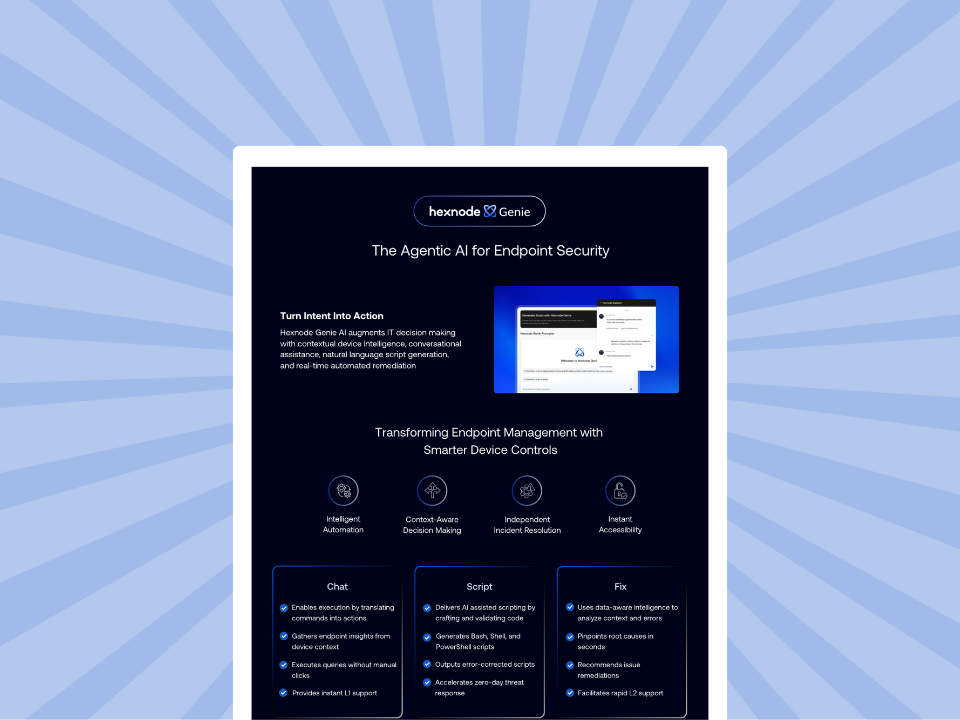
Hexnode Genie Info Sheet
See how Hexnode Genie brings AI-assisted device insights, natural-language script generation, troubleshooting, and endpoint actions into everyday UEM workflows.
How Can DaaS Providers Build a Scalable AI-Assisted Fleet Workflow?
DaaS providers can combine Hexnode Genie’s natural-language device filtering and script generation with manual script validation and supported Hexnode UEM deployment methods.
A practical workflow looks like this:
Identify the repeatable task. Start with a recurring configuration, maintenance, troubleshooting, or remediation requirement. Clearly define what the endpoint should do when the workflow finishes.
Confirm the affected fleet. Use natural-language prompts in Hexnode Genie to filter relevant managed devices. With ‘Allow Genie AI access to device details’ enabled, teams can also access details such as compliance status.
Give Genie a precise prompt. Specify the target operating system and clearly describe the endpoint task and desired outcome. Hexnode recommends specifying the target operating system so Genie can use the appropriate platform-specific commands.
Review the generated script. Move Genie’s output into the built-in Script Editor. Then, inspect the commands and modify the script where the deployment requires additional logic or environment-specific settings.
Run a controlled test. Manually validate the generated script on a test system before performing bulk deployment.
Save the reviewed script to the Hexnode UEM repository. Execute Custom Script supports Windows, macOS, Android, and Linux, while Scripts Policy and Hexnode Access Policy are available for Windows and macOS.
Deploy across the required fleet. Use the appropriate supported Hexnode UEM deployment method to execute the reviewed script on the intended managed endpoints.
Technicians can save reviewed scripts to the Hexnode repository and use them through supported deployment methods.
How Do DaaS Teams Move from One-Off Scripts to Repeatable Automation?
DaaS teams can move beyond one-off scripts by separating script creation from automated execution. Hexnode Genie helps administrators generate scripts from natural-language instructions. Meanwhile, Hexnode Automations supports time-based or activity-based execution of repository scripts.
A practical workflow follows three stages:
Generate and validate the script with Genie. Describe the endpoint task in natural language, review the generated code, and manually validate it on a test system.
Store the reviewed script in the Hexnode Repository. Save the reviewed script to the Hexnode Repository, where it remains available for supported deployment methods.
Configure the script in an Automation. Create the Automation, select its target platform, and configure the Scripts action. Then define Settings and Schedule, Target Filtering, and Review.
Hexnode Automations support time-based and activity-based triggers. During Target Filtering, administrators can use Include/Exclude Groups or Custom Filters. Custom Filter categories include Device, User, Network, and Device Status.
The Scripts action executes repository scripts on supported Windows, macOS, Linux, and Zebra printer environments. Platform-specific prerequisites apply. In this workflow, Genie assists with script creation, while Automations supports time-based or activity-based triggers of repository scripts.
Note:
Platform prerequisites include:
Windows: Windows 10/11 Pro, Enterprise, or Education with Agent 4.2.2+
macOS: macOS 10.11+ with Agent 1.2+
Linux: Supported Debian, Fedora, or Ubuntu devices with the Hexnode Agent
Zebra printers: Link-OS, typically version 5.0 or later
AI-Powered Endpoint Automation with Hexnode Genie
Explore how AI-assisted scripting, conversational endpoint management, and automation can help endpoint operations.
Why Does Hexnode Genie Fit DaaS Fleet Operations?
Hexnode Genie fits DaaS fleet operations by reducing the repetitive administrative work behind device discovery and endpoint scripting. As customer fleets grow, these capabilities help technicians spend less time searching for information or building routine scripts from scratch.
For everyday fleet checks, natural-language device filtering gives technicians a faster way to identify relevant managed devices. This directly addresses the dashboard-navigation friction that grows when teams repeatedly investigate endpoint status across customer environments.
Genie’s AI-assisted script generation addresses a different bottleneck. Technicians can describe an endpoint task in natural language and use the generated script as a starting point. As a result, routine scripting tasks do not always need to begin with manually written code.
The Script Editor lets administrators modify or format AI-generated code, while the Hexnode Repository stores saved scripts for supported deployment methods. Therefore, useful scripts can remain available beyond the immediate task.
Within the scripting workflow, Genie assists with script creation, while Hexnode Automations supports time-based or activity-based triggers of repository scripts on eligible platforms. This distinction helps DaaS teams move from solving individual endpoint requests toward repeatable fleet-management processes as customer environments scale.
FAQs
Can Hexnode Genie find device and compliance information across a DaaS fleet?
Yes. Hexnode Genie supports natural-language device filtering. With Allow Genie AI access to device details enabled, Genie can also access information such as device name, serial number, associated user, and compliance status.
Can DaaS technicians use Hexnode Genie without advanced scripting expertise?
Hexnode Genie generates scripts from natural-language descriptions of endpoint tasks. Administrators should still review and modify generated scripts before deployment.
How should DaaS teams deploy AI-generated scripts safely across large fleets?
Teams should review and modify generated scripts as required. They should then manually validate execution on a test system before bulk deployment.
What is the difference between Hexnode Genie and Hexnode Automations?
Hexnode Genie assists with device filtering and natural-language script generation. Hexnode Automations supports scheduled or event-triggered management operations, including repository-based Scripts actions on eligible platforms.
How can DaaS providers turn AI-generated scripts into recurring workflows?
Hexnode Genie can save generated scripts to the Hexnode Repository. Separately, Hexnode Automations can execute repository scripts through the Scripts action on eligible Windows, macOS, Linux, and Zebra printer environments.
Scale DaaS Fleet Management with Hexnode Genie
AI-powered DaaS fleet management should help providers scale endpoint operations without requiring technician effort to grow at the same rate.
Hexnode Genie supports natural-language device filtering and AI-assisted script generation, while Hexnode Automations supports time-based or activity-based triggers of supported management actions.
The result is a more scalable operating model for teams managing endpoint tasks across growing customer fleets. Technicians can spend less time repeating routine administrative steps and focus more attention on provisioning, troubleshooting, and higher-value client requirements.
Ready to evaluate the impact on your DaaS operations? Request a personalized demo focused on reducing technician effort across customer fleets.
Not ready for a demo? Use the Hexnode ROI Calculator to estimate the potential operational value for your environment.
Reduce Repetitive Work Across Your DaaS Fleets
Put Hexnode UEM and Genie to work across your endpoint operations. Explore natural-language device filtering, AI-assisted scripting, and scalable fleet management.
I write at the intersection of technology, process, and people, focusing on explaining complex products with clarity. I break down tools, systems, and workflows without any noise, jargon, or the hype.