Manual, device-by-device Linux administration becomes increasingly difficult to scale. Centralized, policy-driven management can provide a structured way to standardize security and administration across a growing fleet.
Reliance on fragmented SSH sessions, remote-access tools, and one-off scripts without standardized management processes can contribute to configuration drift, delayed patching, and compliance blind spots as fleets grow.
Depending on platform and operating-system support, centralized UEM can help standardize onboarding and provide capabilities such as automated patching and ongoing compliance monitoring while helping organizations minimize end-user disruption.
Hexnode UEM extends this model to supported Linux devices through the Hexnode Linux Agent, which enables communication between enrolled Linux endpoints and the Hexnode UEM console.
The Hidden Challenges of Linux Device Fleet Security at Enterprise Scale
Linux device fleet security becomes a real operational burden once your endpoint count outpaces your admin team’s manual capacity.
Initially, Linux deployments may begin with a limited number of developer workstations, servers, or specialized workloads before expanding to additional business use cases. Today, however, Linux quietly powers point-of-sale terminals, edge devices, and other business-critical infrastructure across multiple sites.
Why Linux Management Gets Harder as Fleets Grow
IT admins feel this shift firsthand. What once felt manageable through direct terminal access can expand across:
Data centers
Branch offices
Remote locations
Because Linux does not provide a single native tool for fleet-wide oversight across distributions and use cases, organizations may rely on a combination of management tools and administrative processes.
Where Manual Linux Administration Creates Overhead
Depending on the environment, these processes may include:
Direct SSH sessions for troubleshooting and configuration
Remote network access
Bash scripts for patching, compliance checks, and other administrative tasks
This approach can become increasingly difficult to sustain as the fleet grows. Additional endpoints can increase administrative overhead unless repetitive management tasks are standardized or automated.
Without sufficient standardization or automation, organizations can face:
Increased manual administrative overhead
Visibility gaps
Slower patch cycles
Inconsistent security configurations across sites
Therefore, as the fleet grows, IT leaders should establish standardized, controlled management processes rather than relying primarily on ad hoc administration.
What Happens When Linux Device Fleet Security Is Fragmented?
Fragmented Linux management can increase the risk of security gaps and compliance issues by making consistent configuration and oversight more difficult.
Limited endpoint visibility can make it more difficult for IT teams to comprehensively track devices that:
Run outdated software
Carry misconfigurations
Expose known vulnerabilities
As a result, unmanaged inconsistencies across distributed teams can contribute to security and visibility gaps over time.
How Configuration Drift Develops Across Linux Fleets
Configuration drift occurs when the actual configuration of systems diverges from an established baseline configuration over time. In particular, several factors can contribute to this divergence:
Manual changes
Software updates
Administrative actions
Inconsistent configuration processes
Without effective centralized visibility or other configuration-monitoring mechanisms, these inconsistencies may be harder to identify before an assessment, audit, or security incident.
Operational Risks of Fragmented Linux Management
These gaps in Linux device fleet security can contribute to several operational risks:
Delayed patching across the fleet
This is particularly relevant when organizations lack comprehensive asset visibility and standardized patch-management processes.
Weak compliance tracking
This can occur when evidence is distributed across scripts, session logs, and other records without a standardized process for collecting, retaining, and reviewing it.
Heavy dependence on individual admin expertise
This creates key-person risk and can disrupt management activities when experienced personnel are unavailable.
These risks can reinforce one another. For example, weak patch-tracking processes can make it more difficult to identify and document systems that have missed required updates.
Without effective configuration and security monitoring, these gaps may remain undetected until an assessment, audit, or security incident brings them to light.
Therefore, fragmented Linux management does not just increase administrative overhead. Inconsistent patching and configuration can also increase security and compliance risk.
Moving Beyond SSH: Centralizing Linux Device Fleet Security
Unified Endpoint Management (UEM) generally refers to a centralized approach for managing and securing multiple types of supported endpoints. However, specific management capabilities vary by platform, operating system, and vendor.
In short, UEM reduces reliance on manual, device-by-device administration by enabling policy-driven, fleet-wide control for supported management functions. This gives admins a more consistent, centralized view of supported and managed endpoints, helping address fragmentation risks.
How UEM Changes Linux Fleet Management
UEM developed from earlier mobile and enterprise mobility management approaches to provide unified management for multiple endpoint types, including mobile devices and PCs.
Applied to Linux, this model can:
Centralize supported configuration policies
Reduce reliance on scattered scripts
Reduce device-by-device SSH administration
Enrolled devices can be automatically assigned centrally defined configuration policies. Established security baselines can then be maintained through ongoing configuration monitoring and change control.
Three Ways Centralized Management Changes Daily Operations
This centralized approach changes daily operations in three concrete ways:
Policy enforcement reduces manual configuration. Admins define and maintain security baselines centrally, and supported configurations can then be applied automatically to applicable enrolled devices.
Patching becomes systematic and risk-based instead of primarily reactive. Organizations can use scheduled deployment cycles for routine updates while accelerating remediation based on factors such as known exploitation, vulnerability severity, affected-asset criticality, exposure, and organizational risk.
Compliance monitoring can be performed on an ongoing basis. Organizations can set a frequency appropriate to organizational risk and operational requirements. Instead of relying solely on manually reconstructed session records, admins can use centrally collected compliance data to identify deviations from established baselines.
Consequently, centralized management can reduce Linux device fleet security’s dependence on any single administrator’s memory or availability.
A centralized management platform can also provide current information about:
Which monitored devices conform to defined security baselines
Which devices require attention
In turn, this information can contribute evidence for subsequent compliance assessments and audits.
Balancing Linux Security and End-User Productivity
This model can also help organizations minimize disruption to end users when management policies and maintenance activities are implemented appropriately.
Developers and engineers running Linux workstations need their machines available and responsive. Policy-driven management should therefore balance security requirements with operational needs.
Organizations can schedule:
Configuration assessments
Compliance checks
Potentially disruptive patching activities
These activities can be scheduled in ways that minimize unnecessary impact on users.
With appropriate scheduling and policy design, centralized management can help limit unnecessary disruption to end users.
As Linux fleets grow, standardized and automated management becomes increasingly important for maintaining consistent security controls while limiting administrative overhead.
Managing Linux with UEM: The Modern Enterprise Guide
Explore how centralized UEM can help distributed IT teams improve fleet visibility.
Step-by-Step Guide to Linux Device Fleet Security
Securing a Linux fleet requires a repeatable process rather than ad hoc fixes applied device by device.
The following seven steps build a standardized, auditable framework for Linux device fleet security at any scale. Each step assumes a centralized management platform rather than manual terminal access.
Step 1: Standardize device onboarding.
Define a standardized device-management enrollment workflow.
Where the network architecture supports admission controls, organizations can separately require devices to satisfy defined onboarding or verification requirements before receiving normal production access.
Where appropriate network admission controls are implemented, organizations can require managed devices to complete the defined verification and registration process before receiving normal production access.
The enrollment process should:
Register the device using the organization’s approved enrollment and authentication mechanisms
Apply the baseline automatically during or after enrollment where supported. Then, monitor devices at an appropriate frequency for subsequent deviations from the approved configuration.
Because baselines are centrally managed, approved changes can be applied consistently to applicable devices following the organization’s change-control and deployment procedures.
Step 3: Automate continuous patch management.
Establish regular patch assessment and deployment cycles while prioritizing urgent updates based on vulnerability and organizational risk.
Organizations should:
Establish regular patch assessment cycles
Schedule approved patch deployments within appropriate maintenance windows
Prioritize urgent updates according to risk
Maintain expedited processes for vulnerabilities that require faster remediation
Consequently, organizations can address many known vulnerabilities according to risk-based timelines through patching or other appropriate mitigations rather than waiting for an incident to trigger action.
Step 4: Deploy required applications at scale.
Prepare and centrally deploy approved software packages appropriate to each supported device group rather than installing applications individually on each machine.
Depending on the Linux role, these applications can include:
Security agents
Monitoring tools
Business-critical applications
Before broad deployment, test approved software for compatibility and assess whether its installation would introduce unintended changes to established security configurations.
Step 5: Enable remote troubleshooting without physical access.
Configure remote session and command-execution capabilities so admins can diagnose and resolve supported issues remotely.
This can reduce the need for:
Physical access to the device
Separate manual remote-access sessions
These capabilities can become increasingly valuable as the fleet spans multiple offices or remote locations.
Organizations should log remote administrative activity in accordance with their security, audit, and retention requirements to support accountability and subsequent review.
Step 6: Set up dynamic compliance monitoring.
Configure the platform to assess devices against the baseline at a frequency appropriate to organizational risk.
Organizations can then:
Flag devices that deviate from approved configuration baselines
Identify devices that fail defined compliance criteria
Route other deviations through established assessment and change-control processes
Step 7: Standardize scalable script execution.
Store approved scripts centrally and execute them against appropriate device groups or individual systems according to the administrative task and change-control requirements.
This can cover routine tasks such as:
Log rotation
Custom configuration checks
System-state checks
One-time remediation actions
Before running a script fleet-wide, test it on a limited but representative set of devices and configurations. This helps verify expected behavior and identify potential adverse effects.
Together, these seven steps reduce reliance on scattered SSH sessions and one-off scripts by establishing a more structured, repeatable management process.
Because these steps support ongoing monitoring, organizations can improve visibility into managed-device configurations and identify deviations from established baselines more consistently.
This reduces reliance on any single administrator’s manual effort and can help mitigate the fragmentation risks covered earlier in this article.
Featured resource
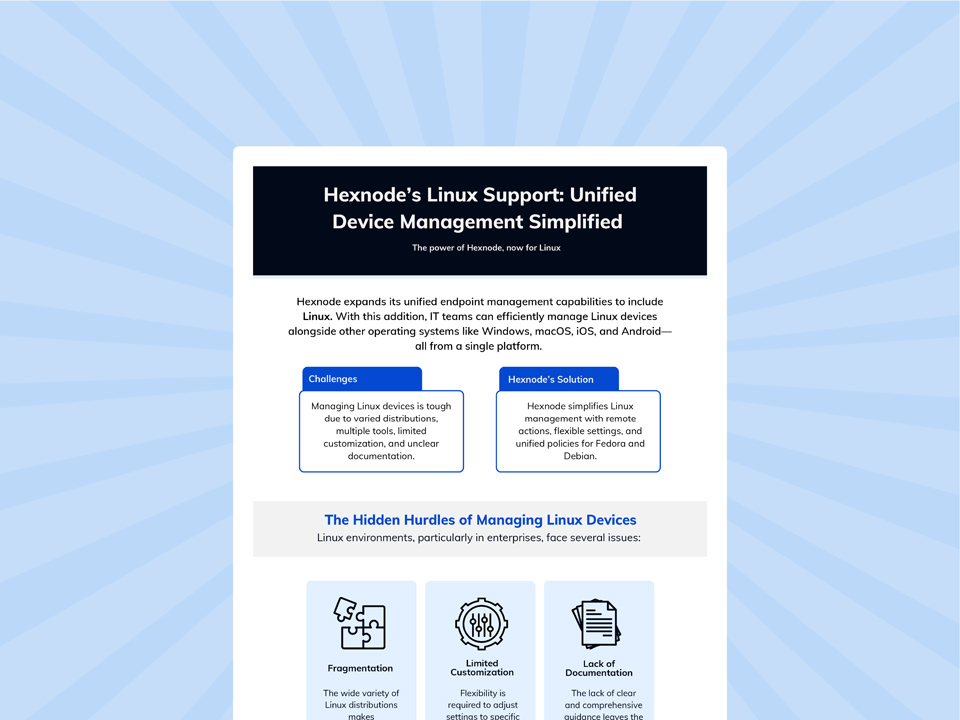
Hexnode’s Linux Support: Unified Device Management Simplified
Explore how Hexnode brings Linux endpoints into a centralized management model for easier administration, visibility, and security.
Centralize Linux Device Fleet Security with Hexnode UEM
A centralized platform closes the gaps a fragmented Linux fleet creates, and Hexnode UEM applies this model specifically to Linux endpoints.
Instead of scattered SSH sessions and one-off scripts, admins manage the entire fleet from a single console. This directly resolves the visibility and consistency problems covered earlier in this article.
Hexnode’s Linux Device Management uses the Hexnode Linux Agent (HLA) to manage supported Linux devices.
The Hexnode Linux Agent establishes communication between supported Linux devices and Hexnode UEM for:
Centralized management
Policy enforcement
As long as the managed Linux device can communicate with the required Hexnode services, admins can manage it remotely through the Hexnode UEM console.
Automate Linux Administration with Custom Scripts
For recurring administrative work, Hexnode’s Execute Custom Script action deploys Bash (.sh) scripts to supported Debian, Fedora, and Ubuntu endpoints from the console.
Admins can use scripts for tasks such as:
User management
Log rotation
Service restarts
Deploying configurations or fixes
Admins can verify script execution from the device’s Action History and use Show Output to view logs and return messages from the script execution.
Monitor Linux Device Compliance Centrally
Hexnode UEM also provides centralized compliance information for managed devices. This allows admins to identify:
Devices that meet configured compliance criteria
Devices that require attention
Consequently, admins can use centrally reported compliance information to monitor managed Linux devices against configured criteria and identify devices that require attention.
What is the best way to secure a growing Linux device fleet?
A scalable approach combines standardized onboarding, centrally managed security baselines, systematic patching, and ongoing compliance monitoring. Centralized endpoint management can reduce reliance on device-by-device SSH administration and help maintain consistent configurations across supported Linux endpoints.
How can organizations prevent configuration drift across Linux devices?
Organizations can reduce configuration drift by defining approved security baselines and continuously monitoring managed devices for deviations. Centralized policies also make it easier to apply approved configuration changes consistently instead of relying on manual changes across individual endpoints.
How often should Linux devices be checked for security compliance?
Linux devices should be assessed at a frequency that reflects the organization’s security risk and operational requirements. Higher-risk or business-critical systems may require more frequent checks, while centrally collected compliance data can help administrators identify devices that deviate from established criteria.
Can UEM replace SSH for Linux device management?
UEM can reduce dependence on SSH by centralizing supported configuration, compliance, scripting, and remote administration functions. SSH may still be useful for specific troubleshooting or administrative tasks, but routine fleet management can be standardized through centralized policies and automation.
How should organizations prioritize Linux security patches?
Linux security patches should be prioritized according to risk rather than handled only through fixed schedules. Relevant factors can include known exploitation, vulnerability severity, asset criticality, exposure, and organizational risk, with expedited remediation processes for vulnerabilities requiring faster action.
Can Hexnode UEM run scripts remotely on Linux devices?
Yes, Hexnode UEM can execute Bash (.sh) scripts on supported Debian, Fedora, and Ubuntu endpoints through its Execute Custom Script action. Administrators can review execution details in Action History and use Show Output to inspect logs and return messages from the script.
Conclusion
Visibility and consistent configuration are important components of Linux device fleet security. Controlled automation can help organizations apply security practices at scale.
As this guide showed, fragmented administrative processes and insufficiently standardized patch management can create security and operational risks that become harder to manage as the fleet grows.
Centralized, policy-driven management can reduce these gaps by replacing much of the ad hoc administration with more repeatable and auditable processes.
A broader Linux fleet security program can include:
Standardized onboarding
Effective patch management
Ongoing compliance monitoring
Because these processes are centrally managed, they can help IT teams improve consistency and reduce reliance on any single administrator’s memory or availability.
Hexnode UEM extends centralized endpoint management to supported Linux devices, with capabilities subject to the applicable distribution, version, agent version, and feature-specific requirements.
Ultimately, scalable Linux security benefits from standardized policies and repeatable processes that complement individual expertise and reduce dependence on undocumented administrative knowledge.
Strengthening Linux device fleet security can reduce the security and compliance risks associated with fragmented management.
Ready to simplify Linux fleet management?
Bring supported Linux endpoints into Hexnode UEM and explore centralized enrollment, policy management, remote administration, and more.
I write at the intersection of technology, process, and people, focusing on explaining complex products with clarity. I break down tools, systems, and workflows without any noise, jargon, or the hype.