Fragmented, manually managed Linux endpoints create rising security, compliance, and IT-efficiency risks that Unified Endpoint Management (UEM) is built to solve.
Linux now spans servers, workstations, and IoT devices, and manual scripts or SSH access can’t scale to secure them consistently.
UEM can replace fragmented management tools with a centralized console and standardized controls across the Linux distributions supported by the selected platform.
Hexnode UEM manages supported Linux devices alongside Windows and macOS, using CLI-based enrollment and remote troubleshooting capabilities from the Hexnode console.
The benefits of managing Linux with UEM become clear as Linux environments grow more distributed and complex. By bringing Linux endpoints into a centralized management framework, IT teams can standardize configurations, strengthen security oversight, automate routine administration, and manage Linux alongside other enterprise endpoints. This guide explores those benefits and explains how UEM can simplify Linux management at scale.
Why Managing Linux with UEM Is Becoming Essential
Managing Linux with UEM has become a priority as Linux spreads well beyond the server room. Today, enterprises run Linux across a much wider mix of environments, including:
Backend servers and cloud infrastructure
Developer workstations and engineering laptops
Edge computing nodes
IoT and embedded hardware
This broader reach raises the stakes for consistent patching and security across every environment.
Distributions, kernel versions, and configurations now vary widely across every layer, creating a highly fragmented ecosystem. Each environment often runs a different distribution, so admins juggle different package managers and patch cycles.
Why Manual Methods and Siloed Tools Fall Short
As a result, IT admins can no longer rely on outdated, manual methods to keep up. Custom Bash scripts and direct SSH access worked well for a handful of servers. However, these approaches break down fast across distributed fleets of hundreds or thousands of devices. Because each script often targets one distribution or configuration, updates become slow and error-prone.
This complexity also creates operational friction beyond the technical side. IT teams often manage Linux devices in a silo, separate from Windows and macOS fleets. Consequently, they must toggle between multiple, disconnected tools just to see the full picture. These gaps are exactly why more organizations now favor managing Linux with UEM over stitching together separate point tools.
The Hidden Costs of Unmanaged Linux Endpoints
Unmanaged Linux endpoints carry serious hidden costs, starting with security. In May 2026, researchers disclosed CVE-2026-46333, a Linux kernel information-disclosure flaw introduced in 2016 that could allow an unprivileged local user to read sensitive root-owned files, including SSH host private keys and /etc/shadow.
The vulnerability affected multiple distributions using vulnerable kernel versions, with working exploits demonstrated against systems including Debian, Fedora, and Ubuntu. Exposure of SSH host keys or cached credentials may enable further attacks, depending on how those credentials and trust relationships are configured.
Incidents like this add up fast. In fact, IBM’s 2026 Cost of a Data Breach Report puts the global average at a record $4.99 million. Regulatory fines and lost business push that number even higher.
The Compliance and Productivity Toll
Compliance creates a second, quieter cost. Without centralized oversight, IT Directors cannot easily prove to auditors that remote Linux devices stay encrypted and secured. As a result, every audit cycle turns into a scramble to manually verify device-by-device compliance. Moreover, regulators and customers increasingly expect documented proof, not verbal assurance, of policy enforcement.
The final cost shows up in wasted IT hours. Meanwhile, administrators often provision, troubleshoot, and update Linux endpoints one device at a time. Because none of this scales, routine maintenance consumes hours that could go toward strategic projects. Consequently, skilled IT staff spend their time on repetitive manual work instead of higher-value initiatives.
None of these costs are hypothetical for organizations running Linux at scale. These compounding costs help explain the benefits of managing Linux with UEM instead of relying on fragmented scripts and manual processes.
Linux Unified Endpoint Management (UEM) provides a centralized approach to deploying, securing, and monitoring Linux devices alongside other operating systems from a single unified console. The benefits of managing Linux with UEM include more consistent policy enforcement, centralized visibility, and greater automation across supported Linux environments.
From Legacy Tools to a Modern UEM Agent
IT teams once relied on legacy Client Management Tools (CMT) built primarily for Windows desktops and laptops. These platforms treated Linux support as a checkbox feature, if they offered it at all. As a result, many administrators use configuration-management and automation platforms such as Ansible, Puppet, or Salt to manage Linux systems.
These platforms are primarily designed for configuration management and infrastructure automation, and their workflows differ from those of a unified endpoint management platform.
Modern Linux UEM closes that gap with a lightweight, purpose-built agent installed directly on each device. An endpoint agent can maintain regular communication with a central management service, while SSH-based automation typically depends on separately configured orchestration or scheduling.
Consequently, admins gain centralized enrollment, patch management, and Linux-specific policy controls from the same Hexnode console used to manage Windows and macOS devices. This shift from reactive scripting to proactive, agent-based management is what makes enterprise-scale Linux governance realistic.
Why Agent-Based Architecture Matters
Agent-based architecture differs fundamentally from the agentless, SSH-push model many admins know. Agent-based platforms commonly use outbound communication, but devices must still be able to reach the vendor’s required domains and network endpoints. This removes the need to keep inbound SSH ports open across an entire fleet, shrinking the attack surface. Regular agent check-ins can provide more timely visibility than infrequent manual or scheduled assessments, subject to platform and connectivity limitations.
Three Core Architectural Benefits
This architecture delivers three core advantages that legacy tools could never offer. Together, they turn Linux from a management afterthought into a first-class citizen inside the broader endpoint strategy.
Standardized policy enforcement: One policy definition applies consistently across supported Debian- and Fedora-based distributions, regardless of each distribution’s native configuration syntax.
Real-time cross-platform visibility: A single dashboard surfaces Linux device health, patch status, and compliance data right alongside Windows, macOS, and mobile endpoints.
Zero-trust automation: The platform continuously verifies device posture, such as disk encryption and patch level, before granting access to corporate resources.
This last capability matters most for compliance-driven organizations facing strict audit requirements. Zero-trust itself follows the framework NIST defines in SP 800-207, which shifts trust decisions away from network location.
In a zero-trust architecture, access-control systems can incorporate device-health information supplied by endpoint-management or security tools rather than granting trust solely because of network location. The posture signals and enforcement options available to a zero-trust implementation vary by operating system and management platform.
Remote Linux Management in the Enterprise
Learn how to remotely enroll, secure, patch, monitor, and troubleshoot Linux devices at scale.
How Managing Linux with UEM Standardizes Your Fleet
Standardizing Linux management across a fleet comes down to three steps.
Step 1: Push Baseline Configurations Before Devices Connect
The first step locks down baseline configuration before a device ever touches the corporate network. IT teams push standardized Wi-Fi, VPN, and identity access policies to every endpoint as part of initial enrollment. As a result, no device reaches internal resources without already meeting minimum security requirements. This pre-connection enforcement closes a common gap where unmanaged devices briefly touch the network before any policy applies.
Identity access protocols typically tie into an existing directory service, so device policy and user identity stay linked. Where organizations enforce network access controls or conditional access policies, devices that fail required security or configuration checks may be prevented from accessing protected network resources.
This baseline approach turns network access into a policy decision instead of a manual gatekeeping task. Many organizations integrate baseline compliance with conditional access solutions so that noncompliant devices can automatically lose access to protected resources.
Step 2: Automate Onboarding and Provisioning
The second step removes manual setup from new employee onboarding. Organizations can automate Linux onboarding using deployment tools or scripted enrollment workflows after the operating system has been installed. When combined with automated deployment workflows, Linux onboarding can significantly reduce the amount of manual setup required from IT administrators. This scales cleanly whether an organization onboards five new hires a month or five hundred.
A typical onboarding workflow installs the management agent, applies organizational settings, configures device naming where applicable, and deploys required software after enrollment. Authentication matters here as much as speed, since an unverified link could hand a device to the wrong user.
After enrollment, the device reports to the management console, where its compliance status is evaluated as policies and configurations are applied.
Step 3: Enforce Continuous Compliance in the Background
The third step keeps devices compliant long after onboarding ends. Automated patch management applies kernel and security updates on a defined schedule. Remote script execution can automate routine maintenance tasks, although the impact on end users depends on the actions performed by the script. Consequently, compliance becomes a constant background state rather than a periodic scramble before an audit.
If a device drifts out of compliance, management platforms can detect and report the change during subsequent monitoring or synchronization, depending on their telemetry and reporting model. IT can then trigger a remediation script remotely instead of dispatching someone to the device in person. Over time, this feedback loop turns fleet-wide security from a reactive fire drill into routine, automated upkeep.
This kind of repeatable, auditable process is what separates mature Linux management from ad hoc scripting. That repeatability is one of the key benefits of managing Linux with UEM instead of piecing together scripts and manual checklists.
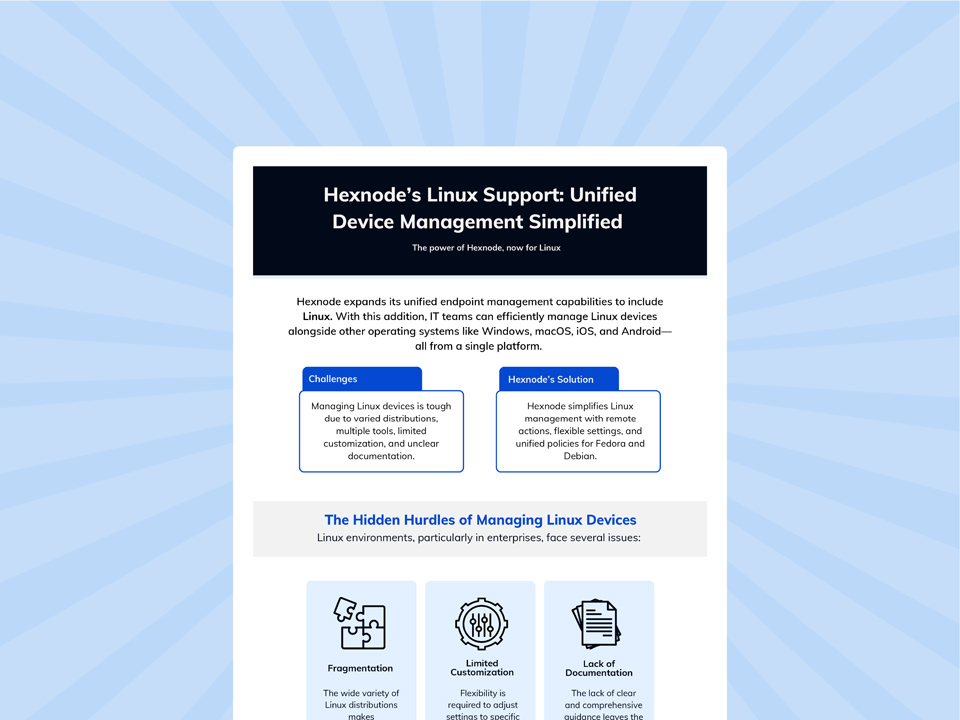
Featured resource
Hexnode’s Linux Support: Unified Device Management Simplified
Explore how Hexnode brings Linux endpoints into a unified dashboard with application control, remote access, monitoring, reporting, and supported configuration policies.
Hexnode brings direct structure to this fragmented ecosystem by supporting Linux natively inside its UEM console. The platform manages major sub-distributions under both the Debian and Fedora families, including Ubuntu, Debian, Fedora, and Linux Mint. As a result, IT teams see these devices in one Linux device management dashboard alongside Windows, macOS, and mobile endpoints instead of relying on separate management tools.
Two Enrollment Methods for Every Deployment Type
Two CLI-Based Enrollment methods handle onboarding for Linux fleets specifically.
In practice, Open Enrollment provisions Linux devices by running commands in the terminal without requiring the user to enter credentials on the device. Because it does not require device-side authentication, Open Enrollment can simplify the enrollment of headless Linux devices such as servers, IoT gateways, and digital signage players where the enrollment command can be executed.
Authenticated Enrollment requires users to enter credentials sent through Email/SMS or pre-assigned by the administrator for Self Enrollment.
These enrollment methods simplify large-scale deployments while reducing manual onboarding effort, although the enrollment prerequisites still apply. Together, Open Enrollment and Authenticated Enrollment support both enrollment without device-side credential entry and user-authenticated enrollment workflows.
Automation and Visibility, No Site Visit Required
Day-to-day management runs through a similar mix of automation and direct visibility. Custom Script Execution deploys Bash scripts to supported Linux endpoints from the Hexnode UEM console for tasks such as user management, system monitoring, and software updates.
For supported Linux devices running a compatible X11 graphical environment, Remote View lets administrators view a user’s screen in real time to assist with remote troubleshooting. Meanwhile, Web Content Filtering lets administrators configure URL blocklists or allowlists in a policy and associate that policy with managed Linux devices.
Together, these capabilities help administrators perform many configuration, troubleshooting, and policy-enforcement tasks remotely.
Each of these actions runs from the same console that manages Windows and macOS, not a separate Linux-only tool. For many day-to-day management tasks, administrators can use the Hexnode UEM console to manage supported Linux devices remotely, subject to the documented requirements of each feature. For IT Directors evaluating options, this is what managing Linux with UEM looks like in practice.
FAQs
Does adopting Linux UEM mean giving up SSH access completely?
No, adopting UEM does not eliminate SSH access entirely. It removes SSH as the primary method for routine fleet management, while admins typically retain it for occasional, deep troubleshooting.
Do teams still need tools like Ansible or Puppet after adopting a Linux UEM platform?
Many organizations continue to use configuration-management platforms such as Ansible or Puppet alongside UEM solutions for infrastructure automation and application configuration beyond endpoint lifecycle management. Some teams keep them for specialized, application-level tasks that fall outside UEM’s scope.
Does adding Linux support to a UEM platform mean replacing existing Windows and macOS management tools?
No, adding Linux support does not require replacing existing Windows or macOS management tools. Linux joins the same management console as another supported platform, while administrators can extend their existing management workflows with Linux-specific policies where required.
Can headless Linux servers be managed without a graphical interface?
Yes, admins can enroll and manage headless Linux servers without a graphical interface. Terminal-based enrollment and script-based tasks like patching don’t require a display. The one exception is any tool that shows a live screen remotely, which needs an active desktop session to exist.
What happens to a managed Linux device’s security policies if it loses network connectivity?
Previously applied policies generally remain in effect while a managed device is offline, although new policies and compliance status updates are synchronized after connectivity is restored. Once connectivity returns, the device resyncs with the console automatically, though extended downtime delays visibility into its real compliance status.
Take Control of Your Linux Environment Today
Managing Linux no longer has to mean a patchwork of Bash scripts, SSH sessions, and one-off manual fixes. Fragmentation, security gaps, and wasted hours all trace back to one root cause. In short, Linux management simply grew up outside the rest of the endpoint strategy.
Unified Endpoint Management closes that gap by treating Linux as a first-class platform alongside Windows and macOS. It is no longer an exception IT teams work around, but a platform they manage directly. As a result, Linux becomes one of the most consistently governed parts of the fleet, not the least.
For IT Directors and admins still relying on scripts and manual checklists, that shift is no longer optional. Ultimately, the benefits of managing Linux with UEM come down to greater consistency, centralized oversight, automation, and less dependence on fragmented manual administration.
Bring Linux into Your Unified Endpoint Strategy
Learn to manage supported Linux distributions alongside Windows, macOS, and mobile endpoints from Hexnode’s unified console.
I write at the intersection of technology, process, and people, focusing on explaining complex products with clarity. I break down tools, systems, and workflows without any noise, jargon, or the hype.