Compliance-Based Access Control ensures only compliant devices can access corporate resources. It continuously evaluates device compliance, restricts access when policies are violated, guides remediation, and restores access automatically. Hexnode helps automate this workflow, enabling organizations to strengthen security while simplifying compliance management at scale.
Compliance-Based Access Control is a security approach that grants or restricts access based on a device’s compliance status. Instead of relying only on user authentication, it verifies whether a device meets predefined security and organizational requirements. As a result, organizations ensure that only trusted devices can access sensitive resources.
Unlike traditional access control, this approach evaluates device compliance throughout the access lifecycle. Therefore, a user with valid credentials may lose access if the device no longer satisfies organizational policies.
Compliance-Based Access Control supports a Zero Trust security model by validating device trust before granting or maintaining access. Consequently, organizations reduce the risk of compromised or misconfigured devices accessing business-critical resources.
How does Compliance-Based Access Control work?
Compliance-Based Access Control follows a continuous evaluation process:
Evaluate device compliance against predefined security and organizational policies.
Compare the device’s status with the approved compliance baseline.
Grant or restrict access based on the compliance result.
Repeat the evaluation whenever the device changes or at scheduled intervals.
Why is continuous compliance important?
A device’s compliance status can change at any time. For example, users may delay operating system updates, disable security settings, or modify required configurations. Additionally, new vulnerabilities may emerge after authentication.
Therefore, organizations should evaluate compliance continuously instead of only during sign-in. This approach improves security compliance, reduces exposure to emerging threats, and supports stronger enterprise security.
Why Identity-Based Access Control Alone Is No Longer Enough
Traditional access management focuses on verifying user identity before granting access to corporate resources. Strong authentication remains essential. However, it only confirms who the user is at sign-in. It does not verify whether the device remains trustworthy after access is granted.
For example, a device may miss critical updates, lose required security controls, or undergo unauthorized configuration changes. Consequently, it may no longer meet the organization’s security compliance requirements. If access decisions rely only on authentication, these risks can remain undetected until they affect business operations.
Remote and hybrid work have made this challenge more significant. Employees now access corporate resources from multiple devices and networks. Therefore, IT teams need more than identity verification to make informed access decisions.
Identity verifies users. But what verifies devices?
Device compliance provides that additional layer of trust. Identity confirms who is requesting access. In contrast, device compliance verifies whether the device meets organizational security requirements.
Together, identity and device compliance enable more informed access decisions. As a result, organizations can strengthen Zero Trust strategies and reduce the risk of compromised devices accessing sensitive resources.
How Compliance-Based Access Control Works: Restrict, Remediate, and Restore
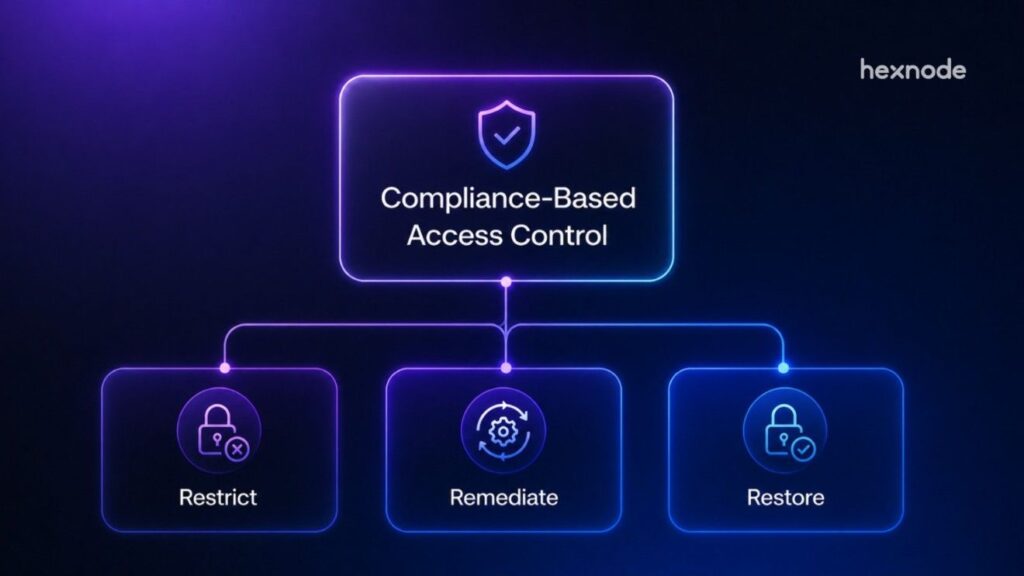
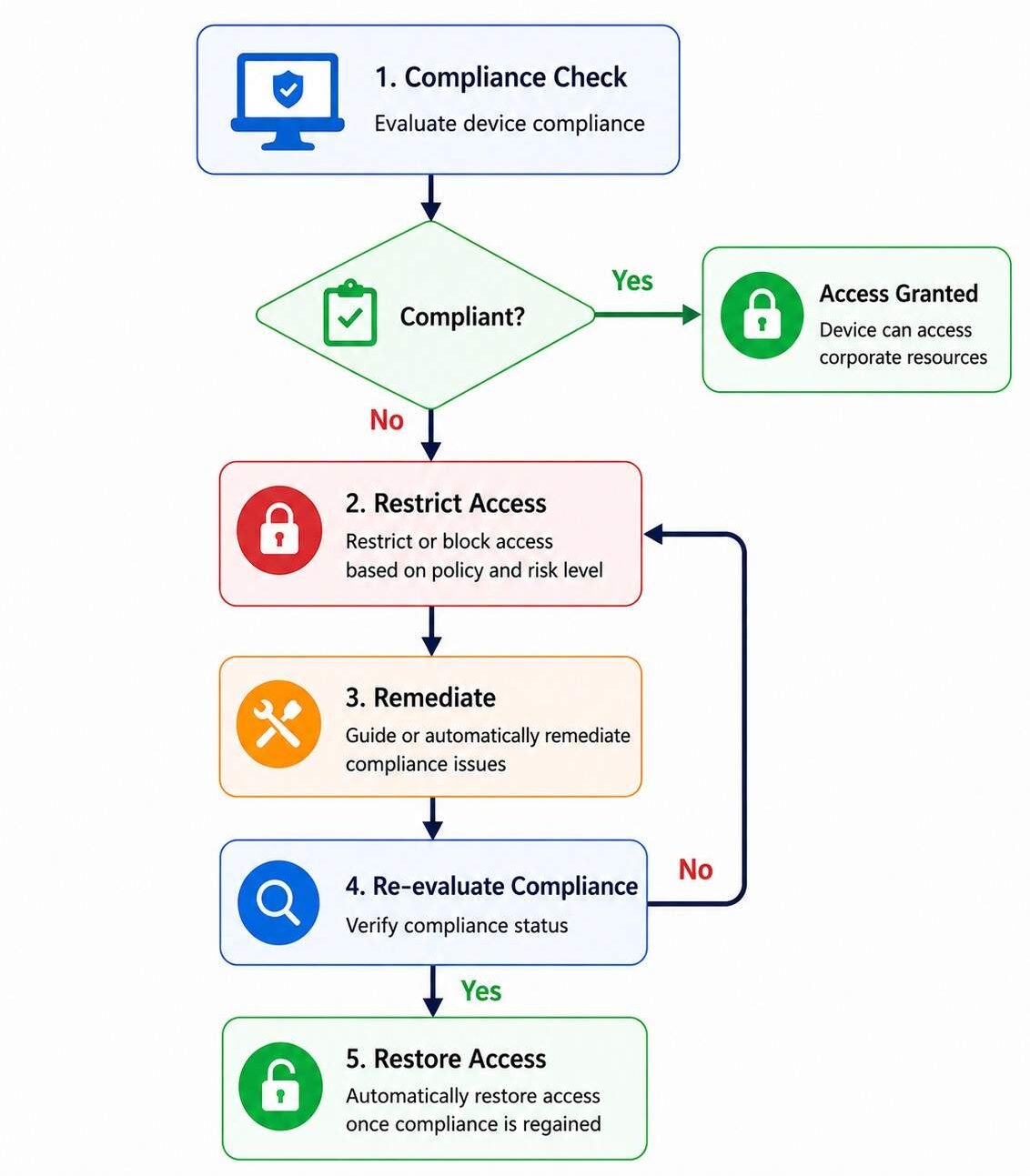
Compliance-Based Access Control follows a continuous workflow that evaluates device compliance, restricts access when policy violations occur, remediates security issues, and restores access after compliance is re-established.
Compliance-Based Access Control continuously evaluates device compliance, restricts access for non-compliant devices, guides remediation, and restores access after compliance is re-established.
Restrict access when devices fall out of compliance
The first stage identifies non-compliant devices. Once a device violates a compliance policy, the system automatically enforces the appropriate access restrictions.
Common policy violations that trigger access restrictions
Organizations typically restrict access when devices violate critical compliance policies, such as:
Missing operating system or security updates.
Disabled device encryption.
Rooted or jailbroken devices.
Missing or weak passcode requirements.
Disabled required security settings.
After detecting a compliance issue, the system applies policy-driven restrictions based on the severity of the violation. Organizations can:
Restrict access to sensitive applications or business resources.
Block access until the device becomes compliant.
Apply limited access for lower-risk scenarios.
Notify IT administrators or security teams.
Consequently, organizations contain potential risks before they affect critical systems.
Remediate compliance issues
The next step is restoring device compliance. A structured remediation process helps users resolve issues while reducing the workload for IT teams.
An effective remediation process should:
Identify the policy or configuration that caused non-compliance.
Verify compliance after corrective actions are complete.
As a result, organizations resolve issues faster while maintaining consistent security compliance.
Restore access after compliance is regained
Once the device becomes compliant, the system restores access automatically. This approach minimizes approval delays and reduces help desk requests. Consequently, employees regain access without unnecessary disruption.
What Makes a Device Compliant?
Device compliance depends on whether a device meets an organization’s predefined security and operational requirements. Although these requirements vary across organizations, every device should satisfy the approved compliance baseline before accessing corporate resources.
A compliant device typically meets requirements such as:
Running a supported operating system with the latest security updates.
Enabling device encryption to protect data at rest.
Enforcing strong passcodes or biometric authentication.
Maintaining required security settings, including screen lock and firewall configurations.
Remaining free from compromise, including rooted or jailbroken states.
Meeting organization-specific requirements, such as approved applications, network configurations, or additional security compliance policies.
Compliance signals that should trigger access decisions
No single setting determines whether a device is compliant. Instead, organizations should evaluate multiple compliance signals together. For example, a missing operating system update presents a different risk than disabled encryption or a rooted device. However, each issue affects the device’s trust level.
Therefore, Compliance-Based Access Control evaluates the device’s overall compliance status rather than isolated security checks. As a result, organizations make more informed access management decisions based on the device’s actual risk.
Benefits of Compliance-Based Access Control
Compliance-Based Access Control helps organizations reduce risk while simplifying access management. Instead of relying only on identity, it evaluates device compliance before granting access. As a result, organizations can make more informed access decisions without increasing administrative complexity.
Key business benefits include:
Reduced security risk: Non-compliant devices lose access before they expose sensitive resources. Consequently, organizations reduce the attack surface and limit the impact of compromised devices.
Improved regulatory readiness: Policy-based access decisions support security compliance and simplify audit preparation. They also help demonstrate consistent enforcement of organizational requirements.
Lower administrative overhead: Automated policy enforcement and automated remediation reduce repetitive manual tasks. Therefore, IT teams can focus on strategic security initiatives instead of routine operations.
Better user experience: Access restrictions apply only when devices become non-compliant. Once issues are resolved, users regain access with minimal disruption. As a result, organizations improve productivity while maintaining security.
Balancing security with employee productivity
Security controls should protect business resources without slowing employees down. Therefore, organizations should automate routine compliance decisions wherever possible.
By limiting manual intervention, Compliance-Based Access Control reduces help desk requests and minimizes unnecessary interruptions. Consequently, IT teams maintain strong security while supporting a better employee experience.
Compliance-Based Access Control vs. Conditional Access
Compliance-Based Access Control and Conditional Access are related, but they serve different purposes. Conditional Access evaluates multiple contextual signals before making an access decision. In contrast, Compliance-Based Access Control focuses specifically on whether a device meets predefined security and organizational policies.
Device compliance is often one of the signals used in Conditional Access policies. Therefore, the two approaches complement each other rather than replace one another.
Are Compliance-Based Access Control and Conditional Access the same?
Compliance-Based Access Control
Conditional Access
Evaluates whether a device meets predefined compliance policies.
Evaluates multiple contextual signals before making an access decision.
Focuses on the device’s current security posture.
Considers identity, device, location, authentication context, risk, and other signals.
Determines whether a device should be trusted based on compliance status.
Applies access policies based on the overall context of an access request.
Acts as a device trust mechanism.
Provides a broader framework for adaptive access decisions.
A common misconception is that Conditional Access automatically guarantees device compliance. However, Conditional Access only evaluates the available signals. Therefore, organizations should continuously assess device compliance to support security compliance and improve risk-based access decisions.
Conditional Access Explained
Learn how Conditional access strengthens enterprise security before granting access to corporate resources.
How to Implement Compliance-Based Access Control
Implementing Compliance-Based Access Control starts with clear policies and a phased rollout. This approach reduces complexity and helps organizations enforce compliance consistently across managed devices.
Define your compliance baseline
First, define what makes a device compliant. The baseline should reflect business requirements, regulatory obligations, and acceptable risk levels.
When defining compliance policies, consider:
Supported operating system versions and required security updates.
Mandatory encryption and authentication requirements.
Essential security configurations and approved applications.
A well-defined baseline ensures consistent access decisions across the organization.
Automate policy enforcement
Manual compliance checks do not scale effectively. Instead, organizations should automate policy evaluation to detect compliance changes immediately.
An effective implementation should include:
Continuous compliance monitoring.
Automated access restrictions for non-compliant devices.
Automated remediation where appropriate.
Automatic access restoration after compliance returns.
Review and refine policies regularly
Compliance requirements change as threats and business priorities evolve. Therefore, organizations should review policies regularly rather than treating them as static controls.
Regular reviews should focus on:
Measuring policy effectiveness.
Monitoring compliance trends.
Reducing false positives.
Adjusting compliance thresholds when risks change.
Common implementation challenges and best practices
Organizations should anticipate a few common challenges when implementing Compliance-Based Access Control. False positives, legacy devices, and complex policies can affect both enforcement and user experience. Therefore, IT teams should balance security requirements with operational needs.
To improve implementation:
Start with critical applications before expanding compliance policies.
Clearly communicate compliance requirements and remediation steps.
Automate policy enforcement and automated remediation wherever possible.
Review policies regularly to reduce false positives and accommodate changing business requirements.
Account for legacy devices when defining compliance baselines.
A phased rollout helps organizations apply policies consistently while minimizing disruption for end users.
Featured resource
Introduction to Hexnode
Discover how Hexnode simplifies endpoint management with intelligent automation, centralized control, and enterprise-grade security.
Automate Compliance-Based Access Control Workflows with Hexnode
After defining compliance policies, organizations need a way to enforce them consistently. Hexnode helps automate the entire Compliance-Based Access Control workflow, from compliance evaluation to access restoration.
Define compliance requirements
Start by configuring the security requirements that devices must meet before accessing corporate resources. These requirements can include operating system versions, encryption, passcode policies, required security settings, and other organizational compliance policies.
Continuously monitor device compliance
Hexnode continuously evaluates device compliance against the configured policies. Administrators can monitor compliance status from a centralized console and quickly identify devices that no longer meet organizational requirements.
Restrict access when devices become non-compliant
When a device falls out of compliance, Hexnode can mark it non-compliant and report that status to Microsoft Entra Conditional Access for supported platforms; if the Conditional Access policy requires a compliant device, the IdP can block access until compliance is restored.
Simplify remediation
Administrators can enforce required security configurations to help devices return to a compliant state. They can also identify affected devices and prioritize remediation through centralized compliance visibility.
Restore access automatically
Once the device satisfies the required compliance policies, Hexnode updates the device compliance state; Microsoft Entra ID then re-evaluates Conditional Access at the next authentication attempt. This eliminates unnecessary manual approvals while helping users regain access faster.
By automating each stage of the Restrict → Remediate → Restore lifecycle, Hexnode helps organizations enforce compliance policies consistently, maintain visibility into device compliance, and simplify access management across the enterprise.
FAQs
What is the difference between Compliance-Based Access Control and Conditional Access?
Compliance-Based Access Control evaluates whether a device meets security policies before granting access. Conditional Access considers multiple signals, including identity, device compliance, location, and risk, to make access decisions.
How does Compliance-Based Access Control support Zero Trust?
Compliance-Based Access Control supports Zero Trust by continuously verifying device compliance instead of relying only on user authentication. If a device becomes non-compliant, access can be restricted until the issue is resolved.
Conclusion
As enterprise environments become more distributed, Compliance-Based Access Control has become a fundamental part of modern access management. Organizations can no longer rely on identity verification alone. Instead, they should continuously evaluate device compliance to ensure only trusted devices access corporate resources.
A compliance-driven approach helps organizations make informed access decisions, adapt to changing risk conditions, and maintain a balance between security and productivity. Therefore, IT teams can enforce policies consistently without creating unnecessary friction for end users.
With platforms like Hexnode, organizations can automate compliance evaluation, streamline policy enforcement, and simplify compliance-driven access workflows. As a result, they can scale secure access across the enterprise while improving both operational efficiency and the user experience while supporting a Zero Trust security model.
Automate Compliance-Based Access Control with Hexnode
See how Hexnode helps organizations evaluate device compliance, enforce security policies, and automate compliance-driven access workflows at scale.
I write at the intersection of technology, process, and people, focusing on explaining complex products with clarity. I break down tools, systems, and workflows without any noise, jargon, or the hype.