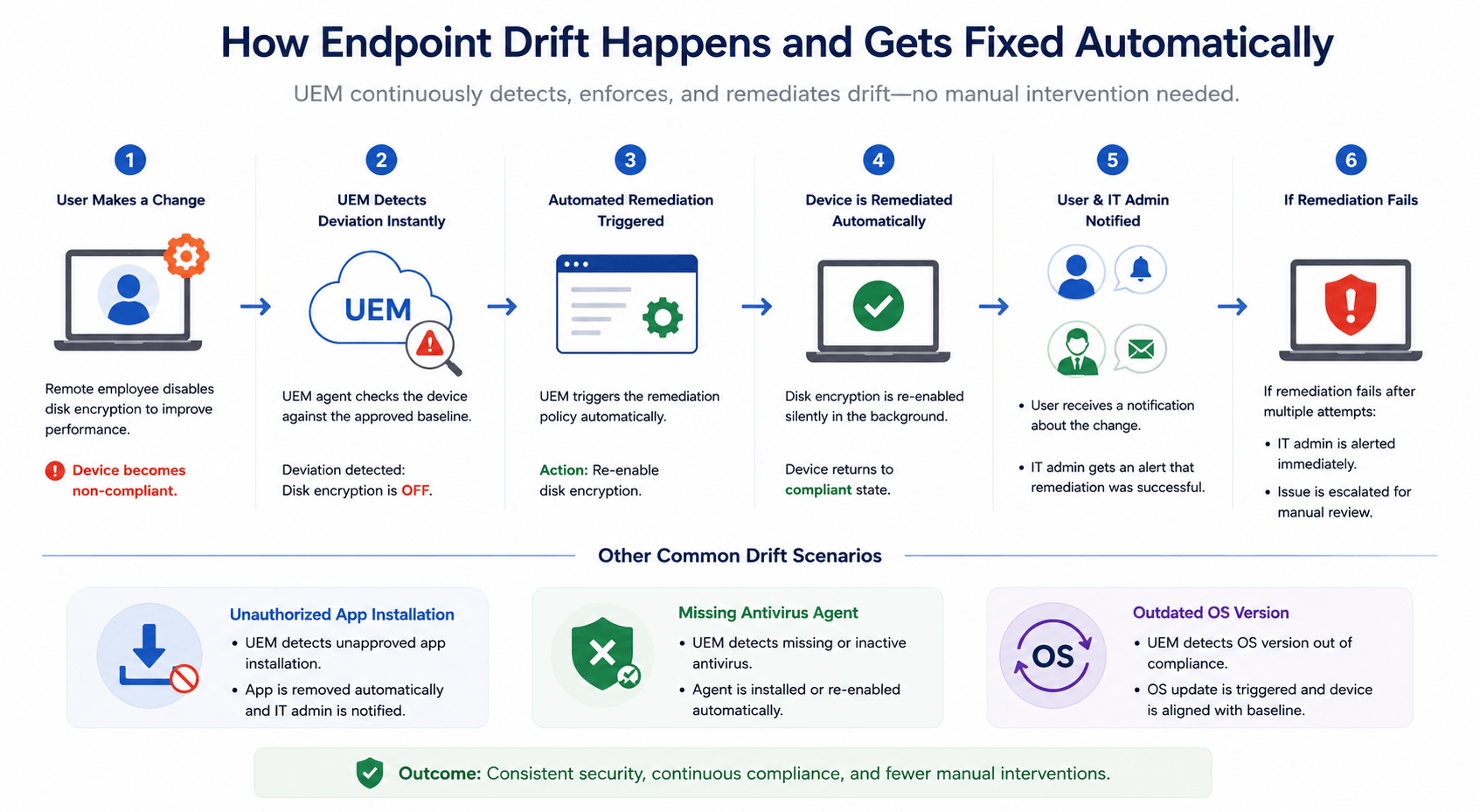
Endpoint drift occurs when managed devices gradually move away from approved security and compliance baselines due to updates, user activity, and operational changes. This creates security gaps, compliance risks, and operational inefficiencies, especially in remote and hybrid environments.
UEM platforms help organizations manage endpoint drift through centralized policy enforcement, compliance monitoring, patch management, and automated remediation workflows. By standardizing configurations and reducing manual intervention, organizations can maintain greater endpoint consistency and operational resilience at scale.
Enterprise endpoints frequently change state. For instance, a device that met security and compliance requirements a few weeks ago may now run outdated software, miss critical patches, or operate with unauthorized configurations without IT teams immediately detecting the change. This gradual deviation from approved baselines, known as endpoint drift, has become a major operational and security challenge in modern distributed environments. As a result, many organizations use UEM for endpoint drift management to maintain endpoint consistency, strengthen compliance visibility, and reduce operational complexity across distributed device environments.
Additionally, the rise of remote work, BYOD adoption, and hybrid infrastructure models has made maintaining consistent endpoint configurations significantly more difficult. Consequently, manual remediation becomes harder to sustain across large endpoint fleets, especially as organizations face growing compliance requirements tied to frameworks and control catalogs such as ISO/IEC 27001, the NIST Cybersecurity Framework, and NIST SP 800-53.
This article explains what endpoint drift is, what causes it, why it increases operational and security risk, and how Hexnode UEM supports automated remediation and ongoing endpoint compliance at scale.
Endpoint Drift Explained: Why Managed Devices Slowly Fall Out of Compliance
Endpoint drift refers to the gradual deviation of a managed device from its approved security, configuration, or compliance baseline. Typically, in enterprise environments, endpoints frequently change state due to software updates, user activity, application changes, and evolving security policies.
In fact, this issue can affect many categories of enterprise endpoints, including:
Corporate laptops and desktops
Mobile devices
Remote workstations
BYOD endpoints
Shared kiosks and frontline systems
Endpoint drift commonly appears in several forms.
Security Configuration Drift
Firewall settings, encryption policies, or access controls deviate from approved standards.
Software and Version Drift
Devices run outdated operating systems or unauthorized software versions.
Compliance Drift
Endpoints fall out of alignment with internal governance policies and security frameworks.
User-Induced Drift
Employees disable protections, install unauthorized applications, or modify device configurations.
However, although often confused, endpoint drift and configuration drift are not identical. Configuration drift focuses on inconsistent system settings. However, endpoint drift is broader and may also include compliance gaps, software inconsistencies, and operational changes across the endpoint lifecycle.
Therefore, organizations use UEM for endpoint drift management to maintain endpoint consistency at scale.
The Hidden Risks of Endpoint Drift in Modern IT Environments
Endpoint drift weakens security posture, disrupts compliance readiness, and increases operational overhead. Indeed, as endpoints move away from approved baselines, organizations gradually lose visibility and consistency across their IT environments.
Specifically, devices affected by endpoint drift often operate with:
Disabled endpoint security controls
Missing OS patches
Outdated or vulnerable applications
Broken VPN or certificate configurations
Unauthorized software installations
Consequently, these gaps increase attack surface exposure, particularly in remote and hybrid environments.
Additionally, endpoint drift complicates compliance initiatives. For example, regulations and standards such as GDPR, HIPAA, ISO/IEC 27001, the NIST Cybersecurity Framework, and NIST SP 800-53 require or support the implementation of appropriate security controls across endpoint environments.
Operationally, inconsistent configurations can also lead to:
Increased helpdesk tickets
Longer remediation cycles
Reduced visibility into device health
Policy conflicts across departments
Growth of shadow IT
Furthermore, modern enterprise environments frequently introduce configuration changes across distributed devices, cloud applications, remote networks, and user workflows.
Common Causes of Endpoint Drift
Endpoint drift typically develops through user activity, inconsistent updates, remote work challenges, and fragmented IT operations.
User-Driven Changes
Frequently, employees often modify device settings to improve usability or bypass restrictions.
Common examples include:
Disabling endpoint protection or encryption
Installing unauthorized applications
Changing VPN or network settings
Modifying authentication configurations
Inconsistent Patch and Update Cycles
Moreover, devices may miss updates for several reasons, especially in distributed environments.
Common causes include:
Missed maintenance windows
Offline remote endpoints
Fragmented OS versions
Unmanaged third-party applications
As a result, organizations may experience inconsistent configurations and increased vulnerability exposure.
Remote and Hybrid Work Complexity
Furthermore, hybrid work environments can reduce IT visibility and delay policy synchronization across endpoints, especially when devices remain offline or intermittently connected.
Common challenges include:
Offline or intermittently connected devices
Delayed policy enforcement
Inconsistent user environments
Manual IT Processes
Lastly, reactive administration methods such as scripts, spreadsheets, and ad hoc troubleshooting often introduce delays and human error.
How Does Unified Endpoint Management (UEM) Solve Endpoint Drift?
Manual endpoint administration becomes difficult to sustain across modern enterprise environments at scale. This is because, devices frequently change state due to updates, user activity, and evolving security policies.
Many unified endpoint management (UEM) platforms provide centralized control across major operating systems such as Windows, macOS, Linux, iOS, and Android, depending on vendor support and device enrollment type. Therefore, instead of relying only on periodic audits, UEM platforms can monitor endpoints against approved baselines through scheduled check-ins, compliance evaluations, or near-real-time device reporting.
Organizations can use UEM to:
Detect endpoint drift through compliance checks or near-real-time reporting
Automate endpoint policy enforcement
Apply remote remediation actions
Maintain configuration consistency
Improve endpoint compliance
Ongoing Policy Enforcement
UEM platforms can validate endpoint states against approved baselines and, where supported, trigger remediation when deviations occur.
Examples include:
Firewall disabled → policy can trigger re-enablement where supported
Encryption turned off → policy can prompt or enforce remediation where supported
Unauthorized application detected → platform can alert IT or remove the app where management controls permit
VPN profile modified → managed VPN configuration can be restored where supported
Automated Patch and Software Management
Additionally, many UEM platforms support centralized patch and software management capabilities by enabling IT teams to:
Deploy OS updates remotely
Enforce approved software versions
Automate patch schedules
Track update compliance
Compliance Monitoring and Alerts
UEM platforms also provide centralized visibility into endpoint health and compliance posture through:
Near-real-time or scheduled compliance tracking
Drift detection against approved baselines
Automated policy violation alerts
Compliance-based prioritization, or risk-based prioritization where supported
Remote remediation workflows
Without UEM Automation
With UEM Automation
Manual remediation workflows
Automated remediation policies
Slower compliance detection
Near-real-time compliance monitoring
Inconsistent endpoint configurations
Standardized security baselines
Reactive troubleshooting
Ongoing endpoint policy enforcement
Featured resource
Why Hexnode UEM?
Explore how Hexnode UEM offers multi-platform device management to simplify security, deployment, and compliance.
Effective UEM for endpoint drift management uses automated controls to enforce policies, detect deviations, and support remediation with reduced manual intervention. As a result, organizations can maintain greater configuration consistency across distributed endpoint environments.
Configuration Profiles and Baselines
Configuration profiles help standardize settings across managed endpoints.
These profiles can enforce:
Security settings
Network configurations
VPN and Wi-Fi policies
Application restrictions
System preferences
Automated Remediation Policies
Modern UEM platforms can, where supported:
Re-enable disabled security settings
Remove unauthorized applications
Restore approved configurations
Trigger compliance actions
Patch Management
Enterprise UEM platforms also help IT teams:
Deploy operating system updates remotely
Manage third-party application updates where supported
Enforce approved software versions
Track patch compliance
Compliance Policies
Compliance policies can evaluate signals such as:
Encryption status
Password requirements
Device health
Access controls
OS version compliance, depending on platform support
Remote Troubleshooting and Actions
Depending on platform support and enrollment type, IT teams may be able to remotely:
Lock devices
Restart systems
Remove managed applications
Refresh policies
Reapply configurations
Real-time use case of UEM for endpoint drift management
Best Practices for Preventing Endpoint Drift at Scale
Preventing endpoint drift at scale often involves a combination of standardized configurations, automated policy enforcement, and monitoring. To combat this, the following best practices can help organizations maintain greater endpoint consistency across distributed environments.
Establish Standardized Endpoint Baselines
Define approved configurations for:
Operating systems
Applications
Encryption settings
Access controls
Use Automated Endpoint Policy Enforcement
Implement UEM for endpoint drift management to enforce policies through regular device check-ins and automate remediation where supported.
Regularly Audit Endpoint Compliance
Regularly validate:
Patch status
Encryption settings
Policy adherence
Device compliance
Standardize Device Provisioning Workflows
Use zero-touch deployment where supported, along with preconfigured templates, to improve onboarding consistency across devices and operating systems.
Implement Role-Based Access Controls (RBAC)
Restrict administrative privileges to reduce unauthorized configuration changes and limit unnecessary access.
Reduce Manual Administrative Intervention
Replace reactive troubleshooting with centralized automation workflows whenever possible. This approach helps reduce delays and minimize human error.
Use Compliance Reporting Proactively
Use centralized reporting tools to identify:
Recurring drift patterns
Policy enforcement gaps
Non-compliant devices
Integrate Endpoint Management with Broader Security Operations
Where integration support is available, connect unified endpoint management platforms with SIEM and security monitoring tools.
Continuously Monitor Remote and Hybrid Endpoints
Maintain as much visibility as possible into enrolled devices operating outside corporate networks, subject to connectivity, platform, and privacy constraints.
Why Is Automated Endpoint Management Becoming Essential?
Enterprise endpoint environments have become increasingly complex. Organizations now manage remote laptops, mobile devices, BYOD systems, kiosks, and cloud-connected endpoints across distributed environments.
At the same time, security standards, control catalogs, and data privacy requirements such as ISO/IEC 27001, the NIST Cybersecurity Framework, NIST SP 800-53, and applicable privacy regulations often require organizations to maintain appropriate security controls, monitoring, and evidence of control effectiveness across endpoint environments.
However, manual endpoint administration struggles operationally at scale. IT teams often find it difficult to efficiently monitor and remediate large fleets of frequently changing devices through reactive workflows alone.
Therefore, UEM for endpoint drift management can serve as a practical operational capability for organizations managing large, distributed endpoint fleets. Modern unified endpoint management platforms can help automate policy enforcement, strengthen endpoint compliance, and improve operational resilience while reducing repetitive administrative work.
Future-Proofing UK IT Compliance: A Blueprint for Seamless Policy Enforcement
Learn how Hexnode UEM automates IT compliance through centralized reporting, and location-aware security enforcement.
How Does Hexnode UEM Help Organizations Manage Endpoint Drift?
Hexnode provides a centralized approach to managing device configurations, compliance status, applications, patches, and remote actions across supported managed devices. By combining automation, policy enforcement, monitoring, and reporting capabilities, Hexnode helps IT teams maintain endpoint configurations more consistently across distributed environments.
Additionally, organizations can monitor device compliance status, configurations, installed applications, and patch information from centralized management dashboard.
Key capabilities include:
Policy deployment and enforcement across supported managed devices
Compliance monitoring and reporting for managed devices
Remote device management actions and compliance policy enforcement for supported devices
Management capabilities for supported remote, BYOD, and corporate-owned devices
For organizations managing large endpoint fleets, a unified endpoint management platform such as Hexnode can help streamline device management, policy enforcement, patch management, and compliance monitoring workflows.
Endpoint drift is a persistent challenge in modern enterprise environments where devices frequently change state across distributed networks and operating systems. Without consistent oversight, configuration inconsistencies, compliance gaps, and security risks can accumulate over time.
However, UEM platforms help organizations reduce operational complexity through centralized management, policy enforcement, remediation workflows, and compliance visibility.
For IT teams managing large endpoint fleets, adopting a structured approach to endpoint drift management is increasingly important for maintaining security consistency, operational efficiency, and long-term endpoint resilience.
Simplify Endpoint Drift Management at Scale
See how Hexnode UEM helps IT teams maintain endpoint consistency across distributed device environments.
Endpoint drift is the gradual deviation of a device from its approved security, configuration, or compliance baseline.
What Causes Endpoint Drift?
Common causes include:
User-driven configuration changes
Delayed updates
Inconsistent patch deployment
Offline devices missing policy synchronization
Unauthorized software installations
Is Endpoint Drift the Same as Configuration Drift?
No. Configuration drift focuses on inconsistent system settings. However, endpoint drift may also include compliance gaps, software inconsistencies, and security posture changes.
How Does UEM Fix Endpoint Drift?
UEM for endpoint drift management can monitor endpoints against approved baselines through compliance checks or device reporting and trigger corrective actions where supported.
I write at the intersection of technology, process, and people, focusing on explaining complex products with clarity. I break down tools, systems, and workflows without any noise, jargon, or the hype.