Containerization helps organizations protect corporate data on personal devices while respecting employee privacy.
It reduces data exposure risks by separating work resources from personal applications and storage.
Android Work Profiles and Apple managed-app controls support data separation, restricted sharing, and corporate-data removal, depending on the enrollment model.
Hexnode UEM helps IT teams manage supported Android and Apple devices through centralized application deployment and security-policy management.
Why Is Managing Work Data on Personal Devices a Challenge?
Containerization helps organizations separate corporate data from personal information on employee-owned devices. However, managing Bring Your Own Device (BYOD) environments remains challenging when business applications and personal apps coexist on the same smartphone or tablet.
Employees may use their personal devices to access corporate email, customer records, business documents, and internal applications. These devices also contain personal messages, photos, files, and applications. Without appropriate data separation and management controls, corporate information may move into unmanaged apps or storage locations, increasing the risk of unauthorized access and data exposure.
At the same time, organizations cannot treat every personal device like a corporate-owned endpoint without considering employee privacy. Extensive device restrictions may interfere with personal use, while a full device wipe could remove personal data alongside corporate information.
This creates a fundamental challenge for IT teams: how can they secure corporate data on personal devices without unnecessarily interfering with employees’ personal information? Containerization offers an approach by separating work resources from personal usage and enabling administrators to apply supported controls to the corporate environment.
Why Is Containerization Important for BYOD Security?
Without effective containerization, organizations may struggle to protect corporate information on employee-owned devices while respecting personal privacy. Work and personal data can interact in ways that increase security risks and complicate device management.
Containerization helps address these challenges in several ways:
Corporate data exposure: Business documents, email attachments, and other sensitive information may move into unmanaged applications or storage locations, increasing the risk of unauthorized disclosure.
Limited administrative control: IT teams may lack the necessary controls to manage business applications, enforce data-sharing restrictions, or remove corporate information remotely.
Employee privacy concerns: Applying extensive controls to an entire personal device can interfere with personal use and undermine employee trust.
Offboarding difficulties: When employees leave an organization, IT teams must revoke corporate access and remove business data without unnecessarily affecting personal files.
Inconsistent security enforcement: Employees use different devices and applications, making it harder to apply consistent security policies across the organization.
Containerization helps establish a boundary between work and personal resources, allowing organizations to manage corporate data without automatically treating the entire personal device as a corporate asset. However, it does not eliminate every security risk. Organizations must also address identity verification, application security, device compliance, and access management.
BYOD Management in the Workplace: Do You Need It?
Learn how work-profile isolation, data-sharing restrictions, and mobile device management support BYOD security.
What Is Containerization and How Does It Work?
In mobile device management (MDM), containerization is an approach to separating corporate applications and data from personal resources on a device, allowing organizations to manage work-related information within supported security boundaries. It helps organizations establish a distinct environment for work-related activities while allowing employees to use their devices for personal purposes.
Rather than treating all information on a device as one management domain, containerization uses operating-system capabilities, managed applications, and enrollment controls to establish boundaries around corporate resources. IT administrators can then apply supported security policies to business applications and data.
Importance of containerization
How Does Containerization Separate Work and Personal Data?
Containerization works through three main mechanisms:
Work and personal data separation: Supported management mechanisms establish boundaries between corporate and personal resources. Android Enterprise Work Profile creates a dedicated work environment, while Apple devices use managed applications and data-sharing controls to protect organizational information.
Controlled data movement: Supported management policies restrict how corporate information moves between managed and unmanaged applications, accounts, or storage locations. The available controls depend on the operating system and enrollment method.
Selective corporate data removal: When an employee leaves the organization or a device no longer meets access requirements, administrators can remove the managed work environment or supported corporate resources without necessarily resetting the entire device.
The implementation differs across platforms. Android Enterprise provides a dedicated Work Profile, whereas Apple devices use managed applications, enrollment frameworks, and data-sharing controls to protect corporate information. These approaches support similar business objectives but do not create identical containers.
Containerization therefore provides a management boundary for corporate data, not a guarantee against every form of data leakage or compromise. Organizations should combine it with appropriate authentication, application security, access controls, and device compliance policies.
How to Implement Containerization Across Android and Apple Devices
Implementing containerization starts with selecting an enrollment method that matches device ownership, corporate security requirements, and employee privacy expectations. IT teams should then configure application management and data-sharing policies, validate the separation, and test corporate-data removal before deployment.
Step 1: Choose the Right Enrollment Model
First, distinguish personally owned devices from corporate-owned devices used for both work and personal activities.
Device ownership helps guide enrollment choices, but the available management and data-separation controls also depend on the operating system, enrollment method, and supported management features.
For employee-owned devices, select an enrollment method that limits management to the designated work environment or managed corporate resources. Document which policies IT can enforce, what device information administrators can access, and how corporate data will be removed during offboarding.
Step 2: Configure Android Enterprise Work Profiles
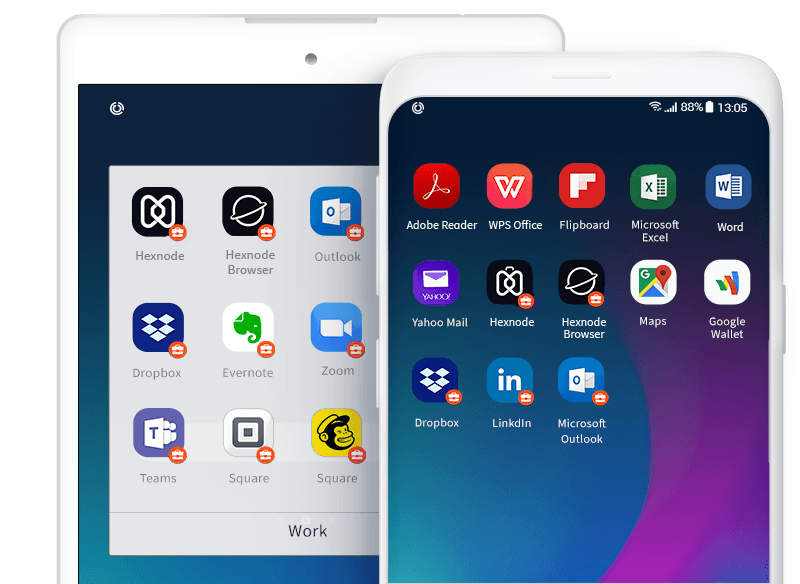
Android Enterprise Work Profile separates corporate applications, data, and management policies from the personal side of a supported Android device. This allows employees to use the same device for work and personal activities while keeping the work environment under organizational management.
To implement this approach:
Enroll the personal Android device using a supported Work Profile provisioning method.
Configure the required work-profile security policies and compliance controls.
Distribute approved business applications through Managed Google Play.
Apply appropriate restrictions to data sharing between work and personal profiles.
Test the work environment and verify that corporate resources remain within the intended management boundary.
Google documents Work Profile as a management solution for personally owned Android devices, with corporate apps, data, and management policies restricted to the work profile. The available controls depend on the Android version and supported enterprise management features. Android Enterprise Work Profile documentation.
The Android Enterprise work container
Step 3: Configure Managed Apps and Data Controls on Apple Devices
Apple platforms use managed applications, enrollment frameworks, and supported data-management restrictions to protect organizational information. On iPhone, iPad, and Apple Vision Pro, Managed Open In allows administrators to control how data moves between managed apps, unmanaged apps, and accounts; available controls vary by platform and enrollment method.
IT teams should:
Select an Apple enrollment method appropriate for device ownership and management requirements.
Deploy business applications as managed apps where supported.
Configure restrictions on sharing information between managed and unmanaged applications.
Apply supported controls for corporate documents, attachments, and managed-app data.
Verify the handling of corporate information across common work applications.
Test the expected behavior when managed apps are removed or the device is unenrolled.
On iPhone, iPad, and Apple Vision Pro, removing a managed app through device management also removes its associated data container. Whether managed apps are removed during device unenrollment depends on the enrollment method and app-management configuration; apps are always removed when a device is unenrolled from an account-driven enrollment.
Containerization in iOS
Step 4: Validate Security and Data Separation
Before deploying containerization across the organization, test whether the configured policies work as intended. A successfully enrolled device does not automatically mean every corporate-data sharing path is adequately controlled.
Validate the following:
Application access: Only authorized users can access corporate applications and resources.
Data sharing: Managed information follows the organization’s approved sharing rules.
Policy enforcement: Applicable authentication, application, and security policies are enforced.
Corporate-data removal: Offboarding removes corporate resources according to the selected enrollment model.
Employee privacy: Management actions remain within the documented scope, except where broader controls are explicitly supported and authorized.
Pilot the configuration on representative Android and Apple devices before expanding deployment. Record platform-specific limitations and communicate the management boundaries to employees so they understand how corporate data is protected and what IT administrators can manage.
Featured resource
Smarter BYOD Management with Containerization
Explore how containerization protects corporate data on personal devices with encryption, remote wipe, and app-level controls.
Containerization helps IT teams protect corporate data on employee-owned devices without automatically treating the entire device as a corporate asset. Hexnode UEM supports platform-native management capabilities that help organizations manage work applications, enforce data-handling policies, and maintain separation between business and personal resources.
Manage Android Work Profiles
Hexnode UEM supports Android Enterprise Work Profile management for compatible devices. IT administrators can deploy managed applications and configure supported policies for the work environment while keeping personal applications and data separate.
This approach helps organizations standardize work-related configurations across enrolled Android devices without applying the same management scope to personal applications.
Control Managed Apps and Corporate Data on Apple Devices
For Apple devices, Hexnode UEM supports corporate application and device management through Apple’s management framework. Administrators can deploy managed applications and apply supported restrictions to control how corporate information moves between managed and unmanaged destinations.
These capabilities help organizations establish consistent data-handling rules while maintaining the distinction between corporate resources and personal content. The available controls depend on the Apple platform, enrollment method, and management configuration.
Simplify Corporate Data Removal During Offboarding
When an employee leaves the organization or a device no longer requires access to corporate resources, IT teams must revoke access and remove managed data appropriately.
Hexnode UEM supports management workflows for removing corporate resources within supported enrollment models. Administrators should validate the expected removal behavior for each platform before deployment, particularly when preserving personal data is a requirement.
Centralize Mobile Device Management
Managing a mixed fleet of Android and Apple devices can introduce operational complexity because each platform implements data separation differently. Hexnode UEM provides a centralized management approach for administering supported device enrollment, application deployment, and security policies.
By combining platform-native containerization mechanisms with appropriate management policies, organizations can protect corporate information, simplify administration, and establish clearer boundaries between work and personal device usage.
FAQs
What is the difference between containerization and mobile device management (MDM)?
Containerization separates corporate applications and data from personal resources, while MDM provides tools to enroll devices, deploy applications, and enforce supported security policies. Containerization can be implemented through operating-system management features and managed applications within an MDM workflow. The level of separation depends on the platform and enrollment method.
Can containerization prevent employees from copying corporate data into personal apps?
Containerization can restrict data transfers between managed and unmanaged applications when the operating system and management configuration support those controls. IT administrators can configure applicable sharing restrictions to reduce the risk of corporate data leakage. However, the available restrictions vary by platform and do not eliminate every possible data-exposure path.
What happens to corporate data when an employee leaves an organization?
IT administrators can revoke corporate access and remove managed work resources using supported device-management workflows. Android Work Profile removal deletes the work profile and its associated data, while Apple data-removal behavior depends on the enrollment method and management configuration. Organizations should test offboarding procedures before deployment to verify the expected impact on personal information.
Does containerization work the same way on Android and iOS?
No, containerization uses different management mechanisms across Android and Apple devices. Android Enterprise Work Profile creates a distinct environment for work applications and data, while Apple uses managed applications, enrollment frameworks, and data-sharing restrictions. IT teams should configure policies according to each platform’s capabilities and enrollment model.
Secure Corporate Data With Containerization
Effective containerization helps organizations protect business information on employee-owned devices while respecting the boundary between work and personal use. By selecting the right enrollment model, enforcing data-sharing policies, and validating corporate-data removal, IT teams can build a more secure and manageable BYOD environment.
Hexnode UEM helps organizations manage supported Android and Apple devices through centralized application and security-policy management. Explore how Hexnode can support your containerization strategy and help balance corporate data protection with employee privacy.
Manage BYOD Devices With Hexnode UEM
Explore how Hexnode UEM can help you manage supported Android and Apple devices, deploy business applications, and apply security policies suited to your BYOD enrollment model.
I write at the intersection of technology, process, and people, focusing on explaining complex products with clarity. I break down tools, systems, and workflows without any noise, jargon, or the hype.