Why Does Authentication Alone Not Keep Access Secure?
Identity session management matters because authentication verifies identity at sign-in, while access risk continues throughout the authenticated session.
After authentication, applications often rely on session cookies or tokens to maintain access. Therefore, anyone who gains control of an active session may reach protected resources without repeating the original authentication.
Several risks can emerge during this period:
Unattended devices can leave authenticated applications accessible to unauthorized users.
Shared workstations can expose active sessions when users fail to sign out.
Stolen session tokens can let attackers impersonate authenticated users while those tokens remain valid.
Excessive session durations extend the period during which compromised sessions can provide unauthorized access.
Because of this, IAM teams must govern access after authentication succeeds. Identity session management controls the period between successful authentication and logout. It helps teams manage how long authenticated access remains available.
What Are the Risks of Poor Session Management?
Poorly managed sessions can enable unauthorized access without requiring an attacker to steal or re-enter the user’s password. Once authenticated, an active session can become another path to protected applications and data.
Common session management risks include:
Session hijacking
Attackers who obtain valid session tokens may impersonate authenticated users until the session expires or becomes invalid.
Unattended-session abuse
Someone with access to an unlocked workstation may use applications under the original user’s authenticated session.
Persistent access after role changes
Existing sessions may retain access that no longer matches a user’s current responsibilities.
Active sessions after offboarding
Former employees may retain authenticated sessions if identity systems do not terminate them during account deprovisioning.
As a result, weak identity session management can increase data exposure and policy violations. It can also weaken auditability by complicating activity attribution. Consequently, IAM and security teams may spend more time investigating suspicious activity. They must determine whether legitimate users or unauthorized sessions caused it.
What Is Session Management in Identity and Access Management?
Session management is the process of creating, maintaining, monitoring, and terminating a user’s authenticated access session.
After successful authentication, the identity system establishes a session that represents the user’s authenticated state. Applications can use session identifiers, cookies, or tokens to recognize that state. Meanwhile, authorization controls determine which applications and resources the authenticated identity can access.
Therefore, identity session management connects a verified identity with authorized activity throughout the session lifecycle. It governs when a session starts, how long it remains valid, and when the system terminates it.
This lifecycle extends beyond the initial login event. Session management continues while the user accesses protected resources. It ends when the session expires, the user logs out, or an administrator terminates access.
Enterprise Identity Management: What to Look for in an IdP
Learn which access-control, and identity-management capabilities IT teams should evaluate when choosing IdP.
How Should Organizations Implement Secure Session Management?
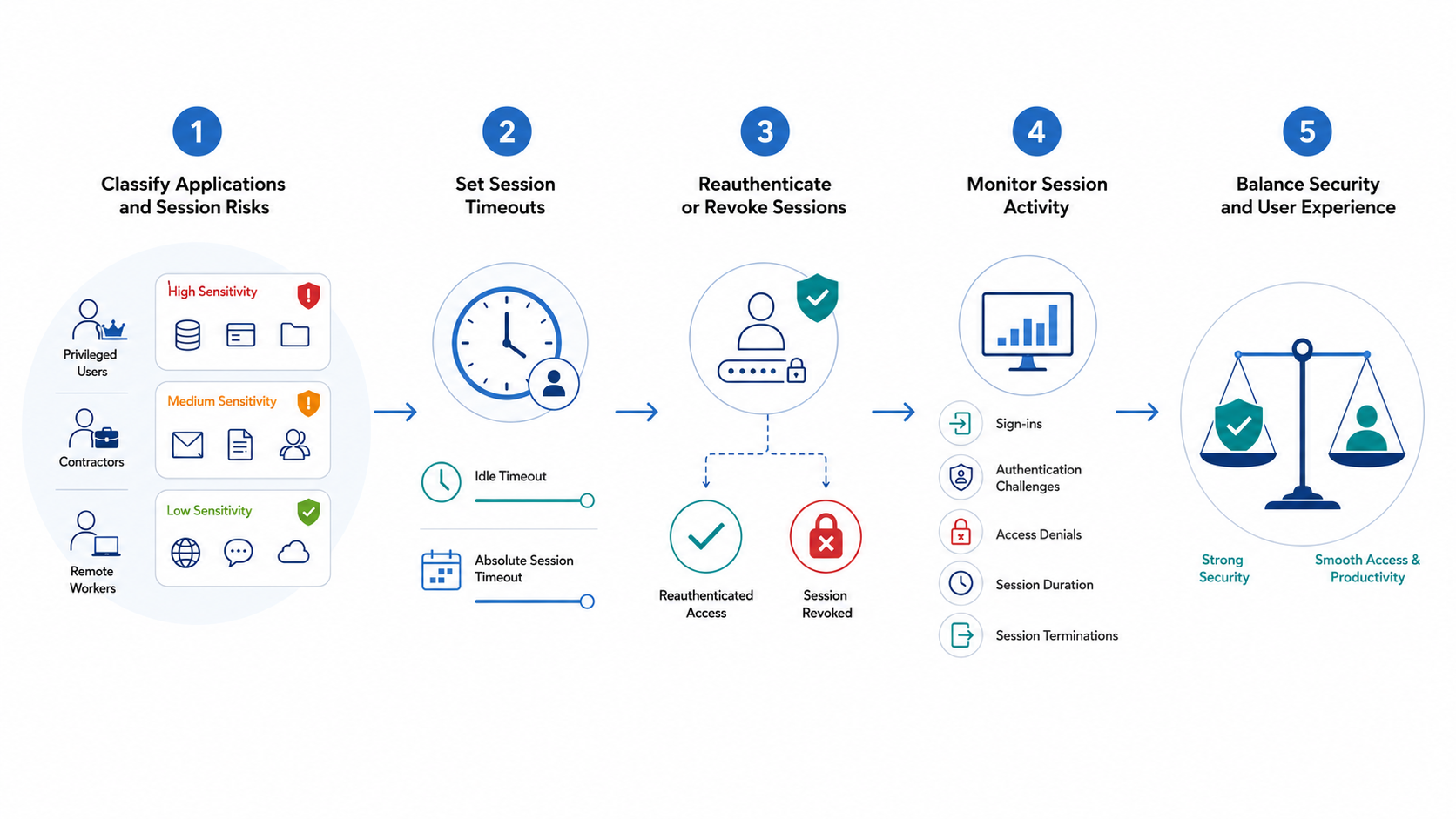
Organizations should classify applications, define session risks, configure controls, test user impact, and monitor outcomes.
First, IAM teams should assess each application’s sensitivity and the consequences of unauthorized session use. They should then define policies according to user role, application sensitivity, and working context. For example, privileged or sensitive access may require stricter session controls than routine application use.
Before organization-wide enforcement, teams should pilot identity session management policies with representative users and workflows. This approach helps identify authentication friction, interrupted workflows, and other usability problems. Teams can then refine controls before broader deployment.
Step 1: Classify Applications and Session Risks
Start by grouping applications according to data sensitivity and the potential impact of unauthorized access. For example, administrative consoles may require tighter session controls than lower-risk applications. Systems containing regulated information may also require stricter controls.
Next, identify users whose access patterns create distinct session requirements. These groups may include:
Privileged users and administrators with elevated permissions.
Contractors who require limited or temporary access.
Remote workers who access resources outside corporate networks.
Other roles that handle sensitive or regulated information.
Then, document the context surrounding each access scenario. Consider shared devices, unmanaged endpoints, public networks, and regulated data access. These factors help IAM teams define appropriate identity session management policies. Teams can tailor those policies to applications, roles, and working environments.
Step 2: Set Idle and Absolute Session Timeouts
An idle timeout ends a session after inactivity. An absolute session timeout limits total session duration, regardless of user activity.
IAM teams should set both limits according to the risk classification established earlier. For example, privileged administration and sensitive data access may justify shorter session durations. Routine, lower-risk applications can use proportionate limits that preserve usability while controlling exposure.
However, organizations should avoid applying one timeout value to every user and application. Excessively short limits can interrupt workflows and repeatedly force users to authenticate. Conversely, overly long limits can extend opportunities to misuse an unattended or compromised session.
Therefore, identity session management policies should balance security with operational requirements. Teams should consider application sensitivity, user privileges, access context, and expected working patterns.
OWASP recommends setting session timeout intervals according to application sensitivity, usage patterns, risk, and business requirements. It also recommends server-side enforcement of session expiration.
Step 3: Define Reauthentication and Session-Revocation Rules
Organizations should require reauthentication when an active session reaches a higher-risk access point. Triggers can include privilege changes, administrative actions, or access to sensitive resources. Stronger verification at these points can confirm that the authenticated user still controls the session.
IAM teams should also define events that require immediate session revocation. These events can include:
Suspected or confirmed account compromise
Loss or theft of an authenticated device
Changes to a user’s role or access rights
Employee departure or account deprovisioning
Manual intervention by an administrator
Finally, logout must invalidate the active server-side session and associated session credentials. Simply closing an application interface does not necessarily terminate authenticated access. OWASP also identifies server-side session invalidation as an important part of secure logout.
Therefore, effective identity session management requires reliable session invalidation when access should end.
Step 4: Monitor Session and Authentication Activity
IAM teams should monitor authentication and session activity to identify access patterns that require investigation. Relevant records include successful and failed sign-ins, authentication challenges, session durations, access denials, and session termination events.
Teams should also establish investigation procedures for unusual activity. Examples include unexpected concurrent access, repeated reauthentication failures, and sessions originating from unexpected contexts. However, teams should evaluate these signals alongside available identity and access context.
Finally, organizations should define retention periods for session-related logs according to security and compliance requirements. They should also restrict log access to authorized personnel. These practices support identity session management investigations while protecting sensitive authentication and session data.
Step 5: Balance Session Security with User Experience
Session controls should reduce access risk without creating unnecessary friction across routine workflows. Frequent logouts and repeated authentication prompts can interrupt work. Consequently, users may seek insecure workarounds that weaken intended controls.
Instead, IAM teams should apply stricter identity session management policies where context justifies them. Privileged users, sensitive applications, and high-impact actions may require shorter timeouts or additional verification. Meanwhile, lower-risk workflows can use proportionate controls that support productivity.
Organizations should also document exceptions to standard session policies. Service accounts, emergency access, and specific operational scenarios may require different timeout or reauthentication rules. However, teams should define each exception, document its justification, and restrict its scope. They should also periodically review whether each exception remains necessary.
Identity session management process
How Does Hexnode IdP Support Secure Session Management?
Hexnode IdP Session Management lets administrators control access duration through session inactivity policies. These controls reduce exposure when users leave authenticated sessions unattended.
Administrators can define session policies that govern how long inactive access remains available. As a result, organizations can limit the window in which someone could misuse an unattended authenticated session. This capability extends identity session management beyond the initial sign-in event.
Hexnode IdP also provides Contextual Authentication for higher-risk actions. It applies step-up authentication with two-factor MFA, adding another identity verification step.
Session Management controls user access duration through session-inactivity policies. Meanwhile, Contextual Authentication uses two-factor step-up authentication for high-risk actions.
In addition, Activity Reports centralize sign-in logs, provisioning records, and authentication histories across users and applications. IAM teams can use this consolidated visibility to review access activity and investigate authentication-related events.
Together, these capabilities address three important parts of session security: access duration, stronger authentication, and activity visibility. They give IAM teams practical controls for managing authenticated access after users successfully sign in.
Featured resource
Hexnode IdP Solution Brief
Explore how Hexnode IdP brings identity, access, authentication, and device posture together to strengthen enterprise access control.
What is the difference between session timeout and session revocation?
A session timeout ends authenticated access after inactivity or after a defined maximum duration. Session revocation terminates access after events such as account compromise, device loss, role changes, or offboarding.
Does MFA replace the need for session management?
No. MFA strengthens identity verification, while session management governs authenticated access after sign-in. Organizations need both because session risks can continue after authentication succeeds.
When should an IAM system require users to reauthenticate?
IAM teams should consider reauthentication when users perform higher-risk actions, such as privilege changes or access to sensitive resources. Stronger verification helps confirm that the authenticated user still controls the session.
What should happen to active sessions when an employee leaves?
Applications should invalidate active sessions when an account terminates or access privileges change. Otherwise, an existing session may retain access that no longer matches the user’s authorization.
What session activity should IAM teams monitor?
IAM teams should track sign-ins, authentication challenges, session durations, access denials, and termination events. They should also investigate unusual concurrent access, repeated reauthentication failures, and sessions from unexpected contexts.
Can Hexnode IdP help manage inactive user sessions?
Yes. Hexnode IdP Session Management lets administrators define session inactivity policies. Contextual Authentication and Activity Reports also support stronger verification and access visibility.
Strengthen Access Security Beyond the Initial Login
Access security requires control over the complete authenticated session, from creation through expiration or revocation. Authentication establishes identity at sign-in, but it does not eliminate risks that emerge afterward.
Therefore, organizations need identity session management controls that govern how long authenticated access remains available. Teams also need clear rules for reauthentication and session termination. In addition, access records help teams investigate authentication and session activity.
A practical approach combines session controls with stronger verification for sensitive actions and centralized access visibility. This approach helps IAM teams address unattended sessions without imposing the same restrictions on every workflow.
Hexnode IdP brings these controls together through Session Management, Contextual Authentication, and Activity Reports.
Administrators can define policies for session inactivity and review access activity across users and applications, while Contextual Authentication provides two-factor step-up authentication for high-risk actions.
Take Control of Authenticated Access
Bring identity, authentication, access policies, and session controls together with Hexnode IdP.
I write at the intersection of technology, process, and people, focusing on explaining complex products with clarity. I break down tools, systems, and workflows without any noise, jargon, or the hype.