Hexnode Genie AI simplifies app-deployment preparation by translating natural-language requests into context-aware actions while keeping deployment validation and authorization under administrator control.
Ambiguous requests can lead to incorrect application selection, unintended device targeting, installation failures, and security risks.
IT teams should verify application identity, target groups, compatibility, licensing, and execution boundaries before approving deployment.
Hexnode Genie AI supports application discovery and target verification through specialized agents, while Hexnode UEM provides Install Application and Required Apps workflows for deployment.
Why do app-deployment requests need more than a simple chat command?
An IT administrator needs to deploy a business application to the Sales team’s managed devices. Before proceeding, they must identify the correct application, confirm the target group, and verify deployment requirements.
Natural language app deployment simplifies request preparation by allowing administrators to describe deployment intent conversationally. However, instructions such as “Deploy Slack to Sales devices” leave critical details unclear, including application versions, operating systems, and deployment scope.
Hexnode Genie AI provides a conversational interface for preparing application deployment workflows. However, interpreting a request does not automatically make it ready for execution. Administrators must validate the application, targets, and intended action.
What can go wrong when deployment intent is not validated?
Unvalidated deployment requests can distribute incorrect applications, target unintended devices, or trigger installation failures. These mistakes disrupt users, increase troubleshooting workloads, and delay application availability.
Ambiguous instructions also introduce security and compliance risks. Deploying applications to unauthorized endpoints or overlooking installation prerequisites can violate organizational policies and expose devices to unnecessary risks.
A conversational request must therefore translate into a reviewable deployment action with clearly identified applications, confirmed device targets, and defined execution boundaries.
Administrators need to establish what will be deployed, where it will be installed, and which conditions must be satisfied before execution.
What is natural language app deployment in UEM?
Natural language app deployment is the process of expressing application deployment requirements in conversational language and translating them into structured management actions.
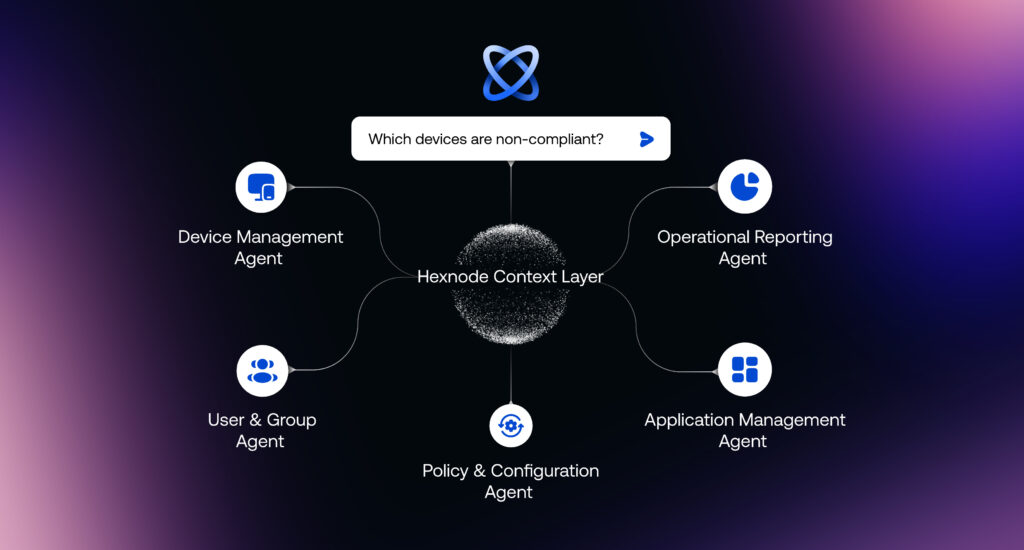
Hexnode’s Chat with Genie AI interprets administrator intent using the Hexnode Context Layer, which provides relevant UEM context and directs requests to specialized workflows. The Application Management Agent supports application discovery and deployment preparation.
A recommended workflow involves interpreting the request, reviewing the prepared application action, and proceeding with deployment once the administrator has confirmed the intended scope.
Before execution, administrators must verify the selected application, intended device targets, and deployment scope. A correctly interpreted instruction does not automatically establish deployment readiness.
How does Genie AI translate a chat request into a deployment workflow?
Genie AI translates conversational requests into application management workflows using UEM context and specialized agents.
The Hexnode Context Layer helps interpret the request, while the Application Management Agent supports application discovery, repositories, app groups, catalogs, and deployment preparation.
For example, an administrator might enter: ‘Prepare Slack for deployment to the Sales device group.’
Genie can assist with identifying the application and preparing the deployment request. The administrator must then verify the application record, selected group, and proposed action.
Natural language interaction does not replace compatibility checks, application availability verification, or administrative authorization before execution.
What information should a reviewable app-deployment request contain?
A reviewable app-deployment request should identify the application, its source, target platform, intended device or user group, deployment method, and expected outcome.
Hexnode’s Application Management Agent supports application discovery and deployment preparation. However, administrators must verify that the selected application and targets match the original request.
Use the following checklist before authorizing execution:
Field
Requested value
Verified value
Review status
Application
Name and identifier
Correct app record
Pending
Source
Approved repository
App availability
Pending
Platform
Target OS
Compatibility
Pending
Targets
Device/user group
Group membership
Pending
Deployment
Method and outcome
Action scope
Pending
This is a recommended administrative checklist, not a built-in Genie approval form.
How can IT administrators prepare an app-deployment request through Genie chat?
IT administrators can prepare app-deployment requests through Chat with Genie AI by defining deployment intent, identifying the application, confirming target devices, and reviewing execution requirements.
Featured Resource
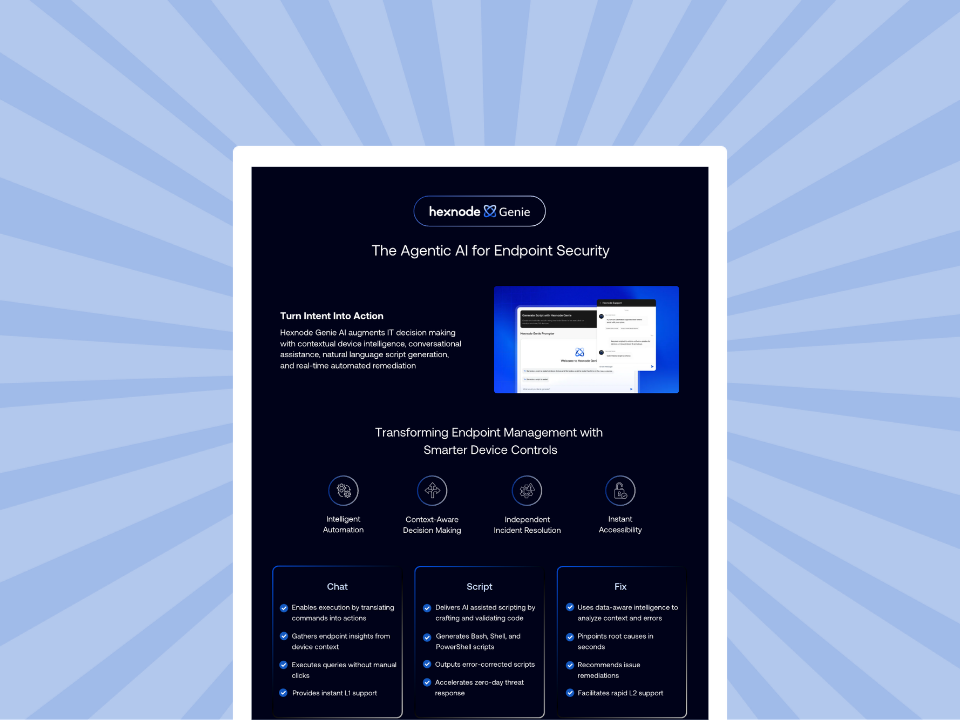
Hexnode Genie Info Sheet
Discover Hexnode Genie and how AI-powered assistance simplifies endpoint management and IT workflows.
The Application Management Agent supports application discovery and deployment preparation using relevant UEM context.
For example, consider deploying Slack to the Sales team’s managed Windows devices. The workflow involves five steps:
Define the deployment objective and identify Slack.
Confirm the intended Sales device group.
Verify compatibility and installation prerequisites.
Review the proposed action and execution boundaries.
Execute the authorized deployment and validate installation results.
These validation steps represent recommended administrative practices.
Define the deployment intent and identify the correct application
Start by specifying the application, target population, and intended outcome. For example: ‘Prepare Slack for installation on the Sales team’s managed Windows devices.’
Hexnode’s Application Management Agent supports application discovery and repository-related workflows, helping administrators identify applications relevant to the request.
Before proceeding, verify the following:
Application identity: Confirm the correct application name, identifier, and version where applicable.
Platform: Ensure the selected application supports the target Windows devices.
Application source: Determine whether the application comes from a public application store or an enterprise application package.
Hexnode’s App Inventory provides visibility into applications available for management. Administrators should distinguish store applications from enterprise applications distributed through managed packages.
Confirm that the selected application record matches the intended distribution source and deployment requirements. An application name alone may not identify the correct package or version.
Confirm the target devices and deployment scope
Once the application is identified, verify which devices should receive it.
Genie’s Device Management Agent and User & Group Agent provide device-level and group-related context that can support target identification.
For the Slack deployment, administrators should verify:
Device group: Confirm the intended Sales group and its current membership.
Operating system: Ensure the selected devices run a supported Windows version.
Enrollment status: Verify that the endpoints are enrolled and manageable.
Target exclusions: Identify devices that should remain outside the deployment.
Compare the requested target population against the actual selected devices or groups.
Pay particular attention to mixed-platform groups, unintended group membership, and devices assigned to other departments.
Genie can assist with gathering relevant context, but administrators should independently confirm that the final deployment scope matches the original request.
Review application compatibility and installation prerequisites
Before executing the Slack deployment, verify that each target device meets the application’s installation requirements.
Review these prerequisites:
OS compatibility: Confirm that the Slack package supports the targeted Windows versions.
Enrollment: Ensure devices are enrolled and available for management.
Licensing: Verify application licensing requirements, where applicable.
Installation settings: Check package dependencies, installation parameters, and required permissions.
Hexnode UEM supports application distribution through Install Application remote actions and Required Apps policies. Installation behavior varies by application type and configuration.
For example, silent installation of Windows EXE applications requires supported installation parameters.
A correctly prepared deployment request does not guarantee successful installation. Device conditions, package configuration, and connectivity can still affect execution.
Establish execution boundaries before approving the request
Execution boundaries define the approved application, exact device targets, permitted action, deployment timing, and conditions requiring further review.
For the Slack deployment, administrators should confirm that only the intended Sales devices are included and that the proposed installation matches organizational requirements.
Hexnode Genie AI supports preparing reviewable application actions, while Hexnode UEM provides established installation mechanisms.
Before execution, administrators should explicitly review the proposed action and authorization scope. Pause or revise the request if the application identity, target membership, installation requirements, or deployment timing differs from the approved plan.
Execute the approved deployment and verify the outcome
Once the application, targets, prerequisites, and authorization are confirmed, administrators can proceed with the approved Slack deployment.
Hexnode UEM provides two established deployment methods:
Install Application: Initiate installation on selected devices through Manage > Devices > Actions > Install Application.
Required Apps: Configure application installation through Policies > Windows > App Management > Required Apps, then associate the policy with the intended targets.
After execution, review deployment outcomes and identify successful, failed, or pending installations. Confirm that Slack appears on the intended devices.
For failed installations, Fix it with Genie AI helps identify potential causes and prepare guided remediation. Administrators should review the suggested fix, apply the appropriate corrective action, and verify the installation outcome.
How does Hexnode Genie AI support reviewable app-deployment requests?
Hexnode Genie AI helps administrators translate conversational deployment intent into context-aware, reviewable application actions through specialized agents.
Hexnode Genie: The wizard of AI scripts
Discover how Hexnode Genie streamlines script creation and execution for efficient endpoint management.
The workflow combines several capabilities:
Chat with Genie AI: Provides a natural-language interface for expressing deployment requirements.
Hexnode Context Layer: Interprets administrator intent using relevant UEM context and routes requests to specialized agents.
Device Management Agent: Provides device-level information to support target verification.
User & Group Agent: Supplies group-related context for identifying intended deployment targets.
Administrators can configure Genie through Admin > Hexnode Genie AI, where they can enable the assistant and manage available access options, including access to device details and error information. These settings do not replace deployment authorization.
Genie-assisted preparation complements Hexnode UEM‘s existing App Inventory, Install Application, and Required Apps capabilities. Together, these features help administrators identify the correct application, confirm deployment targets, and proceed through established installation workflows.
Administrators retain responsibility for validating deployment scope, reviewing proposed actions, and verifying execution outcomes.
FAQs
What happens if an application deployment prepared through Genie AI fails?
Administrators should review the installation outcome and investigate factors such as device connectivity, package compatibility, installation parameters, and permissions. Hexnode’s Fix it with Genie AI can assist with troubleshooting and preparing guided fixes, but administrators must review the proposed remediation and confirm its outcome.
Does Genie AI automatically install applications when an administrator submits a chat request?
Hexnode Genie AI supports application deployment through natural-language interactions. Administrators should verify the selected application, target devices, and proposed actions before execution, then confirm installation outcomes.
Can Genie AI identify the correct devices for an application deployment?
Genie AI can use device and group context to assist administrators in identifying deployment targets. However, IT teams should independently verify group membership, operating-system compatibility, enrollment status, and exclusions before approving deployment.
Ready to prepare app deployments with Hexnode Genie AI?
Hexnode Genie AI brings natural language app deployment into a structured UEM workflow, helping administrators move from conversational instructions to context-aware application actions.
By combining application discovery, device context, and deployment preparation, Genie reduces the manual effort involved in interpreting requests and gathering relevant information.
IT teams can prepare deployment requests with greater clarity while retaining control over application selection, device targeting, and execution.
Simplify App Deployment with Genie
Prepare app-deployment requests, streamline IT workflows, and simplify device management tasks with Hexnode Genie.
Content writer at Hexnode. Fueled by good coffee and the occasional cat cuddle, I enjoy crafting content that informs, connects, and resonates. Nothing excites me more than knowing my words have been read, appreciated, and maybe even bookmarked.