Recent organizational and licensing changes within VMware’s Workspace ONE have prompted many IT teams to seek more stable, scalable endpoint management alternatives. To migrate to Hexnode UEM without disrupting operations, organizations should execute a low-risk, phased approach: clean existing legacy data, prepare Hexnode infrastructure in parallel, and transition devices in controlled enrollment waves. This structured migration minimizes downtime while establishing a simplified, future-proof platform for long-term device management.
Over the past few years, VMware customers have experienced a series of organizational changes. Broadcom completed its acquisition of VMware in November 2023. Soon after, VMware’s End-User Computing (EUC) business, home to Workspace ONE and Horizon, was acquired by KKR and now operates as a standalone entity.
For Workspace ONE administrators, these developments have introduced new systems, updated support workflows, and evolving platform structures that teams need to adapt to. At the same time, updates to licensing models and product lifecycle policies across parts of the VMware and Omnissa portfolio have encouraged organizations to take a closer look at their long-term endpoint management strategy.
For teams evaluating whether to migrate from Workspace ONE, this guide breaks down what truly matters in a replacement platform and how to execute a phased migration to Hexnode, without disrupting end users or day-to-day operations.
A Phased Path to Migrate from Workspace ONE UEM to Hexnode
Migration anxiety is real, especially when you’re responsible for thousands of endpoints and can’t afford downtime. The safest approach is a phased migration, where you slowly transition the devices from one UEM to another without disrupting operations.
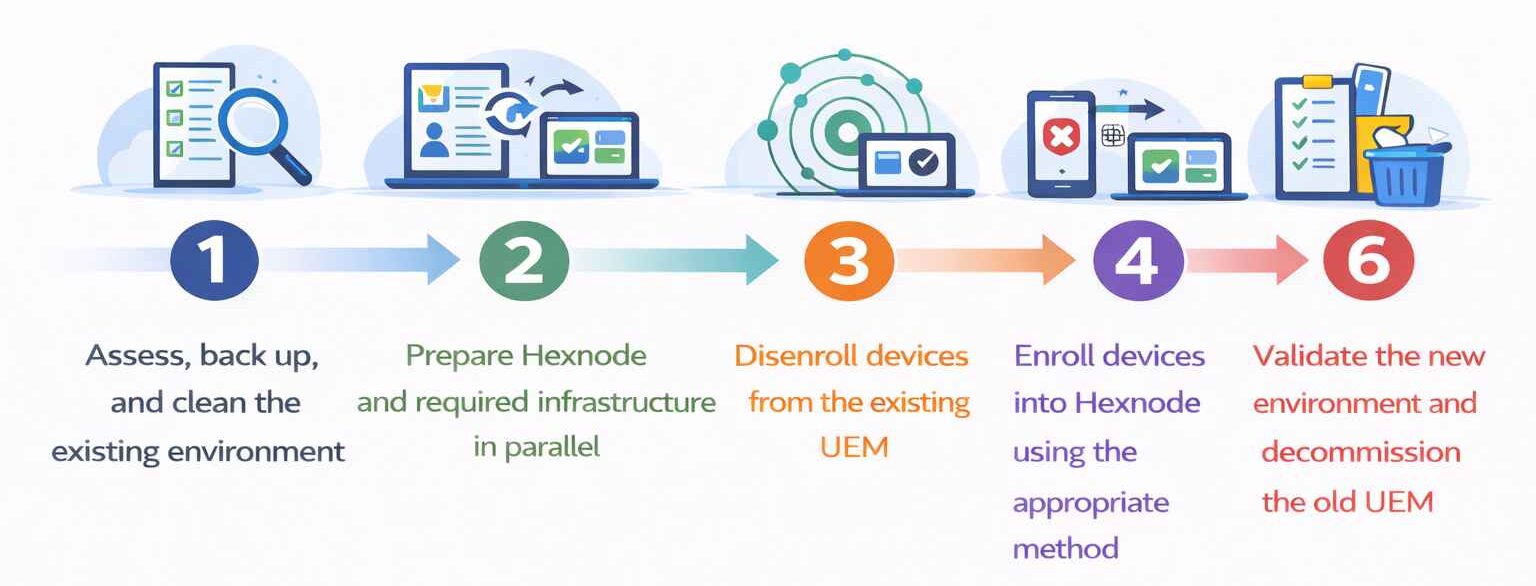
Hexnode provides documented migration guidance built around this model, helping teams migrate from Workspace ONE in a controlled, low-risk way. Here’s a six-step framework aligned with both platform constraints and Hexnode’s recommended flow to migrate from Workspace ONE.
Steps to Migrate from Workspace One to Hexnode
Phase 1: Assess, Back Up, and Clean the Existing Environment
Most long-running UEM environments accumulate legacy profiles, outdated app assignments, and policies that no longer reflect how teams operate today. Migration is the ideal moment to reduce this operational debt by creating a clean, well-understood baseline:
Export device, user, and application data when you migrate from Workspace ONE to create a reliable inventory snapshot.
Back up any data that must be preserved before devices are unenrolled or wiped.
Identify legacy profiles, policies, and app assignments that are no longer required and can be retired.
Hexnode offers a migration checklist that covers key migration activities such as auditing device inventory, mapping users and groups, defining policies, selecting the appropriate enrollment strategy, and building a structured rollout plan.
Factors to consider while migrating from one MDM to another
Learn how to evaluate risks, ensure compatibility, and avoid disruptions for a smooth MDM transition
Phase 2: Prepare Hexnode and Required Infrastructure in Parallel
You now need to set up Hexnode before transitioning any devices so enrollment can happen smoothly.
Sync users and groups from the identity provider you already use (for example, Microsoft Entra ID, Google Workspace or Okta). This keeps policy targeting consistent across pilot and rollout waves.
Prepare enrollment prerequisites for your device platforms required for onboarding.
For Windows environments, this typically includes preparing provisioning artifacts such as provisioning package (.ppkg) files for bulk or automated enrollment.
For Apple environments, this involves setting up Apple Business Manager integrations, including Automated Device Enrollment and Apps and Books, along with the required certificates and server tokens.
Prepare application distribution and licensing so required apps and configurations are applied immediately after enrollment.
Phase 3: Disenroll Devices from the Existing UEM
Devices must be removed from the current UEM before they can be managed by Hexnode.
Disenroll devices using remote actions or manual profile removal, depending on platform support.
Some enrollment methods require devices to be reset or wiped before re-enrollment.
Ensure devices are fully released from the existing UEM before proceeding.
This step formally releases device control from the legacy platform.
Phase 4: Enroll Devices into Hexnode Using the Appropriate Method
Enroll devices into Hexnode using the method that best fits your organization’s scale, device ownership, and operational constraints.
Common approaches include:
Automated enrollment: Used for eligible organization-owned devices such as Apple DEP/ADE for Apple devices.
Bulk enrollment: Helps enroll large groups of devices using CSV-based bulk enrollment, or Windows provisioning packages (.ppkg) for streamlined mass rollouts.
User-driven enrollment: Enables self-enrollment, open enrollment, or email/SMS-based enrollment for distributed, BYOD, or remote users.
Phase 5: Transition Devices in Controlled Waves
Rather than migrating all devices at once, transition devices in planned batches to reduce risk and maintain operational continuity.
Group devices logically (by department, location, or role).
Use custom scripts or automated actions where available to reduce manual effort.
Confirm successful enrollment and policy application before moving to the next batch.
This minimizes disruption and makes troubleshooting manageable.
Phase 6: Validate the New Environment and Decommission the Old UEM
After all devices are enrolled in Hexnode:
Verify that devices are actively reporting and receiving the intended policies and applications.
Compare inventory reports between the old UEM and Hexnode to ensure completeness.
Export reports required for audit, compliance, or record retention.
Decommission or retire the legacy UEM only after successful validation to avoid operational gaps.
Featured Resource
UEM Migration Handbook: An IT admin’s guide for effective migration
Download the whitepaper to learn how you can adopt the right UEM migration strategy for your business.
Recent developments across various UEM ecosystems have highlighted how platform evolution can influence long-term endpoint management strategies. As organizations adapt to updated structures, systems, and policies, many teams are taking the opportunity to reassess how their UEM platform aligns with their operational goals.
For Workspace ONE administrators, the focus is not just on current capabilities, but on how well a platform supports future growth, scalability, and day-to-day management efficiency.
As lifecycle milestones and licensing models continue to evolve, clarity, simplicity, and ease of management become key considerations. Hexnode UEM provides a streamlined approach for teams looking to simplify operations, maintain control, and build a more consistent and scalable endpoint management strategy
Ready to Migrate from Workspace ONE?
Use a structured migration strategy to move your devices to Hexnode, securely and at scale.
Curious, constantly learning, and turning complex tech concepts into meaningful narratives through thoughtful storytelling. Here I write about endpoint security that are grounded in real IT use cases.