Identity federation migration planning helps organizations integrate identity providers without disrupting authentication, application access, or existing user sessions.
Poorly planned federation changes can cause employee lockouts, duplicate accounts, incorrect permissions, and unexpected MFA behavior.
IT teams should verify provider compatibility, map application dependencies, define authentication ownership, and test access, provisioning, and session termination before rollout.
Hexnode IdP supports SAML 2.0 SSO, application assignments, and SCIM 2.0 provisioning for supported applications.
Why can adding an identity provider disrupt existing access?
Adding an identity provider changes the trust relationships behind sign-in, so existing access requires validation. Identity federation migration planning establishes how those changes will affect users and applications.
Consider an IAM administrator connecting another identity platform while employees continue using business applications. The administrator must determine which system validates credentials, where MFA applies, and how identities match existing application accounts. Unclear responsibilities make authentication failures harder to diagnose.
Before changing the configuration, answer four questions:
Are the providers compatible?
Who authenticates users?
Which applications depend on the existing configuration?
What must user testing prove across affected user groups and workflows?
What happens when federation changes are poorly planned?
Poorly planned federation changes can lock employees out, grant incorrect access, and delay business operations. These failures can affect both the users changing sign-in methods and teams relying on their work.
Incorrect identity matching can create duplicate accounts, separating users from existing records or permissions. Unexpected MFA prompts increase support demand, especially when employees cannot identify which system requires authentication. Disrupted access to customer management or support applications can delay responses and service delivery.
Unclear ownership also creates access gaps. One team may assume another has disabled an account or terminated its application sessions. However, blocking new sign-ins does not necessarily end sessions already established. Without explicit responsibility for each action, former employees or reassigned users may retain unintended application access.
What is identity federation migration planning?
Identity federation migration planning establishes how identity systems trust authentication results during an access transition. It defines provider compatibility, authentication responsibilities, application dependencies, and acceptance tests.
An identity provider (IdP) authenticates users and issues an identity assertion: a verifiable statement about their identity. The relying party or service provider validates that assertion before establishing its own application session.
Federation can support coexistence with an existing provider. Map each trust connection separately, including any intermediary identity service. For every connection, identify which system issues authentication results, which consumes them, and which checks establish trust before the user receives access to applications.
How does federation differ from account migration and provisioning?
Federation establishes authentication trust; provisioning manages accounts. SAML and OpenID Connect support authentication integrations, while SCIM supports account lifecycle operations.
Process
What changes
What requires separate validation
Authentication federation
Sign-in trust
Claims and sessions
Directory synchronization
Identity attributes
Mapping and direction
Account provisioning
Account lifecycle
Creation, updates, disablement
Account/data migration
Accounts or data
Transfer completeness and ownership
Federation alone does not transfer passwords, MFA registrations, application data, or existing sessions.
Define whether the transition retains the current authentication source, changes selected application trust relationships, or moves lifecycle responsibility. Explicitly record credential, MFA, and data migration as separate work wherever required.
Who owns authentication, MFA, and sessions after federation?
Authentication, MFA, and access decisions can sit in different systems. The authoritative directory maintains identity records without necessarily controlling these functions.
Adapt this ownership record to your architecture:
Responsibility
Responsible system
Operational team
Credential validation
Authenticating IdP
IAM
MFA enrollment/recovery
MFA provider
IAM/helpdesk
Access policies
IdP/application
Security/application owners
User provisioning
Provisioning service
IAM
Account disablement
Directory/application
IAM/application owners
Session termination
IdP and applications
IAM/application owners
IdP and application sessions have separate lifecycles. Explicitly confirm logout, reauthentication, and revocation behavior across each connection. Test session termination separately from account disablement, including application sessions established before the transition, and document observed results.
Featured Resource
IAM using Hexnode – The complete guide to manage access
Learn how Hexnode simplifies identity and access management for secure, controlled enterprise access.
How should administrators plan and validate a federation rollout?
Plan the rollout by verifying provider compatibility, mapping application dependencies, testing representative users, and approving controlled deployment stages.
Prepare five records: a compatibility matrix, ownership record, application inventory, test results, and recovery procedure. Assign an IAM lead to coordinate changes, application owners to validate workflows, and a security reviewer to assess access controls.
Use the following four steps to gather evidence and resolve blockers before expanding access to additional users.
What compatibility checks start identity federation migration planning?
Start by verifying the exact provider pairing and deployment scenario. Record each provider and tenant, intended role, connection direction, protocol, licensing prerequisites, domain requirements, administrative permissions, and official setup reference in a compatibility matrix.
External-provider federation and application SSO require separate confirmation.
SAML: Verify metadata, issuer/entity identifiers, ACS URLs, and signing certificates.
OIDC: Verify issuer, client registration, redirect URIs, and supported flows.
Validate user-identifier mapping, required claims, certificate or secret renewal ownership, and options for limiting the pilot to selected users. Treat unsupported or unverified combinations as blockers. Shared protocol names alone do not establish compatibility between the selected systems.
Which application dependencies must be mapped before changing sign-in?
Map each business-critical application’s authentication, authorization, provisioning, and recovery dependencies before changing sign-in.
Record its owner, current authentication source, protocol, entry URLs, required claims, role mappings, provisioning connections, and recovery options. Identify applications allowing only one active identity-provider configuration.
Match existing accounts to intended identifiers. Review email changes, aliases, multiple domains, contractors, and duplicate accounts. Assign one provisioning authority per application during coexistence.
Document deep links, native clients, session lifetimes, and noninteractive integrations. Classify each application as unchanged, requiring reconfiguration, or blocked. Attach supporting evidence and name the owner responsible for validating each decision before its sign-in configuration is changed.
What should user acceptance testing prove?
User acceptance testing must prove that authorized users receive correct access, blocked users remain blocked, and critical workflows succeed.
Select a pilot covering employees, privileged users, contractors where applicable, multiple domains, and relevant browsers or native clients. Record each user’s expected identity, application role, MFA behavior, and access outcome before testing.
Maintain a test matrix with Scenario, Expected result, Observed result, Evidence, and Reviewer. Cover:
Fresh sign-in, existing sessions, and supported application entry points.
MFA challenges, recovery paths, and denied access.
Account matching and preservation of existing application data.
Test account disablement, role changes, session expiry, logout, and recovery separately. A successful login does not demonstrate that permissions or session termination behave correctly.
Investigate redirect loops, duplicate accounts, and unexpected access before approval. Record failures against their scenarios, assign an owner, and repeat affected tests after correction. Require reviewers to accept the evidence for every critical workflow and denial scenario.
When should the rollout proceed, pause, or roll back?
Proceed only when provider compatibility is verified, ownership is accepted, critical workflow and denial tests pass, and the recovery procedure has been tested. Obtain IAM, security, and application-owner sign-off before expanding each stage.
Pause the rollout for privileged-user lockouts, unexpected access grants, account mismatches, or critical application failures. Restore the previous configuration when approved stop criteria require recovery.
Before production changes, preserve previous trust settings and test an approved emergency administrative access path. Document who restores prior routing or configuration, reconciles provisioning changes, and retests access.
Configuration rollback may not reverse account or application-data changes. Identify those changes separately and assign recovery actions before restarting the rollout.
Tell affected users when sign-in behavior will change, what they should expect, and where to request support. After recovery, repeat the affected access and denial tests. Resume expansion only after the responsible reviewers accept the results and confirm that outstanding blockers are resolved.
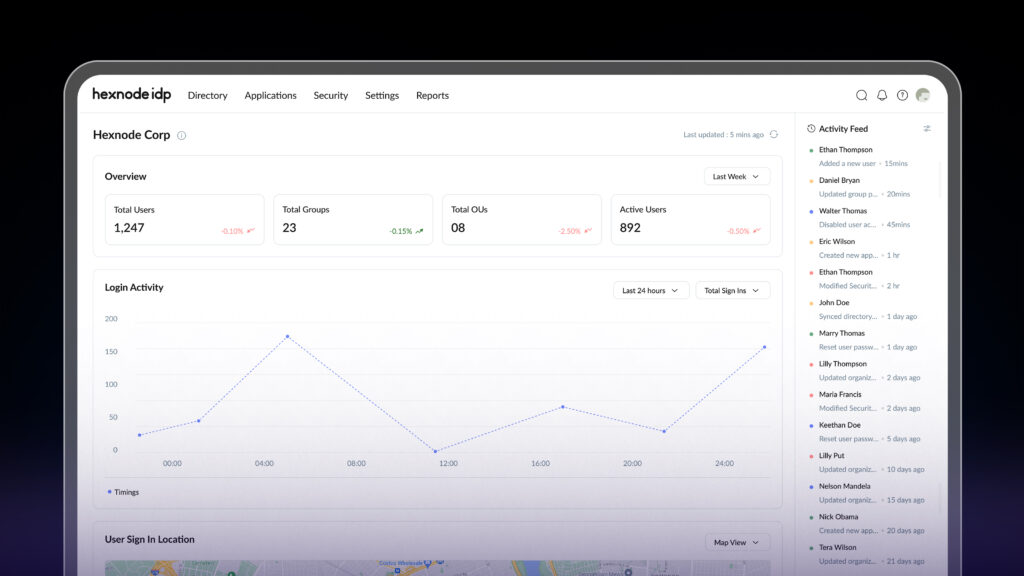
Hexnode IdP Overview: What It Is and Who It’s For
Explore Hexnode IdP, its key capabilities, and who can benefit from identity-driven access.
Plan downstream application access with Hexnode IdP
Assess external-provider federation separately from downstream application configuration. The application steps below cover SAML SSO, assignments, and outbound provisioning; they do not establish the configuration for a specific provider-to-provider connection.
For downstream applications, open Applications > MyApps > + Add Apps, select SAML 2.0, and configure the ACS URL, Entity ID, Audience URI, and Name ID Format against the application’s requirements.
Under the application’s Assignments, use Include to grant pilot users access and Exclude to deny access. Exclude overrides Include, even when a user belongs to an included group. These controls govern downstream application access; validate external-provider federation separately.
SCIM 2.0 outbound provisioning sends identity changes from Hexnode IdP to supported applications. Configure Create Users, Update Users, Deactivate Users, and Sync Groups as required. Use attribute mapping to align user and group fields with the target application’s schema.
The Synchronization Schedule defines when provisioning runs. Check the configured frequency and timing during pilot testing, and verify the resulting account changes in each application before expanding assignments to additional users and groups.
FAQs
Can two identity providers work together during a federation migration?
Yes. Identity federation can allow an existing identity provider and a new provider to coexist through supported trust relationships. Administrators must verify protocol compatibility, authentication responsibilities, and connection direction before configuring the integration.
Does identity federation automatically migrate user accounts and passwords?
No. Identity federation establishes authentication trust between systems but does not automatically transfer passwords, MFA registrations, application data, or existing sessions. Account provisioning, directory synchronization, and data migration require separate planning and validation.
How can organizations prevent duplicate user accounts during identity federation?
Organizations should verify user-identifier mappings and match existing application accounts before changing authentication configurations. Administrators should review email aliases, multiple domains, contractors, and provisioning ownership to prevent account mismatches or unintended duplication.
How can you evaluate Hexnode IdP for your federation plan?
Evaluate Hexnode IdP against your organization’s provider pairing, authentication ownership, and application test requirements. Bring your compatibility matrix and pilot acceptance criteria to a product discussion before committing to rollout. Confirm the supported configuration and evidence needed to approve each stage of your identity federation migration planning.
Simplify Enterprise Identity Federation
Configure application SSO, manage user and group assignments, and automate provisioning for supported applications with Hexnode IdP.
Content writer at Hexnode. Fueled by good coffee and the occasional cat cuddle, I enjoy crafting content that informs, connects, and resonates. Nothing excites me more than knowing my words have been read, appreciated, and maybe even bookmarked.