GMS certification determines whether an Android device gets Google’s core apps, APIs, and enterprise management support, making it a critical factor in enterprise hardware decisions.
GMS certification confirms Google apps and services work correctly, but it’s a separate, optional add-on to the open-source Android OS, not a requirement.
Certified devices gain Android Enterprise support and easier management, while non-GMS devices offer more customization but rely on the mostly deprecated Device Admin API.
Hexnode UEM manages both GMS and non-GMS Android devices, letting businesses choose the right fit without sacrificing lifecycle management.
In the race to become the global leader in mobile operating systems, it is a general consensus that Android OS is a real contender with the lion’s share in the mobile device market being a relative newcomer. Android’s lineup of devices has fared remarkably well in the workplace too, though the topic of whether Google can outshine the Cupertino giant in terms of enterprise offerings is up for debate now. In fact, there are major causes behind the reliable and consistent user experience provided by Android. It includes the open-source software stack, the object-oriented architecture based on the mature Java language, as well as the swift integration with Google’s extensive services.
Whether it be a consumer device or an enterprise device, users cannot afford to lose any pre-loaded apps or services that they expect to be available right out of the box. Google Mobile Services (GMS) specifically offers such a set of pre-installed apps and services meant to boost the productivity of certified Android devices. GMS certification is the process of verifying that all the Google proprietary apps and services work properly as most standard Android devices do, and everything essential comes pre-shared.
This certification is an often-overlooked factor when it comes to choosing the ideal hardware for your business. To choose wisely and put the highest quality devices into the ecosystem, one must have a good understanding of what GMS certification is and what it means for Android systems, especially when used as dedicated devices. Here, we attempt to scrutinize whether this certification is the greatest blessing or the darkest curse for Android device users.
Google Mobile Services (GMS) is a suite of secure, collaboration and productivity apps and APIs powered by Google to ensure a consistent user experience across all Android devices. Apart from a variety of Google-branded apps, GMS also provides APIs required for running other mainstream applications that don’t fall under its array. So, without GMS, it can affect the functioning of other apps also. All the offered apps and services are developed and owned by Google and built on top of the Android Open Source Project (AOSP) to pack the very essence of Google into the Android system.
Popular apps like Google Play Store, Search, Gmail, YouTube, Google Drive, Hangouts, Google Maps, Calendar, etc. typically come under the GMS package though there will be regional variations based on country availability and licensing requirements. Major GMS capabilities include Firebase Cloud Messaging (FCM), SafetyNet APIs, etc. Integrating GMS into the Android system requires a fee per device for the OEMs. What the end users have to pay depends on a particular application’s/service’s requirements though all Google Mobile Services are generally free to use for the consumer set.
Advantages of GMS:
Increased efficiency due to a large bulk of productivity apps.
Over-the-air updates.
Consistency and uniform functionality across multiple devices.
Google guidelines and support to ensure security.
Services to ensure the proper functioning of other mainstream apps.
Is GMS a part of the Android operating system?
Android consists of two independent sections, namely the Android Open Source Project (AOSP) and the Google Mobile Services (GMS). The former corresponds to the basic operating system, and the latter, however, is an add on to it.
Core Android OS by itself doesn’t support some mechanisms and features necessary for enterprises though it provides device-level functionalities like emailing. So, in order to provide these additional requirements, GMS is built on top of the OS and hence is not a part of the Android operating system. Unlike the Android operating system, GMS is not open source and is a different product. However, GMS is not for all types of devices. That is, you can add it only by obtaining a license with Google. It is also possible for a device running the Android operating system to work without including GMS within it.
The big ‘HOWs’ of managing custom Android OS (custom ROM) in the workplace
Explore how custom Android OS helps workplaces boost control, security, and device management with UEM enrollment.
What is Android GMS certification?
The Android GMS certification is Google’s stamp of approval that a device meets all the specifications and requirements recommended by Google. Any device is GMS certified as a confirmation that Google apps and services run correctly on them. GMS certification is not a mandatory requirement for making and selling Android devices in the market; however, Google proprietary apps don’t come pre-installed, and major Google services don’t function as desired on non-certified devices.
GMS certification is a deal between manufacturers and Google. In addition to getting the brand certified, manufacturers have to get each of their models GMS certified before their retail distribution in order to launch them with the GMS suite of apps and services. Obtaining the certification often involves a time consuming and expensive road, especially for device makers who are not top Android OEM. In order to get approval and certification by Google, the device must pass through a series of tests. This include Compatibility Test Suite (CTS), CTS Audio Quality Test Suite (CAT) and so on. Both the hardware and software of the system will be thoroughly examined and validated to ensure that they meet Google standards in terms of performance, quality and reliability.
How to Check if a Device Is GMS Certified
Before purchasing hardware for a fleet deployment, it’s worth confirming a device’s GMS status rather than assuming it based on the brand name alone.
A few quick ways to check:
Look for Google Play Protect certification on the device itself. Navigate to Settings > Google > Security, or check the Google Play Store app under Settings > Play Protect. A “Device is certified” message confirms GMS certification.
Check Google’s official list. Google maintains a public directory of Play Protect certified devices, searchable by manufacturer and model, that IT teams can cross-reference before procurement.
Look for pre-installed Google apps. If the Play Store, Gmail, and Google Maps come pre-loaded out of the box, that’s a strong (though not definitive) signal of GMS certification.
Ask the manufacturer directly. For enterprise or rugged device purchases, request written confirmation of GMS certification status as part of the procurement process. This matters more for lesser-known OEMs and white-label devices, where certification status isn’t always obvious from branding alone.
Skipping this check can create problems later. An uncertified device might not run mainstream apps that depend on GMS APIs like Firebase Cloud Messaging, and it won’t support Android Enterprise, which limits your management options with a UEM down the line.
GMS Certification vs. Play Protect Certified: What’s the Difference?
These two terms often get used interchangeably, which causes confusion during procurement conversations.
GMS certification is the broader process: a device passes Google’s compatibility test suites (CTS, VTS, GTS, and others) to confirm it can run Google’s proprietary apps and services correctly.
Play Protect certified is essentially the consumer-facing badge that results from passing this process. When Google confirms a device meets its security and compatibility standards, it earns the “Play Protect certified” status, visible directly on the device under Settings > Google > Security.
In practice, a device that’s GMS certified is Play Protect certified, and vice versa. The distinction is more about audience: GMS certification is the technical/manufacturer-facing term, while Play Protect certified is the label Google surfaces to end users and IT admins checking a device’s status.
For enterprise buyers, this matters less as a technical distinction and more as a verification shortcut. If you can’t confirm GMS certification through documentation, checking for the “Play Protect certified” badge on the device is the fastest way to get the same answer.
Uncertified devices will show “Device is not certified” in the same settings menu, which is Google’s way of surfacing that Play Protect, and by extension, GMS, hasn’t validated the hardware.
GMS license vs. certification
You shouldn’t confuse GMS license with GMS certification. Firstly, GMS license is simply the permission for manufacturers to distribute the Google suite of apps and services with their devices. Also known as Mobile Application Distribution Agreement (MADA), an OEM/manufacturer/distributor gets the license when they apply for it and successfully complete Google’s review process. This license is one of the pre-requisites for GMS certification. Simply put, the main difference between a GMS license and a GMS certification is that the license is for manufacturers or brands, while certification is for the devices.
How to obtain GMS certification?
Initially, only manufacturers having a proper MADA license (GMS license) from Google were able to obtain GMS certification for their Android hardware. This norm made it difficult for smaller manufacturers to get the certification as Google generally doesn’t provide MADA for such brands. Later, as an easy solution to obtain GMS certification for brands without MADA, Google designated some GMS partner engineering companies to provide hardware for small-scale firms looking to manufacture GMS certified devices. Another factor is that only devices running the current stable or preceding OS versions are eligible to obtain GMS certification.
Compatibility Definition Documentation
There is a Compatibility Definition Document (CDD), which enumerates the Google recommended requirements for devices to be compatible with the latest versions of Android OS. To obtain GMS certification, the device must meet all the needs documented in CDD. There will also be updates in the CDD guidelines with each new Android OS version according to the change in OS conditions.
The document defines in detail the recommendations for different device categories like handheld, tablet, watch, television, and so on. Based on the recommendations for device types, security standards, software, multimedia compatibility, etc., manufacturers can ensure that their devices are eligible to apply for GMS certification.
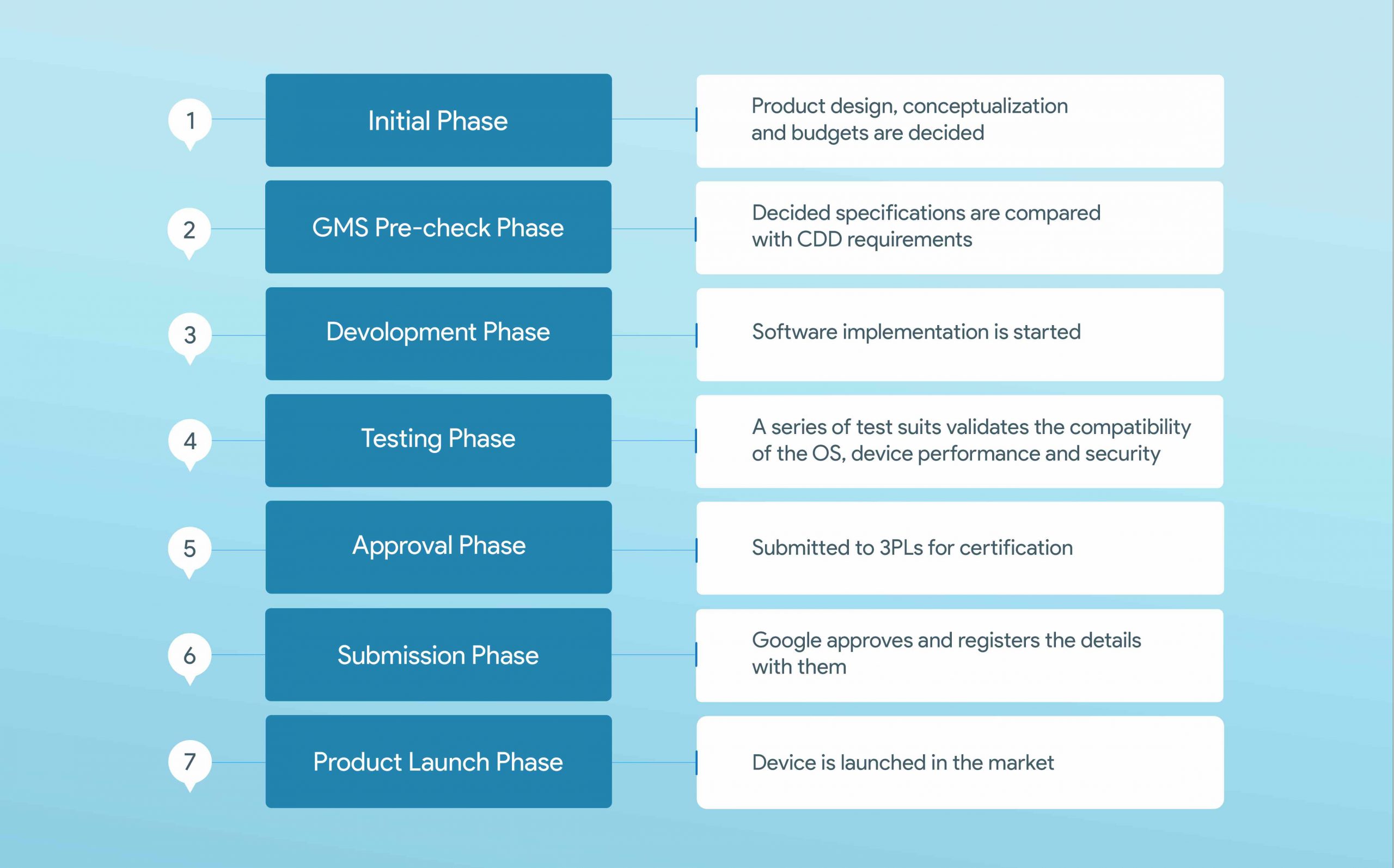
Applying for and obtaining GMS certification is not a simple process but involves different, and even complicated steps. Here is a quick overview of the development cycle an OEM should go through in order to launch Android devices with GMS certification.
GMS certification process
Step-1: Initial phase
The product development cycle begins with the initial phase, where you make the product design and conceptualization. This includes decision making for everything regarding the hardware and software of the product. It is imperative to consider making decisions on GMS certification and budget for the process at this phase itself to avoid any losses generated at a later stage.
Step-2: GMS pre-check phase
In this phase, the decided hardware, software and mechanical requirements for the product are compared with the Google recommendations listed in CDD to evaluate whether it can adhere to Google standards. It is better to consult with an expert to avoid any discrepancies at a later stage.
Step-3: Development phase
Generally, the software implementation starts once the product specifications meets all the Google recommendations. Sometimes, the GMS pre-check and development can go in parallel.
Step-4: Testing phase
After the product is ready with Android ported on it, they are finally required to pass a series of tests. The test suites validate the compatibility of the operating system and Google services, device performance and security and reveal any incompatibilities if present. There are labs with Google’s approval that provide independent testing. For quality analysis, the manufacturer should approach a testing center that is certified by Google. The mandatory tests through which the device passes to guarantee high-quality performance include:
Compatibility Test Suite (CTS)
It is also known as Android Compatibility Tests. CTS helps reveal incompatibilities early on by running more than 300 K unit test cases. CTS also helps to verify the compatibility of the device’s hardware and software. It consists of a set of tests like signature tests, platform API tests, platform resources, platform permissions, and so on.
Compatibility Test Suite Verifier (CTS-V)
After completing the CTS, the device undergoes Compatibility Test Suite Verifier (CTS-V) to verify the Android compatibility further. It is a manual testing tool that allows the validation of functions and APIs that you can’t test without manual input. It involves manual testing of device cameras, sensors, touch screens, audio, etc. using this tool.
Vendor Test Suite (VTS)
Checks the compatibility of the OEM device and the Android system aiming at the lower layer of the Android architecture. VTS consists of a set of test cases for improving the performance and compatibility of the Android system. It also automates the HAL and OS kernel testing with test sets that are automated or structural. It encourages a test-driven development process.
CTS Audio Quality Test Suite (CAT)
Helps validate the recording quality and audio playback capabilities of devices. CAT verifies the audio quality of the device without requiring full-fledged test environments.
GMS Test Suite (GTS)
Tests the compatibility of Google proprietary apps with the device. This automated test verifies whether the GMS apps have been appropriately integrated. It also ensures user data security with a few security-related tests.
Security Test Suite (STS)
Checks for security vulnerabilities and ensure the safety of the device. It guarantees that the devices are safe and no vulnerabilities exist. It is updated monthly, so device makers can undo any latest type of bugs identified in the system.
Step-5: Submission Phase
After the devices pass all the test suites, you’ll have to submit them to third-party logistics (3PLs) for certification. Third-party logistics are laboratories having Google’s approval and have authentication to provide certification on behalf of Google. After the verification from third-party logistics, the result is then sent to Google to approve the GMS certification.
Step-6: Approval Phase
Google approves the certification, and the device details will be consequently registered with Google.
Step-7: Product Launching Phase
Finally, the product is ready for launch in the market with all the approved GMS apps and services.
Regardless of the use case, many consumer-grade Android products will benefit from this certification. Still, there are a few concerns when it comes to enterprise use cases. Knowing the actual benefits and drawbacks is necessary for businesses to check whether to embrace this certification or keep it off their devices.
The PROs
Provides Google supported security and management features necessary for any business.
GMS devices will have the latest version or the preceding version of Android OS. This will consequently help you to experience little to no security flaws.
Monthly security patch updates are provided to these devices.
They come with a broad mix of apps and access to the Google Play Store, which can be controlled using a UEM solution.
These devices come with commonly used APIs like location services.
Android Enterprise is supported to integrate with UEM solutions for better device management.
Application stability and over-the-air updates.
The CONs
Leaves a backdoor for Google into the device, which causes privacy concerns.
Devices should adhere to Google’s terms of use.
Pre-loaded apps will take up a large portion of the available RAM and ROM space.
Forced software updates and apps utilize extra resources.
Google Play Store opens doors for easy malware distribution.
Devices must pass through a complex suite of tests that costs a lot of time and money for device makers.
No support for older Android versions.
Limit options for device customization.
Featured resource
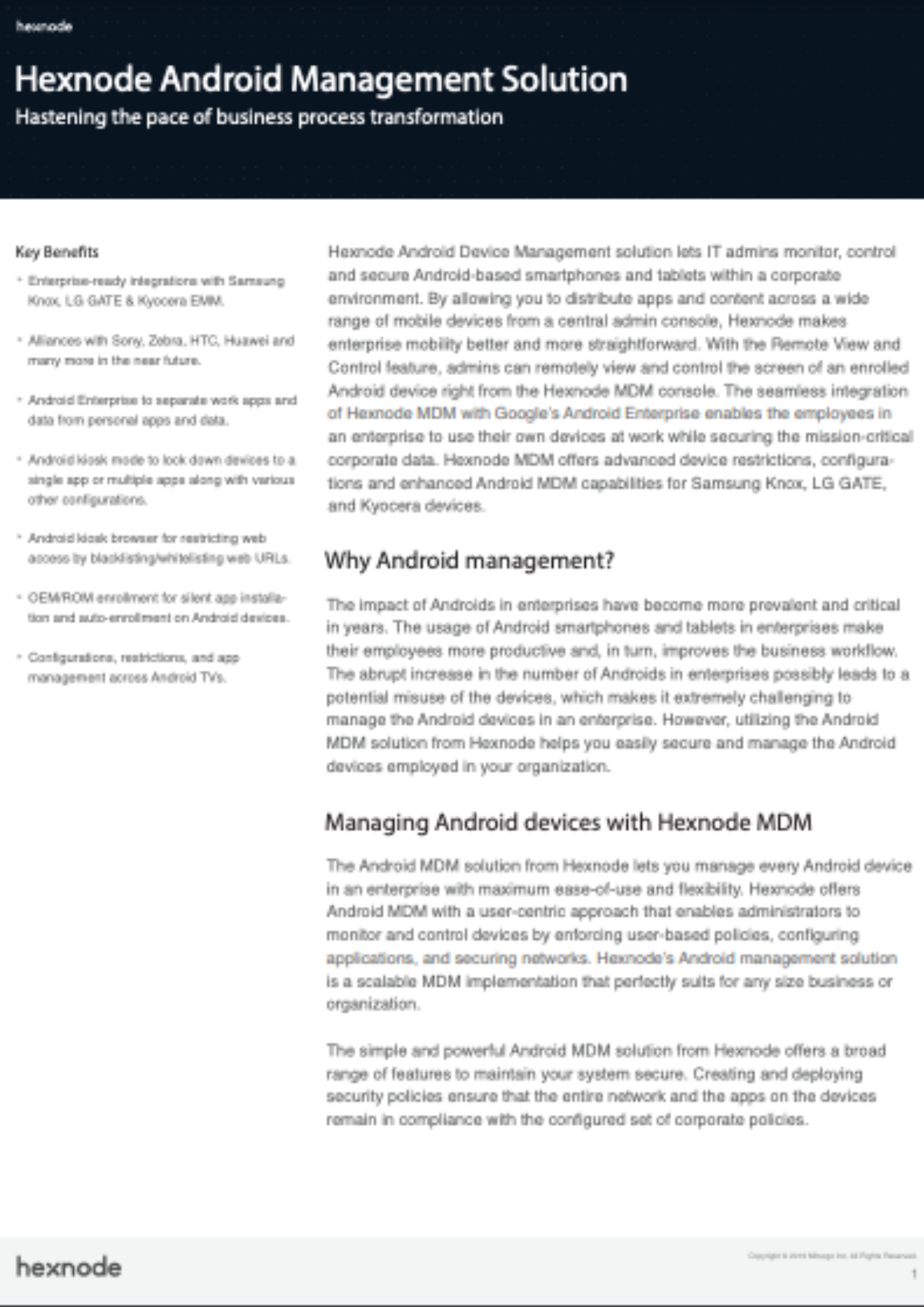
Hexnode Android Management Solution
Get started with Hexnode’s Android Management solution to improve efficiency, increase productivity, save time and overhead costs of managing your corporate devices.
Enterprise devices don’t always need to be certified but deciding between GMS and non-GMS devices depends upon the business use cases.
Business scenarios requiring GMS devices
There are obvious situations where enterprise customers need to use the certified devices.
Google’s privacy policies, terms of use, and requirements have a lesser impact on companies.
Seamlessly updating, managing, and securing applications downloaded from the Google Play Store is a necessity for companies.
Dependence on GMS APIs like Google Location Services compels companies to use specific applications or services.
Companies must receive API updates from Google directly and promptly, without relying on third-party services.
Managing a diverse range of device types, including corporate-owned and personal devices, is a responsibility for companies.
Enterprise applications of non-GMS devices
Work devices always need not be GMS certified. For instance, there are instances where organizations can work perfectly fine with non-GMS devices.
Companies requiring purpose-built devices for specific use cases may need non-GMS devices. They can offer better flexibility for configuring non-standard applications.
Companies using Android applications that don’t depend on Google APIs. In case if they need applications depending on APIs they don’t need constant updation.
Companies using rugged devices in industries like construction and retail for applications like field services and logistics. Furthermore, these devices might require only their particular work apps.
SMBs looking for low price devices which are flexible for any of their particular requirements.
However, when it comes to the management requirements for enterprise devices, GMS devices are the better option since Android Enterprise is officially supported only on devices having GMS certification. The only alternative to manage non-GMS devices is to use Device Admin API, which is mostly deprecated, causing difficulty in managing them.
FAQs
Can a device lose its GMS certification after it’s already been sold?
Yes, if a manufacturer modifies the device’s software or firmware in a way that no longer meets Google’s compatibility requirements, Google can revoke that device’s certification. This can happen with unauthorized custom ROMs or firmware updates that break the original CDD compliance. Once revoked, the device loses access to Google Play Protect certification and related GMS services.
Does rooting a GMS-certified Android device remove its certification?
Rooting a device typically triggers a “Device is not certified” status in Play Protect, since root access breaks the security assumptions Google’s certification relies on. This can also cause SafetyNet or Play Integrity checks to fail, which may block certain apps like banking or streaming services from running. Rooting doesn’t erase the GMS certification tied to the hardware model, but it does change that individual device’s certified status.
How long does the GMS certification process typically take for a new device?
There’s no fixed universal timeline, since it depends on the manufacturer’s testing readiness and whether issues arise during the compatibility test suites. The process spans multiple phases, from pre-check against the CDD through testing, submission, and Google’s approval, which can extend the timeline for OEMs without a MADA license working through partner engineering companies. Smaller manufacturers without prior certification experience should expect a longer runway than established Android OEMs.
Wrapping up
By default, Android Enterprise management APIs are built into all certified Android devices. With the help of a UEM solution, GMS devices can be granularly managed according to their unique deployment scenarios, with the fully managed, work profile, or dedicated device management modes of Android Enterprise.
UEM solutions like Hexnode provide extensive management options for both GMS and non-GMS devices though only GMS certified devices officially support Android Enterprise. Hexnode UEM gives businesses the flexibility to provision, deploy, and also secure purpose-built devices to fit any use case and manage the entire life cycle of GMS certified as well as non-GMS Android devices.
Struggling with device management?
Give Hexnode a go! Try out the 14 day free trial of Hexnode UEM and securely manage your devices.