Choosing the best MDM for schools means finding a solution that extends Apple School Manager into day-to-day device management. Apple School Manager handles assignment, enrollment, and app or book workflows, while MDM manages configuration, security, filtering, reporting, and lifecycle control. Schools should prioritize ASM integration, zero-touch deployment, classroom workflows, privacy-aware controls, app management, and scalable support. The right MDM keeps Apple devices consistent, secure, and ready for instruction.
Managing a fleet of school-issued iPads and Macs is no small feat, especially when IT teams are balancing tight budgets, privacy requirements, and classroom demands.
The challenge is not simply getting devices into students’ and teachers’ hands. It is making sure every device is enrolled correctly, configured consistently, protected against misuse, ready for instruction, and easy to support throughout its lifecycle. In Apple environments, this requires more than just a procurement or enrollment workflow. It requires a management strategy that connects deployment, security, app access, classroom needs, and long-term device operations.
But with dozens of vendors claiming to offer the best MDM for schools, how do you identify the right fit for your environment?
This guide explains what to evaluate, what capabilities matter, and how to choose a solution that fits your Apple environment.
A common misconception in education IT is treating Apple School Manager as a standalone device management solution. In reality, it is an administrative layer for Apple deployments. It helps schools assign devices, support Automated Device Enrollment, and manage app and book purchasing, but it does not enforce policies or manage endpoint behavior.
This is where MDM becomes essential. A device management service lets administrators remotely configure devices by sending configurations, profiles, and commands. It also enables software updates, compliance monitoring, remote lock or wipe, and app installation.
Think of Apple School Manager as the provisioning gateway and the MDM as the execution layer. With Automated Device Enrollment, eligible school-owned Apple devices can enroll into MDM during setup without IT physically touching or preparing each device beforehand.
Without MDM, schools risk:
Configuration drift across devices.
Compliance gaps in filtering, updates, and restrictions.
Manual deployment bottlenecks across 1:1 or shared-device programs.
App lifecycle issues with installation, updates, revocation, and license reuse.
The best MDM for schools turns Apple School Manager workflows into secure, scalable, day-to-day endpoint management.
Key Features to Look for in an Education-Focused MDM
Choosing the best MDM for schools starts with understanding that education device management is different from corporate endpoint management. Schools need more than baseline compliance. They need workflows built around instructional uptime, student safety, Apple School Manager integration, delegated administration, and lifecycle control.
Here are the key capabilities to evaluate before shortlisting a vendor.
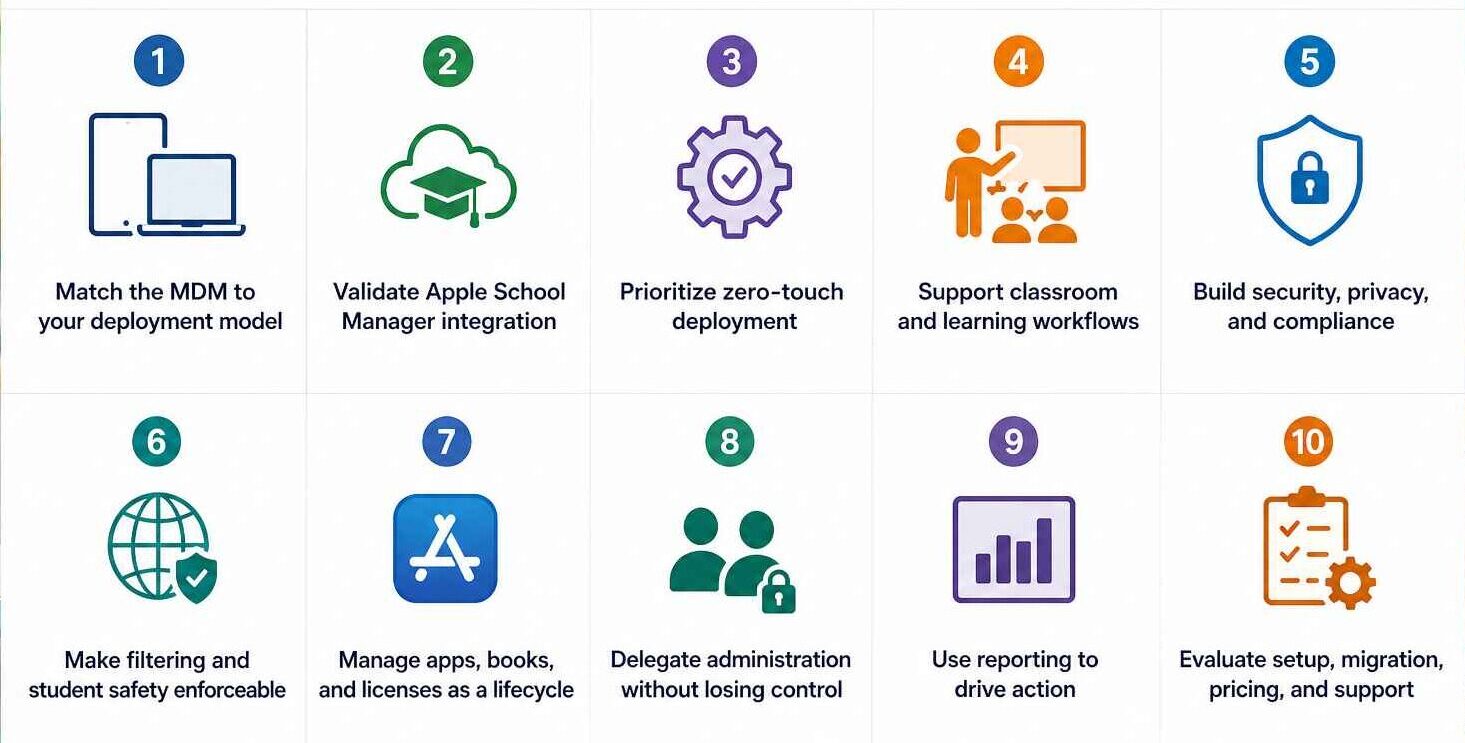
1. Match the MDM to your deployment model
Before comparing vendors, map the Apple environment you run. A one-to-one iPad program, shared iPad, staff Mac fleet, Apple TV deployment, and BYOD program all require different levels of control.
Evaluate whether the MDM supports:
One-to-one programs with zero-touch enrollment, app assignment, remote lock or wipe, and reassignment workflows.
Shared iPad with session control, storage management, app availability, and class-based restrictions.
Staff devices with FileVault visibility, OS update controls, inventory, and compliance reporting.
BYOD programs with privacy-aware enrollment and limited school data management.
School-owned devices need stronger supervision and remote actions. Personally owned devices require lighter-touch controls that separate school-managed data from personal data.
2. Validate Apple School Manager integration
“ASM-compatible” should mean more than basic Apple device enrollment. It should support assigning, reassigning, and unassigning devices from device management services, which matters when devices move between campuses, programs, or support teams.
A strong MDM should sync reliably with Apple School Manager, support Automated Device Enrollment, apply enrollment profiles during Setup Assistant, and make reassignment manageable without manual reconciliation.
3. Prioritize zero-touch deployment
Zero-touch deployment is one of the clearest markers of a mature education MDM. Apple School Manager enables devices to enroll in MDM without IT physically touching the endpoints, and supports flexible deployment models such as personal devices, shared iPad, Mac labs, and Apple TV.
The MDM should let IT predefine what happens the moment a device is activated, including:
Automated enrollment profiles
Setup Assistant customization
Wi-Fi payloads
Identity certificates
Device naming rules
Preconfigured restrictions
Automated app installation
The goal is to achieve consistency and predictable provisioning. Every new or reassigned device should be enrolled, configured, secured, and ready for the classroom with minimal IT intervention.
4. Support classroom and learning workflows
The best MDM for schools should support instruction, not just device lockdown. IT needs governance, but teachers need workflows that do not depend on central IT for every classroom action.
The MDM should help schools operationalize classrooms, Schoolwork, iPads, managed Apple Accounts, app and book assignment, web filtering, and assessment-ready restrictions.
In practice, this means IT can lock students into a testing app, push required apps before class, restrict non-educational resources during school hours, and give teachers limited classroom controls without granting full administrator access.
5. Build security, privacy, and compliance into the baseline
Schools manage devices used by students across classrooms, take-home programs, labs, and mixed ownership models. Security cannot depend on manual configuration or teacher enforcement.
At minimum, the MDM should support passcode enforcement, remote lock and wipe, Managed Lost Mode, OS update controls, certificate management, app allowlists or blocklists, network restrictions, and web filtering.
For Mac management, prioritize:
FileVault reporting and recovery key escrow
Gatekeeper and firewall controls
Software update management
Local account management
Compliance reporting
An ideal MDM should query Apple devices for details such as serial number, UDID, Wi-Fi MAC address, and FileVault encryption status. This visibility supports audit readiness, incident response, and support triage.
Leveraging Shared iPads in schools and enterprises
Read more about how Shared iPads help schools and enterprises offer secure and simple device management.
6. Make filtering and student safety enforceable
Content filtering should be assignable by grade, campus, device type, and ownership model. On managed Apple devices, Web Content Filter payloads can be configured through MDM to deny access to specific websites, allow only approved websites, or apply automatic filtering. Since implementation can vary by device management service, schools should validate how filtering policies behave inside the MDM they are evaluating.
The goal is to make filtering centrally assigned, difficult to disable without authorization, and visible to IT when devices fall out of policy.
7. Manage apps, books, and licenses as a lifecycle
Apple School Manager provides the purchasing layer for apps and books, but the MDM determines whether content management is operationally efficient. Schools need more than the ability to buy licenses. They need to deploy, update, remove, reclaim, and reassign them.
The MDM should support app assignment by grade, class, campus, staff role, device group, or ownership model. IT should be able to remove apps when students graduate, reclaim licenses from retired devices, and push teacher-only apps to staff devices without manual effort.
Where possible, app deployment should connect to directory groups, class structures, or term schedules.
8. Delegate administration without losing control
Large districts cannot route every routine request through central IT. The MDM should support role-based access control, allowing campus technicians, help desk staff, or delegated administrators to perform scoped actions. Local teams should have enough access to resolve routine problems quickly, while district IT teams should retain control over global settings, security policies, enrollment profiles, and destructive actions.
Useful delegated actions may include clearing passcodes, locating devices, viewing inventory, installing approved apps, or assisting with classroom issues.
9. Use reporting to drive action, not just exports
An ideal MDM should provide clear visibility into inventory, enrollment status, OS versions, app installation status, compliance posture, battery, storage, hardware identifiers, and failed actions where available.
The reporting layer should help IT prioritize remediation. Dashboards should surface non-compliant devices, outdated OS versions, failed app installs, unenrolled devices, encryption gaps, and low-storage issues before they disrupt instruction or create audit exposure.
10. Evaluate setup, migration, pricing, and support
Implementation is where many MDM decisions become real. Schools still need to manage APNs certificates, Apple School Manager links, enrollment tokens, content tokens, device assignment rules, enrollment profiles, and baseline policies.
Pricing should also match the deployment model. Device-based licensing may fit shared carts or labs, while user-based licensing may fit staff or mature one-to-one programs.
Featured Resource
Mastering ABM and ASM: The complete handbook
Learn about all the different features available in ABM and ASM and the benefits of pairing these platforms with a UEM solution like Hexnode.
Top MDM Solutions for Apple School Manager in 2026
The right MDM depends on the school’s Apple footprint, deployment model, support capacity, and security requirements. The following platforms are strong candidates for schools evaluating Apple School Manager integration, education workflows, and scalable device management in 2026.
1. Hexnode
Hexnode is a strong fit for schools and districts that need Apple School Manager integration alongside broader multi-platform endpoint management. Hexnode’s Apple School Manager resources position the platform around deploying iPads and Macs for education, managing devices through ASM, and supporting classroom-ready deployment workflows.
It is especially suitable for lean IT teams that need:
Apple device enrollment and policy management
Kiosk use cases, such as single-app or multi-app mode
Shared iPad support
Cross-platform management beyond Apple
2. Jamf School
Jamf School is purpose-built for Apple education environments and is a natural fit for schools heavily invested in Apple Classroom, Schoolwork, and Apple School Manager. The tool can sync teachers, students, and class data from Apple School Manager to support Apple education workflows.
It is suitable for Apple-first schools that want:
Deep Apple education alignment
Classroom-focused device management
ASM synchronization
Teacher and student workflow support
3. Mosyle Manager
Mosyle Manager is designed for Apple-focused education environments and combines MDM with security-oriented features such as web filtering for school-owned Apple devices. It also supports web filtering and security as integrated parts of its Apple-focused MDM platform. It is suitable for schools that want:
Apple-only device management
Integrated filtering and security controls
Streamlined deployment for iPad and Mac
Consolidated management and protection workflows
4. Lightspeed Mobile Device Management
Lightspeed MDM is suitable for schools that want device management tied closely to student safety, filtering, and classroom visibility. Its MDM supports app deployment by school, grade, classroom, and student, and positions its Apple solutions around device management, filtering, and compliance. It is suitable for schools prioritizing:
App and device management by school or grade
Student safety and filtering alignment
Classroom-focused controls
Multi-product education technology ecosystems
5. Kandji
Kandji is a strong option for higher education, staff Mac fleets, and Apple-forward organizations that prioritize automation, modern Apple management, and streamlined onboarding. Kandji’s Apple integration documentation covers Apple School Manager, Apple Business Manager, APNs certificate renewal, and Automated Device Enrollment setup.
It is suitable for environments that need:
Staff and faculty Mac management
Automated Apple device enrollment
Modern Apple admin workflows
Strong lifecycle and compliance automation
Best Practices for Transitioning to Your New MDM
Migrating to a new MDM should be phased, documented, and tested. A reliable migration plan starts with documenting the current device management environment, collecting certificates and tokens, configuring the new service, recreating profiles and payloads, testing across device types, and then beginning migration. Apple’s migration guidance lists these as core migration stages and notes that MDM migration often involves APNs, Apple School Manager, certificates, tokens, usernames, and passwords.
Start with a controlled pilot: Test the migration with IT-owned devices, one campus, or one grade level before moving the full fleet.
Recreate profiles before migration: Rebuild enrollment profiles, configuration profiles, and payloads in the new MDM before assigning production devices.
Handle tokens and certificates carefully: Verify APNs, Apple School Manager, content tokens, certificates, usernames, and passwords before moving devices.
Reassign devices in phases: Move devices by campus, grade, department, or device type, then confirm enrollment, apps, restrictions, and reporting after each wave; Apple School Manager supports migrating devices from one device management service to another.
Train staff before rollout: Brief teachers and support teams on Apple Classroom workflows, app access, testing restrictions, passcode resets, and escalation paths before the new MDM becomes the default.
Choose an MDM That Extends Apple School Manager, Not Replaces It
The best MDM for schools should extend Apple School Manager, not work around it. Apple School Manager streamlines device assignment, Automated Device Enrollment, Managed Apple Accounts, and app or book workflows, while the MDM handles configuration, restrictions, security, app deployment, reporting, and remote actions. Apple’s education guidance also points schools toward MDM support for Apple School Manager, Classroom, Schoolwork, Shared iPad, and new OS education features.
Prioritize strong ASM integration, zero-touch deployment, privacy-aware controls, app lifecycle management, actionable reporting, and scalable support. The right MDM keeps IT efficient, students protected, and teachers supported.
Frequently Asked Questions (FAQs)
1. Can Apple School Manager connect with Google Workspace or Microsoft Entra ID?
Yes. Apple School Manager can use federated authentication and directory sync with identity providers such as Google Workspace and Microsoft Entra ID. This helps schools create and manage Managed Apple Accounts using existing identity data, including role or grade-level attributes where configured.
2. What should schools know before using Shared iPad?
Shared iPad is useful for carts and shared classrooms, but it has specific requirements. It needs an MDM solution, organization-owned Managed Apple Accounts, supervised devices, and supported iPad hardware with at least 32 GB of storage.
3. Can schools manage personal iPads without seeing personal data?
Yes, when they use Apple’s User Enrollment model. With account-driven User Enrollment, IT can manage only the school-provided accounts, settings, and information delivered through MDM, not the user’s personal account or personal data.
Simplify Apple device management for schools
Enroll, configure, secure, and manage iPads, Macs, and classroom devices from one centralized MDM console built for education workflows.
Curious, constantly learning, and turning complex tech concepts into meaningful narratives through thoughtful storytelling. Here I write about endpoint security that are grounded in real IT use cases.