Mixed device fleet management helps logistics and retail IT teams centrally secure, configure, and support rugged devices, kiosks, tablets, shared endpoints, and desktops across multiple operating systems. By standardizing device roles, automating enrollment, applying task-specific controls, centralizing app and content delivery, managing updates, and enabling remote support, organizations can reduce downtime, improve productivity, and simplify endpoint management at scale.
In modern logistics and retail environments, a single organization rarely operates on a single device type. IT teams must manage rugged handhelds in warehouses, tablets on the shop floor, kiosks at customer touchpoints, shared iPads for associates, and Windows devices that power back-office or dispatch operations, all at once.
Without consistent endpoint governance, organizations face immediate consequences: delayed order fulfillment, increased support tickets, store downtime, slower onboarding, and fragmented frontline experiences.
The goal of mixed device fleet management is to bring structure to this complexity, making every device predictable, secure, and easy to deploy and support at scale. This blog is a practical guide for IT admins looking to streamline operations across diverse endpoints without adding management overhead.
What “mixed device fleet management” means in logistics and retail
In logistics and retail, mixed device fleet management means IT teams manage every type of business device, regardless of where or by whom employees use it, through a unified and consistent approach. This approach goes beyond smartphones and laptops. It includes rugged handheld scanners in warehouses, tablets used by store associates, self-service kiosks, digital signage, shared devices across shifts, and traditional desktops in back offices.
The “mixed” aspect goes beyond hardware. It also reflects the diversity of operating systems, including Android, iOS/iPadOS, Windows, macOS, and more, as well as different ownership models such as company-owned, shared, and BYOD deployments. Each combination brings its own policies, risks, and operational requirements.
A traditional MDM-only approach often falls short here, as it typically focuses on individual device types rather than the broader ecosystem. Logistics and retail environments demand a more unified model that applies policies, apps, security controls, and updates consistently across all endpoints.
This is where Unified Endpoint Management (UEM) becomes essential, enabling centralized policy enforcement and visibility across the entire fleet.
Why logistics and retail fleets are harder to manage than standard office fleets
Managing devices in logistics and retail environments is fundamentally different from managing a typical office setup. The number of devices adds complexity, but how and where organizations use them creates even greater challenges.
Key challenges include:
Highly distributed operations: Devices are spread across stores, warehouses, delivery fleets, and remote field locations, far beyond the reach of centralized IT teams.
Shift-based, shared usage: Multiple employees use the same device across shifts, making secure sign-in/sign-out and session control critical.
Diverse hardware mix: IT must handle rugged scanners, POS tablets, kiosks, and standard desktops, all with different capabilities and constraints.
Varied enrollment methods: Each platform (Android, iOS, Windows) requires different provisioning workflows, increasing deployment complexity.
Task-specific usage requirements: Many endpoints are purpose-built and must be restricted to specific apps or workflows, unlike general office devices.
Remote troubleshooting pressure: With devices in constant use across locations, IT teams must resolve issues without physical access.
Why transportation and logistics industry needs rugged devices
Explore how rugged devices and UEM boost efficiency, ROI and supply chain operations in transport and logistics.
10 best practices for mixed device fleet management
1. Standardize device roles before you standardize hardware
Start by defining device roles, not device models. Organizations use warehouse scanners, POS tablets, store associate devices, signage endpoints, dispatcher laptops, and driver handhelds for different purposes and should manage each accordingly.
For each role, define:
Required apps and workflows
Security restrictions and access levels
Update behavior and maintenance windows
Network and connectivity rules
Ownership model (shared, dedicated, or BYOD)
Once roles are clearly defined, hardware decisions become easier and more consistent. With Hexnode, IT teams can map these roles to policies and groups, ensuring every device deployed under a role follows the same configuration, automatically.
2. Automate enrollment and first-run provisioning
Manual device setup doesn’t scale. It introduces inconsistencies, delays onboarding, and increases dependency on local IT or store staff.
Modern fleets rely on zero-touch enrollment, where devices are:
Pre-configured before reaching end users
Automatically enrolled into UEM on first boot
Instantly assigned policies, apps, and restrictions
Across platforms, this includes Apple Automated Device Enrollment, Android Zero-touch or Knox Mobile Enrollment, and Windows Autopilot. Hexnode supports these workflows, enabling devices to be deployment-ready out of the box. This reduces setup time, eliminates manual errors, and ensures every device starts in a compliant state.
3. Segment devices dynamically, not manually
As fleets grow, static grouping quickly becomes unmanageable. Devices change locations, users, and roles frequently, especially in logistics and retail.
Instead, segment devices dynamically based on:
OS and device type
Ownership (corporate, shared, BYOD)
Location or branch
Department or use case
Risk or compliance status
Dynamic grouping ensures devices are always associated with the right policies, even as conditions change. With Hexnode’s dynamic groups, IT teams can automate policy assignments.
4. Use kiosk and shared-device controls for task-specific endpoints
Not every device should behave like a general-purpose endpoint. Many frontline devices are designed for a single task or a limited set of workflows.
Kiosk devices: Ideal for POS, self-service, ticketing, digital signage, and check-in systems. These can be locked to a single app, multiple apps, or even a secure browser.
Shared devices: Used across shifts by multiple employees. These require fast login, secure logout, and restricted app access.
Without proper controls, these devices can easily drift from their intended use, creating both security and productivity issues. Hexnode’s multi-platform kiosk capabilities allow IT teams to lock devices into purpose-built experiences in retail and logistics.
The Hexnode Kiosk Browser
For retail kiosks, standard browsers are a security risk. Hexnode’s Secure Browser allows you to whitelist specific URLs and disable the address bar, preventing customers from navigating away from your store’s catalog or checkout page.
5. Separate corporate and personal data without hurting usability
In environments that support BYOD or corporate-owned, personally enabled devices, data separation becomes critical.
IT teams must ensure:
Corporate apps and data remain secure
Personal user experience is not disrupted
Data leakage between personal and work environments is prevented
This is achieved through managed apps, work profiles, and controlled data sharing policies. Hexnode enables IT admins to enforce secure app and data boundaries, ensuring business information stays protected without compromising usability.
6. Centralize app, browser, and content delivery
Uncontrolled app usage and inconsistent content access are major sources of inefficiency and risk.
A centralized approach ensures:
Only approved apps are installed and accessible
Web access is filtered and restricted as needed
Business-critical content (SOPs, manuals, forms, pricing sheets) is distributed securely
For logistics and retail teams, this means employees always have access to the right tools and information, without distractions or risks. Hexnode’s app management, content distribution, and web filtering capabilities help IT maintain full control.
7. Treat patching and updates as an operational workflow
Unlike office environments, updates in retail and logistics must align with business operations.
Key considerations include:
Scheduling updates during non-peak hours
Staggering rollouts to avoid widespread disruption
Monitoring compliance and update status
Being prepared to pause or roll back if needed
Patching should not be reactive, it should be a structured, repeatable workflow. With Hexnode, IT teams gain visibility and control over update deployment and compliance tracking, ensuring devices remain secure without impacting operations.
8. Make remote troubleshooting part of the default support model
In distributed environments, IT teams rarely have physical access to devices. This makes remote troubleshooting essential, not optional.
Effective remote support includes:
Real-time screen view and remote control
File push and configuration updates
Guided troubleshooting for non-technical users
By resolving issues remotely, IT teams can significantly reduce downtime and avoid costly site visits. Hexnode’s remote view and control features enable faster issue resolution across locations.
9. Use location-aware controls where they improve operations
Location can be a powerful context for policy enforcement, when used responsibly.
Examples include:
Enabling specific policies only within store or warehouse premises
Triggering alerts when devices leave approved zones
Applying location-specific configurations for different branches
In logistics, this can extend to route-aware controls and device recovery workflows. Hexnode’s geofencing capabilities allow IT teams to apply policies dynamically based on device location, improving both security and operational efficiency.
10. Design for redeployment, replacement, and retirement from day one
Device lifecycle management is often overlooked, but it’s critical for scale.
A mature strategy includes:
Maintaining a spare device pool
Quickly re-provisioning devices for new users or roles
Securely wiping and resetting devices before reassignment
Standardized retirement workflows for end-of-life devices
This is especially important for shared and seasonal devices in retail and logistics. Hexnode enables IT teams to manage the entire lifecycle, from deployment to decommissioning, within a single platform.
Feature Resource
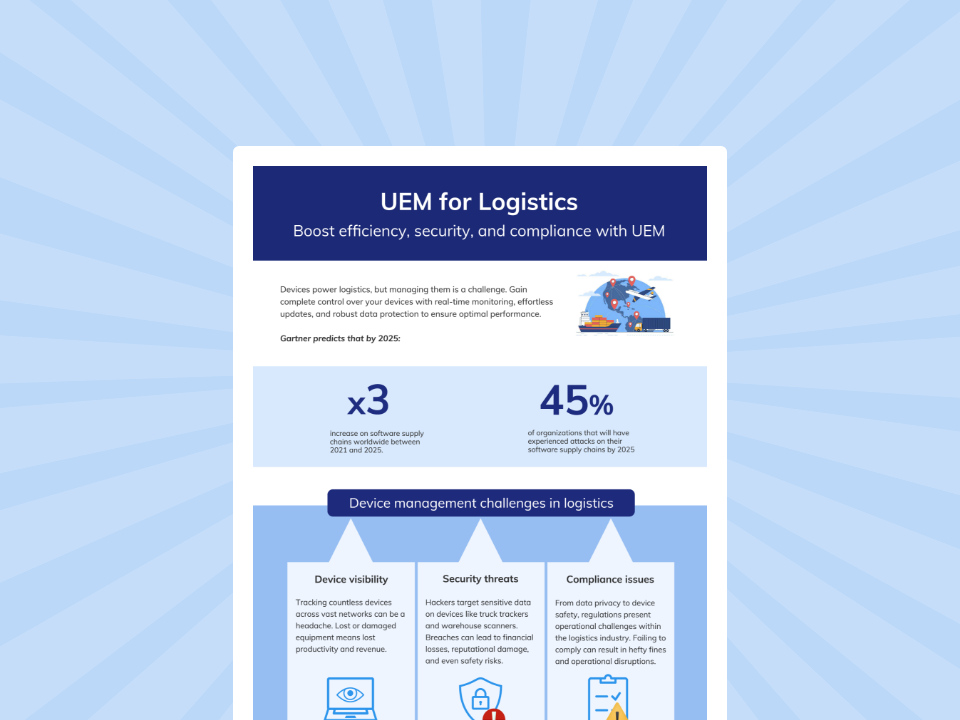
UEM for Logistics
Download the infographic to know how UEM helps to overcome the challenges in Logistics Industry
What IT admins should look for in a UEM platform for mixed device fleet management
Choosing the right UEM platform is critical for successfully managing mixed device environments in logistics and retail.
Here’s a practical evaluation checklist:
Cross-platform support: Ability to manage Android, iOS/iPadOS, Windows, macOS, and other endpoints from a single console
Rugged and kiosk readiness: Native support for rugged devices and advanced kiosk modes (single-app, multi-app, browser-based)
Zero-touch onboarding: Integration with Apple ADE, Android Zero-touch/KME, and Windows Autopilot for automated provisioning
Shared-device governance: Secure login/logout workflows, session control, and role-based access for shift-based usage
App and content management: Centralized distribution of apps, files, and web access with granular control
Patch and compliance visibility: Real-time insights into OS and app updates, with enforcement and reporting capabilities
Remote support capabilities: Screen view, remote control, and troubleshooting tools to resolve issues without on-site intervention
Dynamic policy assignment: Automated grouping and policy enforcement based on device attributes and context
Location-aware controls: Geofencing and location-based policy triggers for operational and security use cases
Low operational overhead: Intuitive interface, automation capabilities, and minimal manual intervention for day-to-day management
Conclusion
Managing mixed device fleets in logistics and retail ultimately comes down to execution. IT teams need a way to apply consistent policies across rugged devices, kiosks, tablets, and desktops, without increasing complexity. A unified platform like Hexnode enables this by bringing multi-platform management, zero-touch enrollment, kiosk control, dynamic grouping, app and content management, patching, remote support, and geofencing into a single console. This reduces tool sprawl and ensures devices behave predictably across distributed environments.
At its core, successful mixed device fleet management relies on standardization, automation, task-specific control, remote troubleshooting, and strong lifecycle practices. When done right, it improves uptime, productivity, support efficiency, and overall operational resilience. For teams managing diverse frontline endpoints at scale, Hexnode provides a practical and streamlined path forward. The goal of mixed device fleet management is not just visibility into endpoints, but reliable uptime, secure access, and faster support across every frontline device.
Try Hexnode free for 14 days
Simplify mixed device fleet management across all your endpoints with Hexnode.
Mixed device fleet management is the centralized approach to managing multiple device types, such as smartphones, tablets, rugged devices, kiosks, and desktops, across different operating systems with consistent policies for security, apps, updates, and support.
Why is mixed device fleet management important in logistics and retail?
Because these industries rely on diverse, distributed, and often shared devices, effective management ensures operational continuity, reduces downtime, improves employee productivity, and minimizes security risks.
How do you secure shared devices used across shifts?
Use secure login/logout workflows, enforce session controls, restrict app access, and apply role-based policies to ensure each user only accesses what they need.
What is the best way to enroll company-owned retail and logistics devices?
Automated or zero-touch enrollment methods pre-configure and secure devices, making them ready for use from the first boot while eliminating manual setup errors.
What should I look for in a UEM for mixed fleets?
Look for cross-platform support, kiosk capabilities, remote troubleshooting, dynamic policy management, and centralized control over apps, updates, and security.
I’m a technical content writer at Hexnode who loves simplifying tech. I break down complex ideas, remove the fluff, and help readers clearly understand our product for what it actually is: simple, reliable, and built to solve real problems.