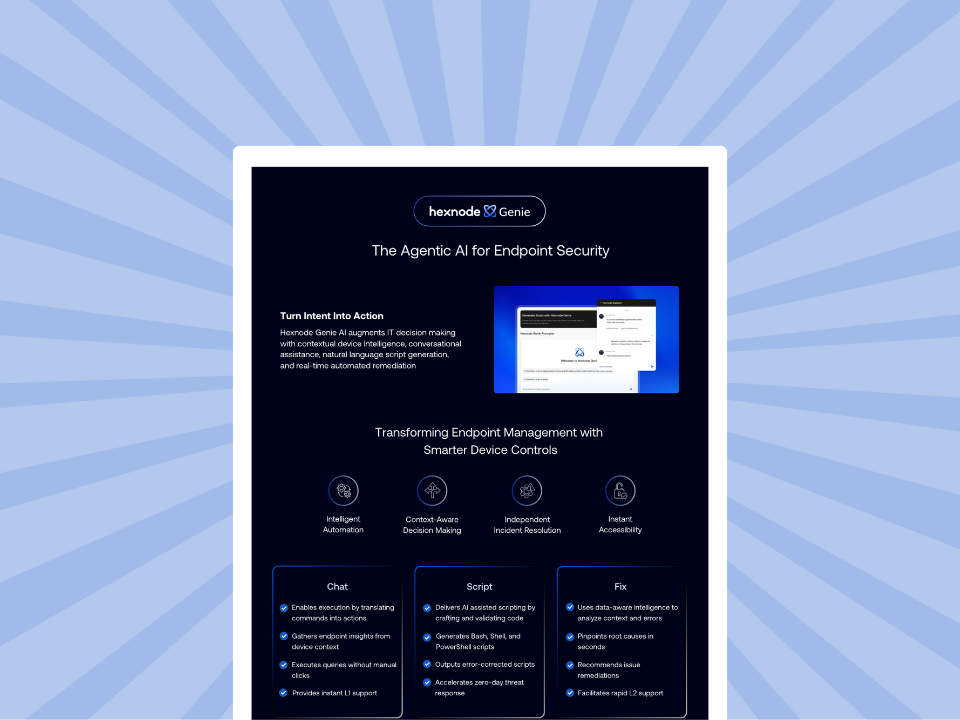
Hexnode Genie and Microsoft Copilot in Intune are not interchangeable AI assistants; the better fit depends on where your device data, admin workflows, and governance controls already live. Copilot in Intune is documented around Intune data exploration, policy/settings analysis, device troubleshooting, Windows 365 insights, and Security Copilot agents. Hexnode Genie is documented around conversational device context, failed-action troubleshooting, remediation guidance, and cross-platform script generation inside Hexnode. The right choice is the one that best aligns with your management platform, governance model, and operational workflows.
Hexnode Genie vs. Microsoft Copilot in Intune: quick comparison
For IT teams evaluating AI-assisted administration, the right choice depends less on the AI label and more on the management environment, available data, and daily operational workflows. Microsoft Copilot in Intune is best understood as an Intune-scoped AI experience tied to Microsoft’s endpoint management data and Security Copilot capabilities. Hexnode Genie, on the other hand, is designed for AI-assisted actions, device insights, troubleshooting, and script generation inside Hexnode.
Comparison area
Hexnode Genie
Microsoft Copilot in Intune
Primary workspace
Hexnode console
Intune admin center
Data scope
Device context, action history, troubleshooting data, error details, and script-related metadata within Hexnode.
Intune data and Windows 365 Cloud PC data where enabled; broader Microsoft-service insights require the standalone Security Copilot portal.
Strongest workflows
Conversational device queries, troubleshooting guidance, AI-assisted scripting, and remediation support.
Intune data exploration, policy/settings analysis, device troubleshooting, Windows 365 insights, and Security Copilot agents
Automation/remediation style
Admin-guided fixes, scripts, and contextual recommendations
Supported Intune actions, policy drafts, agent-guided remediation, and recommendations within Microsoft permission boundaries.
Governance considerations
Admin review, controlled execution, and workflow-specific oversight
Microsoft role-based access, Security Copilot permissions, and tenant controls
To clarify, this comparison is about Microsoft Copilot in Intune, not general Microsoft 365 Copilot. Consequently, for Intune-centered operations, Copilot in Intune aligns with the admin center, data model, and Microsoft permission structure already in use.
For teams prioritizing conversational device queries, remediation support, and script assistance in Hexnode, Genie is the more relevant AI layer.
Hexnode Genie is built for admins who want to move from natural language intent to operational output inside Hexnode. Instead, its core value is the ability to surface device context, explain failures, recommend remediation paths, and help generate scripts without forcing admins to manually stitch together console data, logs, and documentation.
In practice, Genie is positioned around three admin workflows:
Chat: Ask contextual questions about devices, actions, settings, or errors.
Fix: Investigate failed actions and receive remediation guidance based on device context and error history.
Script: Generate or validate scripts for custom administrative tasks.
As a result, that makes Genie most relevant when the admin workflow involves troubleshooting, custom actions, script-assisted remediation, and faster operational decision-making inside Hexnode. According to Hexnode documentation, Genie provides chat-based support, device filtering, troubleshooting guidance, and script assistance from within the console.
Microsoft Copilot in Intune at a glance
Microsoft Copilot in Intune is an AI experience embedded in the Intune admin center and powered through Microsoft Security Copilot capabilities. It is designed to help admins query Intune data, understand policies and settings, review device details, troubleshoot issues, and gain Windows 365 Cloud PC insights.
Specifically, its strength is tightly coupled with Microsoft-managed data. Admins can use natural language to explore Intune data, summarize results, receive recommendations, and initiate supported actions based on those results.
However, this is not an apples-to-apples comparison based only on AI maturity. Each assistant is only as useful as the data, permissions, workflows, and management environment it can access.
Microsoft has also introduced Security Copilot agents in Intune. These include agents such as Policy Configuration Agent, which helps convert plain-language requirements or baseline documents into recommended Intune settings and policy drafts, and Vulnerability Remediation Agent, which uses Defender Vulnerability Management data to identify and prioritize CVE remediation guidance in Intune. These agent workflows are subject to licensing, preview status, role permissions, and administrator review.
Capability-by-capability AI comparison
Ultimately, a useful comparison starts with the admin task, not the AI brand. Copilot in Intune excels at Intune data exploration, policy interpretation, and device-state analysis. Hexnode Genie, by contrast, focuses on conversational device insights, guided remediation, and script-assisted execution within Hexnode.
Natural language search and admin visibility
Capability
Hexnode Genie
Microsoft Copilot in Intune
Natural language queries
Lets admins ask contextual questions inside Hexnode and surface device, action, and issue-related insights without manually navigating multiple views. Hexnode describes Genie as using natural language to answer Hexnode questions, retrieve device information, troubleshoot errors, and generate scripts.
Lets admins query Intune data using natural language across areas such as devices, users, apps, policies, updates, and compliance. Copilot summarizes results and provides recommendations based on the query output.
Best visibility use case
Faster operational triage when the admin already works in Hexnode and needs quick answers about device status, failed actions, or next steps.
Broad visibility into Intune-managed resources, especially when teams need to find affected users, noncompliant devices, missing updates, or policy-related data.
Policy, compliance, and configuration support
Copilot in Intune supports policy interpretation and compliance analysis. Microsoft documents Copilot as being able to explain individual settings, identify potential conflicts, provide recommended values, summarize existing configuration policies, and analyze compliance policies.
In contrast, Hexnode Genie’s role is different. It is more useful when policy or configuration issues surface as operational failures that need investigation, explanation, or remediation from within Hexnode. Thus, the value is less about abstract policy comparison and more about reducing the time between issue discovery and admin action.
Troubleshooting and remediation guidance
Copilot in Intune can surface device-specific information such as installed apps and group membership, and it can help generate KQL queries for supported Device Query properties; however, Device Query requires a license that includes Advanced Analytics. Device Query currently supports eligible, corporate-owned Windows devices managed by Intune and joined to Microsoft Entra or hybrid Entra ID. Real-time query execution requires Windows Push Notification Services. That makes it useful for structured investigation when the relevant telemetry sits inside Intune.
Hexnode Genie is more directly positioned around root-cause analysis and guided remediation. Hexnode describes Genie as analyzing device context, action history, and error patterns to pinpoint likely causes and surface recommended fixes.
Scripting and custom task automation
This is where Hexnode Genie has the clearer fit: it generates scripts from natural-language prompts in PowerShell, Bash, Shell, and Python for Windows, macOS, and Linux devices, and lets admins refine them in the built-in script editor before saving them to the repository.
Copilot in Intune supports AI-assisted query generation for Device Query and Microsoft now documents Security Copilot agents for policy and vulnerability workflows. Copilot in Intune’s AI-assisted code generation is focused on producing KQL queries for Device Query, alongside its policy, remediation, and agent workflows, while Genie generates executable scripts in PowerShell, Bash, Shell, and Python for Windows, macOS, and Linux devices.
Hexnode Genie: The wizard of AI scripts
Explore how Hexnode Genie helps IT teams generate scripts, validate scripts, and automate device tasks with control.
Security, privacy, permissions, and admin control
Data access and permission boundaries
AI inside an admin console must inherit existing least-privilege controls; otherwise, it becomes a shortcut around governance. Security Copilot or Microsoft Entra roles govern access to Copilot in Intune while respecting existing Intune RBAC roles and scope tags. However, admins must audit inherited role permissions when enabling Intune as a Security Copilot data source. Admins can only access Intune data and perform actions permitted by their assigned roles.
Cost and access also need precise framing. Copilot in Intune is included with Security Copilot, requires Security Copilot to be enabled, and uses Security Copilot capacity. Eligible Microsoft 365 E5/E7 customers may receive access to Security Copilot through Microsoft’s rollout model through Microsoft’s inclusion and rollout model, while other customers may need to provision SCU capacity.
Human review before AI-driven action
For Hexnode, the governance question is less about autonomous execution and more about admin trust before action. Hexnode states that Genie strips sensitive PII before complex analytical processing, uses documented secure processing workflows, and keeps generated scripts or suggested remediations in a reviewable phase before execution.
That matters operationally. AI-generated fixes can reduce investigation time, but scripts, remediation steps, and configuration changes still need human validation, especially in regulated or high-availability environments.
Auditability and operational risk
The evaluation should include a practical governance checklist:
Who is allowed to prompt the AI assistant?
Who can approve scripts, remediations, or configuration changes?
Are AI-assisted activities clearly identifiable in audit logs?
What review process exists before broad deployment?
Microsoft notes that the Intune admin center does not directly display Copilot prompt and response history, requiring admins to review this data within Security Copilot. In contrast, Hexnode automatically tags AI-generated or modified scripts in its Action History and Audit Logs to simplify post-change reviews.
Which AI assistant fits which IT workflow?
Microsoft-first environments
For organizations already standardized on Microsoft Intune, Copilot in Intune offers the most natural operational fit. It operates inside the Intune admin center and leverages Intune data, policies, device details, troubleshooting workflows, and Windows 365 Cloud PC insights. Microsoft also positions the experience around endpoint administration workflows, not general productivity use cases.
This matters when the team’s daily work already depends on:
Configuration and compliance policies
Device inventory and assignment data
Windows 365 Cloud PC visibility
Microsoft role and permission boundaries
Script-heavy or mixed-device operations
Consider Hexnode when the operational challenge is less about interpreting existing Intune data and more about moving from admin intent to action. This is especially relevant for teams handling custom workflows, exception-based fixes, or repetitive tasks that require scripts.
Hexnode Genie is a more directly documented fit when admins need to:
Draft scripts from natural language prompts
Adapt scripts for Windows, macOS, or Linux workflows
Validate or refine scripts before deployment
Reduce manual effort in repeatable remediation tasks
Hexnode describes Genie as supporting script generation, troubleshooting guidance, device context analysis, and natural-language device queries inside Hexnode.
Troubleshooting-first teams
For troubleshooting, the better fit depends on where the useful context lives. Copilot in Intune helps admins investigate managed devices using Intune data, including device details, installed apps, group memberships, policy assignments, and error analysis.
Consider Hexnode when the team wants AI assistance tied to action history, failure analysis, and recommended fixes within Hexnode. That can reduce investigation time when admins are dealing with failed actions, recurring device issues, or script-related errors.
Compliance and reporting workflows
Compliance-focused teams should evaluate both assistants through a governance lens, not just an AI feature lens. The key question is whether the assistant helps admins understand policy impact, noncompliance patterns, reporting gaps, and accountability.
Useful evaluation criteria include:
Can admins quickly identify affected devices or users?
Can the assistant explain policy impact before changes are made?
Are recommendations reviewable before execution?
Are AI-assisted actions visible in logs or audit workflows?
Practical evaluation questions before choosing an AI admin assistant
Feature checklists can be misleading. The better evaluation starts with where your team loses time, where your operational data lives, and how much control you are willing to delegate to AI.
Start with these questions:
Which admin workflows create the most operational drag today: policy review, troubleshooting, reporting, script writing, remediation, or user support?
Where does the most important device and policy context currently live: Intune, Hexnode, another console, or across multiple systems?
What level of authority should admins grant AI within your environment: summarizing data, recommending fixes, generating scripts, preparing actions, or triggering approved workflows?
Who owns final approval when AI suggests a policy change, script, or remediation?
Can the assistant respect existing roles, permissions, scope boundaries, and change-control processes?
Does the assistant support your organization’s change management and approval process?
Are AI-assisted actions logged clearly enough for audit, rollback, and incident review?
The answer may be different across teams. A Microsoft-centered operations team may prioritize AI that understands Intune policies and device data. A team using Hexnode for day-to-day device actions may place more value on conversational troubleshooting, script assistance, and remediation guidance within that workflow.
Where Hexnode Genie fits into AI-assisted device operations
Hexnode Genie excels when teams rely on AI to shorten the path from a device question to a controlled admin action. Its value is less about replacing admin judgment and more about reducing the manual work required to locate context, interpret errors, and prepare a safe response.
For visibility, conversational queries can reduce dashboard-hopping. Instead of moving through separate views to check device details, compliance status, action history, or errors, admins can use natural language to surface relevant context faster. Hexnode positions Genie around chat-based assistance, device filtering, troubleshooting support, and contextual answers inside Hexnode.
For troubleshooting and control, Genie is most relevant when failed actions or recurring device issues need investigation. Hexnode states that Genie can analyze device logs, previously executed scripts, action metadata, and failure context to support troubleshooting and remediation guidance.
Fragmented device context can slow investigation and increase the likelihood of escalation, especially when admins must correlate device state, action history, and error details across multiple views. Genie can help admins move faster through questions such as:
Which devices are affected?
What action failed?
What failed action, error message, or script-related action metadata is relevant?
What remediation path is most appropriate?
Does the fix require a script, policy adjustment, or manual review?
For automation and efficiency, Genie directly powers script-assisted administration. Genie uses natural-language prompts to create and validate scripts in PowerShell, Bash, Shell, and Python for Windows, macOS, and Linux devices, with manual editing in the script editor and repository workflows available before deployment.
This is where the comparison becomes practical. Copilot in Intune powers administrative workflows that draw on Intune data, policies, device details, and Windows 365 insights. Hexnode Genie is most relevant when teams value AI-assisted execution, guided troubleshooting, remediation support, and scripting inside Hexnode.
Featured Resource
Hexnode Genie Info sheet
Evaluate Hexnode Genie for faster device troubleshooting, script generation, and controlled remediation workflows.
FAQs about Hexnode Genie vs. Microsoft Copilot in Intune
Is Microsoft Copilot in Intune the same as Microsoft 365 Copilot?
No. Copilot in Intune focuses on Intune admin workflows, while Microsoft 365 Copilot powers productivity apps.
Does Copilot in Intune come with every Intune license?
No. Microsoft does not include Copilot in Intune with standard Intune licenses by default. Instead, Microsoft bundles it with Security Copilot, requiring admins to enable Security Copilot and draw from its capacity. Eligible Microsoft 365 E5/E7 customers may receive Security Copilot through Microsoft’s inclusion and rollout model, while other customers may need to provision SCU capacity.
Can Hexnode Genie or Copilot in Intune act without admin approval?
Both operate within governed admin workflows, but the approval model depends on the action. Hexnode requires human review before admins execute AI-generated scripts or suggested remediations. Microsoft Copilot in Intune honors Intune RBAC and scope tags, and Microsoft’s agent workflows are subject to role permissions, prerequisites, and administrator review.
Which assistant is more relevant for scripting-heavy IT teams?
Hexnode Genie directly supports AI-assisted, cross-platform script generation, review, repository workflows, and deployment paths within Hexnode.
When does Copilot in Intune make more sense?
Copilot in Intune excels when teams center their workflows on Intune data, policy analysis, device troubleshooting, Windows 365 insights, and Microsoft Security Copilot agent workflows.
Can organizations use both Hexnode Genie and Copilot in Intune?
Yes, teams can use each where it fits best based on data location, admin workflows, and operational needs.
Conclusion: choosing the right AI assistant for your IT workflow
Choosing between Hexnode Genie and Microsoft Copilot in Intune is not a universal better vs. worse decision. It depends on where your IT team works, where your device data lives, and which workflows create the most operational friction.
Copilot in Intune best serves teams focused on Intune policies, device data, compliance analysis, troubleshooting, and Microsoft admin experiences. Hexnode Genie fits teams that need AI-assisted visibility, remediation guidance, conversational troubleshooting, and script-driven administrative tasks inside Hexnode.
The practical evaluation should start with bottlenecks:
Policy complexity
Device issue resolution
Custom scripting
Compliance visibility
Admin control
The right AI assistant is the one that shortens the path from question to safe action.
Disclaimer:
This comparison is based on publicly available documentation available in July 2026. Microsoft Copilot in Intune, Security Copilot agents, SCU capacity, Microsoft 365 E5/E7 inclusion, and Hexnode Genie capabilities may change over time. Buyers should verify current licensing, preview/GA status, supported platforms, data-access controls, and workflow behavior with official Microsoft and Hexnode documentation before making a purchasing decision.
Try Hexnode Genie
Start using Hexnode Genie to surface device context, generate scripts, and remediate issues with control at scale.
Associate Product Marketer at Hexnode focused on SaaS content marketing. I craft blogs that translate complex device management concepts into content rooted in real IT workflows and product realities.