An AI script generator gives IT admins a faster way to create script drafts for routine endpoint tasks without starting from a blank editor every time. For teams managing growing device fleets, scripting still plays a critical role in endpoint checks, remediation, configuration updates, cleanup tasks, and operational consistency.
The challenge is that scripting rarely works the same way across every environment. Windows, Mac, and Linux devices rely on different commands, permissions, execution contexts, and scripting languages. A script that works well on one platform may need careful adjustment before it can run safely on another.
This article explains where AI-generated scripts can support IT operations, how admins should write better prompts, what safety checks matter before deployment, and how teams can govern script use across mixed fleets.
An AI script generator converts an admin’s plain-language instruction into a script draft. The admin describes what the script should do, which operating system it should target, and any conditions it should follow. The generated output gives the team a starting point that can be reviewed, adjusted, and tested.
From plain-language request to script draft
A strong request usually includes the task, platform, script type, expected result, and execution context. For example, an admin may ask for a PowerShell script to check disk usage on Windows devices or a shell script to clean temporary files on Linux systems.
The important distinction is that generation is not deployment. The tool creates the draft, but admins decide whether it is safe, accurate, and suitable for the environment.
Review should focus on:
Script logic: Does it perform the intended task without unnecessary changes?
Platform fit: Does it match the target OS, shell, and permission model?
Execution impact: Could it affect files, services, users, or security settings?
Usable output: Does it return clear results for follow-up action?
Hexnode supports this kind of natural-language script generation with a Script Editor and repository-based reuse for generated scripts.
Why are IT teams turning to AI script generators?
IT teams use scripts because many endpoint tasks fall outside standard console actions. Admins may need to check local settings, restart services, remove temporary files, collect logs, validate app versions, or apply small configuration changes across selected devices.
The pressure increases in mixed fleets where Windows, Mac, and Linux devices rely on different commands, permissions, scripting languages, and execution contexts. Manual scripting can slow down routine work, especially when teams need to adapt syntax for each operating system.
An AI script generator can help by giving admins a faster starting point.
Faster first drafts: Admins can move from task intent to script draft without starting from scratch.
Cross-platform support: Teams can generate drafts for different operating systems with more targeted prompts.
Lower repetitive effort: Common checks, cleanup tasks, and remediation steps become easier to draft.
Admin-controlled execution: Review, testing, and approval remain part of the workflow before scripts are used.
Where can an AI script generator support IT operations?
An AI script generator is generally easier to apply when the task is specific, repeatable, and easy to validate. It can help admins draft scripts for routine endpoint work without turning every small task into a manual scripting exercise.
Common scripting use cases
Device checks: Gather local system details, check running services, review disk space, confirm installed software, or validate basic configuration states.
Remediation tasks: Restart failed services, remove temporary files, clear caches, correct approved configuration drift, or apply small fixes after an issue is identified.
Inventory support: Collect software versions, pull local logs, review device state details, or confirm whether required tools are present on the endpoint.
Operational cleanup: Standardize folder structures, validate file permissions, remove outdated files, prepare devices for maintenance, or reduce repetitive housekeeping work.
These tasks still need admin review, especially when scripts change device state. The strongest use cases are not the most complex ones, but the ones where teams can clearly define the expected result and test it before wider use.
How does scripting differ across Windows, Mac, and Linux?
Cross-platform scripting is not just about changing command syntax. Each operating system handles permissions, services, files, users, and execution differently. That matters when admins use an AI script generator because the prompt must give enough context for the generated script to match the target environment.
Platform-specific scripting considerations
Windows: Scripts often rely on PowerShell for service checks, registry changes, software queries, local policy updates, and configuration changes. Admins need to consider execution policy, administrative privileges, device context, and whether the script runs for the signed-in user or the system.
Mac: Scripts typically depend on shell behavior, app paths, user permissions, privacy controls, and local user context. Admins also need to account for how macOS handles protected locations, app bundles, and commands that may require elevated privileges.
Linux: Scripts may need to account for distribution differences, package managers, shell paths, service managers, dependencies, and permission models. A command that works on one distribution may require adjustment on another.
A strong prompt should specify the operating system, script type, desired outcome, privilege level, and expected output. Without those details, a generated script may be valid but unsuitable for the device it targets.
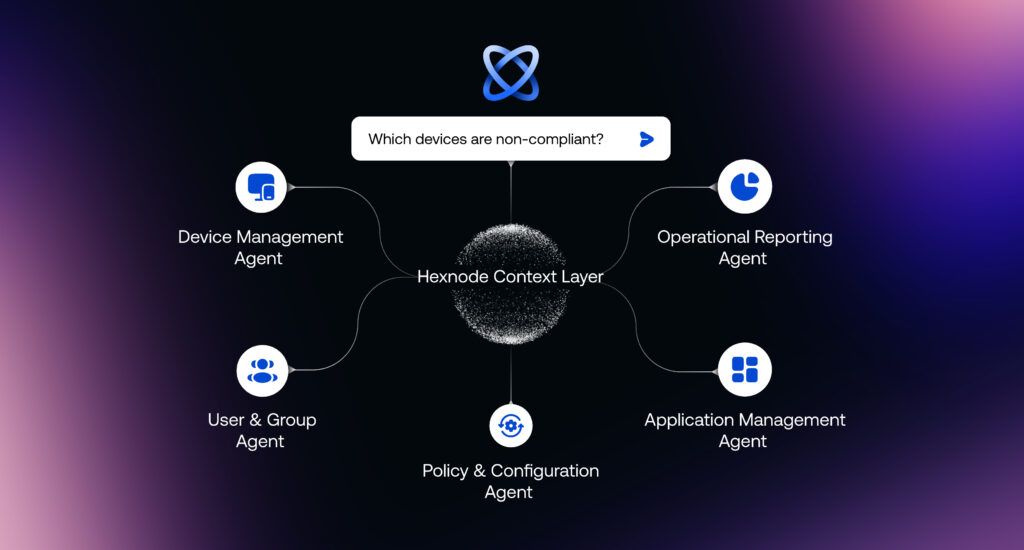
Hexnode Genie: The wizard of AI scripts
Hexnode Genie simplifies AI script generation for faster endpoint automation.
What should admins include in a strong AI script prompt?
A strong prompt gives the AI script generator enough operational context to produce a useful first draft. Vague prompts can create scripts that need more correction, while specific prompts can make review easier.
Target environment
Start with the operating system, OS version range, device type, script language, and execution context. For example, specify whether the script is for Windows using PowerShell, macOS using Zsh, or Linux using Bash.
Task and expected result
State the exact task the script should perform and the output admins should expect. Also mention what the script must not change, especially when working with files, services, user settings, or security controls.
Review-friendly output
Ask for comments, clear logging, error handling, exit codes, and readable results where useful. This helps admins validate whether the script completed successfully or needs follow-up action.
Operational constraints
Include limits such as non-disruptive execution, timeout requirements, rollback expectations, and whether the script should be tested on a pilot group before wider use.
What risks come with AI-generated scripts?
AI-generated scripts can reduce drafting effort, but they still need technical review. A script may use valid syntax and still fail in a real environment because it misses local paths, dependencies, OS versions, privilege requirements, or device-specific configurations.
Correct syntax does not guarantee safe execution
Scripts that change device state usually need stricter review, while scripts that access sensitive data or system details may also carry operational or compliance risk. Scripts that modify services, files, permissions, security settings, user profiles, or configuration values should go through stricter review before use.
Bulk execution adds another layer of risk. A script that works on one test device may behave differently on another device with a different OS version, app state, permission model, or user context.
Admins should validate:
Script logic: Does it perform only the intended action?
Expected output: Does it report success, failure, and errors clearly?
Execution scope: Which devices, users, files, or settings can it affect?
Rollback path: Can the team reverse or contain the change if needed?
Hexnode supports a review-first workflow by allowing generated scripts to be manually modified in the Script Editor before they are saved or used.
What does a safe AI script workflow look like?
A safe workflow treats the output from an AI script generator as a draft that must pass through review, testing, and documentation before wider use. The goal is to move faster without removing operational control.
A review-first scripting lifecycle
Define the task: Specify the target OS, script type, device scope, required permissions, and expected result before generating the script.
Generate the draft: Use the AI script generator to create a starting point, not a final deployment artifact.
Review the logic: Check commands, variables, paths, privilege requirements, expected output, failure handling, and any action that changes device state.
Test in stages: Run the script on one controlled device first. If the result matches expectations, expand to a small pilot group before wider rollout.
Document and reuse: Save approved scripts with a clear purpose, owner, platform, version, change notes, and rollback guidance.
This workflow can help teams standardize script usage and reduce avoidable errors when it is applied consistently.
How should teams govern AI-generated scripts at scale?
Governance starts when script generation moves from individual admin convenience to a repeatable team workflow. At that point, the question is not just whether a script works. Teams also need to know who approved it, where it is stored, what it changes, and how results are tracked after execution.
Low-risk vs high-risk scripts
Not every script needs the same level of control. A script that collects device inventory or checks disk space carries a different risk level than one that modifies services, deletes files, changes permissions, or updates security settings. Teams should classify scripts before they are approved for reuse.
Ownership, versioning, and rollback
Each approved script should have an owner, target OS, version note, approval status, expected result, and rollback guidance. This prevents unmanaged script reuse and helps teams understand what changed when troubleshooting later.
Execution tracking
At scale, teams should track successful runs, failed actions, affected devices, and required follow-up. This keeps AI-generated scripts aligned with internal security, compliance, and change-management expectations.
Featured resource
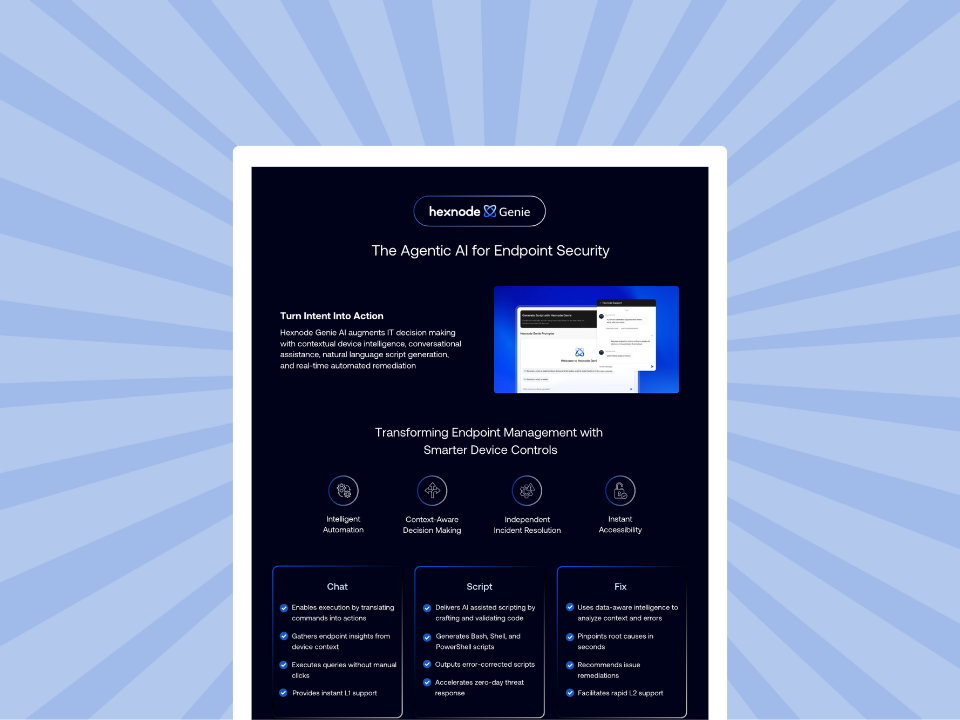
Hexnode Genie Info sheet
Hexnode Genie accelerates endpoint management with AI-assisted scripting, contextual insights, and faster IT remediation workflows.
Bringing prompt-based scripting into endpoint workflows
For mixed fleets, script generation is only one part of the workflow. Admins also need a way to review the output, refine it for the target platform, and save approved scripts for future use. Hexnode Genie supports this process by helping admins move from natural-language intent to script draft.
What this looks like in practice
Start with intent: Admins describe the task in natural language, such as checking a device setting, collecting local details, or preparing a remediation script.
Review before use: Generated scripts can be copied to the built-in Script Editor, where admins can customize and format the code before saving it.
Reuse approved work: Repository integration lets admins save generated scripts directly to the Hexnode Repository for deployment.
This is useful for Windows, Mac, and Linux environments where prompts, permissions, and scripting languages vary by platform. Hexnode Genie should be positioned to support faster script drafting and operational consistency, not as a replacement for admin review, testing, or staged rollout.
Quick evaluation checklist
Before using an AI script generator, teams should confirm a few basics:
Does it support the operating systems and script types your fleet uses?
Can admins review, edit, and validate scripts before use?
Can scripts be tested on limited devices before broader rollout?
Can approved scripts be stored with clear naming, ownership, and version details?
Can teams track execution results, failures, and follow-up actions?
Conclusion
An AI script generator is most useful when it helps admins move faster without removing technical control. It can reduce the time spent creating first drafts, but Windows, Mac, and Linux environments still require platform-specific review because commands, permissions, execution context, and system behavior can vary.
Clear prompts, manual validation, limited-device testing, staged rollout, documentation, and script reuse help reduce avoidable operational risk. Hexnode Genie supports this approach by helping teams move from prompt-based script generation to script review and repeatable workflows without treating AI-generated scripts as final output.
Simplify endpoint scripting with Hexnode Genie
Start your 14-day free trial and streamline script workflows today.
Can non-developers use an AI script generator effectively?
Yes. They still need basic task knowledge, review discipline, and enough technical context to identify risky commands or unclear output.
What should admins avoid entering into an AI script prompt?
Avoid credentials, private keys, access tokens, customer data, internal secrets, or sensitive business details that are not required for script generation.
How can IT teams measure whether AI-generated scripting is useful?
Track drafting time saved, script reuse, failed execution rates, manual task reduction, remediation speed, and consistency across endpoint workflows.
A storyteller for practical people. Breaks down complicated topics into steps, trade-offs, and clear next actions—without the buzzword fog. Known to replace fluff with facts, sharpen the message, and keep things readable—politely.