Remote linux management has become essential as Linux devices move beyond servers into laptops, kiosks, edge systems, and other enterprise endpoints. At scale, managing Linux is no longer just about SSH access. It requires a centralized approach to onboarding, patching, security, policy enforcement, monitoring, and troubleshooting. This article explains what effective remote linux management should include, the common approaches enterprises take, why UEM platforms are often a better fit, and how Hexnode supports Linux management with CLI enrollment, Remote View, OS updates, scripting, and policy management.
Linux has moved far beyond the server room. In many enterprises, Linux now powers developer laptops, engineering workstations, kiosks, point-of-sale systems, thin clients, edge devices, and specialized field hardware. This shift has created a new operational challenge for IT teams: how do you manage a growing fleet of Linux devices without relying on manual administration, ad hoc scripts, or one-off support sessions?
Remote management is the answer. But managing Linux at enterprise scale is not just about SSH access. It is about building a repeatable system for provisioning, patching, securing, monitoring, troubleshooting, and retiring devices from a central control plane.
In this article, we will look at what remote Linux management means in practice, why it matters, the capabilities enterprises should prioritize, and the best way to build a scalable management strategy.
At small scale, Linux devices are often maintained with direct administrator access, local package repositories, and scripts. But at an enterprise level, that model breaks down. You need visibility into device health, software state, compliance posture, and user activity without logging into machines individually. You also need a reliable way to enforce configuration, collect logs, and respond to incidents across different distributions.
This is why enterprise Linux management increasingly looks like endpoint management rather than traditional server administration, making remote management essential for security, consistency, and support.
Common Approaches to Remote Linux Management
There is no single model that fits every enterprise. Most organizations end up choosing one of four common approaches, depending on the size of their Linux fleet, the mix of distributions, and how centralized they want management to be.
Native Administration Tools
This approach relies on SSH, package managers, shell scripts, systemd commands, and repository management. It is flexible and inexpensive, but it also depends heavily on administrator skill and often provides weak reporting, inconsistent enforcement, and limited help desk usability. While effective in small, engineering-led environments, it becomes harder to manage safely at scale.
Configuration Automation Platforms
This model uses centralized automation to provision systems, enforce configurations, deploy software, and execute repeatable administrative tasks across many devices. Tools such as Ansible are commonly used for this approach, helping teams manage Linux environments through consistent, policy-driven workflows. Platforms built around this model also support automation at scale across larger fleets.
It is especially effective for infrastructure and operations teams, but on its own, it may not provide the full device management experience endpoint teams often need, such as enrollment visibility, self-service workflows, or direct remote actions.
Distribution-specific Enterprise Tools
This approach centers on tools built specifically for a particular Linux distribution and its ecosystem. These platforms usually combine administration, patching, auditing, imaging, and security capabilities in a way that is closely integrated with the operating system.
It works well in environments where the Linux estate is relatively homogeneous and organizations want deeper platform-specific control.
Unified Endpoint Management Platforms
This model brings Linux into the same management framework as Windows, macOS, iOS, and Android, giving IT teams a more unified way to manage diverse endpoint environments. Platforms such as Hexnode UEM fit well here by helping organizations manage Linux devices alongside other operating systems from a centralized console.
Linux device management 101
Read more about how Hexnode turns the fragmented Linux ecosystem into single, unified UEM console.
Security Best Practices for Remote Linux Management
As Linux management becomes more centralized, security becomes inseparable from operations. The same tools that make remote management efficient also increase the scope of impact when something goes wrong. A weak access model, an overly broad policy, or an untested change can affect large parts of the fleet at once.
That is why security in remote Linux management is not just about protecting devices individually. It is about designing the management layer itself to be controlled, auditable, and resilient. In practice, a few principles matter most.
Use Centralized Identity and Least Privilege
Connect administrative access to a centralized identity provider and avoid shared credentials. Use role-based access control so users only get the permissions required for their tasks.
Harden the Operating System Baseline
Start with a consistent security baseline instead of configuring each Linux device differently. Recognized hardening guidance, such as vendor documentation and security checklists, can help standardize important settings.
Encrypt Management Traffic
Remote commands, inventory data, logs, enrollment details, and policy updates should be sent over encrypted channels. This helps protect management communication, especially for remote or internet-facing devices.
Audit Administrative Actions
Keep clear records of who made a change, what was changed, which devices were affected, and whether the action succeeded. Audit logs help with troubleshooting, accountability, and security investigations.
Segment Device Groups
Avoid applying changes to the entire Linux fleet at once. Use pilot groups, rings, or environment-based groups so scripts, packages, and policies can be tested before wider rollout.
A Practical Rollout Strategy
If your organization is just starting to manage Linux devices remotely, the best approach is incremental.
First, define which Linux endpoints matter most. Developer laptops, kiosks, and edge devices all have different needs. Then, standardize on a minimum supported set of distributions and versions. After that, build a baseline around enrollment, identity, patching, security controls, logging, and inventory.
A practical rollout often looks like this:
Standardize the supported Linux platforms
Create a secure baseline image
Automate onboarding and enrollment
Centralize patching and configuration
Add inventory, compliance, and logging
Pilot remote actions with a small device group
Expand gradually with staged policies
The goal is not to force Linux into a management model designed for another platform. It is to build a repeatable operating approach that respects how Linux is used in the enterprise while still giving IT the consistency, visibility, and control it needs at scale.
What to Look for in a Linux Management Solution
After defining the capabilities Linux remote management requires, the next step is evaluating which solution can deliver them in a practical and scalable way. The tools may differ, but the core requirements remain largely the same.
Whether the choice is open-source tooling, distribution-specific software, or a unified endpoint management platform, the same core questions still apply:
Can it support your Linux distributions today?
Does it provide patching, inventory, and policy enforcement?
Can it automate provisioning and post-deployment configuration?
Does it integrate with your identity and access controls?
Can it centralize logs, compliance status, and troubleshooting data?
Does it scale across remote and intermittently connected devices?
Can help desk teams use it without deep Linux expertise?
The right answer will vary by environment. Engineering-led companies may lean more heavily on automation frameworks and open tooling. Broad enterprise IT teams may prefer a platform that unifies Linux with the rest of endpoint management.
Why UEM Platforms are a Better Fit for Linux Remote Management
For many enterprises, the value of a UEM approach goes beyond managing multiple operating systems from one place. It also aligns more closely with how modern IT teams support endpoints at scale. As Linux devices become part of broader enterprise fleets, UEM platforms often provide a more practical way to manage them consistently, securely, and without adding operational complexity.
Specifically, UEM enables centralized, multi-platform control from a single console, standardizes operational workflows across distributed environments, simplifies IT administration by reducing reliance on manual scripting, and ultimately provides a scalable, unified management model for the enterprise.
What Hexnode Specifically Supports for Linux Management
Hexnode positions Linux management as part of its UEM console for devices running distributions derived from Fedora and Debian, and it currently calls out support details for Ubuntu 18.04+, Fedora 36+, Debian 10+, and Linux Mint 21+.
1. Enroll Linux devices through CLI
Hexnode uses CLI-based enrollment for Linux, making it highly effective for both desktop and headless systems. This lightweight method is well-suited for servers, IoT gateways, and digital signage players, and it seamlessly supports both open and authenticated enrollment flows.
2. Use Live Terminal for remote shell access
Hexnode’s Live Terminal feature gives admins remote shell access directly from the UEM console, enabling real-time command execution across Debian, Fedora, and Ubuntu distributions.
3. Leverage Remote View and Remote Control for GUI devices
For Linux devices with a desktop environment, Hexnode supports both Remote View and Remote Control to streamline help desk operations. These features are available on Debian, Fedora, and Mint-based distributions (requiring Hexnode Agent 2.8.7+ and an active GUI).
Note: Remote Control requires an X11 windowing system rather than Wayland.
4. Push OS updates remotely
IT teams can seamlessly deploy system patches, security updates, and critical fixes to managed Linux endpoints directly from the centralized portal.
5. Execute custom scripts centrally
Primarily designed for Bash-based scripts, Hexnode’s Execute Custom Script feature is perfect for tasks like user management, system monitoring, and software deployment. Admins can even leverage built-in sample scripts for everyday actions like gathering system information or resetting local user passwords.
6. Apply comprehensive Linux policies
Hexnode’s capabilities extend far beyond basic remote access. IT teams can enforce a wide range of Linux policies to secure and standardize their endpoints, including password policy enforcement, device restrictions, Wi-Fi and network configurations, web content filtering, certificate management, wallpaper customization, and local account administration.
Featured Resource
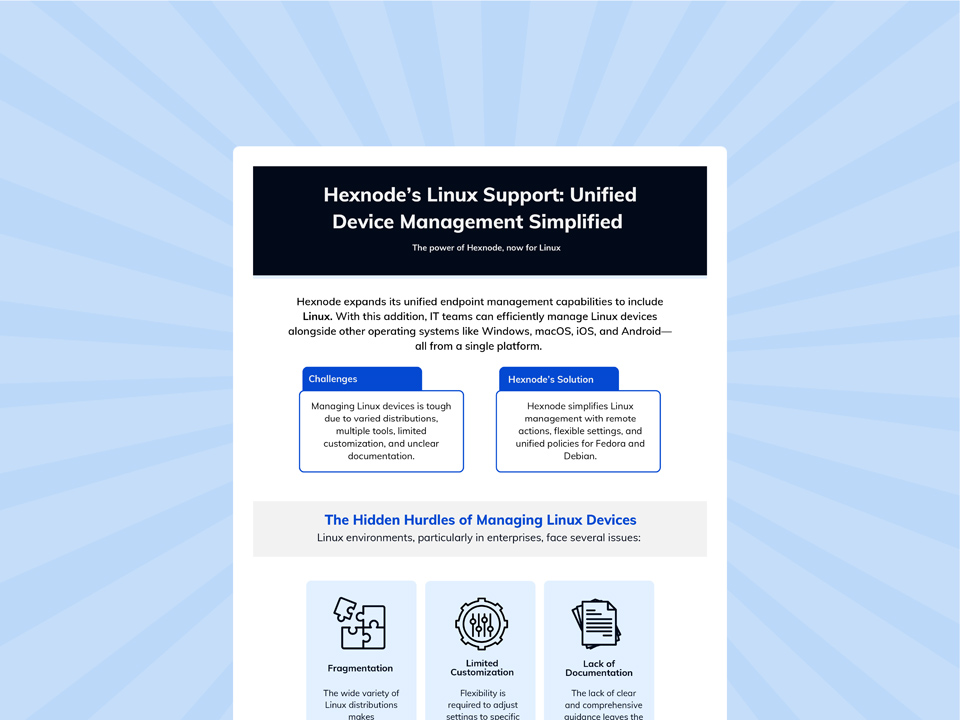
Hexnode’s Linux Support: Unified Device Management Simplified
Download to learn how Hexnode simplifies Linux device management.
Remote Linux management is no longer just a niche concern for infrastructure teams. As Linux devices become more common across enterprise environments, organizations need a management approach that is scalable, secure, and consistent. The most effective strategies go beyond basic remote access to cover the full device lifecycle, from onboarding and patching to compliance, troubleshooting, and ongoing support. For many enterprises, that also means managing Linux as part of a broader endpoint ecosystem rather than as a separate operational silo. The real goal is not just remote control, but reliable, policy-driven management that fits the realities of modern IT.
Frequently Asked Questions (FAQs)
1. Can Linux devices be managed remotely without direct user intervention?
Yes, many Linux management tasks can be handled remotely without depending on the end user every time. Actions like patch deployment, script execution, policy updates, inventory collection, and terminal-based administration can often be performed centrally, though some actions, such as GUI-based remote control may still require user approval depending on the setup and platform.
2. What challenges make remote Linux management harder than managing other endpoints?
Linux environments are often more complex because enterprises may use different distributions, package systems, desktop environments, and device types across the same fleet. That variation can make standardization, policy enforcement, and support more difficult unless the organization uses a centralized management approach.
3. When should an enterprise move from SSH-based administration to a centralized Linux management platform?
SSH works well for small-scale administration, but it becomes harder to sustain when the Linux fleet grows and IT needs broader visibility, policy consistency, patch compliance, audit trails, and easier support workflows. At that point, a centralized management platform becomes the more practical option.
Curious, constantly learning, and turning complex tech concepts into meaningful narratives through thoughtful storytelling. Here I write about endpoint security that are grounded in real IT use cases.