Hexnode vs Microsoft Intune: Side-by-Side Comparison
This blog post delivers a comprehensive, side-by-side comparison of Hexnode vs Microsoft Intune.

Get fresh insights, pro tips, and thought starters–only the best of posts for you.

Managing a multi-OS fleet across Linux and macOS is fundamentally different from managing a Windows-only environment. Yet many organizations attempt to do exactly that, using Windows-first tools designed primarily for Microsoft ecosystems.
The reasoning often sounds practical. If your organization already has Microsoft 365 E5 license, why invest in another platform? Why not consolidate everything under a single dashboard?
In practice, this approach creates serious operational gaps. While tools like Intune offer deep and mature controls for Windows, their macOS and Linux support remains limited. IT teams managing mixed device fleets quickly encounter delayed feature rollouts, shallow reporting, and restrictive policy frameworks that don’t align with how macOS and Linux actually work.
For Mac administrators, this often means relying on scripts and workarounds to compensate for Intune’s limitations for macOS. For DevOps teams managing Linux systems, native support is frequently insufficient; raising questions about real Linux MDM capabilities in Windows-centric platforms.
This is the core challenge of multi-OS fleet management across Linux and macOS: when a management solution is built around a single operating system, every other platform becomes an afterthought.
This guide breaks down why Windows-first architectures struggle with macOS and Linux at scale, and how Hexnode’s OS-agnostic approach enables true management of mixed device fleets with native controls, automation, and flexibility.
To understand why some Windows-first tools struggle in multi-OS fleet management environments (Linux, macOS, etc.), you need to look at how teams originally built them.
Many traditional UEM platforms started with Windows-centric management models such as WMI and CSP. Vendors later layered support for other platforms on top of this Windows foundation instead of designing multi-OS support into the core from the beginning.
Historically, some macOS app deployments in Microsoft Intune relied on a wrapper tool. This tool converted applications into a proprietary format before upload. While functional, it added extra steps for administrators.
Microsoft has since updated Intune. Admins can now upload standard .pkg installers directly. This change reduces the need for separate wrapping tools.
However, macOS app preparation is still required. Packages must be signed with the correct certificates. Deploying .pkg or .dmg files also comes with specific requirements.
These steps increase packaging complexity. They also create operational friction. This is especially true when managing macOS apps in a platform not originally built for non-Windows systems.
By contrast, Hexnode’s Unified Endpoint Management platform was designed to support multiple operating systems from the start. It delivers native macOS and Linux management capabilities without relying on legacy Windows-centric workflows.
On macOS, Hexnode supports direct deployment of standard .pkg and .dmg installers and automates configuration and app installation using native MDM protocols.
On Linux, Hexnode provides flexible native device management tools, including script-driven automation and remote actions, that work with common package formats and system tools.
A single unified console only works if it manages every platform effectively. For modern enterprises, multi-OS fleet management means native support, not legacy wrappers.
Apple releases major device management updates every year. These often bring new capabilities that fleet management tools must support immediately. A prime example is Declarative Device Management (DDM). DDM replaces older reactive models with a proactive approach to macOS updates and configurations.
Platforms like Microsoft Intune offer day-zero support, but gaps in feature coverage remain. This is common with newer APIs and platform-specific services.
Result: Your team upgrades to macOS Sequoia on Day 1. Your compliance policies may not work if the platform hasn’t integrated the latest protocols. This causes friction for Intune customers. Often, the needed settings are missing from the catalog or require manual configuration.
For Hexnode, Unified Endpoint Management is not a side hustle; it is our entire business. We pride ourselves on Day-Zero Support.
If some legacy UEM platforms treat macOS as an afterthought, support for Linux has historically been even more limited. In many traditional tools, Linux endpoints are primarily visible only for basic compliance checks (such as password policies and encryption status), with fewer controls available compared to Windows or macOS.
In contrast, modern enterprise environments depend heavily on Linux. Whether it’s server workloads and headless cloud infrastructure, developer workstations, or edge and kiosk systems in retail, Linux plays a critical role in delivering reliable services and powering digital experiences.
Microsoft Intune does support Linux device management; you can enroll Linux devices, enforce compliance policies, and use scripts to perform advanced configurations. However, these capabilities are often focused on compliance and custom scripting rather than full device lifecycle and GUI feature management.
This means many IT teams end up using Intune primarily for basic Linux compliance and endpoint visibility, rather than deep system management, a limitation some administrators encounter when trying to administer a diverse fleet.
Hexnode’s Unified Endpoint Management platform treats Linux as a first-class citizen alongside Windows and macOS. Hexnode enables centralized management of Linux endpoints from the same console you use for all other platforms.
Key Linux-centric capabilities include:
This contrasts with some legacy paths where Linux was limited to compliance visibility with minimal configuration controls.
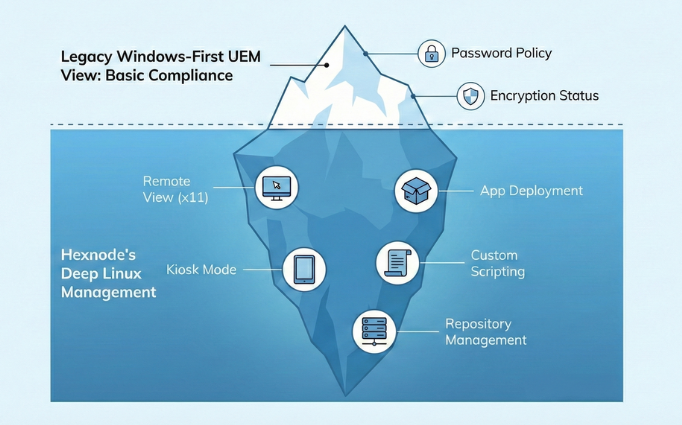

Explore Hexnode's advanced capabilities for Linux endpoint management, focusing on how the platform delivers centralized security, configuration, and administrative control.
Download InfographicFor the modern SysAdmin, the ability to automate and troubleshoot via scripting is a key measure of any enterprise management platform. In multi-OS fleet management environments, flexibility in scripting is especially important.
Windows-centric platforms naturally rely on PowerShell, Microsoft’s native and comprehensive scripting environment. On non-Windows systems (such as macOS and Linux), administration typically uses Bash or shell scripting, which are native to those platforms and widely used for automation and configuration.
Hexnode’s Unified Endpoint Management platform supports native script execution across operating systems:
Hexnode allows administrators to deploy and execute custom scripts, capturing execution results and output logs for auditing and troubleshooting.
Scenario 1: macOS Administrative Script
Goal: Grant a developer temporary admin rights on a Mac.
Hexnode Action: Deploy a Bash script using the Execute Custom Script action.
|
1 2 |
#!/bin/bash dscl . -append /Groups/admin GroupMembership $1 |
This script uses the macOS Directory Service CLI (dscl) to add a specified user to the macOS admin group. Hexnode records the execution results and output logs for review.
Scenario 2: Linux Configuration Update at Scale
Goal: Update SSH configuration on multiple servers to disable root login.
Hexnode Action: Push a Bash script to the Linux fleet.
|
1 2 |
sed -i 's/PermitRootLogin yes/PermitRootLogin no/' /etc/ssh/sshd_config systemctl restart sshd |
This standard Bash approach modifies the SSH config and restarts the SSH daemon on each device. Hexnode deploys and executes this script on enrolled Linux endpoints, providing centralized management and result logging.
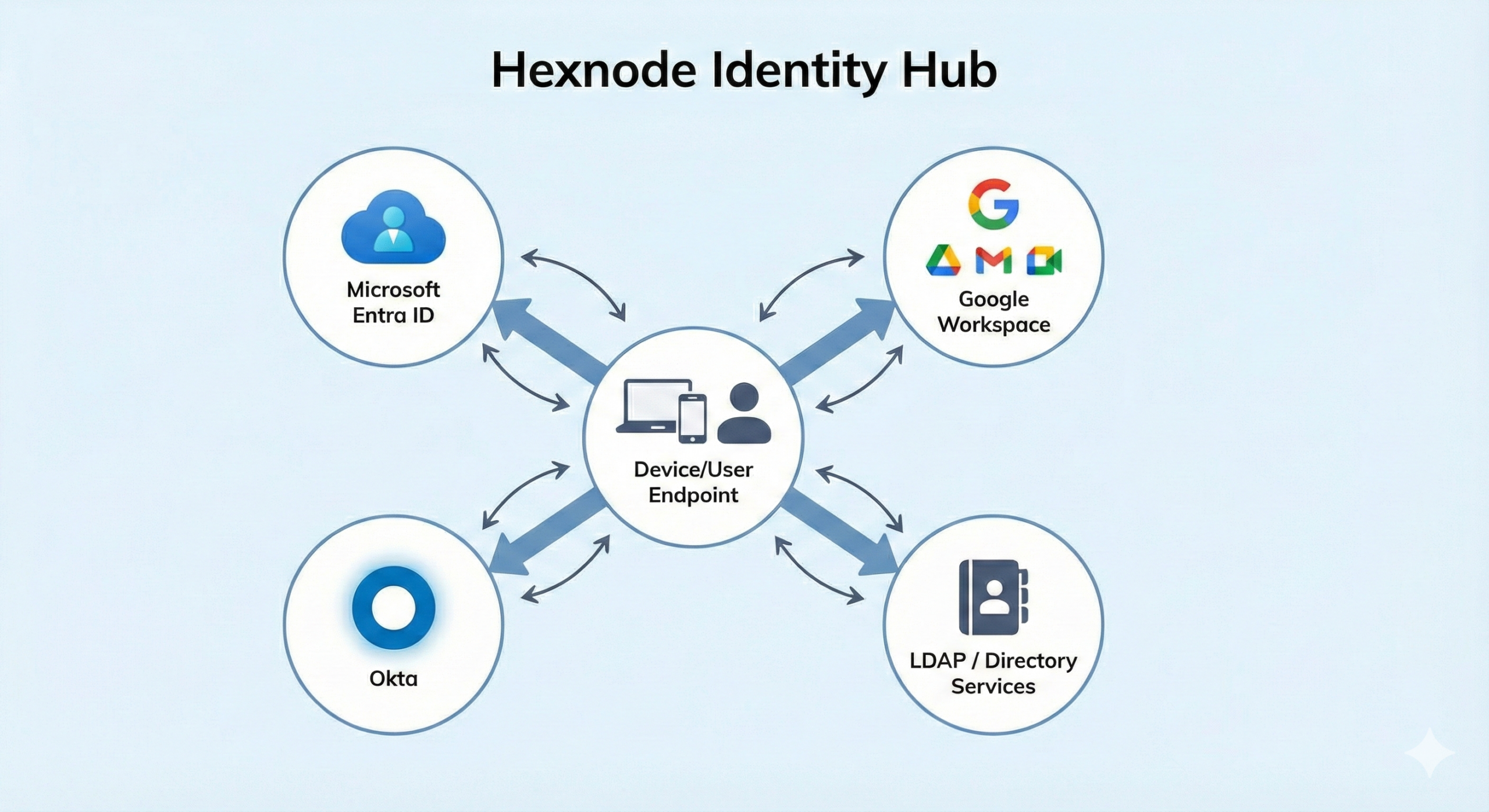
Windows-first management platforms naturally center identity around Active Directory or Microsoft Entra ID. For Windows environments, this works well. But organizations running a mix of operating systems, forcing every team into the same identity model often creates unnecessary friction.
When Mac teams prefer Google Workspace, or Linux engineers rely on LDAP-based directories, identity integration in Windows-centric tools can become complex and rigid, even when integrations technically exist.
Hexnode does not lock your device management strategy to a single identity provider. Instead, it allows organizations to align identity with how each platform and team actually works.
This decoupled approach allows IT teams to choose the most appropriate Identity Provider (IdP) for each use case, rather than forcing every platform into a Windows-centric identity model.
When your CFO asks, “Intune already comes with Microsoft 365 E5, why are we paying for Hexnode?” the answer is Total Cost of Ownership (TCO).
A tool that’s bundled with your Microsoft stack can still become expensive when it’s stretched beyond what it was designed to do.
The Hexnode ROI: By using a tool designed for Multi-OS Fluency, you reduce administration time, improve the Digital Employee Experience (DEX), and eliminate the “Shadow IT” silos where Mac and Linux devices often hide.
You cannot manage a Mac like a PC. You cannot manage a Linux server like a tablet. Each operating system has its own philosophy, its own architecture, and its own language.
Hexnode succeeds because we respect the OS. Our platform speaks fluent Windows, Mac, and Linux, without wrappers or workarounds. Instead of relying on delayed APIs, we give you direct access to native tools you need to manage your diverse fleet without compromise.
Stop fighting the OS. Start managing it.
Test our Linux Scripting Engine and macOS Package Deployment risk-free. See why agile enterprises choose Hexnode.
Sign Up TodayQ: Can Intune manage Linux servers effectively?
A: Microsoft Intune supports Linux primarily for device enrollment, compliance policies, conditional access, and custom scripting, with a focus on desktop-oriented distributions like Ubuntu LTS. However, its Linux capabilities fall short of Linux-first or server-focused tools, offering no deep headless server lifecycle management, limited multi-distro support, weak kiosk lockdown, and no native Linux configuration controls. As a result, organizations managing Linux infrastructure often rely on additional tools alongside Intune.
Q: Why can managing macOS devices in Intune be challenging?
A: While Intune has improved macOS support and now allows native app deployment, challenges can still arise due to Apple’s rapidly evolving MDM framework and Intune’s Windows-centric design. New macOS features may require manual configuration through the settings catalog, and some macOS-specific workflows can take time to reach full parity, increasing administrative effort compared to platforms that prioritize macOS-native management.
Q: Does Hexnode support scripting for macOS and Linux?
A: Yes. Hexnode supports native scripting across platforms, including Bash and shell scripts for macOS and Linux, and PowerShell for Windows. Administrators deploy scripts centrally and view execution results and logs in the console, enabling them to automate configurations and troubleshoot issues across diverse operating systems without relying on Windows-specific scripting models.