Choosing the best patch management software requires more than comparing basic update features. Organizations should look for a solution that supports OS and application patching, automated deployments, testing controls, vulnerability-based prioritization, compliance-ready reporting, and the ability to scale as device environments grow. A strong patch management platform should also reduce manual effort while giving IT teams better visibility and control over every stage of the patching process. For businesses evaluating solutions against these criteria, Hexnode is a strong option, offering centralized patch management, policy-driven automation, patch visibility, and unified endpoint management capabilities across multiple operating systems.
Cybersecurity threats do not wait for convenient timing. New vulnerabilities appear constantly, software vendors release updates on different schedules, and IT teams are expected to keep devices secure without disrupting employee productivity. That is why patch management has become a core part of modern endpoint security.
But choosing the right patch management software is not as simple as picking the most popular tool on the market. Every organization has different requirements based on its device mix, IT resources, compliance needs, deployment model, and security priorities. A small business with a few hundred endpoints may need a lightweight, automated solution, while a large enterprise may need advanced testing workflows, third-party app support, role-based access controls, and deep reporting.
This guide explains what patch management software does, why it matters, and how to choose the best patch management software for your organization.
What is a Patch Management Software?
Patch management software is a tool that helps IT teams identify, test, deploy, and monitor software updates across endpoints, servers, and applications. These patches may address security vulnerabilities, fix bugs, improve performance, or add new functionality.
Instead of manually updating every device, patch management software centralizes the process. IT administrators can use it to scan systems for missing patches, approve updates, schedule deployments, automate installations, and generate reports to confirm patch compliance.
A strong patch management solution does more than just install updates. It gives organizations visibility into patch status, helps prioritize critical vulnerabilities, and allows IT teams to control how updates are rolled out across environments.
Understanding Patch Management: Why it Matters?
Get a practical overview of patch management, why it matters, the patch lifecycle, and how modern tools simplify the process.
Signs Your Organization Needs Better Patch Management Software
Understanding the importance of patch management software, some organizations already have a patching process in place. But they still struggle with inefficiency and risk. Here are a few signs it may be time to upgrade:
Patches are deployed manually or inconsistently
Remote devices frequently miss updates
Third-party applications are not patched regularly
IT teams lack real-time visibility into patch status
Users complain about disruptive restarts or update failures
Audit preparation takes too much manual effort
Critical vulnerabilities remain unresolved for too long
If any of these issues sound familiar, your current patch management approach may not be enough for your organization’s needs.
Key Factors to Consider When Choosing the Best Patch Management Software for Your Organization
Choosing the best patch management software starts with understanding your operational requirements. Here are the most important areas to evaluate.
1. Operating System and Device Support
The first question is simple: does the solution support the devices and platforms your organization uses?
Some tools focus mainly on Windows environments, while others offer support for macOS, Linux, and mobile devices. If your organization has a mixed environment, cross-platform support is essential. You should also consider whether the tool can manage laptops, desktops, servers, remote endpoints, and BYOD devices where relevant.
A patch management solution that only covers part of your environment creates blind spots. Ideally, you want a platform that aligns with your actual patching needs while fitting into a broader endpoint management strategy.
2. Application Patching Alongside OS Updates
Operating system updates are only part of the patching challenge. Many security gaps also come from outdated applications such as browsers, communication tools, and other commonly installed business software.
That is why third-party patching support is a critical selection criterion. Look for a solution that can automatically detect, deploy, and report on updates for commonly used third-party applications. The broader the application catalog, the better.
3. Automation Capabilities
An effective patch management solution should minimize manual effort as much as possible. In fact, automation is one of the key factors that separates basic update tools from enterprise-grade patch management software. Other important automation features include:
Automatic scanning for missing patches
Criteria-based deployment
Scheduled patch rollouts
Update approval workflows
Reboot management
Technician notifications
Rule-based automation for OS and application updates
4. Testing and Deployment Controls
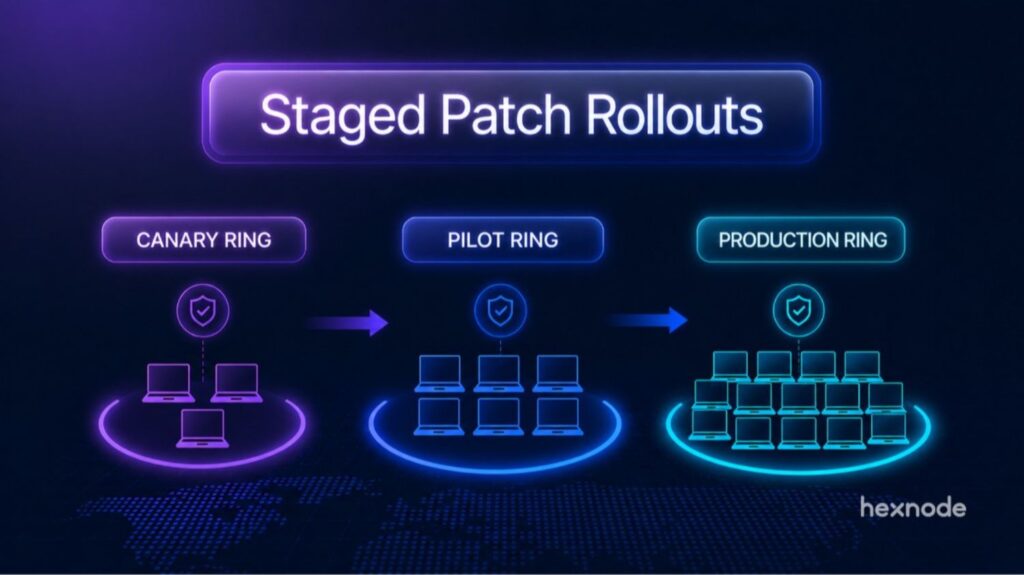
Not every patch should be installed everywhere at once. Some updates can conflict with critical applications or create performance issues. That is why staged deployment is so important. Choose patch management software that allows you to:
Test patches before full deployment
Create pilot or test groups
Roll out updates in phases
Define maintenance windows
Exclude selected updates
Delay non-critical patches if needed
These controls help you balance security and stability. They are especially valuable in organizations with production servers, specialized software, or distributed workforces.
5. Patch Prioritization and Vulnerability Context
A long list of missing patches is not always useful by itself. What matters is understanding which updates are most urgent.
The best patch management tools provide context by linking patches to severity ratings, CVEs, exploitability data, or risk-based prioritization. This helps IT and security teams focus first on the vulnerabilities that present the greatest danger.
If your organization handles sensitive data or operates in a high-risk industry, this feature can make a major difference in how quickly critical threats are addressed.
6. Reporting and Compliance Readiness
Reporting is not just about checking a box. It is about proving that your patching program is effective. Look for software that offers:
Real-time patch status dashboards
Device-level update history
Missing patch visibility
Deployment success and failure tracking
Executive-level summaries
Audit-ready compliance reporting
Good reporting helps different stakeholders in different ways. IT teams need operational detail, security teams need risk visibility, and leadership may need a high-level compliance overview. This makes reporting one of its more important strengths in a patch management context.
7. Ease of Use and Centralized Administration
Even the most feature-rich solution can become a burden if it is difficult to use. A clean interface, intuitive workflows, and centralized controls matter more than many buyers realize.
Evaluate whether the software makes it easy to create policies, review missing updates, deploy patches, and troubleshoot failures. If the learning curve is steep, adoption may suffer and routine tasks may take longer than expected.
8. Cloud-based Flexibility for Modern IT Environments
Organizations should also consider how well a patch management solution fits remote, hybrid, and distributed work environments.
A cloud-based platform is often easier to scale, simpler to maintain, and better suited for teams managing endpoints across multiple locations. It can allow administrators to manage endpoints from anywhere without relying heavily on on-premises infrastructure. On the other hand, an on-premises deployment may be preferred in organizations with strict data control requirements, legacy systems, or specific network constraints.
The right choice depends on your IT architecture, security requirements, and management preferences.
9. Unified Management Instead of Siloed Tooling
Patch management does not happen in isolation. It works best when it is part of a wider endpoint management and security workflow. Depending on your needs, useful integrations may include:
Integrated workflows can improve visibility, simplify operations, and make it easier to respond to patch-related issues.
10. Scalability and Future Readiness
Your needs today may not be the same a year from now. As your device fleet grows, your patching solution should grow with it.
Consider whether the software can support more endpoints, more locations, more administrators, and more complex policies without a drop in performance or manageability. Scalability matters for both growing businesses and large enterprises.
A solution that fits only your current size may become a limitation later.
Featured Resource
The Cybersecurity Blueprint: How to adopt the right cybersecurity strategy for your business
Download the whitepaper to learn how you can adopt the right cybersecurity blueprint for your business.
Knowing what to look for in patch management software is only part of the decision-making process. It is just as important to recognize the common mistakes that can undermine your evaluation and lead to the wrong choice. Many organizations run into the same issues when comparing patch management solutions, often prioritizing short-term convenience over long-term effectiveness. Some common pitfalls include:
Choosing based on price alone: Budget matters, but the cheapest option can cost more in the long run if it lacks automation, reporting, or cross-platform support. Consider total value, not just licensing cost.
Ignoring third-party applications: Some teams focus only on operating system patches and leave a major attack surface exposed. Make sure third-party applications are part of your patching strategy.
Overlooking user experience: Aggressive update policies can frustrate employees and hurt productivity. The best tools help IT enforce patching without creating unnecessary disruption.
Failing to test at scale: A product may look good in a demo but behave differently in your actual environment. Some might look for a smaller number of devices but struggle to live up to scale. Run a pilot where possible and evaluate performance, usability, and deployment reliability.
Thinking patching is purely an IT task: Patch management is also a security and compliance function. Involving security, compliance, and operations stakeholders can lead to a better decision.
What the Best Patch Management Software Should Deliver
At a high level, the right patch management software should help your organization do a few things consistently and well:
Identify missing patches quickly, so vulnerabilities do not remain unnoticed across devices.
Prioritize critical updates, helping IT teams focus on the patches that matter most.
Deploy patches efficiently, without creating unnecessary disruption for end users.
Provide clear reporting, so teams can verify patch success and track overall progress.
Support compliance efforts, with visibility and records that make audits easier to manage.
Why Hexnode is a Strong Fit
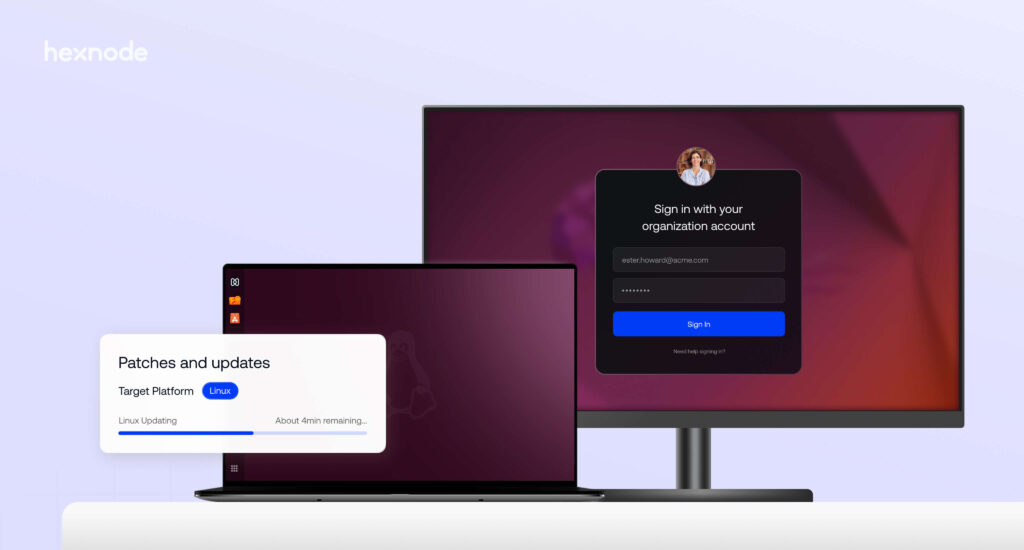
For organizations looking for a solution that delivers on these fundamentals, Hexnode UEM is a strong option. It combines patch visibility, automated deployment workflows, policy-driven control, reporting, and unified endpoint management in a single platform. That makes it well suited for IT teams that want to simplify patching while improving security, compliance, and day-to-day operational efficiency. Hexnode’s patch management capabilities also continue to expand, with support now extended to tvOS and visionOS, while iOS update controls have been reorganized under the Patches and Updates policy for a more unified management experience.
Making the Right Choice for Your Patch Management Needs
Choosing the best patch management software for your organization is about finding the right balance between security, control, efficiency, and scalability. The ideal solution should fit your current environment, support future growth, and make patching easier for both administrators and end users.
Priorities may vary, whether that is automation, application patching, remote endpoint coverage, or compliance reporting, but the key is to evaluate solutions based on real operational needs. And, the right software should help your team patch faster, reduce manual effort, and manage updates with greater confidence. If it can do that consistently, you are on the right track.
Frequently Asked Questions (FAQs)
How often should patch management software deploy updates?
Critical security patches usually need to be deployed as quickly as possible, while lower-risk or feature-related updates may be scheduled during planned maintenance windows. A good patch management solution should let IT teams balance urgency with stability by automating routine updates and giving them more control over high-impact deployments.
Can patch management software help reduce downtime?
Yes. When used properly, patch management software can reduce downtime by allowing teams to test updates before wider deployment, schedule installations outside working hours, and control reboot behavior. These capabilities help prevent unexpected disruptions and make the patching process more predictable for both IT teams and end users.
Is patch management software only useful for large enterprises?
No. Organizations of all sizes can benefit from patch management software. Smaller teams often gain value from automation and reduced manual effort, while larger organizations benefit from better visibility, policy control, and scalability. The main difference is not whether patch management is needed, but how much flexibility and control the organization requires.
Simplify Patching with Unified Endpoint Management
Streamline patch deployment, improve visibility, and keep devices secure with a centralized platform built for modern IT environments.
Curious, constantly learning, and turning complex tech concepts into meaningful narratives through thoughtful storytelling. Here I write about endpoint security that are grounded in real IT use cases.