Microsoft Intune Autopatch simplifies Windows update management for Microsoft-centric environments, while Hexnode offers centralized patch automation across supported Windows and macOS devices. The best choice depends on your operating systems, application landscape, compliance needs, and desired level of deployment control.
Keeping every endpoint up to date has become increasingly challenging as organizations manage a growing mix of operating systems, applications, and remote devices. In addition to regular operating system updates, IT teams must deploy security patches, bug fixes, and updates for third-party software to reduce risk and maintain system reliability. Delayed patching can leave known vulnerabilities unaddressed, increasing the likelihood of security incidents and compliance gaps.
Manual patching workflows are difficult to sustain across distributed and hybrid work environments, where devices may not always be connected to the corporate network. Patch automation helps streamline this process by deploying updates consistently, reducing administrative effort, improving patch compliance, and enabling IT teams to respond more quickly to newly disclosed vulnerabilities.
Windows Autopatch is a cloud service accessible through Microsoft Intune that automates updates for Windows, Microsoft 365 Apps for enterprise, Microsoft Edge, and Microsoft Teams. It supports controlled deployment of Windows feature and quality updates, driver and firmware updates, Microsoft 365 Apps for enterprise, Microsoft Edge, and Microsoft Teams, with workload-specific eligibility requirements.
Windows Autopatch capabilities are available with eligible subscriptions such as Microsoft 365 Business Premium, Microsoft 365 F3, E3 or E5, Windows Enterprise E3 or E5, and qualifying Education A3 or A5 subscriptions. Devices must satisfy the applicable prerequisites, including Intune management, a supported Microsoft Entra join configuration, an eligible licence and a supported Windows 10 or Windows 11 edition; co-managed devices must also meet Microsoft’s Configuration Manager requirements.
Instead of requiring administrators to manually plan every deployment phase, Windows Autopatch uses deployment groups to progressively deliver updates across an organization. Autopatch groups use configurable deployment rings, including default Test and Last rings, to stage updates across progressively broader device populations. This staged deployment approach helps reduce the risk of organization-wide disruptions caused by problematic updates.
How Intune Autopatch Deploys Updates
Before a device can participate in Windows Autopatch, it must pass Microsoft’s prerequisite and readiness checks, including validation of enrollment status, supported Windows edition, ownership, and recent communication with Intune. Eligible devices are then registered with the service and assigned to deployment groups.
As updates are released, Windows Autopatch deploys them in phases, beginning with smaller groups before expanding to larger populations. Administrators can monitor deployment progress and device update status through the Intune admin center. If issues are detected during deployment, administrators can pause update deployments while they investigate and resolve the problem before continuing the rollout.
What Microsoft Intune Autopatch Does Well
Windows Autopatch is designed to simplify update management for organizations that primarily use Microsoft technologies. Because it is integrated with Microsoft Intune and Windows Update for Business, administrators can manage Windows update deployments through a familiar management interface while reducing the need to manually configure and maintain update policies.
The service manages Windows quality and feature updates, eligible driver and firmware updates, Microsoft 365 Apps for enterprise, Microsoft Edge, and Microsoft Teams, subject to the requirements of each workload. Rather than deploying updates to every device simultaneously, Windows Autopatch uses deployment groups to roll out updates in phases. This staged approach allows updates to be validated on a smaller subset of devices before broader deployment, reducing the likelihood that an update-related issue will affect the entire organization.
For organizations with predominantly Windows-managed endpoints, this automation can reduce routine administrative effort while providing visibility into update status and deployment progress through the Microsoft Intune admin center. Administrators retain oversight of deployments and can pause or adjust releases when necessary, helping balance automation with operational control.
Microsoft Intune Alternative: Why Hexnode is a Better UEM for Modern Device Fleets
Microsoft Intune alternative: Compare Hexnode and Intune to find the right UEM for mixed device fleets, security, and cost.
Where Microsoft Intune Autopatch May Not Fit Every Organization
Windows Autopatch is designed to automate updates for supported Windows devices and Microsoft software within the Microsoft ecosystem. For organizations whose endpoint environments are primarily Windows-based and already managed with Microsoft Intune, this can simplify update administration. However, organizations with broader endpoint management requirements may find that additional tools or workflows are needed.
One consideration is licensing. Windows Autopatch requires eligible Microsoft subscriptions and supported device configurations. Therefore, organizations should confirm that their licensing and device fleet meet Microsoft’s prerequisites before adopting the service.
Organizations should also determine whether they need to manage only Microsoft workloads or patch non-Microsoft applications. Windows Autopatch manages Windows updates, eligible drivers and firmware, Microsoft 365 Apps for enterprise, Microsoft Edge, and Microsoft Teams. It delivers these updates through the relevant Microsoft update services.
However, Windows Autopatch does not provide a general catalogue for patching non-Microsoft applications. Microsoft Intune offers a separately licensed Enterprise App Management catalogue. This additional Intune Suite capability supports selected Microsoft and non-Microsoft Windows applications.
Organizations should compare this option with Hexnode’s Windows application catalogue and patch automation before choosing a solution.
When Organizations Need More Flexible Patch Automation
Many organizations manage Windows, macOS and mobile endpoints through one IT team, although the patch-automation capabilities compared here apply specifically to supported Windows and macOS devices in Hexnode and supported Windows devices in Windows Autopatch. In these environments, administrators often prefer a centralized approach that provides consistent visibility into patch status, deployment progress, and compliance across multiple operating systems. They may also need to automate updates for third-party applications alongside operating system patches.
As endpoint environments become more diverse, evaluating whether a patch automation solution aligns with the organization’s operating systems, application portfolio, and management workflows becomes just as important as evaluating its Windows update capabilities.
Hexnode vs. Microsoft Intune Autopatch: Feature Comparison
Windows Autopatch automates supported Microsoft update workloads on eligible Windows devices, while Hexnode provides manual and automated operating-system and application patch deployment for supported Windows and macOS devices. Windows Autopatch manages Windows quality and feature updates, drivers and firmware, Microsoft 365 Apps for enterprise, Microsoft Edge, and Microsoft Teams on eligible Windows devices. Hexnode allows IT teams to review, approve, deploy and automate operating-system and application updates for supported Windows and macOS devices from the Patches and Updates console.
The comparison below highlights the key differences.
Capability
Microsoft Intune Autopatch
Hexnode
Windows patch automation
Automates Windows quality updates, feature updates, drivers, firmware, Microsoft Edge, and Microsoft 365 Apps for eligible managed devices.
Supports automated deployment and management of Windows patches through configurable deployment policies.
macOS support
Does not provide Windows Autopatch functionality for macOS devices.
Supports macOS patch management, including operating system updates and updates for supported applications.
Third-party application patching
Primarily manages Microsoft software updates and Windows Update content.
Supports Windows application updates through a catalogue of more than 1,300 prepackaged applications and manages supported macOS operating-system and application updates.
Deployment scheduling
Uses deployment groups and phased rollout policies managed by Windows Autopatch.
Allows administrators to define patch-selection criteria, require update approval, schedule automations, restrict installation and restart activity to maintenance windows, configure retries, and exclude specified operating-system updates.
Compliance monitoring
Provides update compliance and deployment reporting through Microsoft Intune.
Provides centralized views of applicable, critical, missing and approval-pending patches, together with patched devices, unpatched devices, reboot status, severity, CVE details and automation progress.
Deployment controls
Administrators can pause deployments and manage update rollout through deployment groups.
Administrators can manually deploy updates or automate them using criteria such as severity, release date, CVE, KB number and update classification, with optional approval and exclusion controls.
Reporting
Integrated reporting within the Microsoft Intune admin center.
Provides dashboards and reports for available and missing patches, patch severity, vulnerable devices, devices awaiting restart and time-to-remediate monitoring, with scheduled report delivery for compliance reviews.
Administrative flexibility
Best suited for organizations standardizing on Microsoft’s update ecosystem.
Supports policy-based patch deployment with configurable automation, targeting, scheduling, and update approval workflows across supported platforms.
For organizations that operate primarily within the Microsoft ecosystem, Windows Autopatch offers a streamlined way to automate Windows update deployments using Microsoft’s recommended rollout model. Organizations that need automated patching for both Windows and macOS, approval-based deployments, maintenance-window controls, CVE-based targeting or a prepackaged Windows application catalogue may find Hexnode better aligned with those requirements.
Choosing the Right Patch Automation Strategy
There is no single patch automation solution that fits every organization. The right choice depends on your endpoint environment, software ecosystem, compliance requirements, and the level of administrative control your IT team needs.
If your organization primarily manages Windows devices and already relies on Microsoft Intune, Windows Autopatch can simplify routine update deployments by automating much of the Windows update lifecycle.
Organizations with more diverse device fleets, however, often have broader requirements. Managing Windows and macOS patches alongside the wider mobile fleet, updating supported applications and tracking missing or vulnerable patches from one console may influence which solution best fits the organization.
Feature Resource
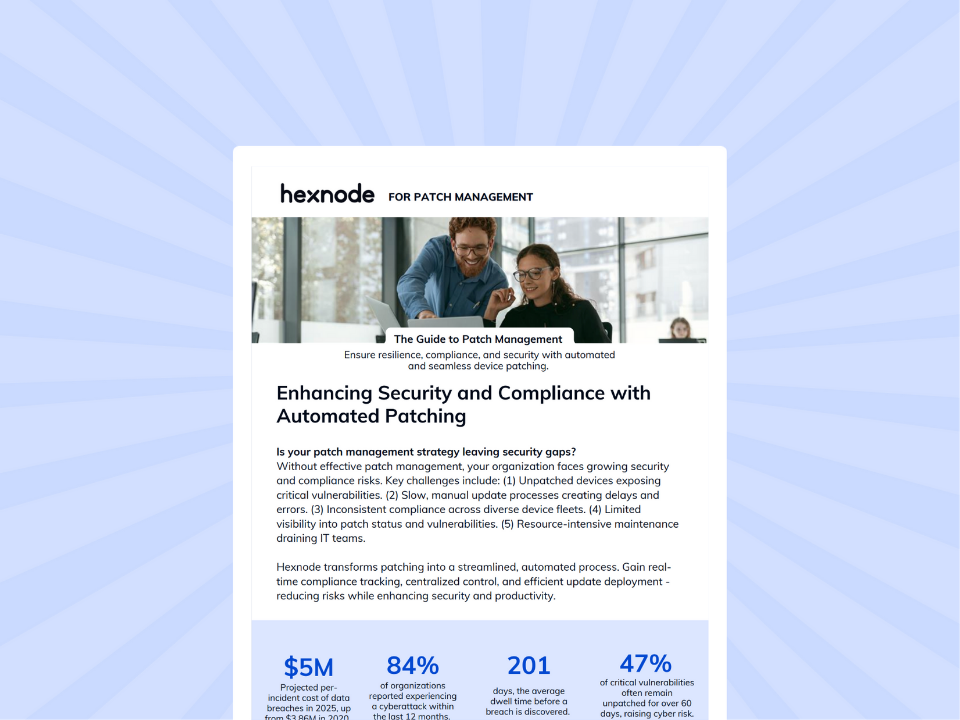
Hexnode UEM for Patch Management
Download the one-pager to discover how Hexnode simplifies patch management and strengthens device security.
Questions to Ask Before Selecting a Patch Automation Solution
Before making a decision, consider the following:
Which operating systems do you manage?
Is patch automation required only for Windows devices, or must the same console also manage operating-system and application updates on macOS devices?
What types of updates need to be automated?
Only Windows updates?
Third-party application updates?
Driver and firmware updates?
How important is centralized visibility?
Can your team monitor patch status and compliance across all managed devices from one location?
Do you need detailed reporting for audits or internal compliance requirements?
What level of deployment control do you require?
Can updates be scheduled around business hours?
Do you need phased deployments, approval workflows, or the ability to defer specific updates?
How will your environment evolve over time?
Will additional operating systems or device types be introduced?
Will patch management requirements become more complex as the organization grows?
Choosing a patch automation solution means aligning its capabilities with your IT environment. It should not depend on which platform offers the longest feature list.
Organizations with diverse endpoint fleets often prioritize consistent visibility, policy-driven automation, and centralized management across multiple operating systems. In contrast, Windows-focused organizations may find a Windows-centric approach sufficient for their current needs.
Managing Patch Automation Across Diverse Device Environments with Hexnode
For organizations managing a mix of Windows and macOS devices, patch automation often involves more than deploying operating system updates. IT teams also need centralized visibility, flexible deployment controls, and efficient ways to keep supported applications up to date across their endpoint fleet.
Hexnode UEM helps streamline these tasks by providing centralized patch management capabilities for supported Windows and macOS devices. From a single console, administrators can:
Manage Windows and macOS operating-system updates, supported macOS application updates and Windows application updates from a catalogue of more than 1,300 prepackaged applications.
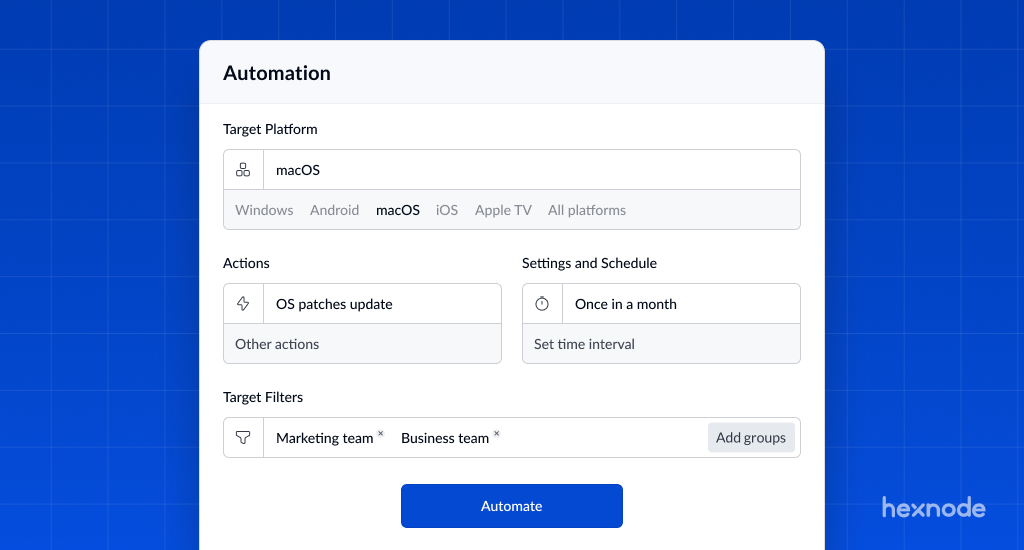
Choose between manual deployments or automated patch workflows.
Create patch automations using criteria such as severity, release date, CVE, KB number and update classification, and target them to the required devices or groups.
Maintain a more consistent patching process across managed devices.
To help minimize disruption to end users, administrators can also configure deployments around organizational requirements by:
Scheduling updates during maintenance windows.
Automating deployments based on predefined policies.
Require administrator approval, revoke approval for previously authorised patches, or exclude selected Windows and macOS operating-system updates from automated deployment.
Hexnode also provides visibility into patch management activities, enabling IT teams to:
Monitor patch deployment progress.
Review automation and deployment status.
Identify devices that are missing updates.
Identify missing patches, vulnerable devices, affected CVEs and devices awaiting restart, and use release-date filters to prioritise endpoints that exceed internal remediation targets.
By combining centralized management with policy-driven automation, Hexnode can help organizations:
Reduce manual patch management effort.
Improve operational efficiency.
Maintain greater visibility into patch compliance.
Exercise better control over software update deployments across mixed Windows and macOS environments.
Conclusion
As endpoint environments grow in size and complexity, patch automation becomes essential for maintaining security, reliability, and compliance. However, the right solution depends on more than its feature set. Organizations should assess their operating systems, update types, reporting needs, and required level of deployment control.
Windows Autopatch provides phased, policy-based update management for eligible Windows devices. It covers Windows updates, drivers and firmware, Microsoft 365 Apps for enterprise, Microsoft Edge, and Microsoft Teams.
Organizations requiring Windows and macOS patch automation may prefer Hexnode’s cross-platform workflow. It supports configurable approval and exclusion rules, maintenance-window deployments, and CVE-aware patch visibility.
Ultimately, organizations should base their decision on scalability, operational efficiency, and consistent patching as their IT environments evolve.
Try Hexnode Free for 14 Days
Reduce manual patching, improve compliance, and automate software updates with Hexnode.
What is the difference between patch management and patch automation?
Patch management is the overall process of identifying, testing, deploying, and verifying software updates across managed devices. Patch automation focuses on automating repetitive parts of that process—such as scheduling deployments, enforcing update policies, and monitoring deployment status—to reduce manual effort while maintaining consistency.
Can Microsoft Intune Autopatch replace third-party patch management software?
Not necessarily. Windows Autopatch automates supported Windows update workloads, drivers and firmware, Microsoft 365 Apps for enterprise, Microsoft Edge, and Microsoft Teams. Organizations needing non-Microsoft application updates can evaluate Microsoft Intune Enterprise App Management for supported Windows catalogue apps or Hexnode for Windows application patching and combined Windows and macOS patch automation.
How should organizations evaluate a patch automation solution?
Instead of comparing feature lists alone, consider factors such as:
Supported operating systems
Third-party application patching capabilities
Deployment scheduling and maintenance windows
Compliance reporting and audit visibility
Scalability as your endpoint environment grows
These considerations help determine whether a patch automation solution aligns with your organization’s long-term operational requirements.
Does patch automation eliminate the need to test updates?
No. While automated patch management can streamline deployments, organizations often continue to validate updates before broad rollout—particularly for business-critical systems. A phased deployment strategy can help identify compatibility issues early while minimizing disruption to users.
What should organizations look for in patch management software for hybrid workplaces?
For distributed and hybrid work environments, patch management software should provide:
Centralized visibility into patch compliance
Flexible deployment scheduling across time zones
Automated update workflows
Support for multiple operating systems where required
Reporting tools to demonstrate compliance and monitor deployment health
These capabilities can help IT teams maintain secure, up-to-date endpoints regardless of where employees work.
I’m a technical content writer at Hexnode who loves simplifying tech. I break down complex ideas, remove the fluff, and help readers clearly understand our product for what it actually is: simple, reliable, and built to solve real problems.