BitLocker compliance is not guaranteed by policy assignment alone. IT teams must continuously compare the intended encryption baseline with each device’s actual encryption, protection, and recovery state, then diagnose drift before applying targeted remediation. A reliable process combines centralized visibility, prerequisite and policy checks, controlled enforcement, recovery-key governance, and post-action verification to keep Windows devices consistently protected.
BitLocker deployment is not the end of encryption management
Assigning a BitLocker policy alone does not guarantee that every required drive maintains active encryption, continuous protection, and verified recoverability. Policy assignment only represents the desired state. The device’s reported encryption status, protection state, recovery-key availability, and drive coverage represent the observed state.
Those two states can diverge over time. A device may miss an updated policy, encounter a TPM or firmware issue, retain a conflicting local configuration, or fail to complete an encryption action. Administrators may also suspend protection for maintenance and never restore it, while newly added drives can remain outside the original encryption scope.
This is why BitLocker compliance must be treated as a continuously maintained control, not a completed deployment task. IT teams need an ongoing process to detect deviations, determine their cause, apply the appropriate corrective action, and verify the result.
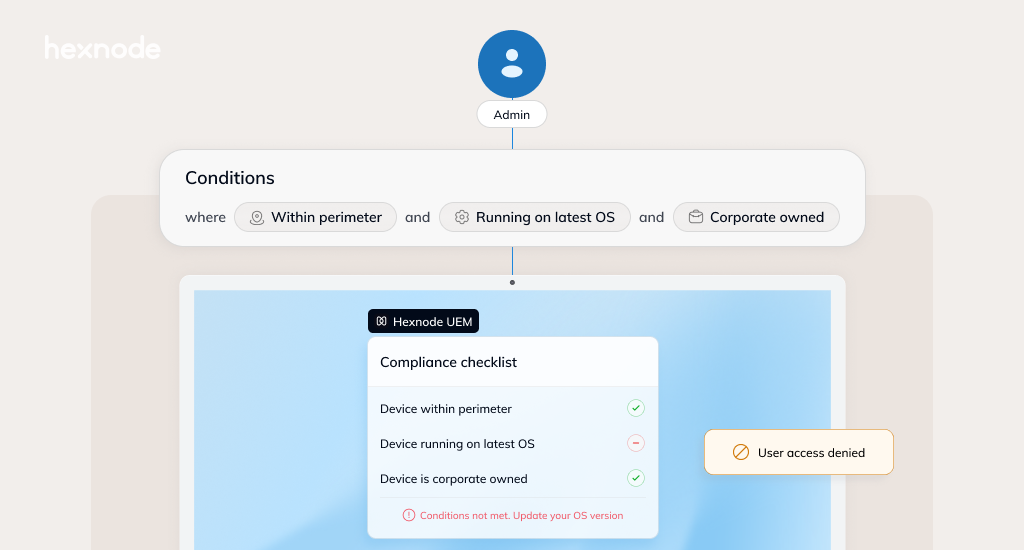
Centralized device management supports this process by helping administrators compare assigned encryption requirements with the actual BitLocker and drive status reported by managed Windows devices.
BitLocker configuration drift occurs when a device’s actual encryption state no longer matches the organization’s approved baseline. It is different from an initial deployment failure, where encryption never starts, and from a temporary state, such as encryption still progressing after policy assignment.
Desired BitLocker state
The desired state defines what IT expects across managed Windows devices:
Required operating system and fixed drives are encrypted.
Approved encryption methods and cipher strengths are in use.
Startup authentication, TPM, and recovery settings match policy.
Recovery information is stored in an approved escrow location.
Observed BitLocker state
The observed state reflects what is actually happening on the endpoint. Drift exists when:
A drive is unencrypted, partially encrypted, suspended, decrypting, or protected with different settings.
A recovery password is missing, exposed, due for rotation under organizational policy, or stored outside the approved recovery process.
TPM or startup authentication settings no longer match the security baseline.
A newly added fixed or removable drive falls outside the intended controls.
Drift becomes manageable when administrators can compare assigned BitLocker requirements with the reported encryption, protection, and recovery status of each device. Centralized visibility helps separate temporary conditions from persistent compliance gaps that require remediation.
How to manage BitLocker and why should you use it?
Learn how BitLocker protects Windows data and how IT teams can configure and manage encryption centrally.
Why BitLocker settings drift after deployment
BitLocker drift often results from routine operational changes rather than deliberate tampering. The root cause may sit in policy design, hardware state, administrative activity, or device connectivity.
Conflicting management layers
Local Group Policy, domain GPOs, and device-management policies can define incompatible BitLocker settings. Silent encryption may fail when another policy requires a startup PIN or physical startup key, while overlapping profiles may apply different recovery options or encryption methods.
Before remediation, IT must understand policy precedence, configuration ownership, and assignment scope. Reapplying the same policy without resolving the conflict can produce repeated failures.
Hardware and platform changes
BitLocker depends on several platform conditions. Drift can appear when the TPM is disabled, uninitialized, locked out, or no longer ready. Firmware, BIOS, motherboard, or other hardware changes may also affect existing protectors.
Unsupported Windows editions or failed prerequisites can prevent the intended BitLocker configuration from applying. Hardware, TPM, BIOS, or UEFI changes may instead trigger recovery or require protectors to be revalidated before the device returns to its normal operating state.
Administrative and user-driven changes
Protection may be suspended for maintenance and never resumed. A local administrator may disable BitLocker, initiate decryption, or change recovery credentials outside the approved workflow.
Newly installed fixed drives and connected removable media may also remain unmanaged if the original policy scope does not cover them.
Connectivity and management gaps
Offline devices can miss updated policies, while enrollment or check-in issues can prevent accurate status reporting. In other cases, the policy reaches the endpoint but the encryption action fails.
Within Hexnode, administrators can review policy status, device check-in information, and BitLocker action results. Failed actions and device status can support troubleshooting, but administrators may need to examine the documented error and validate BitLocker prerequisites separately to determine the cause.
BitLocker drift conditions IT teams should monitor
Effective BitLocker monitoring requires more than checking whether encryption is enabled. IT teams should track drift across encryption state, configuration, recovery controls, and device lifecycle.
Encryption-state drift
A required drive may report as unencrypted, remain partially encrypted, or stall before completion. Suspending protection while a volume remains encrypted creates a critical gap between raw data encryption and active policy enforcement. Security teams must treat unexpected decryption as a high-priority incident.
Configuration drift
A device may use an encryption method, cipher strength, or drive encryption type that differs from the approved baseline. Controls can also vary across operating system, fixed, and removable drives. Missing startup authentication requirements or noncompliant protector types indicate that encryption exists but does not meet policy.
Recovery and key-management drift
Recovery readiness must be monitored alongside encryption status. Common issues include:
No recovery password available through the approved management system
A used or exposed recovery password that has not been rotated
Obsolete, exposed, or unauthorized recovery protectors remain associated with the volume without a documented operational need.
Recovery information stored outside the approved location
Reporting and lifecycle drift
Devices that stop reporting can create false confidence in compliance data. Newly enrolled, rebuilt, reassigned, retired, or repurposed devices may also retain outdated encryption records or fail to reach the required state.
Administrators can inspect drive-level BitLocker status directly within Hexnode’s device summary and verify compliance when policies mandate encryption for OS and fixed drives. Native Enrollment does not support BitLocker compliance checking.
Build a repeatable BitLocker drift remediation workflow
BitLocker drift remediation should operate as a closed-loop process. Detecting a non-compliant device is only the starting point; the workflow must also identify the cause, apply the right correction, and verify the resulting state.
Step 1: Define the approved encryption baseline
Document the expected configuration before measuring drift. The baseline should specify supported Windows editions and hardware, with separate requirements for operating system, fixed data, and removable drives.
It should also define:
Approved encryption methods and cipher strengths
Startup authentication requirements
Recovery options and password-rotation rules
Permitted exceptions, including devices without a compatible TPM
Step 2: Detect and classify the deviation
Compare the device’s reported state with its assigned baseline. Classify the issue as policy drift, hardware failure, encryption failure, recovery-key gap, or reporting problem.
This distinction matters because each condition carries a different risk and requires a different response. An unencrypted drive may create immediate exposure, while a stale device record may indicate a visibility issue rather than confirmed encryption failure.
Step 3: Investigate prerequisites and conflicts
Confirm that the device runs a supported Windows edition, remains enrolled, and has checked in recently. Verify TPM readiness and review firmware or hardware changes that may affect protection.
Administrators should also inspect local policies, domain GPOs, and centrally assigned BitLocker settings. Action failures and Windows BitLocker event logs can provide additional context where the management status alone is insufficient.
Step 4: Apply the least disruptive corrective action
Correct conflicting policy values before repeating enforcement. Trigger encryption only when a device meets prerequisites, resume protection if suspended, and resolve TPM, recovery, or startup authentication issues before forcing another attempt.
Hexnode supports BitLocker configuration through Windows policies and provides a Force BitLocker Encryption action for eligible managed devices.
Step 5: Verify the resulting state
Confirm that encryption completes, recheck the drive’s BitLocker status, and verify that the system escrowed the required recovery password.Validate the configured startup-authentication or key-protector requirements separately where necessary. Track failed, pending, and remediated devices separately.
The case should remain open until the observed state matches the approved baseline.
Match remediation actions to the type of BitLocker drift
BitLocker remediation should reflect the specific failure condition. Applying the same action to every non-compliant device can create repeat failures, user disruption, or weaker security controls.
Confirm policy receipt, OS support, TPM readiness, and absence of conflicting encryption controls
Remove the blocking condition, then trigger encryption
Confirm required drives start and complete encryption
Encryption is present but protection is suspended
Firmware update, BIOS change, or incomplete maintenance activity
Check suspension history and whether a reboot or maintenance completion should restore protection
Resume protection through an approved administrative process
Verify that protectors are active and protection is no longer suspended
Policy and startup authentication conflict
Silent encryption and mandatory preboot authentication are configured together, or policies overlap
Review local policy, domain GPOs, and centrally assigned settings
Standardize startup authentication requirements, synchronize the corrected policy, and retry
Confirm the intended protector and authentication configuration are applied
TPM is unavailable or not ready
TPM disabled, uninitialized, locked out, unsupported, or affected by hardware changes
Check TPM presence, version, readiness, and lockout state
Resolve the hardware or firmware issue separately; use a non-TPM workflow only when policy explicitly permits it
Confirm TPM readiness and successful BitLocker protection
Recovery password is missing or exposed
Escrow failure, password disclosure, or incomplete rotation
Verify whether recovery information reached the approved location
Escrow or rotate the password and restrict access to authorized administrators
Confirm the current recovery password is available and document access where required
Hexnode can configure recovery password requirements and rotation and store recovery information for managed BitLocker devices, subject to platform prerequisites and the organization’s configured workflow.
Automate carefully: remediation guardrails for BitLocker
Automated BitLocker remediation can reduce response time, but poorly scoped actions can disrupt users, trigger repeated failures, or weaken existing protection. The safest approach is to automate within a controlled workflow rather than treating every deviation as an immediate enforcement case.
Start with pilot groups before applying updated BitLocker settings across the wider fleet. Decouple detection, approval, corrective action, and verification so teams can evaluate high-risk conditions before initiating remediation.
Key guardrails include:
Do not repeatedly force encryption while TPM, policy, or recovery prerequisites remain unresolved.
Schedule actions that may affect startup or restart behavior within approved maintenance windows.
Communicate with users when remediation may introduce preboot authentication or require a reboot.
Exclude approved exception devices and assign each exception an owner, expiry date, or review cycle.
Restrict recovery-password access through least privilege and audit administrative retrieval.
Verify encryption, protection, and recovery status after remediation instead of relying on a successful command response.
In Hexnode, administrators can phase BitLocker changes by assigning policies to selected devices or administrator-defined device groups and executing device-specific actions where required. This reduces the chance of applying disruptive changes indiscriminately across the entire Windows fleet.
Measure whether BitLocker remediation is working
Organizations must measure BitLocker remediation as an ongoing security program rather than a series of isolated device fixes. The right metrics show whether encryption coverage is improving, whether recovery controls remain reliable, and how much operational effort remediation requires.
Track indicators such as:
Percentage of in-scope devices with all required drives encrypted
Number of devices with missing, suspended, or mismatched BitLocker protection
Percentage of protected devices with a current recovery password stored in the approved location
Mean time from drift detection to verified remediation
Repeated failures by device model, TPM state, policy, or Windows version
Number and age of approved encryption exceptions
Percentage of remediation cases requiring manual intervention
Frequency of stale or non-reporting devices in the compliance dataset
These metrics help identify whether failures are isolated or systemic. For example, repeated errors across one hardware model may indicate a firmware issue, while a high manual-intervention rate may point to weak policy standardization.
Hexnode device details and compliance status allow administrators to verify reported BitLocker encryption states, while Action Reports provide direct visibility into remote action results. Administrators must independently verify the resulting drive status and recognize that Native Enrollment does not support BitLocker compliance checking.
Common mistakes that allow BitLocker drift to persist
BitLocker drift often persists because teams validate policy delivery instead of the actual encryption outcome. Marking a policy as assigned does not prove that every required drive maintains active encryption, full protection, and verified recoverability.
Common mistakes include:
Monitoring only the operating system volume while ignoring fixed data and removable drives
Forcing encryption before resolving TPM readiness, startup authentication, or policy conflicts
Failing to confirm that recovery credentials were successfully escrowed
Applying the same remediation to unencrypted, suspended, and decrypting devices
Allowing permanent exceptions without an owner, expiry date, or review cycle
Ignoring stale inventory and devices that have stopped reporting
Treating a successful action response as proof that encryption completed
Changing encryption settings and assuming existing encrypted drives will automatically adopt the new configuration
Some BitLocker settings take effect when encryption begins. Updating the policy does not necessarily decrypt and re-encrypt an existing volume with the revised method or configuration.
This is why remediation must include state validation, exception governance, and post-action verification. Without those controls, dashboards can show apparent policy coverage while devices continue operating outside the approved encryption baseline.
Keeping BitLocker aligned with policy through Hexnode
Hexnode provides BitLocker policy configuration, device-reported encryption information, compliance reporting, recovery-password management, and remote actions that administrators can use within their remediation workflow.
Standardize encryption requirements across Windows devices
Administrators can configure BitLocker requirements separately for operating system, fixed data, and removable drives. Policies can define encryption methods and cipher strengths, startup authentication, recovery options, and password-rotation behavior.
Assigning these configurations to relevant devices or groups creates a consistent baseline and reduces variation caused by device-by-device administration.
Identify devices that have fallen outside the baseline
Device-reported BitLocker information helps administrators review drive-level encryption and protection status. Policy and action status can then help distinguish devices with configuration failures from endpoints that have not processed an instruction or recently checked in.
This allows IT to narrow remediation to affected devices instead of redeploying settings across the entire Windows fleet.
Correct encryption and recovery gaps remotely
After confirming that the Windows edition, TPM or permitted non-TPM configuration, policy, and recovery prerequisites are valid, administrators can use the Force BitLocker Encryption action to initiate encryption of the operating-system drive with the associated BitLocker policy configuration. Hexnode also supports recovery-password escrow and remote rotation for all encrypted drives or selected partitions.
Where TPM readiness or local configuration requires deeper validation, IT can use remote scripts or established troubleshooting workflows before retrying enforcement. IT teams must then re-verify the resulting encryption, protection, and recovery status.
For supported Windows 10 and Windows 11 Pro, Enterprise, and Education devices, Hexnode centralizes BitLocker policy configuration, drive-status review, recovery-password escrow and supported rotation actions, and remote-action tracking. Native Enrollment does not support BitLocker compliance checking, and recovery-password rotation requires meeting specific policy and identity prerequisites.
Featured Resource
Hexnode Windows Management Solution
Explore centralized Windows security, policy enforcement, compliance monitoring, and remote management.
No. A drive can remain encrypted while BitLocker protection is suspended, the recovery password is unavailable, or its encryption settings differ from the approved baseline. Compliance should include encryption status, active protection, configuration, and recovery readiness.
How can IT tell the difference between BitLocker drift and encryption still in progress?
Check the device’s reported encryption percentage, recent policy and action status, and last check-in time. A temporary state should progress toward the approved baseline, while stalled encryption, repeated failures, or persistent mismatches usually require investigation.
Should IT force BitLocker encryption again when a device is non-compliant?
Not immediately. Administrators should first verify Windows support, TPM readiness, policy delivery, startup authentication settings, and competing encryption controls. Repeating enforcement without fixing the underlying issue can produce the same failure or disrupt the user.
What should happen after a BitLocker recovery password is used?
The password should be treated as exposed and rotated through the organization’s approved process. IT should then verify that the new recovery information is stored in the approved location and available only to authorized administrators.
How should devices without a compatible TPM be handled?
They should follow a documented exception or non-TPM workflow only when organizational policy permits it. IT should not weaken authentication requirements solely to make the device appear compliant, and every exception should have an owner and review date.
Does changing a BitLocker policy update drives that are already encrypted?
Not necessarily. Some settings apply when encryption begins, so changing the policy may not automatically re-encrypt an existing drive with the new method or configuration. Administrators should verify the actual drive state and plan any required transition carefully.
Conclusion
BitLocker drift remediation is a continuous security control, not a task that ends once an encryption policy is deployed. Effective management requires IT teams to establish an approved baseline, detect deviations, diagnose the underlying cause, apply a targeted correction, and verify that the device has returned to the expected state.
Effective verification must extend beyond simple drive encryption status. Active protection, compliant configuration, and recovery readiness are equally important to maintaining a defensible encryption posture.
Centralized policy enforcement and device-level visibility make this process more consistent and scalable. They help administrators identify gaps earlier, reduce manual checks, and maintain reliable BitLocker protection across changing Windows environments.
Keep BitLocker protection aligned
Enforce encryption policies, monitor device status, and manage recovery information with Hexnode.
Associate Product Marketer at Hexnode focused on SaaS content marketing. I craft blogs that translate complex device management concepts into content rooted in real IT workflows and product realities.