The complete guide to Android tablet management
Learn more about comprehensive Android tablet management best practices

Get fresh insights, pro tips, and thought starters–only the best of posts for you.

If you’ve ever tapped a link and watched it open directly inside an app instead of a browser, you’ve already experienced Android Intent working behind the scenes. Every smooth transition between apps, every shared file, and every triggered system action relies on this structured communication mechanism.
These interactions may feel effortless to users, but they are the result of deliberate architectural design. For developers, it shapes how applications interact. For IT administrators, it influences security, control, and device behavior. Understanding how this underlying system works is key to building reliable applications and managing Android devices effectively.
In this article, we break down the core communication model that powers Android, examine how it functions, and explore why it matters in both development and enterprise environments.
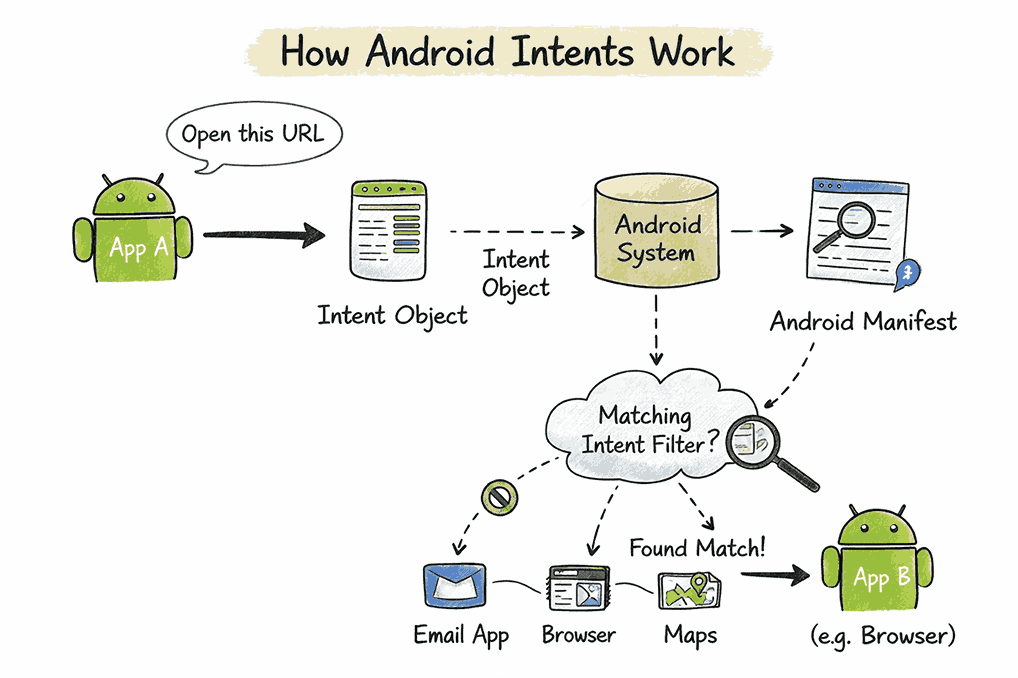
An Android Intent is a messaging object that enables communication between application components within the Android operating system. It represents a request for an action to be performed by another component.
In Android’s architecture, applications consist of modular components such as:
These components do not call each other directly. Instead, they communicate through Intents.
An Android Intent carries structured information that describes:
When a component sends an Intent, the Android system determines which component should handle the request and then executes it.
For example, when a user opens a new screen, shares an image, launches the camera, or taps a web link, the system processes an Intent behind the scenes. These Intents enable modular design, cross-application interaction, and system-level coordination.
Android Intents operate quietly behind many everyday interactions. Most users never see them, but nearly every app transition depends on them.
These interactions feel seamless because the system coordinates communication between components and applications in real time.
The same mechanism powers enterprise workflows.
In all of these cases, Android relies on structured communication rules to determine how applications interact.
Not all Intents behave the same way. The way an Intent is constructed directly affects how the Android system resolves it, which component handles it, and how securely data moves between applications. Choosing the correct Intent type determines whether an interaction stays within the application or reaches external apps.
Android primarily supports two types of Intents:
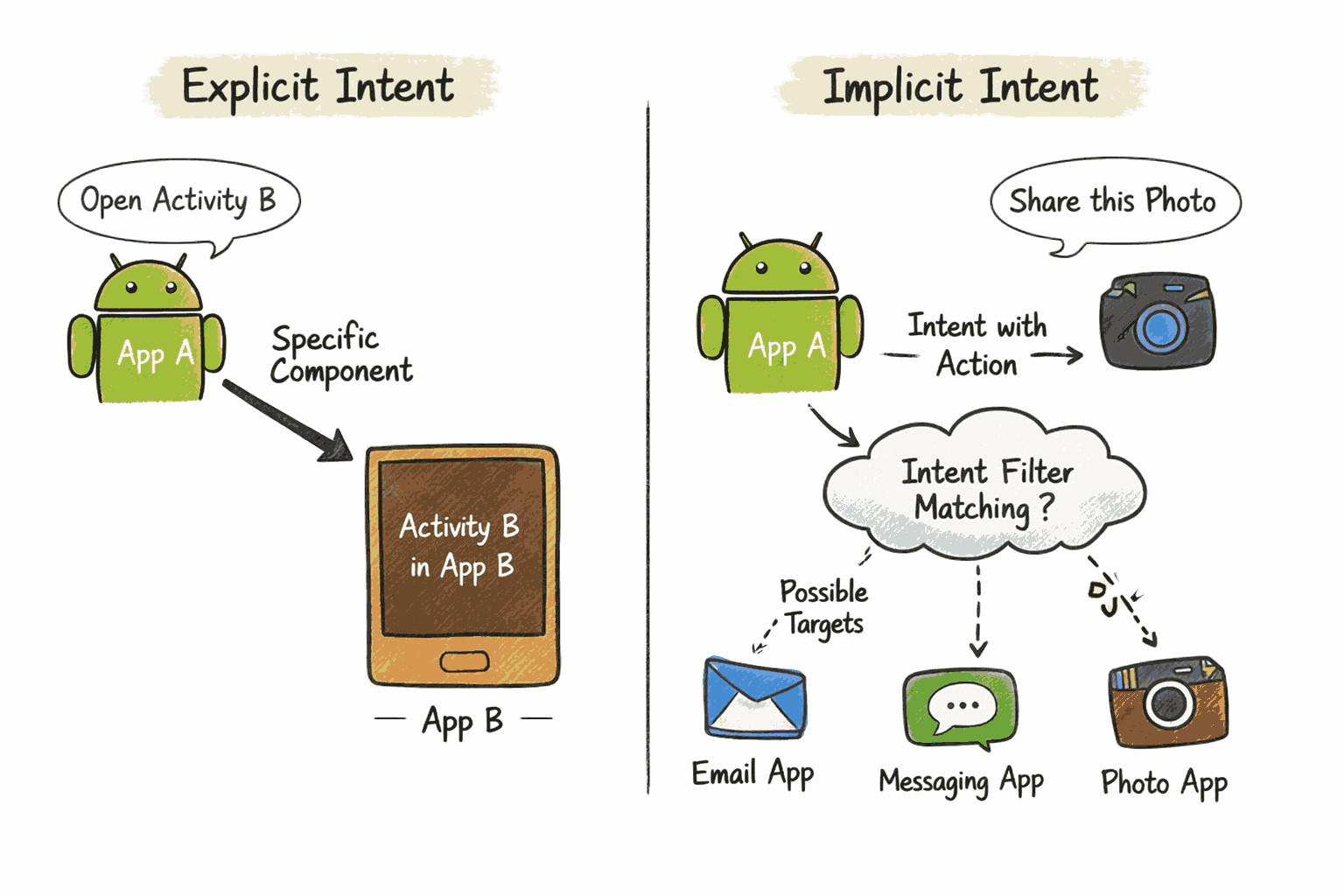
An Explicit Intent specifies the exact component that should handle a request. The application directly names the target component. Developers typically use Explicit Intents for internal operations such as:
Because the target is predefined, the Android system does not perform resolution matching. It launches the specified component immediately.
An Implicit Intent does not name a specific component. Instead, it declares a general action and allows the system to determine which app can handle it. The Android system scans installed applications and matches the Intent against declared Intent filters based on action, data, and category.
Common examples include:
Implicit Intents enable cross-application interaction, which increases flexibility. However, they also introduce complexity. In enterprise deployments, unmanaged Implicit Intents can expose data to unintended applications, making policy enforcement essential.
| Aspect | Explicit Intent | Implicit Intent |
|---|---|---|
| Target specified | Yes | No |
| Resolution required | No | Yes |
| Typical use case | Internal navigation | Cross-app interaction |
| Control level | High | Variable |
| Enterprise risk level | Lower | Higher if unmanaged |
Understanding the types of Intents is only part of the picture. To use them effectively, you must understand how the Android system processes them internally.
When a component sends an Intent, it does not directly execute the requested action. Instead, it hands the request to the Android system. The system evaluates the Intent, determines which component should handle it, and then routes it accordingly.
To do this, an Intent object carries structured information.
Let us look at a simple example of using an implicit Intent to open a web page.
|
1 2 3 4 5 6 |
Intent intent = new Intent(Intent.ACTION_SENDTO); intent.setData(Uri.parse("mailto:support@example.com")); if (intent.resolveActivity(getPackageManager()) != null) { startActivity(intent); } |
In this example:
This example does not specify a browser. Instead, it describes the action that needs to occur. The Android system determines which installed application can fulfill the request.
An Intent object can include several elements that help the system interpret the request:
However, depending on the use case, not all fields need to be present in every Intent.
Once a component sends an Intent, the Android system follows a defined resolution process:
If multiple components qualify, the system may display a chooser dialog.
This mechanism enables flexible app-to-app communication while maintaining architectural separation between applications. At the center of this process lies the Intent filter.
While Android Intents enable seamless communication between components, they also expand the application’s interaction surface. If developers and administrators do not configure them carefully, they can introduce security vulnerabilities.
Modern Android versions require explicit export declarations and enforce stronger permission controls. However, organizations must implement additional governance to reduce risk.
In personal devices, flexibility is beneficial. In enterprise environments, however, control is critical. Android Intents can influence:
For example:
Understanding how Intents function is essential for enforcing:
This is where Android Enterprise and Unified Endpoint Management (UEM) solutions come into play.
Since relying on conventional device management methods poses the admin with several challenges, businesses require a versatile solution like Hexnode for managing their endpoints.
Get the White paper
This is where Unified Endpoint Management becomes essential.
Hexnode extends Android Enterprise capabilities by giving organizations granular control over device behavior, application environments, and data boundaries. By managing which apps run on a device and how they operate, administrators indirectly control how Intents resolve and how data flows between components.
With Hexnode, IT administrators can:
Hexnode enables organizations to provision devices in fully managed, dedicated, or work profile modes. This ensures clear separation between corporate and personal apps, preventing unintended cross-profile Intent interactions.
In kiosk deployments, Hexnode restricts devices to approved applications only. By limiting installed apps, administrators reduce the number of components capable of receiving implicit Intents, making resolution predictable and secure.
Hexnode integrates with Managed Google Play to allow controlled application deployment. When only vetted applications exist on the device, Intent resolution remains confined to trusted components.
By blocking unauthorized app installations, Hexnode reduces the risk of malicious apps registering broad Intent filters that intercept sensitive actions or data.
Administrators can enforce permission policies that restrict access to device resources. This limits the impact of improperly handled Intents and prevents excessive data exposure.
Through Android Enterprise containerization, Hexnode ensures that corporate data remains within managed environments. Even when an app attempts to share data via an Intent, policy boundaries prevent it from crossing into unmanaged apps.
Hexnode provides real-time visibility into device compliance and application states. Administrators can identify policy violations and take corrective action before Intent-related vulnerabilities escalate.
By controlling the application ecosystem on each device, organizations significantly reduce the risk of unauthorized Intent resolution. When only approved apps exist and policy boundaries are enforced, Intent matching becomes controlled, predictable, and secure.
1. Are Android Intents secure?
Android provides security mechanisms such as permission enforcement and explicit export declarations. However, poor configuration can introduce vulnerabilities.
2. How do enterprises control Android app interactions?
Enterprises use Android Enterprise frameworks and device management solutions to restrict app installations, enforce work profiles, and manage app permissions.
3. What happens if no app can handle an implicit Intent?
If no installed application matches the Intent’s action, data, and category, the Android system throws an exception. Developers should always validate Intent resolution before triggering it to prevent application crashes.
Manage app communication, enforce security boundaries, and maintain policy compliance across all your Android enterprise devices.a
Signup Now