The essential guide to establishing a mobile device policy
Learn how to develop a mobile device policy for your organization

Get fresh insights, pro tips, and thought starters–only the best of posts for you.
If you are not new to the mobility management space, you would have come across terms like MDM, EMM, UEM, etc. Knowing the difference between these management techniques is really important as it is necessary for you to identify the right solution to suit your organization’s needs. So, let’s see what each of them exactly means and offers.

Organizations now are more concerned about their employees working remotely to be productive around the clock. The need to proactively manage their laptops, smartphones, tablets, wearables, ruggedized devices, or even the Internet of Things (IoT) especially handling sensitive business data is critical than ever before.
As the volume of proprietary information transferred across the endpoints for high level business operations is frequently growing, devices coming with some sort of predetermined security management and hardening are sure to bring more confidence and success to the enterprise.
Employing a strong mobility management strategy is often the first step towards preventing any data breach and can impact a range of outcomes. A secure, unified, comprehensive and future-proof mobility management tool can address most of the device management concerns to bridge all the security gaps and prevent users from circumventing any security systems in place.
The ever-evolving mobility management technologies are always urging organizations to seek out better management options to ensure security without overburdening the user. As the mobility management landscape is in continuous flux, choosing the right solution is an important challenge that IT teams have ever encountered to remain agile and competitive in the marketplace.

Mobility management involves device deployment, configuration, monitoring, securing, and ongoing support. Several categories of mobility management tools are out there, and chances are there to get confused with the jumble of three-letter acronyms including MDM, EMM, and UEM.
Knowing the difference between these management products is important to avoid the enforcement of a mobility management plan that is not the best fit for your organization. Deploying the wrong strategy can cost business money and kill employee morale. Here are a few pointers for those who are struggling with breaking down the difference between various types of mobility management tools that are available today.
Mobile Device Management (MDM) allows you to manage and secure corporate or employee-owned mobile devices such as smartphones and tablets deployed across multiple OS platforms. Enrolled devices can be configured to address company policies and requirements. Devices can be locked, tracked and monitored remotely from the MDM console.
Other major services that an MDM solution should offer include:
and so on.
In short, the main objective of MDM is to give organizations secured control over their devices.
As MDM solutions functioned at the device level it became difficult to break through the challenges arose with BYOD (Bring Your Own Devices) and COPE (Corporate Owned Personally Enabled) trends in the organizations. Sensitive corporate data on employees’ devices had to be secured without compromising their privacy. So, MDM transformed into a more comprehensive solution, EMM.
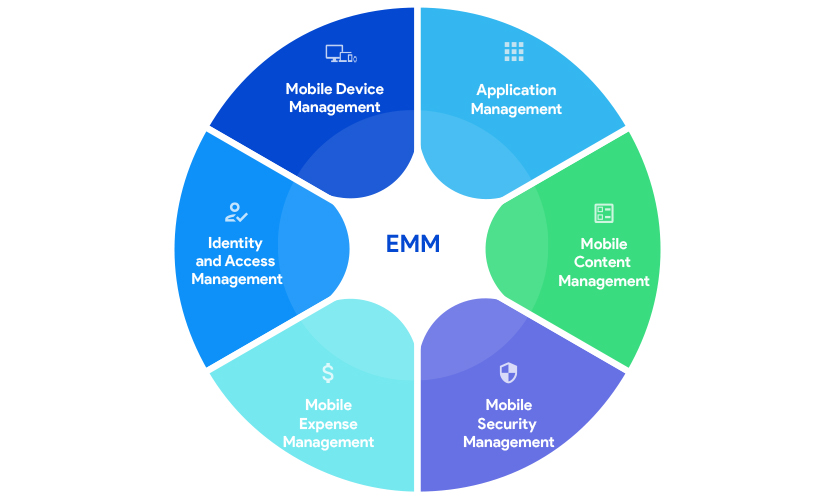
Enterprise Mobility Management (EMM) encompasses technologies to manage apps and content with stringent security. Generally, EMM offers everything that MDM can perform. Other major components of EMM include:
It is a more targeted solution for app management. It allow organizations to control access to applications and data associated with it instead of controlling the entire physical device. You can seamlessly deploy and update in-house and play store apps over-the-air. It provides in-depth management of apps restricting malicious apps, configuring and removing apps according to the company policy and even forcing devices to work in a purpose-specific mode known as kiosk mode with one or more apps allotted by the organization.
Another important part of MAM is containerization which separates work-related content from personalized data by placing them in a separate virtual container.
Though a part of MAM, containerization has vital importance especially in cases where the devices have both work and personal data. Containerization establishes separate, encrypted containers on personal (BYOD) devices – a secure area on the device that keeps business data isolated from everything else on the device.
Along with securing corporate apps and data, this approach also ensures that organizations can’t interact with personal data on the device. On Android devices, containerization could be achieved by enrolling them in the Android Enterprise program and deploying a work profile container. For iOS devices, data flow between the managed work apps and personal apps could be controlled by applying a set of restrictions.
It is all about the remote distribution, management, and collaboration of critical business content. Any means of content sharing can be managed and secured access to documents can be granted. Encryption can be mandated to protect the data stored on the devices and thereby unauthorized access to the data can be prevented.
It is much like MDM and refers to the best practices to secure your mobile devices. In addition to the security features offered by MDM, Mobile Security Management adopts a much stronger security strategy to provide application level and data level protection. For application-level security, unwanted apps can be restricted, and kiosk mode can be enabled.
You can also analyze and audit the information regarding all the applications installed on the devices. Data security can be ensured by enforcing device disk encryption and a strong device password. For web-based protection unsecured websites could be blacklisted.
Used to track mobile communication expenses and audit mobile data usage. Can set up data usage limits and restrict network connectivity once the limit is reached. App-wise data usage restrictions can also be configured.
Refers to the process of managing and defining roles and privileges to individuals for accessing corporate resources to ensure that the right person has the right access. It also controls how employees use corporate apps and data. It is actually to mitigate the security threats from employees while providing a good user experience. For authorization, strong passwords and two-factor authentications could be enforced. Network services like Wi-Fi, VPN and emails can be authenticated with certificates.
Unified Endpoint Management (UEM) approach consolidates the management of all endpoints including smartphones, tablets, laptops, wearables, TVs and IoT devices providing a single pane to manage devices, apps, and data. It is an evolution and combination of MDM and EMM along with the capabilities of traditional client management tools.
This centralized platform with a multi-device architecture covers all platforms, a wide range of devices as well as services and help you remove the hassle of complicated integrations among different tools on multiple platforms.
UEM solutions have all the capabilities of its predecessors including mobile device management, mobile application management, mobile security management, mobile content management, mobile expense management, kiosk management and so on. Taking management a few steps further it offers other enhanced features like no-touch deployment of devices under different platforms to make them business-ready over-the-air.
It has seamless business integrations to boost productivity and can manage any of the business scenarios: BYOD (Bring Your Own Device), CYOD (Choose Your Own Device), COPE (Corporate Owned Personally Enabled) or COBO (Corporate Owned Business Only).

Without a few points in mind, making the right decision on the most suited mobility management tools can be next to impossible. Here are the key considerations for decision making:
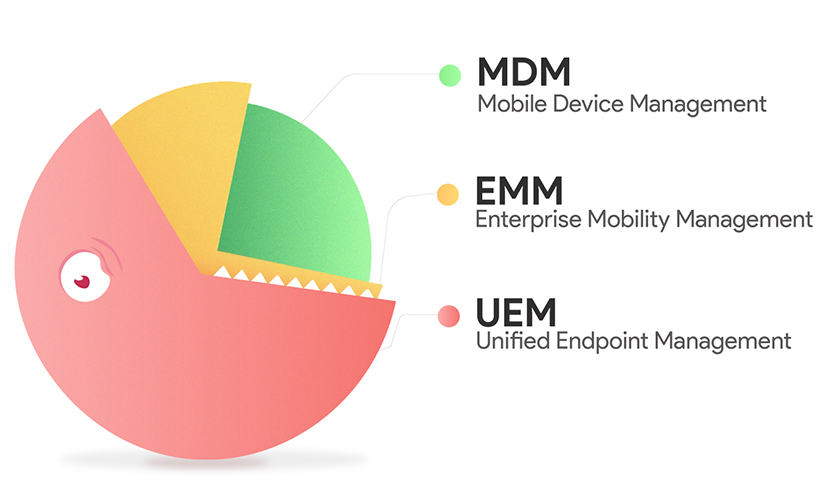
So, to sum up, MDM, EMM, and UEM are the different evolutionary stages of mobility management and addresses the security and privacy concerns raised as a part of the modern business trends. Simply put, the main difference between these solutions lie in their management scopes. MDM focusses on the basic management of mobile devices by leveraging device-level policies and putting security protocols to provision these devices.
EMM is a much comprehensive approach that includes all aspects of managing enterprise mobility including MAM, MCM, MSM, MEM, Identity and Access management along with MDM. And finally, UEM implies a coherent mechanism to integrate the management of all endpoints along with mobile devices into a single platform.
After knowing the lines of difference between these management tools, it is quite easy to determine the right solution for your mobility needs. The point is to analyze, identify, and figure out your organization’s needs and choose the one that’s best suited for you.
No matter which mobility management strategy is right for you, Hexnode can help you with that!