TL;DR:
Choosing kiosk management software involves more than locking a device to an application. IT teams need to weigh operating system support, kiosk modes, browser controls, remote troubleshooting, exit options and hardware restrictions.
Hexnode is particularly relevant to mixed fleets, documenting kiosk workflows for Android, iOS and iPadOS, Windows, ChromeOS, Linux and Apple TV, plus Autonomous Single App Mode for macOS, all through the same console used for app management and compliance.
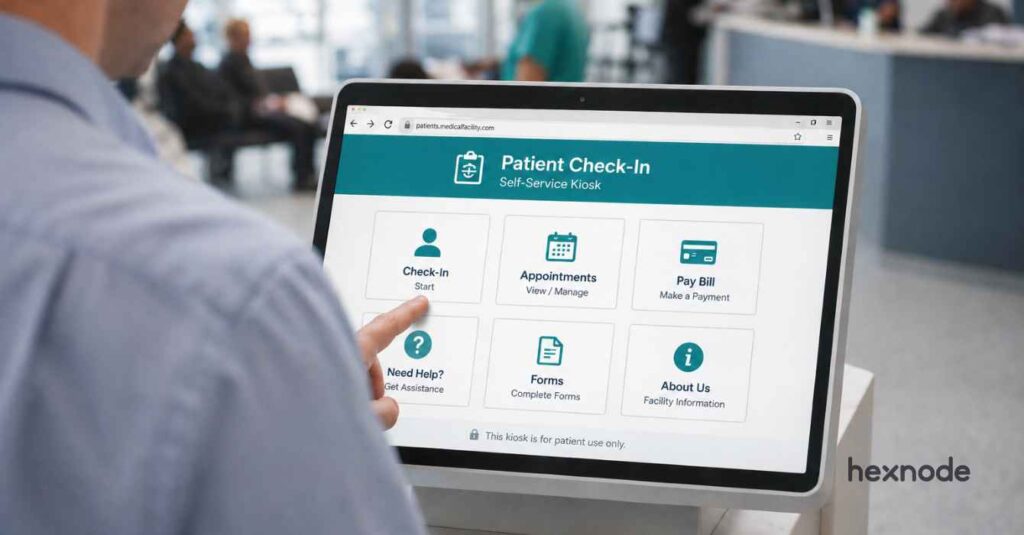
Kiosks are now familiar in retail stores, hospitals, hotels, airports, schools and warehouses. They support self-checkout, visitor registration, patient check-in, digital signage and point-of-sale.
The visible screen is only one part of a deployment. Behind it, kiosk management software determines which applications users can open and which websites they can visit. It also governs how administrators maintain the device. A kiosk that cannot be updated, diagnosed or recovered remotely quickly becomes an operational burden.
What is kiosk management software?
Kiosk management software turns a general-purpose device into a dedicated endpoint. It restricts the device to one application, a group of applications, an approved website or managed signage. Administrators use it to configure devices remotely, distribute applications and content, and restrict system settings. They can also monitor device health and troubleshoot issues without visiting each kiosk.
Types of kiosk lockdown
- Single-app kiosk: One application or web app. Suits self-ordering terminals and dedicated scanners.
- Multi-app kiosk: A set of approved apps on a managed launcher. Suits shared workstations and warehouse handhelds.
- Website kiosk: One site or a restricted set of pages, with navigation and downloads controlled.
- Autonomous single app mode: An authorized app can enter and exit single-app mode as its workflow requires. This makes the mode suitable for task-based sessions such as assessments and application-testing workflows.
- Digital signage: Centrally managed media on a schedule, with little or no user interaction.
The Definitive Guide to Kiosk Management and Strategy (2026 Edition)
Top 10 kiosk management software solutions
Below is a breakdown of the leading kiosk management platforms available today, covering their supported operating systems, kiosk modes, remote management capabilities and key differentiators.
1. Hexnode
Suitable for: Managing kiosks and general-purpose endpoints across multiple operating systems from one UEM console.
Hexnode provides kiosk lockdown for Android, iOS and iPadOS, Windows, ChromeOS, Linux and Apple TV, and Autonomous Single App Mode for compatible macOS applications. Available modes differ by the management framework each operating system exposes.
- Kiosk modes: Hexnode supports single-app, multi-app, web-app and digital-signage configurations on Android. On iOS and iPadOS, it offers single-app, multi-app, web-app and Autonomous Single App Mode, while Windows adds single-app, multi-app, website and digital-signage kiosks. ChromeOS and Linux are covered by single-app and multi-app modes. Apple TV supports single-app lockdown, and compatible macOS applications can run under Autonomous Single App Mode.
- Browser control: On Android, Hexnode Kiosk Browser supports single-tab and multi-tab browsing, URL allowlisting, full-screen web apps and configurable website-refresh behavior.
- Peripheral lockdown: Hexnode can restrict cameras, microphones, external storage, USB access, status bars and hardware buttons where those controls are available for the device platform and management mode.
- Background apps: On Android, Hexnode hides approved background applications from the kiosk launcher while allowing them to run or be invoked by the foreground kiosk application.
- Remote support: Remote View is available for iOS and iPadOS, Android, Windows, macOS, ChromeOS, and supported Linux distributions with a compatible GUI. Remote Control is available for Android, Windows, macOS and ChromeOS, and on supported Linux distributions using the X11 display manager.
- Exit and recovery: On Android, administrators can disable kiosk mode from the portal or exit locally using a configured passcode, with optional automatic reactivation after 1 to 1,440 minutes. On iOS and iPadOS, instant kiosk toggling is available for Web App Kiosk configurations using Hexnode Browser Lite.
- Beyond lockdown: Enrollment, inventory, app management, security and compliance run in the same console as the kiosk policies.
2. Esper
Suitable for: Dedicated devices, point-of-sale systems, digital displays and other edge-device fleets.
Esper manages Android, iOS and iPadOS, Linux, Windows and Apple TV devices.
- Kiosk modes: Kiosk Mode pins a device to one app and Multi-App Mode exposes an approved set. Administrators can configure both through Blueprints and apply them to individual devices, multiple selected devices or device groups.
- Apple TV: Esper supports Apple Business provisioning, tvOS application deployment, single-app kiosk mode, switching between kiosk and multi-app states, remote reboot actions and software-update deferral for up to 90 days.
- Browser and OS: Esper Titanium provides a managed Chromium-based browser with URL allowlists and blocklists, while Esper Foundation provides a customized Android operating system for supported x86 and ARM devices.
- Troubleshooting: Esper provides Remote Viewer and Remote Control for Android and Windows devices and for Ubuntu, Debian and PiOS devices with a graphical user interface. Supervised iOS and iPadOS 15 or later devices in Multi-App Mode support Remote Viewer when screenshots are permitted. The device user must initiate screen sharing through the Esper Agent. Esper documents bug-report collection and Secure Remote ADB for Android devices.
3. KioWare
Suitable for: Browser-based self-service kiosks needing session management, OS lockdown and peripheral integration.
KioWare offers kiosk products for Windows, Android, ChromeOS and Linux, locking down browser-based experiences and selected applications.
- Lockdown scope: KioWare supports browser and operating-system lockdown, single-application mode, domain and page allowlists, download controls, dialog filtering and keyboard restrictions.
- Session handling: KioWare can end inactive sessions, clear cookies, cache and user-session information, and return the kiosk to a configured start page or attract screen.
- Self-healing: KioWare’s software watchdog monitors the KioWare executable and restarts it when necessary.
- Peripherals: KioWare supports integrations with barcode and magnetic-stripe readers, EMV devices, RFID and NFC devices, and selected printers and scanners.
- Management: KioWare Server provides self-hosted management, while KioCloud is the KioWare-hosted option; both support device grouping, health monitoring, remote commands, content updates and reporting.
4. LogMeIn Miradore
Suitable for: Small and midsize organizations needing cloud device management with Android and iPad kiosk controls.
LogMeIn Miradore manages Android, iOS and iPadOS, Windows and macOS devices. Its Home screen and kiosk mode profile and standard Kiosk mode profile require fully managed devices running Android 9 or later. The Knox kiosk profile targets fully managed, Knox-enabled Samsung devices and requires a compatible third-party kiosk launcher.
- Kiosk profiles: Three Android options, including a Home screen and kiosk mode profile combining custom launcher control with single-app and multi-app lockdown.
- UI restrictions: Choose which elements stay visible — home button, notification area, recent apps, keyguard — rather than an all-or-nothing lockdown.
- Background apps: Hidden Android applications can run without appearing on the kiosk home screen, although they may still open through permitted notifications or other allowed pathways.
- Exit method: Miradore’s Home screen and kiosk mode profile can use either a shared static security code or a device-specific code that regenerates every 30 days to exit single-app or multi-app kiosk mode temporarily on the device.
- Samsung and Apple: Miradore provides a separate Knox kiosk profile for fully managed, Knox-enabled Samsung devices. Its iOS and iPadOS kiosk profile requires supervision, disables the Home button and prevents the device user from removing it.
5. ManageEngine Mobile Device Manager Plus
Suitable for: IT teams wanting kiosk management inside a broader platform with cloud and on-premises options.
ManageEngine documents kiosk support for Android, iOS and iPadOS, Windows, macOS, ChromeOS and Apple TV.
- Kiosk modes: ManageEngine supports single-app, multi-app and website kiosk configurations, application and web-shortcut allowlisting, and passcode-protected kiosk exit where the device platform provides that workflow.
- Autonomous mode: On supervised iOS and iPadOS devices, an authorized application can enter and exit Autonomous Single App Mode according to its own task or session workflow.
- Hardware control: Decide which buttons and device functions stay enabled, and which settings a user can still reach while locked down.
- Background apps: Dependencies such as a VPN or navigation service run behind the kiosk app rather than being blocked with everything else.
- Remote support: ManageEngine provides remote viewing for eligible iOS, iPadOS and Android devices and remote control for supported fully managed Android devices. Unattended access is also available for Android devices configured in kiosk mode. The product is available in cloud-hosted and on-premises editions.
What is a kiosk software?
Learn what kiosk software is, how it works, and why businesses rely on it to manage self-service devices.
6. NoviSign
Suitable for: Signage networks and interactive touch kiosks focused on content creation, scheduling and monitoring.
NoviSign is primarily a signage content-management platform with interactive kiosk functionality. Its players support Android, Windows, ChromeOS, LG webOS, Samsung Tizen, BrightSign, Linux and an HTML web player.
- Content creation: A drag-and-drop editor for images, video, text, dashboards and live data — the work happens in the CMS rather than in a device policy.
- Widgets: NoviSign includes website, form, QR-code, social-feed, calendar and poll widgets. The platform documents its queue-management workflow for Android player devices.
- Scheduling: NoviSign can schedule playlists by date, time, duration, screen and screen group. On Android, Work Offline mode can play previously cached content, while online components such as web pages and polls remain unavailable without connectivity.
- Monitoring: NoviSign’s Monitoring and Reports module tracks connectivity, player and operating-system versions, recent screen status and historical screen availability.
- Reporting: NoviSign’s proof-of-play reports show media exposures, total exposure time and the number of screens on which content played, with CSV export available through its reporting tools.
7. 42Gears SureMDM and SureLock
Suitable for: Dedicated devices, shared frontline endpoints and rugged deployments.
42Gears combines SureMDM for centralized management with SureLock for app lockdown and SureFox for browser lockdown. Kiosk modes are documented for Android, Windows, iOS and iPadOS, and Linux. A dedicated SureLock build also locks Wear OS smartwatches to a single application.
- Kiosk modes: Single-app and multi-app lockdown with app and website allowlisting, and browser configurations handled separately through SureFox.
- Tamper resistance: On supported Android devices, SureLock can restrict factory reset, screenshots, cameras, system settings and hardware keys. 42Gears documents Safe Mode controls for compatible Samsung Knox devices and, through a separate legacy setting, devices running Android Marshmallow or earlier.
- Admin access: Configuration controls sit behind a password, and a custom launcher, icons and screensavers keep branding consistent across the fleet.
- Remote operations: SureMDM can deploy SureLock configurations, provide screen sharing, track device location and report application-usage data on supported devices.
8. Scalefusion
Suitable for: Android, iOS and iPadOS, Windows and ChromeOS kiosk deployments requiring browser controls, content publishing or remote support. Linux single-app and multi-app kiosk deployments are also supported.
Scalefusion provides app and browser kiosk configurations for Android, iOS and iPadOS, and Windows. ChromeOS kiosk management and Linux single-app and multi-app kiosk modes are also available within its UEM platform.
- Kiosk modes: Scalefusion supports single-app and multi-app lockdown and browser controls on Android, iOS and Windows. ChromeOS devices are covered through a dedicated kiosk mode, and Linux supports single-app and multi-app kiosk configurations.
- Browser depth: On Windows, Scalefusion can control JavaScript, pop-ups, form autofill, cookies and browser history. On Android company-owned devices, separate restrictions cover power options, hardware keys, navigation controls and external media.
- Content: FileDock distributes managed files and folders. Presentation Mode, delivered through Scalefusion’s Content Management add-on, can publish continuously looping digital-signage content on Android, Windows and iOS devices.
- Remote support: Scalefusion provides Remote Cast for Android, iOS and iPadOS, Windows and macOS. Remote Control is available for compatible Android, Windows and ChromeOS devices. For compatible Windows hardware, Intel vPro AMT access extends management reach. This covers situations where the operating system is unavailable or the device is powered off.
- Enrollment: Scalefusion supports Android zero-touch enrollment, Samsung Knox Mobile Enrollment and Windows Autopilot. Apple Automated Device Enrollment is also supported through Apple Business Manager or Apple School Manager.
9. SiteKiosk
Suitable for: Public-facing Windows and Android kiosks needing device protection, remote administration and signage.
SiteKiosk Online supports Windows and Android endpoints, organized around protecting the device, managing it remotely and presenting interactive or signage content.
- Device protection: Browser and OS protection for unattended machines, with website allowlisting, session-data deletion and startup protection, plus an editor for building interactive projects and signage.
- Accessibility: SiteKiosk Online provides a configurable accessibility menu with screen-reader support, screen magnification and color filters, including the built-in SiteKiosk Reader on Windows.
- Assistive hardware: SiteKiosk Online can use supported Storm Interface input devices, while Smart Kiosk Control lets users operate compatible Windows kiosks from a smartphone after scanning a QR code.
- Administration: SiteKiosk Online provides device monitoring and alerts, browser-based remote desktop and recovery-shell access, and job templates that administrators can run on individual clients.
10. Codeproof
Suitable for: Kiosk policies inside a cloud UEM platform covering Android and iOS devices, Windows and macOS endpoints, ChromeOS devices and rugged hardware.
Codeproof provides kiosk management for Android, iOS and iPadOS, Windows, macOS and ChromeOS, while Linux is included in its broader UEM platform.
- Kiosk modes: Codeproof supports Android single-app and multi-app kiosks with a custom launcher. Supervised iOS and iPadOS devices support Single App Mode, and Windows supports single-app and multi-app configurations. macOS kiosk management rounds out the platform’s OS coverage. ChromeOS kiosk apps and managed guest sessions round out the platform’s supported configurations.
- Windows depth: Single-app and multi-app kiosk for Win32, UWP or MSIX apps, with auto-login, shell replacement, exit PINs, scheduled lockdown and watchdog recovery for unattended terminals.
- In-kiosk settings: Codeproof’s Android kiosk application includes Wi-Fi, Bluetooth and accessibility managers. These remain available even when the native Settings application is blocked.
- App control: Codeproof supports remote application deployment and lifecycle management. For device provisioning, it offers Android Zero-Touch Enrollment, Samsung Knox Mobile Enrollment and Windows Autopilot. Apple Automated Device Enrollment is also supported through Apple Business Manager.
Why Hexnode is a strong fit for multi-platform kiosk management
Hexnode combines kiosk lockdown with the broader controls of a UEM platform. This means IT teams manage dedicated kiosks alongside employee phones, tablets, computers, televisions and rugged devices from one console.
Its kiosk workflows cover Android single-app, multi-app, web-app and signage configurations. On iOS and iPadOS, the platform supports single-app, multi-app, autonomous single-app and web-app workflows. Windows adds single-app, multi-app, website and signage kiosks, while ChromeOS supports single-app and managed multi-app kiosks.
Linux rounds this out with single-app and multi-app configurations for supported graphical applications. Apple TV supports single-app lockdown, and compatible macOS applications run under Autonomous Single App Mode.
The exact controls available depend on each operating system’s native management capabilities.
Hexnode supports Remote View for iOS and iPadOS, Android, Windows, macOS, ChromeOS and supported Linux distributions with a compatible GUI. Remote Control is available for Android, Windows, macOS and ChromeOS. Supported Linux distributions using the X11 display manager also qualify for Remote Control.
Frequently Asked Questions
What is the difference between single-app kiosk mode and Autonomous Single App Mode?
On supervised iOS and iPadOS devices, standard Single App Mode locks the device to one designated application. It remains in that state until an administrator removes or changes the kiosk configuration. Autonomous Single App Mode, by contrast, allows a supported application to enter and exit single-app mode according to its workflow. Standard mode suits unattended terminals and signage, while autonomous mode suits assessments and other task-based sessions.
Do Apple devices need to be supervised to run in kiosk mode?
Yes. MDM-enforced Single App Mode requires supervised iPhones, iPads and Apple TVs. Organizations can establish supervision through Automated Device Enrollment in Apple Business Manager or manually with Apple Configurator. An existing unsupervised device generally requires erasure before supervision can be applied.
Will a kiosk keep working if it loses its internet connection?
After a kiosk policy reaches the device, operating-system restrictions may continue to apply locally. However, remote commands, reporting, policy changes and cloud-delivered updates require connectivity. Locally cached content may remain available depending on the product and configuration. Test offline behavior for the exact platform, application and content workflow before deployment.
How can IT exit kiosk mode if the exit passcode is lost?
If the device is online, an administrator can use the product’s remote kiosk-disable or policy-removal action where that workflow is available. If the device is offline, recovery depends on an exit method configured before deployment, such as a global, local or device-specific exit code. Without one, administrators may need to re-provision the device.
What is the difference between kiosk mode and digital signage?
Kiosk mode restricts what a user can do and centers around interaction, such as a check-in form or payment app. Digital signage plays scheduled content with little or no user input, shifting the priority to playlists and playback reporting. Many deployments need both, which is why some platforms treat signage as a kiosk configuration.
Does kiosk mode stop someone from factory resetting a kiosk device?
Kiosk and device-restriction policies can block factory-reset options exposed through the operating system. Supported Samsung Knox controls can also restrict resets initiated through ADB or recovery mode. Android zero-touch enrollment forces an eligible device to re-enroll after a reset. Apple Activation Lock restricts reactivation when administrators configure those protections.
Conclusion
Kiosk management software should protect the intended user experience. At the same time, it should give IT teams the tools to deploy, update, monitor and recover devices remotely. The right product depends on the deployment type — whether a web kiosk, point-of-sale terminal, shared employee device, interactive display or signage network.
Hexnode suits teams that want to run several kinds of kiosk deployment through the same UEM environment as their wider fleet. The others here address needs from browser lockdown and edge-device management to signage content, rugged workflows and public-access terminals.
Transform Any Device into a Kiosk with Hexnode
Manage single-app, multi-app, browser and signage kiosks across Android, iOS, Windows and more — all from one console.
Sign Up Now