 Emily Brown
Endpoint security for Mac devices has often received less attention than security for corporate Windows devices.
Although Macs provide a comparatively secure environment, they are not immune to security threats.
Organizations must therefore adapt their Mac endpoint security strategies as threats and enterprise requirements evolve.
Common mistakes while achieving Endpoint Security for Mac
Relying on end-users for securing their devices
Mac users are often assumed to be more technically proficient. However, leaving device security entirely to users can create unnecessary risk.
Organizations cannot expect every user to monitor device security continuously.
IT administrators should oversee devices and ensure that required updates, configurations, and security controls remain enabled.
Excessive restrictions on the devices
While it is inadvisable to give the user complete control over the device, it is also not recommended to tightly restrict the devices. Striking the right balance is important to maximize security while not compromising on user experience.
Dependence on legacy applications for protection
macOS continues to evolve, so the tools used to secure Mac devices must evolve with it.
For example, Profile Manager may be manageable for a small number of Apple devices. However, it can become difficult to use as the device fleet grows.
An MDM solution that supports current platform capabilities provides a more scalable approach to managing a large number of devices.
Security Threats in 2020

1. Phishing:
Phishing and credential attacks never go out of fashion in the battle for security. For macOS users, phishing attacks have gone up by 30-40% last year. These attacks could be aimed at stealing the Apple ID of the user or installing adware on the Mac.
Using 2-Factor authentication for access to the accounts can give a measure of security against phishing. Watch out for:
- Attackers send emails that look like Apple support messages, claiming to detect problems in your Mac or stating that Apple locked your account. Attackers often use these emails—which include a “Restore” link—to fool users into giving up their Apple credentials.
- Bank links in an email. Online bank accounts should be accessed only by manually typing in the URL or your own bookmarks.
- Unauthorized dmg or pkg files. The apps should be installed either from the Mac App Store or a trusted developer. If the Mac is enrolled with Hexnode, the admin can restrict the user to the App Store and remotely install the required applications for higher security
2. Ransomware:
While a Windows user has been well aware of the threat ransomware poses, Mac users have enjoyed a relatively calmer experience. However, with the advanced ransomware like ThiefQuest surfacing especially for Macs, the admins can no longer be complacent towards the security threat.
With Hexnode, preventive measures such as setting up a VPN, configuring Firewall and blacklisting dangerous websites can be taken with ease.
3. Insider Attacks:
With all the corporate data migrating to the cloud, conducting a security attack would not be easy. In such a case, it is possible that the attackers seek to get insider information by providing high compensation. To prevent insider attacks to an extent, the best method is to provide the minimum access possible.
The user should have access only to those accounts that are essential for getting the work done. For instance, with Hexnode, you can create user groups according to departments and assign different policies and configurations to each user group as required.
4. Software attacks:
No software is perfect. There is always the possibility of discovering a new security weakness in the existing version. The software and OS updates usually patch the weak links in the security. The user may often skip the updates, which would leave the system vulnerable to attacks. Hence, it is recommended to enforce the OS updates for enterprise macOS devices.
Using an MDM for Endpoint Security
A Mobile Device Management solution is a simple and excellent tool for increasing the endpoint security of the macOS devices.
FileVault Encryption
FileVault is Apple’s full-disk encryption program. The disk content is encrypted and the users have to provide a passcode on booting the device to access the data and files.
It highly increases device security as it actively prevents unauthorized users from accessing sensitive corporate data. Hexnode provides you with three methods for encrypting your macOS computers:
- Personal Recovery Key: These are the unique alphanumeric keys that are automatically generated at the time of encryption. The user has to note the key for future decryption of the encrypted disk.
- Institutional Recovery Key: These are used by institutions or organizations so that a common key is used to decrypt all their devices.
- Institutional and Personal Recovery Key: As the name suggests, both institutional and personal recovery keys are generated for the user. This is the most recommended method for device encryption. A major advantage is that even if the personal recovery key is lost, you would be able to decrypt the device using the institutional recovery key.
Smart Card Authentication
For devices running macOS 10.12.4 or higher, the IT admins can remotely configure smart card authentication settings with Hexnode. Authentication via smart cards improves the device security by leaps and bounds than a simple device password.
Hexnode allows you to enable user login via smart cards, enforce users to pair with a single smart card, verify the authenticity of the certificate, and much more.
Managed software and OS updates
An MDM like Hexnode makes enforcing OS updates for business Macs effortless. Admins can download and schedule updates to install later or install them immediately after downloading.
Network security
Setting up enterprise Wi-Fi through an MDM allows users to connect without a password prompt. This method adds a major security benefit to the enterprise network because it prevents users from knowing the network password.
Web Content Filtering
Majority of the security attacks are successful only because of irresponsible surfing of the internet at the endpoints. Using web content filtering, the admin can filter any websites or domains that pose a threat to endpoint security. All the admin needs to do is log in to the Hexnode Web portal and blacklist/whitelist the Web URLs as required while configuring the policy assigned to the Mac devices.
What does 2020 bring or Mac security?
The Apple WWDC event this year brought with it many wonderful features that would increase the endpoint security for Mac devices. We have discussed a few here:
Lights Out Management for Mac Pro
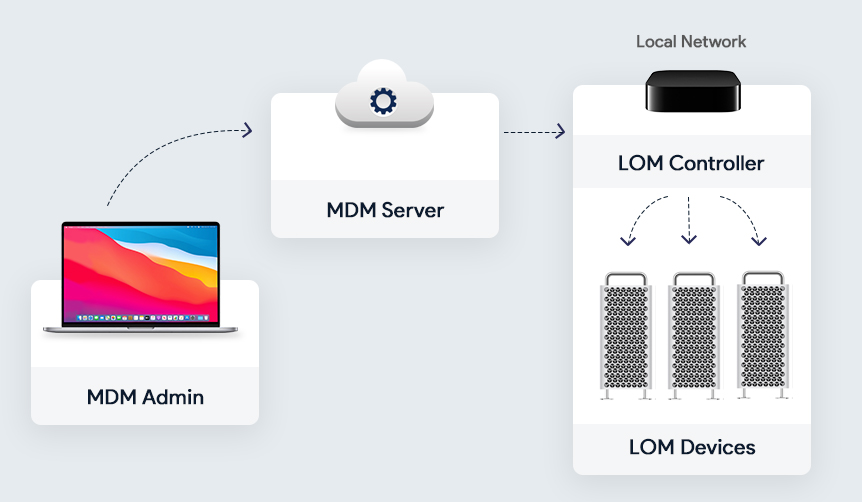
Admins can remotely start up, reboot, or shut down one or more Macs even if they are unresponsive. The MDM server accomplishes this task by sending a command to the MDM-enrolled controller on the Mac network.
Lights Out Management requires macOS Big Sur, the Macbook Pros to be on the same subnet, and the Lights Out Management Payload to be installed. The remote control of the macOS devices given to the admins by LOM helps to secure the devices
Supervision for User Approved MDM
Earlier, only the macOS devices enrolled using the Apple Business Manager account could be supervised. The admins can now query, list, and delete local users, control Activation Lock Bypass, install supervised restrictions profile using MDM, or even schedule software updates in even user-enrolled Macs.
Bootstrap Tokens
Bootstrap tokens are encryption keys provided by the MDM server used to create admin accounts in the macOS devices without using a password for authentication. Instead of using complicated workflows for creating the admin account and user accounts, the bootstrap token enables users to get a secure token and boot a Mac that uses FileVault.
This is a coveted feature for network accounts. The admins can take advantage of authorized software updates and kernel extensions once this is implemented. All the latest Macs with the Apple T2 Security Chip support bootstrap tokens.
Preventing accidental installations of downloaded profiles
For protection against the accidental installation of potentially harmful profiles, the downloaded profiles have to be manually installed by the user. To install the downloaded profile, the user has to go to the device System Preferences > Profiles > Downloaded Profiles and install the profile using the user password after previewing it.
Preventing silent profile installs from the command line
For enhanced security, macOS Big Sur no longer supports completely silent profile installation via the terminal. Instead, the system treats profiles installed through the terminal as downloaded profiles. Users must manually open System Preferences and install the profile, just as they would with any downloaded profile.
Format change for Serial Numbers
Serial numbers of the Mac devices serve not only as unique identifiers but also for automated device enrollment. The existing 12-digit serial numbers contain bits of identifiable information such as where and when the device is built. To prevent malicious use of identifiable data, Apple will now use completely random 10-character serial numbers.
The year 2020 has been a golden year for Mac endpoint security. With the realization that Mac is not immune to security threats, measures have been taken to keep Mac devices still the best option when it comes to endpoint security.
For business and individual users alike, Mac endpoint security was somewhat of a blind spot due to either lack of knowledge or the lack of proper tools. With Macs steadily making its mark in the business world, it is now time to focus on strengthening the endpoint security using an MDM solution that keeps evolving with updated features.