# Deploy ThreatLocker to macOS devices with Hexnode UEM
ThreatLocker, a zero-trust endpoint protection platform, provides robust cybersecurity solutions to organizations, ensuring continuous verification and protection against potential threats. ThreatLocker protects endpoints from a wide variety of threats, including phishing, malware, ransomware, rootkits, password attacks, and IoT attacks. This document will assist you through the step-by-step process for deploying ThreatLocker to macOS devices with the help of Hexnode UEM guaranteeing strong protection against cybersecurity threats.
Pre-requisites:- Devices should be enrolled in the Hexnode portal before deployment.
- Refer [ThreatLocker supported OS builds](https://threatlocker.kb.help/threatlocker-supported-os-builds/) for the macOS system requirements.
How to deploy ThreatLocker
--------------------------
ThreatLocker can be deployed to macOS devices using Hexnode’s [Scripts](https://www.hexnode.com/mobile-device-management/help/automate-the-execution-of-custom-scripts-on-mac/) policy. Deploying ThreatLocker to devices involves configuring [System Extensions](https://www.hexnode.com/mobile-device-management/help/how-to-configure-system-extensions-on-macos-devices/), [Notification Settings](https://www.hexnode.com/mobile-device-management/help/manage-app-notification-settings-on-macos-devices-using-configuration-profiles/), and [Web Content Filtering](https://www.hexnode.com/mobile-device-management/help/how-to-set-up-web-content-filtering-for-mac-using-hexnode-mdm/). You can use a single policy or separate ones to configure the System Extension, a configuration profile with Notification Settings and Web Content Filtering, and the ThreatLocker app installation script. In this document, we will configure all these settings in a single policy.
Follow these steps to deploy ThreatLocker to macOS endpoints:
### ThreatLocker installation script
1. In the Hexnode UEM portal, navigate to **Policies > New Policy > macOS**.
2. Select **Scripts** from the left menu and click on **Configure**.
3. Click on **Choose Scripts** and choose the ThreatLocker installation script. The script should be modified to include your **Group Key** which can be obtained from the [ThreatLocker portal](https://threatlocker.kb.help/mac-agent-group-key-location/). Script to install ThreatLocker on macOS devices
\#!/bin/bash GroupKey="xxxxxxxxxxxxxxxxxxxxxxxx" # Check if the script is run with administrative privileges if \[ "$(id -u)" != "0" \]; then echo "This script must be run as root or with sudo." exit 1 fi # Function to remove ThreatLocker app only if it exists in the Applications directory cleanup() { if \[ -d /Applications/ThreatLocker.app \]; then echo "Cleaning up: Removing ThreatLocker application" rm -rf /Applications/ThreatLocker.app else echo "Application not installed" fi } # Function to check system extension state check\_system\_extension\_state() { extensionIdentifier="com.threatlocker.app.agent" extensionStates=$(systemextensionsctl list | grep "$extensionIdentifier") activatedEnabledFound=false while IFS= read -r line; do if \[\[ $line == \*"activated enabled"\* \]\]; then echo "ThreatLocker installed." return 0 elif \[\[ $line == \*"activated waiting for user"\* \]\]; then echo "ThreatLocker installed; waiting on user input to permit system extension." return 1 fi done <<< "$extensionStates" return 2 } # Start of the script's main logic if \[ -d /Applications/ThreatLocker.app \]; then echo "ThreatLocker already installed. Checking status..." if pgrep -x "ThreatLocker" > /dev/null; then check\_system\_extension\_state case $? in 0) echo "ThreatLocker is running." exit 0 ;; 1) echo "Action required: waiting on user input to permit system extension.." exit 1 ;; 2) open /Applications/ThreatLocker.app --args -groupKey $GroupKey echo "Starting ThreatLocker..." sleep 15 check\_system\_extension\_state ;; esac else open /Applications/ThreatLocker.app --args -groupKey $GroupKey echo "Starting ThreatLocker..." sleep 15 check\_system\_extension\_state fi else echo "Downloading and installing ThreatLocker..." # Make API call and extract version number Response=$(curl -H "InstallKey: $GroupKey" -s -w "%{http\_code}" -o /tmp/threatlocker\_version.json https://api.threatlocker.com/getgroupkey.ashx) if \[ "$Response" -ne 201 \]; then echo "Unable to retrieve version number or invalid group key." exit 1 fi Version=$(awk -F ':' '/URL/ {print $2}' /tmp/threatlocker\_version.json | tr -d '"') if \[ -z "$Version" \]; then exit 1 fi curl --output "/private/var/tmp/ThreatLocker.app.zip" "https://updates.threatlocker.com/repository/mac/$Version/ThreatLocker.app.zip" unzip -qq /private/var/tmp/ThreatLocker.app.zip -d /Applications chown -R root:wheel /Applications/ThreatLocker.app if \[ ! -d /Applications/ThreatLocker.app \]; then echo "Unable to download ThreatLocker." exit 1 fi open /Applications/ThreatLocker.app --args -groupKey $GroupKey echo "Installing ThreatLocker..." sleep 15 check\_system\_extension\_state result=$? if \[ $result -eq 0 \]; then echo "ThreatLocker installed successfully." elif \[ $result -eq 1 \]; then echo "Action required: User must permit system extension." exit 1 else echo "An error occurred during installation." cleanup exit 1 fi fi
1
2
3
4
5
6
7
8
9
10
11
12
13
14
15
16
17
18
19
20
21
22
23
24
25
26
27
28
29
30
31
32
33
34
35
36
37
38
39
40
41
42
43
44
45
46
47
48
49
50
51
52
53
54
55
56
57
58
59
60
61
62
63
64
65
66
67
68
69
70
71
72
73
74
75
76
77
78
79
80
81
82
83
84
85
86
87
88
89
90
91
92
93
94
95
96
97
98
99
100
101
102
\#!/bin/bash
GroupKey="xxxxxxxxxxxxxxxxxxxxxxxx"
\# Check if the script is run with administrative privileges
if \[ "$(id -u)" != "0" \]; then
echo "This script must be run as root or with sudo."
exit 1
fi
\# Function to remove ThreatLocker app only if it exists in the Applications directory
cleanup() {
if \[ -d /Applications/ThreatLocker.app \]; then
echo "Cleaning up: Removing ThreatLocker application"
rm -rf /Applications/ThreatLocker.app
else
echo "Application not installed"
fi
}
\# Function to check system extension state
check\_system\_extension\_state() {
extensionIdentifier="com.threatlocker.app.agent"
extensionStates=$(systemextensionsctl list | grep "$extensionIdentifier")
activatedEnabledFound=false
while IFS= read -r line; do
if \[\[ $line == \*"activated enabled"\* \]\]; then
echo "ThreatLocker installed."
return 0
elif \[\[ $line == \*"activated waiting for user"\* \]\]; then
echo "ThreatLocker installed; waiting on user input to permit system extension."
return 1
fi
done <<< "$extensionStates"
return 2
}
\# Start of the script's main logic
if \[ -d /Applications/ThreatLocker.app \]; then
echo "ThreatLocker already installed. Checking status..."
if pgrep -x "ThreatLocker" > /dev/null; then
check\_system\_extension\_state
case $? in
0) echo "ThreatLocker is running."
exit 0
;;
1) echo "Action required: waiting on user input to permit system extension.."
exit 1
;;
2) open /Applications/ThreatLocker.app --args -groupKey $GroupKey
echo "Starting ThreatLocker..."
sleep 15
check\_system\_extension\_state
;;
esac
else
open /Applications/ThreatLocker.app --args -groupKey $GroupKey
echo "Starting ThreatLocker..."
sleep 15
check\_system\_extension\_state
fi
else
echo "Downloading and installing ThreatLocker..."
\# Make API call and extract version number
Response=$(curl -H "InstallKey: $GroupKey" -s -w "%{http\_code}" -o /tmp/threatlocker\_version.json https://api.threatlocker.com/getgroupkey.ashx)
if \[ "$Response" -ne 201 \]; then
echo "Unable to retrieve version number or invalid group key."
exit 1
fi
Version=$(awk -F ':' '/URL/ {print $2}' /tmp/threatlocker\_version.json | tr -d '"')
if \[ -z "$Version" \]; then
exit 1
fi
curl --output "/private/var/tmp/ThreatLocker.app.zip" "https://updates.threatlocker.com/repository/mac/$Version/ThreatLocker.app.zip"
unzip -qq /private/var/tmp/ThreatLocker.app.zip -d /Applications
chown -R root:wheel /Applications/ThreatLocker.app
if \[ ! -d /Applications/ThreatLocker.app \]; then
echo "Unable to download ThreatLocker."
exit 1
fi
open /Applications/ThreatLocker.app --args -groupKey $GroupKey
echo "Installing ThreatLocker..."
sleep 15
check\_system\_extension\_state
result=$?
if \[ $result -eq 0 \]; then
echo "ThreatLocker installed successfully."
elif \[ $result -eq 1 \]; then
echo "Action required: User must permit system extension."
exit 1
else
echo "An error occurred during installation."
cleanup
exit 1
fi
fi
4. Click on **Configure**.
5. Once the script is added, a window will show up to configure the installation settings based on the requirements. Here, we are setting the script to execute on subsequent user log on. [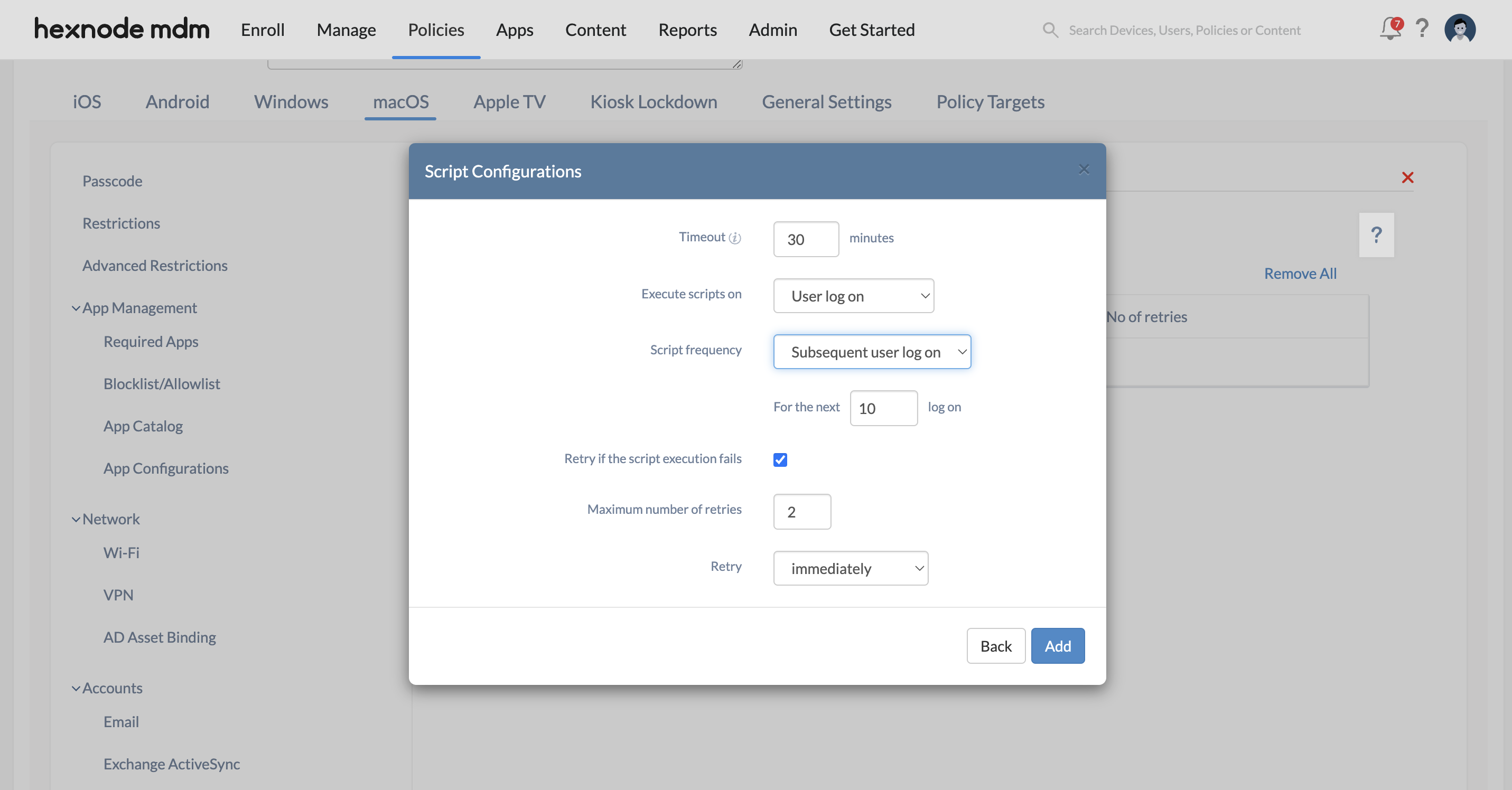](https://cdn.hexnode.com/mobile-device-management/help/wp-content/uploads/2024/11/configure-script-installation-for-deploying-ThreatLocker-to-macOS-devices.png)
### Configure System Extensions
1. Select **System Extensions** under **Configurations** from the left menu and click on **Configure**.
2. Under the **Team Identifiers** section, enter `MSY54GN4KF` as the identifier and click on Add.
### Configure Web Content Filtering and Notification Settings
Web Content Filtering and Notification Settings can be configured using Hexnode’s [Deploy Custom Configuration feature](https://www.hexnode.com/mobile-device-management/help/how-to-deploy-custom-configuration-profiles-to-macos-devices/).
1. Under the **macOS** tab, navigate to **Configurations > Deploy Custom Configuration**.
2. Click **Configure**.
3. Click on **Choose File** and upload the *.mobileconfig, .xml,* or *.plist* file. You can either use the configuration profile given below or create your own custom configuration profile using any profile creator tools.
4. Click **OK**. Web Content Filtering and Notification Settings configuration profile
PayloadContent FilterDataProviderBundleIdentifier com.threatlocker.app FilterDataProviderDesignatedRequirement anchor apple generic and identifier "com.threatlocker.app" and (certificate leaf\[field.1.2.840.113635.100.6.1.9\] /\* exists \*/ or certificate 1\[field.1.2.840.113635.100.6.2.6\] /\* exists \*/ and certificate leaf\[field.1.2.840.113635.100.6.1.13\] /\* exists \*/ and certificate leaf\[subject.OU\] = MSY54GN4KF) FilterGrade inspector FilterSockets FilterType Plugin PayloadDisplayName Web Content Filter PayloadIdentifier com.apple.webcontent-filter.F1181281-7161-4DD4-8274-C93347FDB7A5 PayloadType com.apple.webcontent-filter PayloadUUID F1181281-7161-4DD4-8274-C93347FDB7A5 PayloadVersion 1 PluginBundleID com.threatlocker.app UserDefinedName ThreatLocker NotificationSettings BadgesEnabled BundleIdentifier com.threatlocker.app.UIAgent CriticalAlertEnabled NotificationsEnabled ShowInCarPlay ShowInLockScreen ShowInNotificationCenter SoundsEnabled PayloadDisplayName Notifications PayloadIdentifier com.apple.notificationsettings.2E51FC87-6849-4B09-960A-434EEFCD0F14 PayloadType com.apple.notificationsettings PayloadUUID 2E51FC87-6849-4B09-960A-434EEFCD0F14 PayloadVersion 1 PayloadDisplayName ThreatLocker Notifications and Web Content Filtering Configuration PayloadIdentifier FD9F7BD2-89AE-46E9-8902-F96E3A32AEBA PayloadType Configuration PayloadUUID FD9F7BD2-89AE-46E9-8902-F96E3A32AEBA PayloadVersion 1
1
2
3
4
5
6
7
8
9
10
11
12
13
14
15
16
17
18
19
20
21
22
23
24
25
26
27
28
29
30
31
32
33
34
35
36
37
38
39
40
41
42
43
44
45
46
47
48
49
50
51
52
53
54
55
56
57
58
59
60
61
62
63
64
65
66
67
68
69
70
71
72
73
74
75
76
77
78
PayloadContent
FilterDataProviderBundleIdentifier
com.threatlocker.app
FilterDataProviderDesignatedRequirement
anchor apple generic and identifier "com.threatlocker.app" and (certificate leaf\[field.1.2.840.113635.100.6.1.9\] /\* exists \*/ or certificate 1\[field.1.2.840.113635.100.6.2.6\] /\* exists \*/ and certificate leaf\[field.1.2.840.113635.100.6.1.13\] /\* exists \*/ and certificate leaf\[subject.OU\] = MSY54GN4KF)
FilterGrade
inspector
FilterSockets
FilterType
Plugin
PayloadDisplayName
Web Content Filter
PayloadIdentifier
com.apple.webcontent-filter.F1181281-7161-4DD4-8274-C93347FDB7A5
PayloadType
com.apple.webcontent-filter
PayloadUUID
F1181281-7161-4DD4-8274-C93347FDB7A5
PayloadVersion
1
PluginBundleID
com.threatlocker.app
UserDefinedName
ThreatLocker
NotificationSettings
BadgesEnabled
BundleIdentifier
com.threatlocker.app.UIAgent
CriticalAlertEnabled
NotificationsEnabled
ShowInCarPlay
ShowInLockScreen
ShowInNotificationCenter
SoundsEnabled
PayloadDisplayName
Notifications
PayloadIdentifier
com.apple.notificationsettings.2E51FC87-6849-4B09-960A-434EEFCD0F14
PayloadType
com.apple.notificationsettings
PayloadUUID
2E51FC87-6849-4B09-960A-434EEFCD0F14
PayloadVersion
1
PayloadDisplayName
ThreatLocker Notifications and Web Content Filtering Configuration
PayloadIdentifier
FD9F7BD2-89AE-46E9-8902-F96E3A32AEBA
PayloadType
Configuration
PayloadUUID
FD9F7BD2-89AE-46E9-8902-F96E3A32AEBA
PayloadVersion
1
### Associate target device
1. Navigate to **Policy Targets** and select the *Devices, Device Groups, Users, User Groups,* or *Domains* you would like to associate the policy with.
2. Click on **Save**.
What happens at the device end?
-------------------------------
Once the ThreatLocker app is successfully deployed on macOS devices through Hexnode UEM, the devices will be added to the ThreatLocker portal. It ensures that the devices will be actively managed and protected against a wide range of threats including phishing, malware, ransomware, rootkits, password attacks, and IoT vulnerabilities.