# Configure Spotlight settings on Macs using configuration profiles
This document helps you configure Spotlight settings on Macs using custom configuration profiles.
Apple provides the Spotlight search option to assist customers in finding items on their macOS device or receiving suggestions from the App Store, Internet, Music, etc. Spotlight searches for items based on various different categories, like Applications, Images, Fonts, etc. But what if a company’s IT administrator only wants a select few categories to appear in the search results? Well, the admin can achieve this using a custom configuration profile that can be remotely deployed to multiple enrolled macOS devices using Hexnode’s [Deploy Custom Configuration](https://www.hexnode.com/mobile-device-management/help/how-to-deploy-custom-configuration-profiles-to-macos-devices/) feature.
Disclaimer:
The configuration profile provided below is adapted from a third-party open-source site.
Creating customizations to configure Spotlight settings
-------------------------------------------------------
The device management profile contains the `orderedItems` array, which lists the various categories that can appear in the Spotlight search results. To disable any category, say Applications, change the value of the enabled key of the category from **true** to **false**. The disabled category will no longer appear in Spotlight search.
Configuration profile to configure Spotlight settings
PayloadContent PayloadDisplayName Spotlight PayloadIdentifier com.apple.Spotlight.O9C82362-094A-492B-B571-721272701B2B PayloadType com.apple.Spotlight PayloadUUID A8C92162-053A-594B-D571-353292711D2G PayloadVersion 1 orderedItems enabled name DOCUMENTS enabled name MOVIES enabled name EVENT\_TODO enabled name BOOKMARKS enabled name MENU\_EXPRESSION enabled name CONTACT enabled name MENU\_CONVERSION enabled name MENU\_DEFINITION enabled name DIRECTORIES enabled name FONTS enabled name IMAGES enabled name MESSAGES enabled name MUSIC enabled name MENU\_OTHER enabled name PDF enabled name PRESENTATIONS enabled name MENU\_SPOTLIGHT\_SUGGESTIONS enabled name SPREADSHEETS enabled name SYSTEM\_PREFS enabled name APPLICATIONS PayloadDisplayName Untitled PayloadIdentifier MacBook.10781BD0-743E-457F-B252-9E7C35325968 PayloadType Configuration PayloadUUID 20781BJ0-723G-413L-K252-8G7C45585260 PayloadVersion 1
1
2
3
4
5
6
7
8
9
10
11
12
13
14
15
16
17
18
19
20
21
22
23
24
25
26
27
28
29
30
31
32
33
34
35
36
37
38
39
40
41
42
43
44
45
46
47
48
49
50
51
52
53
54
55
56
57
58
59
60
61
62
63
64
65
66
67
68
69
70
71
72
73
74
75
76
77
78
79
80
81
82
83
84
85
86
87
88
89
90
91
92
93
94
95
96
97
98
99
100
101
102
103
104
105
106
107
108
109
110
111
112
113
114
115
116
117
118
119
120
121
122
123
124
125
126
127
128
129
130
131
132
133
134
135
136
137
138
139
140
141
142
143
144
145
146
147
148
149
150
151
152
153
154
155
156
157
158
159
160
161
162
163
164
165
166
167
168
169
170
171
172
173
174
175
176
177
178
179
180
181
182
183
184
185
186
187
188
189
190
191
192
193
194
195
196
197
198
199
200
201
202
203
204
205
206
207
208
209
210
211
212
213
214
215
216
217
218
219
220
221
222
223
224
225
226
227
228
229
230
231
232
233
234
235
236
237
238
239
240
241
242
243
244
245
246
247
248
249
250
251
252
253
254
255
256
257
258
259
260
261
262
263
264
265
266
267
268
269
270
271
272
273
274
275
276
277
278
279
280
281
282
283
284
285
286
287
288
289
290
291
292
293
294
295
296
297
298
299
300
301
302
303
304
305
306
307
PayloadContent
PayloadDisplayName
Spotlight
PayloadIdentifier
com.apple.Spotlight.O9C82362-094A-492B-B571-721272701B2B
PayloadType
com.apple.Spotlight
PayloadUUID
A8C92162-053A-594B-D571-353292711D2G
PayloadVersion
1
orderedItems
enabled
name
DOCUMENTS
enabled
name
MOVIES
enabled
name
EVENT\_TODO
enabled
name
BOOKMARKS
enabled
name
MENU\_EXPRESSION
enabled
name
CONTACT
enabled
name
MENU\_CONVERSION
enabled
name
MENU\_DEFINITION
enabled
name
DIRECTORIES
enabled
name
FONTS
enabled
name
IMAGES
enabled
name
MESSAGES
enabled
name
MUSIC
enabled
name
MENU\_OTHER
enabled
name
PDF
enabled
name
PRESENTATIONS
enabled
name
MENU\_SPOTLIGHT\_SUGGESTIONS
enabled
name
SPREADSHEETS
enabled
name
SYSTEM\_PREFS
enabled
name
APPLICATIONS
PayloadDisplayName
Untitled
PayloadIdentifier
MacBook.10781BD0-743E-457F-B252-9E7C35325968
PayloadType
Configuration
PayloadUUID
20781BJ0-723G-413L-K252-8G7C45585260
PayloadVersion
1
What happens at the device end?
-------------------------------
[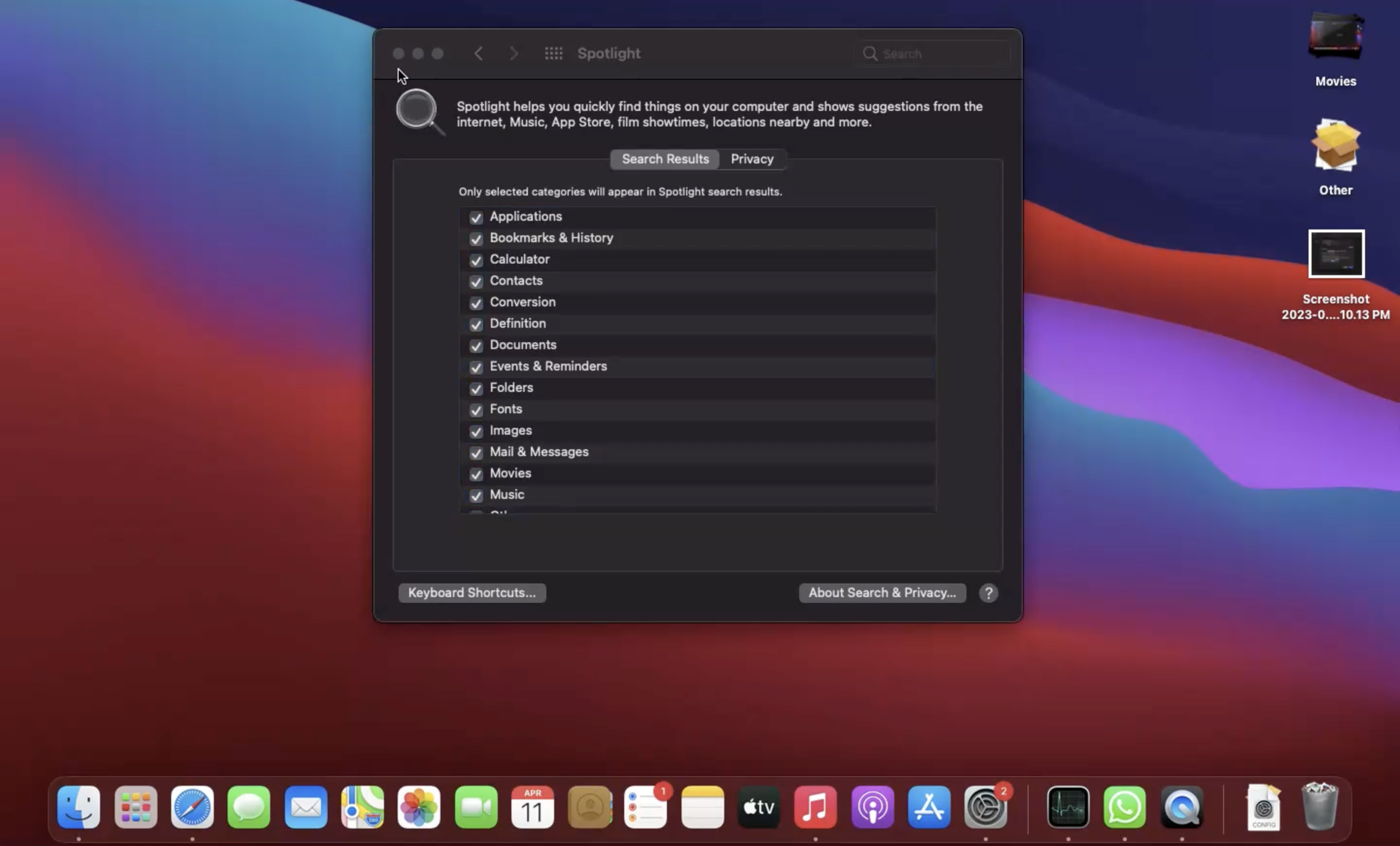](https://cdn.hexnode.com/mobile-device-management/help/wp-content/uploads/2024/06/Configure-Spotlight-settings-on-Macs.png)
There may be a possibility that the disabled category will still be shown as enabled in the **System Preferences** > **Spotlight** > **Search Results** page (**System Settings** > **Siri & Spotlight** in Ventura), but it will be excluded from the search results regardless.
Notes:- To create and customize configuration profiles, you can use tools like Apple Configurator, Profile Manager or manually create them using text editors.
- Use non-encrypted .mobileconfig, .xml, or plist files to deploy profiles across macOS devices.
- Ensure that you do not associate conflicting configurations with the devices.
- Use wildcards to fetch key values from the portal.
- It is recommended to manually validate the configuration profile execution on a system before executing the action in bulk.
- Hexnode will not be responsible for any damage/loss to the system on the behavior of the configuration profile.