# Configuration profile to skip True Tone Display for macOS users
This document helps you create and deploy a custom configuration profile to skip True Tone Display on Macs on Setup Assistance for new users.
Apple’s True Tone display adjusts display color temperature based on ambient lighting for a more natural viewing experience. However, administrators may prefer not to configure this as it may affect the device’s color accuracy and it may not be desirable in certain professional or color-critical workflows. Using a configuration profile, administrators can customize the Setup Assistance experience for user accounts to skip True Tone Display on Macs. The configuration profile can be deployed remotely with the help of Hexnode’s Deploy [Custom Configuration](https://www.hexnode.com/mobile-device-management/help/how-to-deploy-custom-configuration-profiles-to-macos-devices/) feature.
Disclaimer:
The sample configuration profiles provided below are created using various profile creator applications.
Note:
This configuration profile is supported on **macOS 10.12 or later**.
Disable True Tone setup
-----------------------
Configuration profile to skip true tone display setup on macOS devices
PayloadContent SkipTrueTone PayloadIdentifier com.apple.SetupAssistant.managed.A7FA6375-2F44-4D1C-AFCF-0574980D987D PayloadType com.apple.SetupAssistant.managed PayloadUUID A7FA6375-2F44-4D1C-AFCF-0574980D987D PayloadVersion 1 PayloadDisplayName Setup Assistant PayloadIdentifier macOS.9E4E7E17-EB1C-4AE1-BB76-FA35B398A973 PayloadType Configuration PayloadUUID A975B24E-5AD9-48AE-BC58-F2A433A9CDFD PayloadVersion 1
1
2
3
4
5
6
7
8
9
10
11
12
13
14
15
16
17
18
19
20
21
22
23
24
25
26
27
28
29
30
31
PayloadContent
SkipTrueTone
PayloadIdentifier
com.apple.SetupAssistant.managed.A7FA6375-2F44-4D1C-AFCF-0574980D987D
PayloadType
com.apple.SetupAssistant.managed
PayloadUUID
A7FA6375-2F44-4D1C-AFCF-0574980D987D
PayloadVersion
1
PayloadDisplayName
Setup Assistant
PayloadIdentifier
macOS.9E4E7E17-EB1C-4AE1-BB76-FA35B398A973
PayloadType
Configuration
PayloadUUID
A975B24E-5AD9-48AE-BC58-F2A433A9CDFD
PayloadVersion
1
What happens at the device end?
-------------------------------
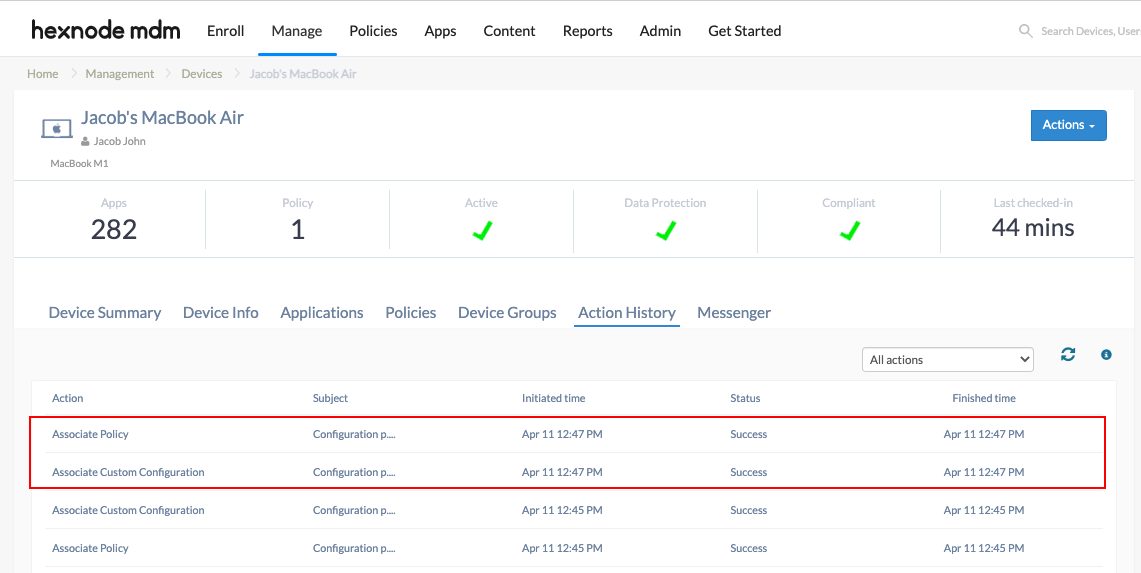
On deploying this configuration profile, the True Tone Setup Assistant screen is disabled and does not show up when the user is logging in to their user account for the first time. You can view the status of the policy execution by navigating to the **Action History** tab of the device.
[](https://cdn.hexnode.com/mobile-device-management/help/wp-content/uploads/2024/05/Skip-True-Tone-Display-for-macOS-users-using-configuration-profiles.png)
Notes:- To create and customize configuration profiles, you can use tools like Apple Configurator, Profile Manager or manually create them using text editors.
- Use non-encrypted .mobileconfig, .xml, or plist files to deploy profiles across devices.
- Ensure that you do not associate conflicting configurations with the devices.
- Use wildcards to fetch key values from the portal.
- It is recommended to manually validate the configuration profile on a system before executing it in bulk.
- Hexnode will not be responsible for any damage/loss to the system on the behavior of the configuration profile.