# Configuration profile to manage Safari settings on Macs
Creating a custom configuration profile for Safari settings can be extremely beneficial for organizations that want to specify certain browsing settings for employees. For instance, enabling the restriction that blocks third-party cookies enhances privacy by preventing advertisers from tracking browsing traffic across various sites. Other settings include managing autofill information, setting up data storage preferences, organizing bookmarks, or setting up plugins and extensions. This document helps you create a customized profile to manage Safari settings on macOS. Deploying this configuration profile across multiple devices is simplified through Hexnode’s [Deploy Custom Configuration](https://www.hexnode.com/mobile-device-management/help/how-to-deploy-custom-configuration-profiles-to-macos-devices/) feature.
Disclaimer:
The sample configuration profiles provided below are created using various profile creator applications.
Custom configuration profile to customize Safari settings on Mac
----------------------------------------------------------------
Deploy this configuration profile to modify settings in Safari on macOS.
Custom configuration profile to customize Safari settings on Mac
PayloadContent AskBeforeSubmittingInsecureForms AutoFillFromAddressBook AutoFillMiscellaneousForms AutoFillPasswords AutoOpenSafeDownloads BlockStoragePolicy 2 BookmarksCollectionsIncludeAddressBook BookmarksCollectionsIncludeRendezvous BookmarksMenuIncludesBookmarksToolbar BookmarksMenuIncludesRendezvous DefaultBrowserPromptingState2 1 DefaultBrowserPromptingState3 2 DefaultDatabaseQuota 5242880 DidDisableIndividualExtensionsAfterRemovingOnOffSwitchIfNecessary ExtensionsEnabled HistoryAgeInDaysLimit 31 HomePage https://www.example.com NewTabBehavior 0 NewWindowBehavior 0 PayloadDisplayName Safari PayloadIdentifier com.apple.Safari.0E6DC77E-5749-48C6-A238-D9940486722A PayloadType com.apple.Safari PayloadUUID 25973144-3DE0-4BCF-8445-370E64B92E7D PayloadVersion 1 SendDoNotTrackHTTPHeader TabCreationPolicy 1 WarnAboutFraudulentWebsites com.apple.Safari.ContentPageGroupIdentifier.WebKit2JavaScriptCanOpenWindowsAutomatically com.apple.Safari.ContentPageGroupIdentifier.WebKit2PrivateBrowsingEnabled PayloadDisplayName Parental Controls: Web Content Filter PayloadIdentifier com.apple.familycontrols.contentfilter.8D5B3487-6B77-46C7-B84B-97521FF3B1B8 PayloadType com.apple.familycontrols.contentfilter PayloadUUID FD6D216A-99EA-4E14-A897-3ED755E4FDA1 PayloadVersion 1 filterBlacklist https://www.sample.com restrictWeb useContentFilter PayloadDisplayName Safari Settings PayloadIdentifier MacBook-Air.111FB8B4-4F6B-44D9-89D0-10FF9D001A03 PayloadScope System PayloadType Configuration PayloadUUID 4F63CB8B-5B18-40D3-8489-59C7EF2CCD4D PayloadVersion 1 TargetDeviceType 5
1
2
3
4
5
6
7
8
9
10
11
12
13
14
15
16
17
18
19
20
21
22
23
24
25
26
27
28
29
30
31
32
33
34
35
36
37
38
39
40
41
42
43
44
45
46
47
48
49
50
51
52
53
54
55
56
57
58
59
60
61
62
63
64
65
66
67
68
69
70
71
72
73
74
75
76
77
78
79
80
81
82
83
84
85
86
87
88
89
90
91
92
93
94
95
96
97
98
99
100
101
102
103
104
105
106
107
108
109
110
111
112
113
114
115
116
117
118
119
120
121
122
123
124
125
126
127
128
129
130
131
132
133
134
135
136
137
138
139
140
141
142
143
144
145
146
147
148
149
150
151
152
153
154
155
156
157
158
159
160
161
162
163
164
165
166
167
168
169
170
171
172
173
174
175
176
177
178
179
180
181
182
183
184
185
186
187
188
189
190
191
192
193
194
195
196
197
198
199
200
201
202
203
204
205
PayloadContent
AskBeforeSubmittingInsecureForms
AutoFillFromAddressBook
AutoFillMiscellaneousForms
AutoFillPasswords
AutoOpenSafeDownloads
BlockStoragePolicy
2
BookmarksCollectionsIncludeAddressBook
BookmarksCollectionsIncludeRendezvous
BookmarksMenuIncludesBookmarksToolbar
BookmarksMenuIncludesRendezvous
DefaultBrowserPromptingState2
1
DefaultBrowserPromptingState3
2
DefaultDatabaseQuota
5242880
DidDisableIndividualExtensionsAfterRemovingOnOffSwitchIfNecessary
ExtensionsEnabled
HistoryAgeInDaysLimit
31
HomePage
https://www.example.com
NewTabBehavior
0
NewWindowBehavior
0
PayloadDisplayName
Safari
PayloadIdentifier
com.apple.Safari.0E6DC77E-5749-48C6-A238-D9940486722A
PayloadType
com.apple.Safari
PayloadUUID
25973144-3DE0-4BCF-8445-370E64B92E7D
PayloadVersion
1
SendDoNotTrackHTTPHeader
TabCreationPolicy
1
WarnAboutFraudulentWebsites
com.apple.Safari.ContentPageGroupIdentifier.WebKit2JavaScriptCanOpenWindowsAutomatically
com.apple.Safari.ContentPageGroupIdentifier.WebKit2PrivateBrowsingEnabled
PayloadDisplayName
Parental Controls: Web Content Filter
PayloadIdentifier
com.apple.familycontrols.contentfilter.8D5B3487-6B77-46C7-B84B-97521FF3B1B8
PayloadType
com.apple.familycontrols.contentfilter
PayloadUUID
FD6D216A-99EA-4E14-A897-3ED755E4FDA1
PayloadVersion
1
filterBlacklist
https://www.sample.com
restrictWeb
useContentFilter
PayloadDisplayName
Safari Settings
PayloadIdentifier
MacBook-Air.111FB8B4-4F6B-44D9-89D0-10FF9D001A03
PayloadScope
System
PayloadType
Configuration
PayloadUUID
4F63CB8B-5B18-40D3-8489-59C7EF2CCD4D
PayloadVersion
1
TargetDeviceType
5
The following configurations can be customized.
KeysDescriptions**AskBeforeSubmittingInsecureForms**This key is used to enable or disable the system to alert when a form is submitted to non-secure sites. **** enables system alerts, which will help to prevent the unintended submission of sensitive data where it might be insecure.
**** disables system alerts, allowing uninterrupted form submissions to any website without alerts.
**AutoFillFromAddressBook**This key is used to specify whether Safari can autofill contact information from the device’s Address Book into web forms. **** indicates that autofill for web forms from saved contact information is enabled, allowing automatic filling of forms to make it easier for the user.
**** indicates that autofill for web forms from saved contact information is disabled, which means the user needs to type in manually their contact details whenever required.
**AutoFillMiscellaneousForms**This key determines whether autofill for miscellaneous forms is enabled or disabled. **** indicates that autofill miscellaneous form is enabled, auto-filling web forms using previously entered text, such as your name, address, email, and phone number.
**** indicates that autofill for miscellaneous forms is disabled, so users need to fill the forms manually.
**AutoFillPasswords**This key is used to configure whether autofill usernames and passwords in web forms is enabled or disabled.
**** indicates that the configuration for password autofill is enabled, facilitating faster logins. **** indicates that the configuration for password autofill is disabled, necessitating the user to manually enter a password to enhance security.
**AutoOpenSafeDownloads**This key is used to enable or disable the system to automatically open files considered safe after they are downloaded. **** indicates enabling the option to automatically open downloaded files considered safe by the system, automating the process for users by immediately accessing downloaded files.
****indicates disabling the option to automatically open downloaded files and requires users to manually open files. This adds an extra layer of safety by preventing the automatic execution of malicious files.
**BlockStoragePolicy**The key is used to configure how Safari manages the storage of cookies and website data. It uses an integer value that specifies the access level granted for storing cookies and website data in Safari. - 0 – Allows all storage (cookies, local storage) without restrictions.
- **1** – Block third-party cookies and data.
- **2** – Blocks all cookies and site data except for the current website domain visited (Default value).
- **3** – Allows data to be stored only on third-party websites that you have visited. It will block cookies from other third parties and non-visited domains.
- **4** – Completely disable storing any site data and cookies.
**BookmarksCollections IncludeAddressBook**This key configures whether contacts from the Address Book are integrated into Safari’s bookmarks. ****indicates that the configuration integrates contacts from the Address Book into Safari’s bookmarks for easy access.
**** indicates that the configuration excludes integrating contacts from the Address Book into Safari’s bookmarks, keeping bookmarks focused on web URLs.
**BookmarksCollections IncludeRendezvous**This key is used to include or exclude the local network services discovered via Rendezvous (also known as Bonjour) into Safari’s bookmarks. **** indicates bookmarks enable the inclusion of Bonjour-discovered services in the bookmarks, facilitating quick access to network resources like local servers or printers directly from Safari.
The ****setting prevents including Rendezvous in bookmarks, limiting Safari to traditional web URLs such as those starting with http:// or https:// and excluding local network services from bookmarks.
**BookmarksMenuIncludes BookmarksToolbar**This key controls whether bookmarks saved in the bookmarks toolbar are also displayed in the bookmarks menu. ****indicates that bookmarks from the toolbar are included in the main bookmarks menu.
****indicates that bookmarks toolbar items are excluded from the main bookmarks menu.
**BookmarksMenuIncludes Rendezvous**This key configures whether items from the bookmark’s toolbar are displayed within the bookmark menu in Safari.
**** indicates that Bonjour bookmarks are included in the bookmarks menu. This integration facilitates quick navigation to local services without manually entering their addresses, allowing Safari to display services such as local web servers or other networks directly in the bookmarks menu for easier access.
**** indicates that Bonjour bookmarks are not included in the bookmarks menu. As a result, Bonjour bookmarks, such as local web servers and other networks, will not be visible in the bookmarks menu.
**DefaultBrowserPromptingState2**This key is used to set prompts for users to set Safari as the default browser, especially under specific conditions.
**1** suppresses the prompt that normally appears when Safari is quit for the first time and if it is not set as the default browser. It typically prompts the user to either keep the current default browser or switch to Safari.
**DefaultBrowserPromptingState3**This key is used to suppress the prompt asking users to change their default browser to Safari.
**2** indicates that the prompt to “Make Safari your Default Browser?” is suppressed when Safari is launched and is not already set as the default browser.
**DefaultDatabaseQuota**This key is used to configure the maximum local storage space allowed for the database.
**5242880** (default 5MB) value specifies the limit of local storage database.
**DidDisableIndividualExtensions AfterRemovingOnOff SwitchIfNecessary**This key is used to manage the behavior of individual Safari extensions when their respective on/off switch is removed from the Safari extensions preferences.
**** indicates that Safari will automatically disable any extensions that no longer have an on/off switch available in the browser settings.
**** allows the extensions to remain active even if their on/off switches are removed or not available, giving users or administrators more flexibility in managing extensions.
**ExtensionsEnabled**This key is used to configure extensions from the App Store to be enabled/disabled in Safari.
****indicates that the extensions from the App Store are enabled.
**** indicates that the extensions from the App Store is disabled.
**HistoryAgeInDaysLimit** This key is used to configure the maximum number of days to retain browser history. After the pre-set day ends, the history will be removed automatically.
**31** (Default value) indicates that the browser history will be removed after one month.
- **1** – Deletes automatically after one day.
- **7** – Deletes automatically after one week.
- **14** – Deletes automatically after two weeks.
- **365** – Deletes automatically after one year.
- 4 – Completely disable storing any site data and cookies.
**HomePage**This key determines the default URL that opens in new windows or tabs in Safari.
**NewTabBehavior** This key is used to configure the content for a new tab that is opened in Safari.
These values can define various configurations:
- 0– Displays Safari’s homepage in a new tab.
- **1** – Opens a blank page in a new tab.
- **2**– Duplicates the current page as a new tab.
- **3** – Shows Safari’s Bookmarks in a new tab.
**NewWindowBehavior**This key is used to set the content shown when opening a new window in Safari.
These values can define various configurations:
- 0– Displays Safari’s homepage in a new tab.
- **1** – Opens a blank page in a new tab.
- **2**– Duplicates the current page as a new tab.
- **3** – Shows Safari’s Bookmarks in a new tab.
**SendDoNotTrackHTTPHeader**This key enables or disables the sending of ‘Do Not Track’ requests to websites, which informs them that the user prefers not to be tracked.
****indicates that the sending of the ‘Do Not Track’ header is enabled.
**** indicates that the sending of the ‘Do Not Track’ header is disabled, allowing websites to track user activity.
**TabCreationPolicy**This key is used to determine when to open a new tab instead of a new window in a browser. This policy can help manage how content is displayed and organized to enhance the user experience by keeping related pages within a single window.
**0** (Default value) helps manage how content is displayed and organized to enhance the user experience by keeping related pages within a single window.
- 0– Never opens a new tab or window. Content always opens in the current tab or window.
- **1** – Automatically opens a new tab or window based on specific conditions. The browser will decide when to open a new tab or window.
- **2**– New content always opens in a new window.
**WarnAboutFraudulentWebsites**This key is used to enable or disable warnings about potentially fraudulent or malicious websites.
****indicates that warnings are enabled, which helps protect users from visiting websites that could be harmful or involved in phishing or scam activities.
**** indicates that warnings are disabled, which increases the risk of visiting and interacting with malicious websites.
**filterBlacklist**This key is used to block access to specific websites. When used in conjunction with ‘restrictweb’ and ‘useContentFilter’ enabled, it ensures that any URLs specified in the deny list are completely inaccessible to the user.
****indicates that it enables the blocklist (for specific URLs which is mentioned in the denylist) as long as ‘restrictweb’ and ‘useContentFilter’ are also enabled.
**** deactivates the blocklist, allowing access to all previously blocked sites.
**restrictWeb** This key is used to enable or disable restrictions on web access to specific URLs.
**** indicates that restrictions on web access for specific URLs are enabled.
**** indicates that restriction on web access is disabled and allows unrestricted access to the websites.
**useContentFilter** The key is used to enable or disable content filters on web access to specific URLs.
****indicates that content filters on web access for specific URLs are enabled, thereby blocking or allowing access to those websites.
****indicates that content filters on web access are disabled, allowing unrestricted access to all websites.
What happens at the device end?
-------------------------------
Once the configuration profile is applied to Macs, Safari will be configured according to the specified settings in the profile. This profile sets up a specific homepage, manages access to specified URLs, blocks third-party cookies and site data, sets data storage limits, and manages autofill settings. Additionally, the profile configures the behavior of new tabs and windows and controls extensions.
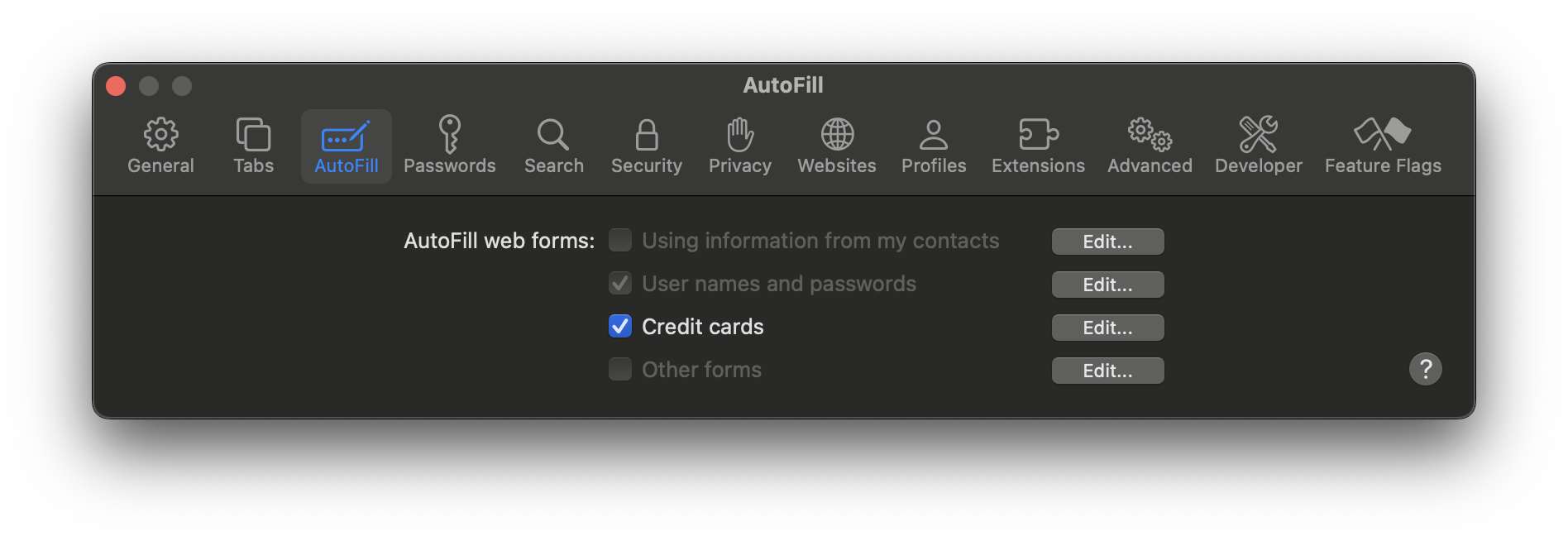
Also, the device will have the corresponding settings modified. For instance, after deploying the configuration profile to manage AutoFill settings in Safari on Macs, the following changes will be reflected on the device:
[  ](https://cdn.hexnode.com/mobile-device-management/help/wp-content/uploads/2024/05/Manage-Safari-settings-on-Macs.png)
Notes:- To create and customize configuration profiles, you can use tools like Apple Configurator, Profile Manager or manually create them using text editors.
- Use non-encrypted .mobileconfig, .xml, or plist files to deploy profiles across devices.
- Ensure that you do not associate conflicting configurations with the devices.
- Use wildcards to fetch key values from the portal.
- It is recommended to manually validate the configuration profile on a system before executing it in bulk.
- Hexnode will not be responsible for any damage/loss to the system on the behavior of the configuration profile.