# Configuration profile to manage access to iCloud services on Mac
The configuration profile provided in this document helps organizations manage access to the iCloud services on Mac.
Setting up iCloud on your Apple devices lets users sync and store files, documents, and folders in the cloud. Once logged in to iCloud, the devices can also be allowed access to other services that rely on iCloud, for instance, iCloud Mail services, iCloud Notes services, etc. Admins can enable/disable these services to customize the way users access apps and data through them. You can use a configuration profile to restrict/allow different iCloud services on the devices. Through Hexnode UEM, admins can deploy configuration files to remote macOS devices using the [Deploy Custom Configuration](https://www.hexnode.com/mobile-device-management/help/how-to-deploy-custom-configuration-profiles-to-macos-devices/) policy.
Disclaimer:
The sample configuration profiles provided below are created using various profile creator applications.
Restrict iCloud services on Mac
-------------------------------
Manage access to iCloud services on Mac
PayloadContent PayloadDescription PayloadDisplayName Restrictions PayloadEnabled PayloadIdentifier 9D267E54-297A-42E0-973E-A4207AFFC7FB PayloadType com.apple.applicationaccess PayloadUUID 9D267E54-297A-42E0-973E-A4207AFFC7FB PayloadVersion 1 allowCloudCalendar PayloadEnabled PayloadIdentifier F6C86CF1-5B68-433D-88A9-ACB6B73CBC44 PayloadRemovalDisallowed PayloadScope System PayloadType Configuration PayloadUUID F6C86CF1-5B68-433D-88A9-ACB6B73CBC44 PayloadVersion 1
1
2
3
4
5
6
7
8
9
10
11
12
13
14
15
16
17
18
19
20
21
22
23
24
25
26
27
28
29
30
31
32
33
34
35
36
37
38
39
40
41
PayloadContent
PayloadDescription
PayloadDisplayName
Restrictions
PayloadEnabled
PayloadIdentifier
9D267E54-297A-42E0-973E-A4207AFFC7FB
PayloadType
com.apple.applicationaccess
PayloadUUID
9D267E54-297A-42E0-973E-A4207AFFC7FB
PayloadVersion
1
allowCloudCalendar
PayloadEnabled
PayloadIdentifier
F6C86CF1-5B68-433D-88A9-ACB6B73CBC44
PayloadRemovalDisallowed
PayloadScope
System
PayloadType
Configuration
PayloadUUID
F6C86CF1-5B68-433D-88A9-ACB6B73CBC44
PayloadVersion
1
Replace `allowCloudCalendar` with the required key to disable the corresponding iCloud service. You can disable multiple iCloud services through a single configuration file by adding multiple keys. Use the following keys for Mac:
KeyValueSupported VersionsDescriptionallowCloudAddressBookBoolean10.12+ If set to false, the key will will help you disable the iCloud Address Book services.allowCloudBookmarksBoolean10.12+ If set to false, the key will help you disable iCloud Bookmark sync.allowCloudCalendarBoolean10.12+ If set to false, the option will help you disable iCloud Calendar services.allowCloudDocumentSyncBoolean 10.11+ If set to false, the option will help you disable document and key-value syncing to iCloudallowCloudKeychainSyncBoolean 10.12+ If set to false, the option helps you disable iCloud keychain synchronizationallowCloudMailBoolean 10.12+If set to false, the option helps you disable iCloud Mail servicesallowCloudNotesBoolean 10.12+ If set to false, the option helps you disable iCloud Notes services.allowCloudPhotoLibraryBoolean 10.12+ If set to false, the option will help you disable iCloud Photo Library.allowCloudRemindersBoolean 10.12+ If set to false, the system disables iCloud Reminder services.What happens at the device end?
-------------------------------
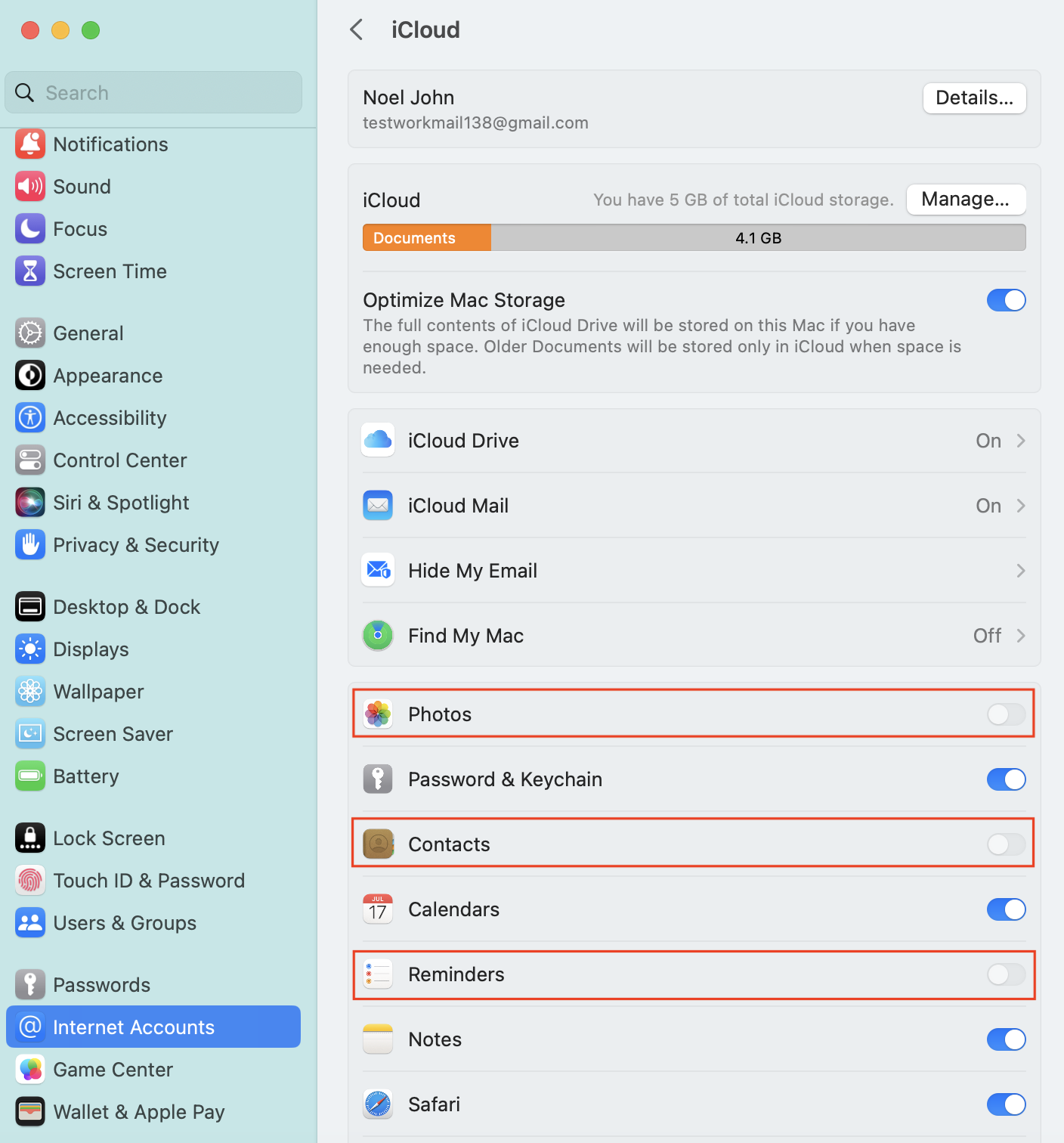
The corresponding iCloud services mentioned in the custom configuration file with the value set as false will be disabled. Navigate to **Internet Accounts > iCloud** to verify the iCloud services permitted.
For instance,
1. restricting the iCloud Address Book services disables the *Contacts* toggle button.
2. disabling iCloud Bookmark sync disables the *Safari* toggle button.
3. blocking iCloud Calendar services disables the the *Calendars* option.
4. preventing document and key-value syncing to iCloud disables the *iCloud Drive* option.
5. restricting iCloud keychain synchronization disables the *Keychain* option.
6. disabling iCloud Mail services disables the *Mail* option.
7. blocking iCloud Notes services disables the *Notes* option.
8. preventing iCloud Photo Library disables the *Photos* option.
9. restricting iCloud Reminder services disables the *Reminders* option.
The user will not be able to configure these settings any further. Only after removing the policy from the device the user will be allowed to manually configure the disabled settings.